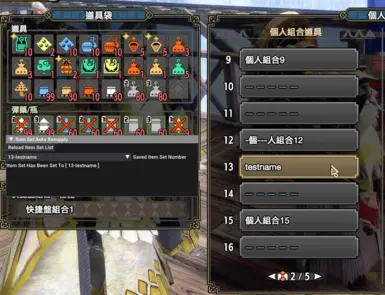
自动补货物品套装
根据预设的物品组合,在任务结束时自动补充物资。
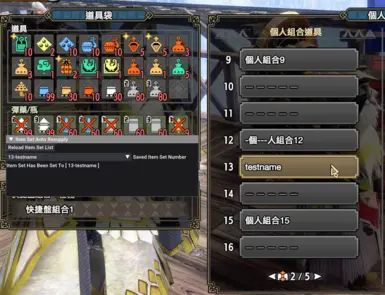 查看大图
查看大图简介
此模组可在任务结束时根据预设的物品组合自动补充物资。
需求:
如何安装:
- 安装 REFramework 和 REFramework D2D;
- 下载模组;
- 将模组解压至《怪物猎人:崛起》根目录。最终路径应为 ./reframework/autorun/itemSetAutoResupply.lua。
使用方法:
- 首次使用: (1) 打开 REFramework 菜单,展开脚本生成 UI 菜单项,你会找到“道具组自动补充”窗口。 (2) 点击“重载道具组列表”按钮读取你的道具组列表。 (3) 选择要使用的道具组,下方会出现提示“道具组已设置为[xxx]”,表示选择已保存,模组正在运行!
- 后续使用:当你按照上述步骤选择你的物品套装后,无需再进行任何额外操作,模组将自动生效。
说明
这个 MOD 可以在你完成任务时自动加载你的道具个人组合。
前置:
- REFramework
- REFramework D2D (大于等于 Ver1.3 版本时需要!)
安装方式:
- 安装 REFramework 和 REFramework D2D;
- 下载 MOD;
- 将 MOD 解压缩后存放至 Monster Hunter Rise 根目录,即 ./reframework/autorun/itemSetAutoResupply.lua。
如何使用:
- 首次使用:(1) 打开 REFramework 菜单并且点击 Script Generated UI,此时会打开一个新的窗口叫做 Item Set Auto Resupply。(2) 点击 Reload Item Set List 按钮读取已保存的道具个人组合。(3) 在下拉框中选择一个你想要的道具组合,此时下拉框下方会显示“Item Set Has Been Set To [xxx]”,表明 MOD 已经设置成功!
- 后续使用:因为已按照上述步骤设置完成,因此后续不需要做任何操作,MOD 即可自动运行。
在 Github 上查看源代码:https://github.com/dzxrly/MHR-ItemSetAutoResupplyMod
更新日志:
版本 1.4 - 功能更新:
- Update Chinese fonts support. / 更新了中文支持。
Ver1.3 - 功能更新:
- In this version, item set load tip and item NOT ENOUGH tip will show in the game. [New Additional Requirements: REFramework D2D] / 添加了游戏内显示个人组合已自动加载和个人组合物品不足的提示。【需要安装新的依赖库:REFramework D2D】
To open the feature above, you should open the REFramework menu and click the Script Generated UI, then check two SHOW BUTTONs! / 开启上述功能需要打开 REF 菜单然后点击 Script Generated UI,再勾选两个带有 Show 字样的按钮。
版本 1.2 - 错误修复:
- Fix a bug that makes REF UI start flickering in the Training Area, thx for @bbacmk's reporting. / 修复了一个在训练场中使用 MOD 时导致 REF UI 闪屏的 BUG。 PS: Please DO NOT click the Reload Item Set List button in the Training Area, it will cause the options in the dropmenu to disappear. / 请尽量不要在训练场中点击 Reload Item Set List 按钮,会导致下拉菜单内容消失。
Ver1.1 - 错误修复:
- Fix a bug that makes your selection locked on the first item set, caused by the converter of String & Integer & Float. / 修复了一个会导致个人组合被锁定在第一套的 BUG,应该是因为隐式类型转换导致的。
还没有人评论,去客户端里说两句吧。
评论在新手盒子客户端中发表,这里同步展示。