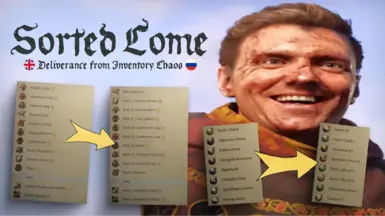
Sorted Come (PTF) - 模块化物品分类器 - 英语与俄语
现已支持英文版!完全可自定义的模块化背包分类器。 Полностью кастомизируемый модульный сортировщик инвентаря.
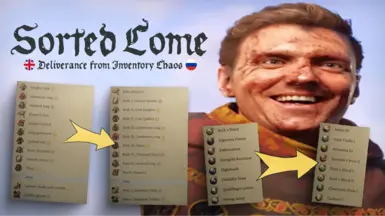 查看大图
查看大图[color=#a4c2f4][b][color=#d5a6bd][size=3]大家好!英语不是我的母语,但我尽最大努力让我的模组能被尽可能多的人使用。
如果您有任何建议、反馈或发现任何错误,欢迎在帖子部分留言——我将不胜感激!
[/size][/color]
[size=6]简体中文[/size][/b][/color](英文原文见下方)
[b][color=#f6b26b][size=4]又一场战斗结束后,亨利打开塞满新护甲的背包……[/size][/color][/b]
结果他花了不少时间来对比新旧装备,因为他的背包里完全乱作一团——兜帽和锁甲头巾被胡乱地扔在包底![color=#fff2cc]也许是时候整理一下了?[/color]
[size=3]
[/size][b][color=#f6b26b][size=4]模组提供两个版本:
[/size][/color][color=#b4a7d6][size=4]1. 整合版 (AIO)[/size][/color][/b][color=#f9cb9c][size=4]
[/size][/color]如果你不想手动选择模块,此版本包含了迄今为止所有已细化的物品类型更改。
它提供 4 种变体:主要模块(护甲、武器、盾牌和药水)并带有附加标签:
— [b]A[/b] - 用逗号或空格分隔;
— [b]B[/b] - 放在方 [括号] 内;
— [b]D[/b] - 用长破折号分隔。
此外,每个变体都包含 A 版本中皮肤、草药、钥匙、地图、配方和骰子的模块(O 版本除外)。
— [b]O[/b] - 类似于 D,但使用药水 A 版和骰子 B 版。
[b][size=4][color=#ffe599]2. 模块化版[/color] - 每种物品类型的独立模块[/size][/b]
包含所有可用的排序变体。整合版也包含在内。
使用 Vortex 或 MO2 时,会提供方便的安装程序(也可以手动将文件移动到 mods 文件夹进行安装)。
[img]https://staticdelivery.nexusmods.com/mods/7286/images/518/518-1740364052-1658314006.png[/img]
[b]每个模块都遵循特定的命名格式:[/b]
[img]https://staticdelivery.nexusmods.com/mods/7286/images/518/518-1740364049-616463218.png[/img]
[b][size=4]所有可用文件及格式列表:[/size][/b]
[code]
模块名称 | 示例格式
————————————————护甲——————————————————
原始 | 马格德堡胸甲
armor_mod_al | 护甲 I,马格德堡胸甲
armor_mod_bl | [护甲 I] 马格德堡胸甲
armor_mod_dl | 护甲 I — 马格德堡胸甲
armor_mod_al_alt | I 马格德堡胸甲
armor_mod_bl_alt | [I] 马格德堡胸甲
armor_mod_dl_alt | I — 马格德堡胸甲
————————————————武器——————————————————
原始 | 库滕堡长剑
weapon_mod_al | 剑 II,库滕堡
weapon_mod_bl | [剑 II] 库滕堡
weapon_mod_dl | 剑 II — 库滕堡
weapon_mod_al_alt | II 库滕堡
weapon_mod_bl_alt | [II] 库滕堡
weapon_mod_dl_alt | II — 库滕堡
————————————————骰子——————————————————
原始 | 带三点的赌骰
dice_mod_al | 带三点的骰子
dice_mod_bl | [2 1 9 1 2 1] 带三点的骰子
dice_mod_dl | 带三点的骰子 [2 1 9 1 2 1]
dice_mod_al_alt | [3] 带三点的骰子
dice_mod_ar_alt | 带三点的骰子 [3]
dice_mod_bl_alt | [2 1 9 1 2 1] 带三点的骰子 [3]
dice_mod_br_alt | [3] 带三点的骰子 [2 1 9 1 2 1][/code]
[code]————————————————草药——————————————————
原始 | 蒲公英
herb_mod_al | 生蒲公英
————————————————钥匙——————————————————
原始 | 烧焦的钥匙
keys_mod_al | 钥匙 烧焦的
————————————————地图——————————————————
原始 | 模糊的地图
maps_mod_al | 地图 模糊的
————————————————药水——————————————————
原始 | 弱效救星烈酒
potions_mod_ar | 救星烈酒 I
potions_mod_br | 救星烈酒 [I]
potions_mod_dr | 救星烈酒 — I
potions_mod_ar_alt | 救星烈酒 弱效
potions_mod_br_alt | 救星烈酒 [弱效]
potions_mod_dr_alt | 救星烈酒 — 弱效
————————————————配方——————————————————
原始 | 贵族军刀图纸
recipe_mod_al | 图纸 – 贵族军刀
——————————————————————————————————————————
原始 | 骑士盾牌
shields_mod_al | 盾牌 骑士的
shields_mod_bl | [盾牌] 骑士的
shields_mod_dl | 盾牌 — 骑士的
shields_mod_bl_alt | [盾] 骑士的
shields_mod_dl_alt | 盾 — 骑士的
————————————————皮肤——————————————————
原始 | 狼皮
skins_mod | 狼的毛皮
[/code]
[b][color=#f6b26b][size=4]药水:[/size][/color][/b]
— 药水强度分级:I, II, III, IV(在 [b]_alt [/b] 版本中为 基础、普通、优质、卓越)。
[b][color=#f6b26b][size=4]护甲、武器、盾牌:[/size][/color][/b]
— 为每件护甲添加了[color=#fff2cc]标签[/color],指示装备槽位;
— [b]_alt[/b] 版本使用简短缩写;
— 例外:任务护甲和亨利无法穿戴的女性护甲。
[b][color=#f6b26b][size=4]骰子:[/size][/color][/b]
— 缩短了骰子名称,第一个单词始终是“骰子”。
— 模块化版本提供了各面权重;
— AIO 版本使用无权重版本。
— 这里有一个[url=https://www.nexusmods.com/kingdomcomedeliverance2/mods/492?tab=description]很棒的模组[/url],可以在描述中直观显示权重值。
— [b]_alt [/b] 版本包含附加标签:
[code][=] — 所有面概率相等的骰子
[d, =] — 魔鬼骰子
[1] [2] [3] [4] [5] [6] — 特定值出现概率极高
[1>5>6], [5>2], [1>6] — 最常出现值的顺序
[even] [odd] — 主要出现偶数或奇数结果
[/code]
[b][color=#f6b26b][size=4]皮肤、草药、钥匙、地图、配方:[/size][/color][/b]
— 皮肤:第一个单词始终是“毛皮”;
— 草药:第一个单词始终是“生”(如果未干燥);
— 钥匙:第一个单词始终是“钥匙”;
— 地图:第一个单词始终是“地图”;
— 配方:格式为“配方 — %类型% %物品名称%”。
[size=4][b][color=#f6b26b]兼容性:[/color][/b][/size]
[b][color=#93c47d]兼容[/color][/b] [b]任何不覆盖物品名称的模组。[/b]
[color=#f6b26b][size=4][b]安装:[/b][/size][/color]
通过 Vortex 或 MO2
[b]或[/b]
手动将存档中所需的模块文件夹复制到 Mods
[color=#a4c2f4][size=6][b]ENGLISH[/b][/size][/color]
After another battle, Henry opens his backpack, stuffed with new armor...
And he spends a considerable amount of time comparing his old equipment with the new, as his inventory is in complete disarray — hoods and coifs are haphazardly thrown at the bottom of his bag! [color=#fff2cc]Perhaps it's time to impose some order?[/color]
[size=3]
[/size][b][color=#f6b26b][size=4]The mod is available in two versions:
[/size][/color][color=#b4a7d6][size=4]1. All-in-One (AIO)[/size][/color][/b][color=#f9cb9c][size=4]
[/size][/color]If you prefer not to select modules manually, this version includes all the changes for inventory item types that have been refined so far.
It is available in 4 variations: main modules (armor, weapons, shields, and potions) with added tags:
— [b]A[/b] - separated by commas or space;
— [b]B[/b] - in square [brackets];
— [b]D[/b] - separated by long dash.
Additionally, each version includes modules for skins, herbs, keys, maps, recipes, and dice (except O) in version A.
— [b]O[/b] - similar to D, but uses potions A and dice B.
[b][size=4][color=#ffe599]2. Modular[/color] - separate modules for each item type[/size][/b]
Includes all available sorting variations. AIO versions are also included.
When using Vortex or MO2, a convenient installer is available (manual installation by moving files to the mods folder is also possible).
[img]https://staticdelivery.nexusmods.com/mods/7286/images/518/518-1740364052-1658314006.png[/img]
[b]Each module follows a specific naming format:[/b]
[img]https://staticdelivery.nexusmods.com/mods/7286/images/518/518-1740364049-616463218.png[/img]
[b][size=4]List of all available files and formats:[/size][/b]
[code]
Module name | Example format
————Armor————————————————————————————————————————————
Original | Magdeburg Cuirass
armor_mod_al | Body I, Magdeburg Cuirass
armor_mod_bl | [Body I] Magdeburg Cuirass
armor_mod_dl | Body I — Magdeburg Cuirass
armor_mod_al_alt | I Magdeburg Cuirass
armor_mod_bl_alt | [I] Magdeburg Cuirass
armor_mod_dl_alt | I — Magdeburg Cuirass
————Weapons—————————————————————————————————————————
Original | Kuttenberg Longsword
weapon_mod_al | Sword II, Kuttenberg
weapon_mod_bl | [Sword II] Kuttenberg
weapon_mod_dl | Sword II — Kuttenberg
weapon_mod_al_alt | II Kuttenberg
weapon_mod_bl_alt | [II] Kuttenberg
weapon_mod_dl_alt | II — Kuttenberg
————Dice———————————————————————————————————————————
Original | Gambling Die with a Three
dice_mod_al | Die with a Three
dice_mod_bl | [2 1 9 1 2 1] Die with a Three
dice_mod_dl | Die with a Three [2 1 9 1 2 1]
dice_mod_al_alt | [3] Die with a Three
dice_mod_ar_alt | Die with a Three [3]
dice_mod_bl_alt | [2 1 9 1 2 1] Die with a Three [3]
dice_mod_br_alt | [3] Die with a Three [2 1 9 1 2 1][/code]
[code]————Herbs———————————————————————————————————————
Original | Dandelion
herb_mod_al | Raw Dandelion
————Keys——————————————————————————————————————————
Original | Burned Key
keys_mod_al | Key Burned
————Maps——————————————————————————————————————————
Original | Blurred Map
maps_mod_al | Map Blurred
————Potions———————————————————————————————————————
Original | Weak Savior Schnapps
potions_mod_ar | Savior Schnapps I
potions_mod_br | Savior Schnapps [I]
potions_mod_dr | Savior Schnapps — I
potions_mod_ar_alt | Savior Schnapps Weak
potions_mod_br_alt | Savior Schnapps [Weak]
potions_mod_dr_alt | Savior Schnapps — Weak
————Recipes———————————————————————————————————————
Original | Noble Saber Blueprint
recipe_mod_al | Blueprint – Noble Saber
———————————————————————————————————————————————————
Original | Knightly Shield
shields_mod_al | Shield Knightly
shields_mod_bl | [Shield] Knightly
shields_mod_dl | Shield — Knightly
shields_mod_bl_alt | [S] Knightly
shields_mod_dl_alt | S — Knightly
————Skins———————————————————————————————————————
Original | Wolf Pelt
skins_mod | Pelt of a Wolf
[/code]
[b][color=#f6b26b][size=4]Potions:[/size][/color][/b]
— Potion strength gradation: I, II, III, IV (Basic, Common, Decent, Exceptional in [b]_alt [/b] version).
[b][color=#f6b26b][size=4]Armor, Weapons, Shields:[/size][/color][/b]
— Added [color=#fff2cc]tags[/color] to each piece of armor, indicating the equipment slot;
— The [b]_alt[/b] version uses short abbreviations;
— Exception: quest and female armor, which Henry cannot wear.
[b][color=#f6b26b][size=4]Dice:[/size][/color][/b]
— Shortened dice names, first word is always "Die.";
— The modular version offers side weights;
— The AIO version uses no weight version.
— There is a [url=https://www.nexusmods.com/kingdomcomedeliverance2/mods/492?tab=description]great mod[/url] that visually displays weight values in descriptions.
— [b]_alt [/b] versions contain additional tags:
[code][=] — die with equal chance for all sides
[d, =] — devil’s die
[1] [2] [3] [4] [5] [6] — critically high chance for specific values
[1>5>6], [5>2], [1>6] — order of most frequent values
[even] [odd] — mostly even or odd results
[/code]
[b][color=#f6b26b][size=4]Skins, Herbs, Keys, Maps, Recipes:[/size][/color][/b]
— Skins: first word is always "Hide";
— Herbs: first word is always "Raw" (if not dried);
— Keys: first word is always "Key";
— Maps: first word is always "Map";
— Recipes: format "Recipe — %type% %item name%."
[size=4][b][color=#f6b26b]Compatibility:[/color][/b][/size]
[b][color=#93c47d]Compatible[/color][/b] [b]with any mods that do not overwrite item names.[/b]
[color=#f6b26b][size=4][b]Installation:[/b][/size][/color]
Via Vortex or MO2
[b]OR[/b]
Manually copy the necessary module folders from the archive to Mods
![https://staticdelivery.nexusmods.com/mods/7286/images/518/518-1740364052-1658314006.png[/img]](https://staticdelivery.nexusmods.com/mods/7286/images/518/518-1740364052-1658314006.png%5B/img%5D)
![https://staticdelivery.nexusmods.com/mods/7286/images/518/518-1740364049-616463218.png[/img]](https://staticdelivery.nexusmods.com/mods/7286/images/518/518-1740364049-616463218.png%5B/img%5D)
显示 1-12 条,共 12 条
以上为资源接口提供的文件记录。安装时请在客户端确认文件、游戏版本及依赖。
还没有人评论,去客户端里说两句吧。
评论在新手盒子客户端中发表,这里同步展示。