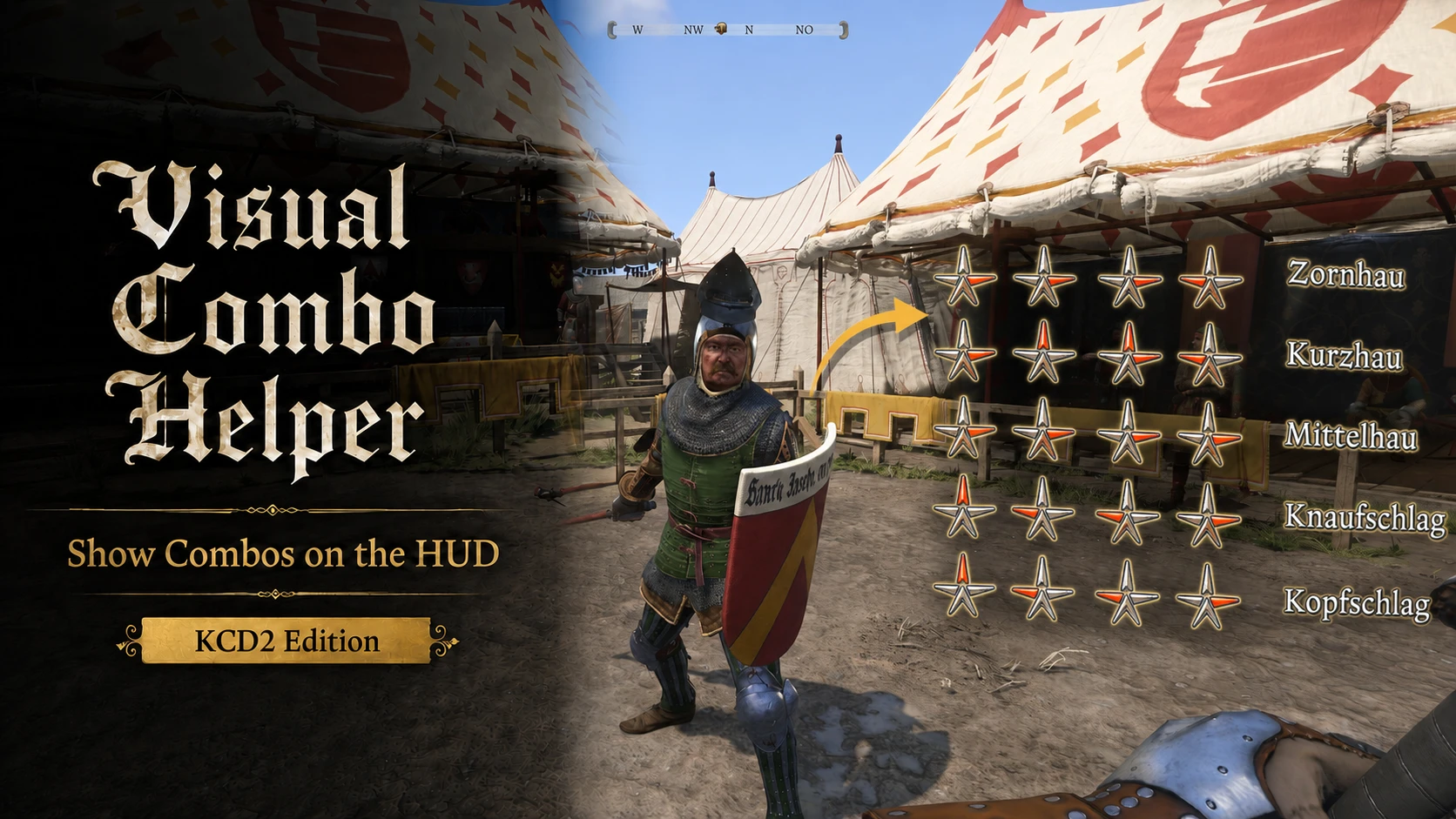
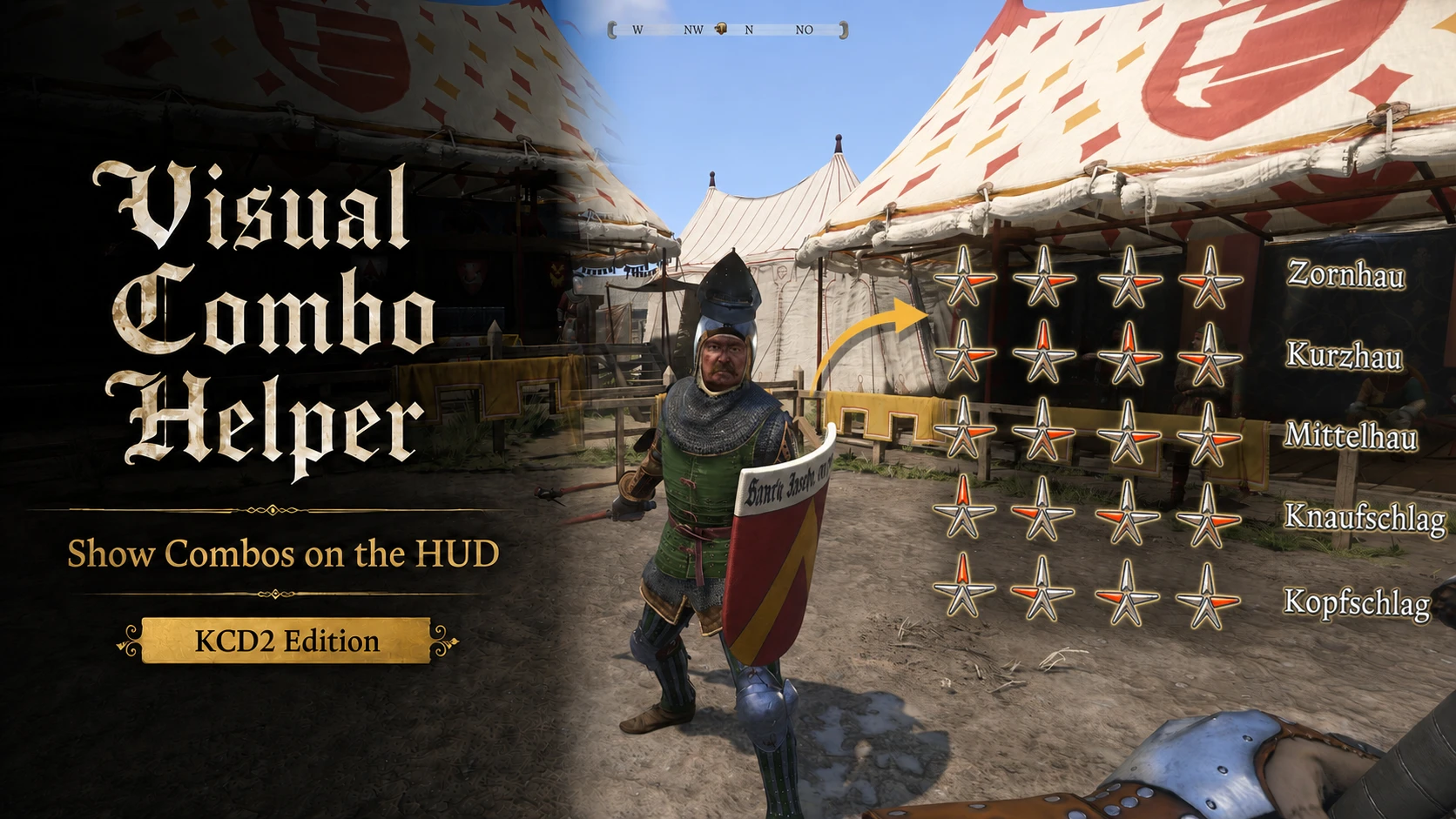
Visual Combo Helper
Displays your learned melee combos on the HUD whenever a supported weapon is drawn, using compact direction icons and localized combo names for quick in-combat reference.
 查看大图
查看大图[center][url=https://imgur.com/a/nexus-banners-HuCkUzG][img width=800]https://i.imgur.com/RIt77kt.png[/img][/url][/center]
Visual Combo Helper displays Henry's learned melee combos directly on the HUD in Kingdom Come: Deliverance II.
The mod automatically detects the active weapon class at runtime and shows only the combos Henry has actually learned. Version 1.0.2 also supports Unarmed combat, DLC weapons, correctly built modded weapons, Longsword + Shield combat, and three configurable display modes.
Each entry uses compact direction icons together with the localized in-game combo name, giving you a quick reference during combat without repeatedly opening the Player menu.
Visual Combo Helper is purely informational. It does not unlock combos, perform inputs, or change combat timing, damage, AI, animations, perks, or combo rules.
[b]How It Works[/b]
Visual Combo Helper reads the active weapon class through the game's runtime systems and checks Henry's learned combo perks. It then renders only the matching entries on the right side of the HUD.
The helper no longer depends on English weapon-name matching. Correctly configured DLC and modded weapons are therefore detected by their actual weapon class. A longsword used together with a shield automatically displays the Shortsword + Shield combo group.
Unarmed combos appear only when Henry has empty hands and a valid combat target. Simply walking around without a weapon does not display the Unarmed list.
The combo data is read directly from the game's tables, so the helper does not need to open or capture the Player menu before it can work.
[center][url=https://imgur.com/a/nexus-banners-HuCkUzG][img width=800]https://i.imgur.com/fGqKu5B.png[/img][/url][/center]
[center][/center]
[list]
[][b]Learned combos on the HUD[/b] -- see your available combos directly during gameplay.[/]
[][b]Runtime weapon-class detection[/b] -- identifies the actual active weapon class instead of relying on internal weapon names.[/]
[][b]Three display modes[/b] -- choose between automatic, toggle, and timed behavior.[/]
[][b]Learned entries only[/b] -- combos remain hidden until Henry has actually learned them.[/]
[][b]Localized names[/b] -- uses the game's localized combo names.[/]
[/list]
[center][url=https://imgur.com/a/nexus-banners-HuCkUzG][img width=800]https://i.imgur.com/8rrO0H5.png[/img][/url][/center]
[b]Vortex Mod Manager[/b]
[list=1]
[]Remove or disable any previous Visual Combo Helper KCD2 test build or older version.[/]
[]Download and install the version 1.0.2 archive with Vortex.[/]
[]Enable the mod.[/]
[]Launch the game.[/]
[/list]
[b]Manual Installation[/b]
[list=1]
[]Download and extract the archive.[/]
[]Copy the included [b]visualcombohelper[/b] folder into:
[code]...\KingdomComeDeliverance2\Mods\[/code][/]
[]Launch the game.[/]
[/list]
The final folder structure should look like this:
[code]KingdomComeDeliverance2
└── Mods
└── visualcombohelper
├── Data
│ └── visual_combo_helper.pak
├── mod.cfg
├── mod.manifest
├── README.txt
└── CHANGELOG.txt[/code]
[b][size=4]Display Mode Configuration[/size][/b]
The display behavior is configured in:
[code]...\KingdomComeDeliverance2\Mods\visualcombohelper\mod.cfg[/code]
Open [b]mod.cfg[/b] with a normal text editor. The default configuration is:
[code]vch2_config_mode =automatic
vch2_config_hotkey =h
vch2_config_duration =5.0[/code]
[b]Available Modes[/b]
[list]
[][b]automatic[/b]
The default behavior. The helper appears whenever a supported weapon is drawn. It also appears during valid Unarmed combat when Henry has empty hands and a combat target.[/]
[][b]toggle[/b]
The helper starts disabled. Press the configured hotkey to enable or disable it. The helper still appears only while a supported weapon or valid Unarmed combat state is active.[/]
[][b]timed[/b]
Press the configured hotkey to display the helper temporarily. Pressing the key again restarts the timer.[/]
[/list]
[b]Changing the Hotkey[/b]
The default hotkey is:
[code]vch2_config_hotkey =h[/code]
Key names are normalized to lowercase, so [b]H[/b] and [b]h[/b] are treated the same.
Standalone [b]Alt[/b], [b]Ctrl[/b], and [b]Shift[/b] cannot be used by themselves because the game treats them as modifier keys rather than normal bindable keys.
Restart the game after changing the hotkey.
The mode and duration can also be reloaded during play through the console command:
[code]vch2_reload_config[/code]
[b]Uninstallation[/b]
Delete the following folder:
[code]...\KingdomComeDeliverance2\Mods\visualcombohelper\[/code]
No save-game cleaning is required because the mod does not add items, quests, perks, or persistent gameplay records.
[center][url=https://imgur.com/a/nexus-banners-HuCkUzG][img width=800]https://i.imgur.com/g009FHD.png[/img][/url][/center]
Visual Combo Helper is a UI reference mod with table-driven combo data and runtime weapon-class detection. It does not modify combat, animation, perk, or combo database tables in the player's installation.
The mod includes:
[list]
[]A custom Visual Combo Helper Scaleform movie and UI element definition.[/]
[]A Lua controller for visibility, learned-combo filtering, display modes, and configuration.[/]
[]An XGEN bridge that reads the active weapon class and Unarmed combat target state.[/]
[]A table-derived list of supported combo directions and perk identifiers used only for display.[/]
[/list]
[b]Supported Combat Groups[/b]
[list]
[]Longsword[/]
[]Shortsword[/]
[]Shortsword with Shield[/]
[]Blunt weapons[/]
[]Blunt weapons with Shield[/]
[]Halberd[/]
[]Unarmed[/]
[/list]
[b]Combo-Mod Compatibility[/b]
Visual Combo Helper displays the standard learned combo entries and their standard direction sequences from the supported KCD2 tables.
Mods that preserve the original combos while adding alternative inputs should generally remain usable, but the helper displays the standard sequence rather than every alternative recipe. Mods that replace direction sequences, remove original combos, or add completely new custom combo perks may require a dedicated compatibility update before their changes can be represented accurately.
Because Visual Combo Helper does not alter combat tables itself, it should remain compatible with most combat, animation, AI, and balancing mods that do not replace the same helper assets or fundamentally redefine the combo perk set.
[b]File Conflict Notice[/b]
Visual Combo Helper overrides:
[code]AI/player/switch/switch.xml[/code]
Another mod that replaces the same file may conflict and require a compatibility patch.
[center][b][size=4][color=#e38b2c]MY KCD1 MODS[/color][/size][/b][/center]
[center][url=https://www.nexusmods.com/kingdomcomedeliverance/mods/2078][img width=180]https://wsrv.nl/?url=https%3A%2F%2Fstaticdelivery.nexusmods.com%2Fmods%2F2298%2Fimages%2F2078%2F2078-1758318549-110567350.png&w=180&h=101&fit=contain&cbg=111216&output=jpg&q=92&dpr=2[/img][/url][url=https://www.nexusmods.com/kingdomcomedeliverance/mods/2079][img width=180]https://wsrv.nl/?url=https%3A%2F%2Fstaticdelivery.nexusmods.com%2Fmods%2F2298%2Fimages%2F2079%2F2079-1758319344-1722707447.png&w=180&h=101&fit=contain&cbg=111216&output=jpg&q=92&dpr=2[/img][/url][url=https://www.nexusmods.com/kingdomcomedeliverance/mods/2080][img width=180]https://wsrv.nl/?url=https%3A%2F%2Fstaticdelivery.nexusmods.com%2Fmods%2F2298%2Fimages%2F2080%2F2080-1758322839-61837252.png&w=180&h=101&fit=contain&cbg=111216&output=jpg&q=92&dpr=2[/img][/url][url=https://www.nexusmods.com/kingdomcomedeliverance/mods/2081][img width=180]https://wsrv.nl/?url=https%3A%2F%2Fstaticdelivery.nexusmods.com%2Fmods%2F2298%2Fimages%2F2081%2F2081-1758477375-551931810.png&w=180&h=101&fit=contain&cbg=111216&output=jpg&q=92&dpr=2[/img][/url][/center]
[center][url=https://www.nexusmods.com/kingdomcomedeliverance/mods/2294][img width=180]https://wsrv.nl/?url=https%3A%2F%2Fstaticdelivery.nexusmods.com%2Fmods%2F2298%2Fimages%2F2294%2F2294-1784411935-500052174.png&w=180&h=101&fit=contain&cbg=111216&output=jpg&q=92&dpr=2[/img][/url][url=https://www.nexusmods.com/kingdomcomedeliverance/mods/2318][img width=180]https://wsrv.nl/?url=https%3A%2F%2Fstaticdelivery.nexusmods.com%2Fmods%2F2298%2Fimages%2F2318%2F2318-1785508765-1455232813.png&w=180&h=101&fit=contain&cbg=111216&output=jpg&q=92&dpr=2[/img][/url][/center]
[center][b][size=4][color=#e38b2c]MY KCD2 MODS[/color][/size][/b][/center]
[center][url=https://www.nexusmods.com/kingdomcomedeliverance2/mods/1388][img width=180]https://wsrv.nl/?url=https%3A%2F%2Fstaticdelivery.nexusmods.com%2Fmods%2F7286%2Fimages%2F1388%2F1388-1784736432-532674128.png&w=180&h=101&fit=contain&cbg=111216&output=jpg&q=92&dpr=2[/img][/url][url=https://www.nexusmods.com/kingdomcomedeliverance2/mods/1819][img width=180]https://wsrv.nl/?url=https%3A%2F%2Fstaticdelivery.nexusmods.com%2Fmods%2F7286%2Fimages%2F1819%2F1819-1745978527-898198551.png&w=180&h=101&fit=contain&cbg=111216&output=jpg&q=92&dpr=2[/img][/url][url=https://www.nexusmods.com/kingdomcomedeliverance2/mods/1348][img width=180]https://wsrv.nl/?url=https%3A%2F%2Fstaticdelivery.nexusmods.com%2Fmods%2F7286%2Fimages%2F1348%2F1348-1784817768-1412532715.png&w=180&h=101&fit=contain&cbg=111216&output=jpg&q=92&dpr=2[/img][/url][url=https://www.nexusmods.com/kingdomcomedeliverance2/mods/2510][img width=180]https://wsrv.nl/?url=https%3A%2F%2Fstaticdelivery.nexusmods.com%2Fmods%2F7286%2Fimages%2F2510%2F2510-1759758273-1659068545.png&w=180&h=101&fit=contain&cbg=111216&output=jpg&q=92&dpr=2[/img][/url][/center]
[center][url=https://www.nexusmods.com/kingdomcomedeliverance2/mods/2508][img width=180]https://wsrv.nl/?url=https%3A%2F%2Fstaticdelivery.nexusmods.com%2Fmods%2F7286%2Fimages%2F2508%2F2508-1759678423-33858081.png&w=180&h=101&fit=contain&cbg=111216&output=jpg&q=92&dpr=2[/img][/url][url=https://www.nexusmods.com/kingdomcomedeliverance2/mods/2811][img width=180]https://wsrv.nl/?url=https%3A%2F%2Fstaticdelivery.nexusmods.com%2Fmods%2F7286%2Fimages%2F2811%2F2811-1784817596-604746715.png&w=180&h=101&fit=contain&cbg=111216&output=jpg&q=92&dpr=2[/img][/url][/center]
[center][i]Optional support:[/i][/center]
[center][url=https://ko-fi.com/r0ughers][img]https://staticdelivery.nexusmods.com/mods/7371/images/355/355-1782494840-1675022727.png[/img][/url][/center]
![https://i.imgur.com/RIt77kt.png[/img][/url][/center]](https://i.imgur.com/RIt77kt.png%5B/img%5D%5B/url%5D%5B/center%5D)
![https://i.imgur.com/fGqKu5B.png[/img][/url][/center]](https://i.imgur.com/fGqKu5B.png%5B/img%5D%5B/url%5D%5B/center%5D)
![https://i.imgur.com/8rrO0H5.png[/img][/url][/center]](https://i.imgur.com/8rrO0H5.png%5B/img%5D%5B/url%5D%5B/center%5D)
![https://i.imgur.com/g009FHD.png[/img][/url][/center]](https://i.imgur.com/g009FHD.png%5B/img%5D%5B/url%5D%5B/center%5D)
![https://wsrv.nl/?url=https%3A%2F%2Fstaticdelivery.nexusmods.com%2Fmods%2F2298%2Fimages%2F2078%2F2078-1758318549-110567350.png&w=180&h=101&fit=contain&cbg=111216&output=jpg&q=92&dpr=2[/img][/url][url=https://www.nexusmods.com/kingdomcomedeliverance/mods/2079][img](https://wsrv.nl/?url=https%3A%2F%2Fstaticdelivery.nexusmods.com%2Fmods%2F2298%2Fimages%2F2078%2F2078-1758318549-110567350.png&w=180&h=101&fit=contain&cbg=111216&output=jpg&q=92&dpr=2%5B/img%5D%5B/url%5D%5Burl=https://www.nexusmods.com/kingdomcomedeliverance/mods/2079%5D%5Bimg)
![https://wsrv.nl/?url=https%3A%2F%2Fstaticdelivery.nexusmods.com%2Fmods%2F2298%2Fimages%2F2079%2F2079-1758319344-1722707447.png&w=180&h=101&fit=contain&cbg=111216&output=jpg&q=92&dpr=2[/img][/url][url=https://www.nexusmods.com/kingdomcomedeliverance/mods/2080][img](https://wsrv.nl/?url=https%3A%2F%2Fstaticdelivery.nexusmods.com%2Fmods%2F2298%2Fimages%2F2079%2F2079-1758319344-1722707447.png&w=180&h=101&fit=contain&cbg=111216&output=jpg&q=92&dpr=2%5B/img%5D%5B/url%5D%5Burl=https://www.nexusmods.com/kingdomcomedeliverance/mods/2080%5D%5Bimg)
![https://wsrv.nl/?url=https%3A%2F%2Fstaticdelivery.nexusmods.com%2Fmods%2F2298%2Fimages%2F2080%2F2080-1758322839-61837252.png&w=180&h=101&fit=contain&cbg=111216&output=jpg&q=92&dpr=2[/img][/url][url=https://www.nexusmods.com/kingdomcomedeliverance/mods/2081][img](https://wsrv.nl/?url=https%3A%2F%2Fstaticdelivery.nexusmods.com%2Fmods%2F2298%2Fimages%2F2080%2F2080-1758322839-61837252.png&w=180&h=101&fit=contain&cbg=111216&output=jpg&q=92&dpr=2%5B/img%5D%5B/url%5D%5Burl=https://www.nexusmods.com/kingdomcomedeliverance/mods/2081%5D%5Bimg)
![https://wsrv.nl/?url=https%3A%2F%2Fstaticdelivery.nexusmods.com%2Fmods%2F2298%2Fimages%2F2081%2F2081-1758477375-551931810.png&w=180&h=101&fit=contain&cbg=111216&output=jpg&q=92&dpr=2[/img][/url][/center]](https://wsrv.nl/?url=https%3A%2F%2Fstaticdelivery.nexusmods.com%2Fmods%2F2298%2Fimages%2F2081%2F2081-1758477375-551931810.png&w=180&h=101&fit=contain&cbg=111216&output=jpg&q=92&dpr=2%5B/img%5D%5B/url%5D%5B/center%5D)
![https://wsrv.nl/?url=https%3A%2F%2Fstaticdelivery.nexusmods.com%2Fmods%2F2298%2Fimages%2F2294%2F2294-1784411935-500052174.png&w=180&h=101&fit=contain&cbg=111216&output=jpg&q=92&dpr=2[/img][/url][url=https://www.nexusmods.com/kingdomcomedeliverance/mods/2318][img](https://wsrv.nl/?url=https%3A%2F%2Fstaticdelivery.nexusmods.com%2Fmods%2F2298%2Fimages%2F2294%2F2294-1784411935-500052174.png&w=180&h=101&fit=contain&cbg=111216&output=jpg&q=92&dpr=2%5B/img%5D%5B/url%5D%5Burl=https://www.nexusmods.com/kingdomcomedeliverance/mods/2318%5D%5Bimg)
![https://wsrv.nl/?url=https%3A%2F%2Fstaticdelivery.nexusmods.com%2Fmods%2F2298%2Fimages%2F2318%2F2318-1785508765-1455232813.png&w=180&h=101&fit=contain&cbg=111216&output=jpg&q=92&dpr=2[/img][/url][/center]](https://wsrv.nl/?url=https%3A%2F%2Fstaticdelivery.nexusmods.com%2Fmods%2F2298%2Fimages%2F2318%2F2318-1785508765-1455232813.png&w=180&h=101&fit=contain&cbg=111216&output=jpg&q=92&dpr=2%5B/img%5D%5B/url%5D%5B/center%5D)
![https://wsrv.nl/?url=https%3A%2F%2Fstaticdelivery.nexusmods.com%2Fmods%2F7286%2Fimages%2F1388%2F1388-1784736432-532674128.png&w=180&h=101&fit=contain&cbg=111216&output=jpg&q=92&dpr=2[/img][/url][url=https://www.nexusmods.com/kingdomcomedeliverance2/mods/1819][img](https://wsrv.nl/?url=https%3A%2F%2Fstaticdelivery.nexusmods.com%2Fmods%2F7286%2Fimages%2F1388%2F1388-1784736432-532674128.png&w=180&h=101&fit=contain&cbg=111216&output=jpg&q=92&dpr=2%5B/img%5D%5B/url%5D%5Burl=https://www.nexusmods.com/kingdomcomedeliverance2/mods/1819%5D%5Bimg)
![https://wsrv.nl/?url=https%3A%2F%2Fstaticdelivery.nexusmods.com%2Fmods%2F7286%2Fimages%2F1819%2F1819-1745978527-898198551.png&w=180&h=101&fit=contain&cbg=111216&output=jpg&q=92&dpr=2[/img][/url][url=https://www.nexusmods.com/kingdomcomedeliverance2/mods/1348][img](https://wsrv.nl/?url=https%3A%2F%2Fstaticdelivery.nexusmods.com%2Fmods%2F7286%2Fimages%2F1819%2F1819-1745978527-898198551.png&w=180&h=101&fit=contain&cbg=111216&output=jpg&q=92&dpr=2%5B/img%5D%5B/url%5D%5Burl=https://www.nexusmods.com/kingdomcomedeliverance2/mods/1348%5D%5Bimg)
![https://wsrv.nl/?url=https%3A%2F%2Fstaticdelivery.nexusmods.com%2Fmods%2F7286%2Fimages%2F1348%2F1348-1784817768-1412532715.png&w=180&h=101&fit=contain&cbg=111216&output=jpg&q=92&dpr=2[/img][/url][url=https://www.nexusmods.com/kingdomcomedeliverance2/mods/2510][img](https://wsrv.nl/?url=https%3A%2F%2Fstaticdelivery.nexusmods.com%2Fmods%2F7286%2Fimages%2F1348%2F1348-1784817768-1412532715.png&w=180&h=101&fit=contain&cbg=111216&output=jpg&q=92&dpr=2%5B/img%5D%5B/url%5D%5Burl=https://www.nexusmods.com/kingdomcomedeliverance2/mods/2510%5D%5Bimg)
![https://wsrv.nl/?url=https%3A%2F%2Fstaticdelivery.nexusmods.com%2Fmods%2F7286%2Fimages%2F2510%2F2510-1759758273-1659068545.png&w=180&h=101&fit=contain&cbg=111216&output=jpg&q=92&dpr=2[/img][/url][/center]](https://wsrv.nl/?url=https%3A%2F%2Fstaticdelivery.nexusmods.com%2Fmods%2F7286%2Fimages%2F2510%2F2510-1759758273-1659068545.png&w=180&h=101&fit=contain&cbg=111216&output=jpg&q=92&dpr=2%5B/img%5D%5B/url%5D%5B/center%5D)
![https://wsrv.nl/?url=https%3A%2F%2Fstaticdelivery.nexusmods.com%2Fmods%2F7286%2Fimages%2F2508%2F2508-1759678423-33858081.png&w=180&h=101&fit=contain&cbg=111216&output=jpg&q=92&dpr=2[/img][/url][url=https://www.nexusmods.com/kingdomcomedeliverance2/mods/2811][img](https://wsrv.nl/?url=https%3A%2F%2Fstaticdelivery.nexusmods.com%2Fmods%2F7286%2Fimages%2F2508%2F2508-1759678423-33858081.png&w=180&h=101&fit=contain&cbg=111216&output=jpg&q=92&dpr=2%5B/img%5D%5B/url%5D%5Burl=https://www.nexusmods.com/kingdomcomedeliverance2/mods/2811%5D%5Bimg)
![https://wsrv.nl/?url=https%3A%2F%2Fstaticdelivery.nexusmods.com%2Fmods%2F7286%2Fimages%2F2811%2F2811-1784817596-604746715.png&w=180&h=101&fit=contain&cbg=111216&output=jpg&q=92&dpr=2[/img][/url][/center]](https://wsrv.nl/?url=https%3A%2F%2Fstaticdelivery.nexusmods.com%2Fmods%2F7286%2Fimages%2F2811%2F2811-1784817596-604746715.png&w=180&h=101&fit=contain&cbg=111216&output=jpg&q=92&dpr=2%5B/img%5D%5B/url%5D%5B/center%5D)
![https://ko-fi.com/r0ughers][img]https://staticdelivery.nexusmods.com/mods/7371/images/355/355-1782494840-1675022727.png[/img][/url][/center]](https://ko-fi.com/r0ughers%5D%5Bimg%5Dhttps://staticdelivery.nexusmods.com/mods/7371/images/355/355-1782494840-1675022727.png%5B/img%5D%5B/url%5D%5B/center%5D)
还没有人评论,去客户端里说两句吧。
评论在新手盒子客户端中发表,这里同步展示。