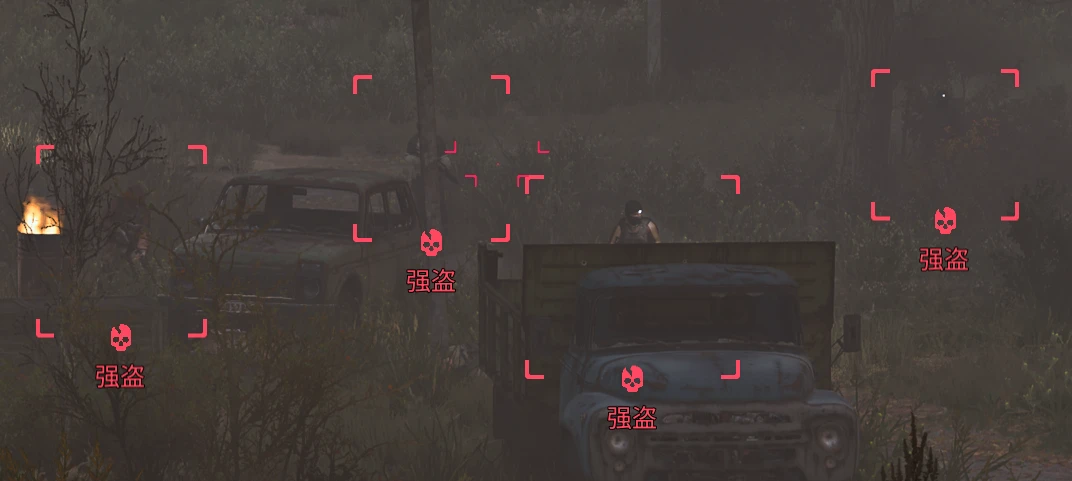
双筒望远镜阵营标签
使用望远镜观察NPC时,本模组会在官方阵营图标下方生成一个原生 UI 文字组件,它作为界面的一部分,完美同步跟随图标的全部行为 When observing NPCs through binoculars, this mod generates a native UI text component directly below the official faction icon.
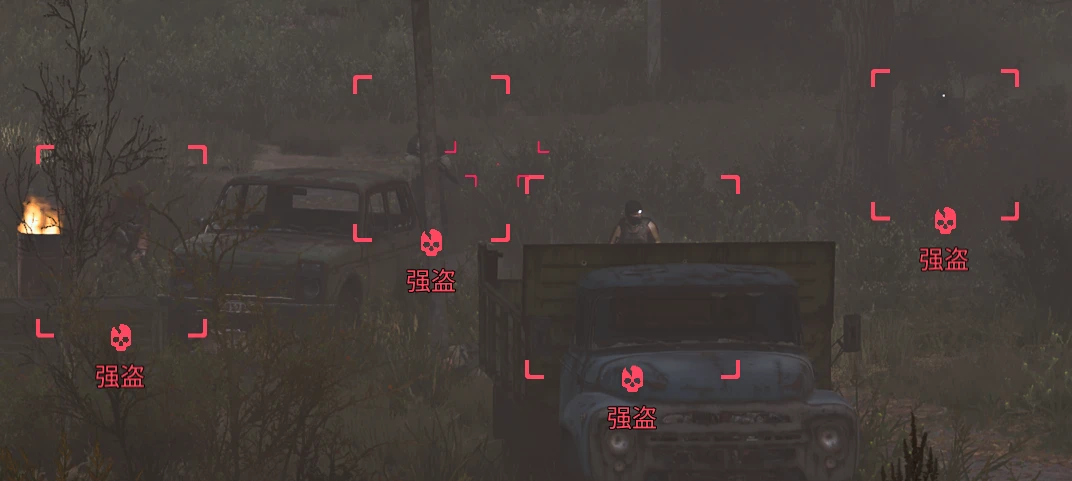 查看大图
模组描述/Description
厌倦了举起望远镜时,看着满屏幕的阵营图标却认不出是谁?Binocular Faction Label 专为“图标脸盲”玩家设计。当你在游戏中使用望远镜观察 NPC 时,它会直接在官方的阵营图标下方生成对应的阵营名称,让你瞬间识别阵营,再也不用切出游戏查攻略。本模组在 DeepSeek-V4.1-Flash协助下完成
Tired of looking through your binoculars and seeing a screen full of faction icons you can't recognize? Binocular Faction Label is designed specifically for players with "icon blindness." When you use your binoculars to observe NPCs in-game, it directly generates the corresponding faction name below the official faction icon, allowing you to instantly identify factions without ever needing to alt-tab and check a guide. This mod was developed with the assistance of DeepSeek-V4.1-Flash.
安装说明/Installation
前置要求:游戏版本 2.1.x,且已正确安装 UE4SS(推荐站内UE4SS(更新2.1))
- 1.复制文件:将压缩包内的 “ue4ss” 整个文件夹复制到游戏目录:
...\S.T.A.L.K.E.R. 2 Heart of Chernobyl\Stalker2\Binaries\Win64\
(如果你已正确安装UE4SS,该路径下应该已经存在一个同名文件夹;提示合并文件时选择“是”)。
- 2.启用模组(关键):打开
...\Win64\ue4ss\Mods\mods.txt
,在txt文件末尾添加一行:
FactionLabel : 1
如果你的目录下还有 “mods.json”,请在该json文件列表中添加
{ "mod_name": "FactionLabel", "mod_enabled": true }
- 3.启动游戏:完成上述两步即可生效。
(注:仅复制文件不添加代码是无法生效的。卸载时只需在 “mods.txt”中改为0,并删除FactionLabel文件夹即可,完全不伤存档。)
Requirements: Game version 2.1.x, and UE4SS must be correctly installed (Recommended: UE4SS (Update 2.1) on Nexus).
- 1.Copy Files: Copy the entire "ue4ss" folder from the archive into your game directory:
...\S.T.A.L.K.E.R. 2 Heart of Chernobyl\Stalker2\Binaries\Win64\
(If you already have UE4SS installed correctly, a folder with the same name should already exist in this path. Select "Yes" when prompted to merge folders).
- 2.Enable the Mod (Crucial): Open
...\Win64\ue4ss\Mods\mods.txt
and add the following line at the very end of the text file:
FactionLabel : 1
(If you also have a "mods.json" file in that directory, please add:
{ "mod_name": "FactionLabel", "mod_enabled": true }
to its list).
- 3.Launch the Game: It will take effect once the above two steps are completed.
(Note: Simply copying the files without adding the code above will not work. To uninstall, just change the value to 0 in "mods.txt" and delete the FactionLabel folder. This is completely safe and will not affect your save files.)
核心特性/Main features
- 精准显示:仅在使用望远镜对准NPC且出现阵营图标时,在图标下方显示阵营名称。
- 颜色同步:文字颜色完美跟随图标状态。敌对阵营(红框红图标)文字同步变红。
- 智能过滤:具名 NPC(有专属名字的角色)不显示阵营,保持原版沉浸感;变异体 / 僵尸(无阵营图标)不显示任何文字。
- 可自定义:使用记事本打开 Scripts[main.lua](main.lua),
- 改名字:修改 “NAMES” 列表里的文字(如把“责任”改成“纪律团”)。
- 调位置:修改 “CFG” 里的 “offsetY” 数值,即可调整文字与图标的距离。
- 改颜色:可通过 “hostileMargin”调节变红的灵敏阈值。
- Precise Display: Faction names are displayed directly below the faction icons, but only when you aim at an NPC through your binoculars and the icon appears.
- Color Sync: The text color perfectly mirrors the icon's state. If the NPC is hostile (red frame/icon), the faction name turns red as well.
- Smart Filtering: Named NPCs (characters with unique names) won't show a faction label to preserve immersion; Mutants and Zombies (which have no faction icon) won't display any text at all.
- Fully Customizable: Open Scripts[main.lua](main.lua) with Notepad to customize your experience:
- Change Names: Edit the text in the “NAMES” list (e.g., change " 责任 " to "Duty Organization").
- Adjust Position: Modify the “offsetY” value in the “CFG” section to adjust the distance between the text and the icon.
- Tweak Colors: Adjust the “hostileMargin” value to change the sensitivity threshold for the red color trigger.


特别致谢
感谢所有在变异区里摸爬滚打、并提供测试反馈的潜行者们, 感谢大肥鱼在代码编写过程中的大力协助。如果你在使用或自定义时遇到问题,欢迎评论留言!
Thanks to all the stalkers who have been fighting and crawling through the Zone, and providing testing feedback. A huge thanks to DeepSeek-V4.1-Flash (the fat bule whale) for the tremendous assistance with the coding. If you run into any issues while using or customizing the mod, feel free to leave a comment!
正在加载版本记录…
正在加载评论…
评论在新手盒子客户端中发表,这里同步展示。