自动卸载战利品
打开尸体 / 藏匿点的战利品界面时,自动替你把里面的枪退膛。 When you open a corpse / stash loot container, this mod unloads the weapons in it for you.
 查看大图
[size=6][b]自动退膛 / Auto Unload Loot[/b][/size]
[size=4]v1.0.0[/size]
[size=3]打开尸体 / 藏匿点的战利品界面时,自动替你把里面的枪退膛。 When you open a corpse / stash loot container, this mod unloads the weapons in it for you.[/size]
[size=2]需要:UE4SS + S2AE(成就解锁 MOD)· Requires: UE4SS + S2AE (Achievements Enabler)[/size]
[size=5]◆ 这是什么 / What this mod does[/size]
[b]中文[/b] 搜刮敌人尸体、藏匿点、储物箱时,你要做的通常是:打开容器 → 按住 Shift 再按一次 G, 让 S2AE(成就解锁 MOD)的「一键退膛」把容器里所有上了膛的枪一次退掉。
这个 MOD 就是把最后那一步自动化:你只管打开容器,退膛由它替你按。 它做的事只有一件 —— 认出「打开的是别人的容器」,然后在游戏进程内部发一次 「修饰键 + 退膛键」(默认 Shift + G)。真正退膛的仍然是 S2AE, 所以手感、音量、速度和你自己按 Shift+G 完全一样:安静、瞬间、一次性完成, 而不是一把一把地响。
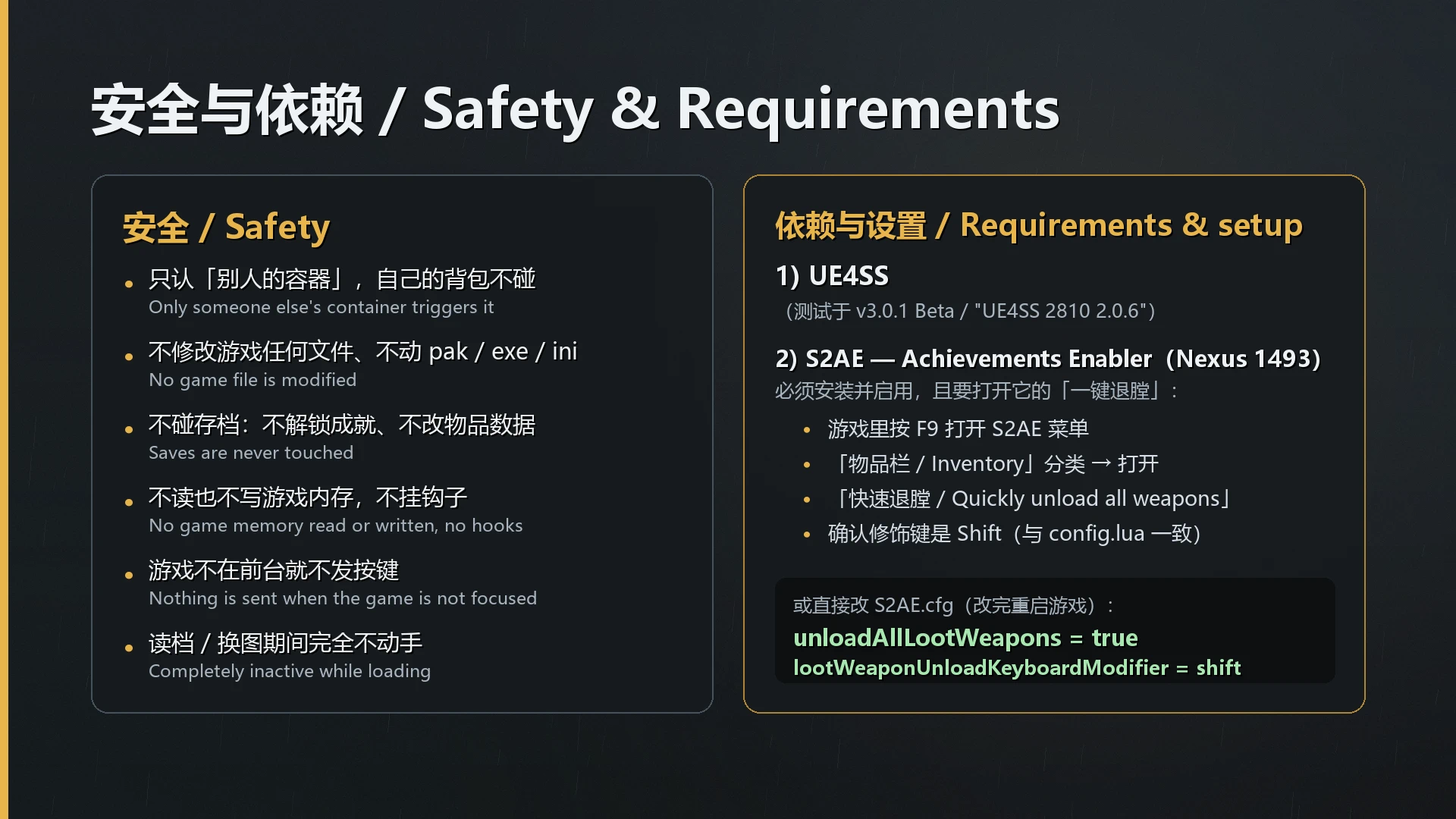
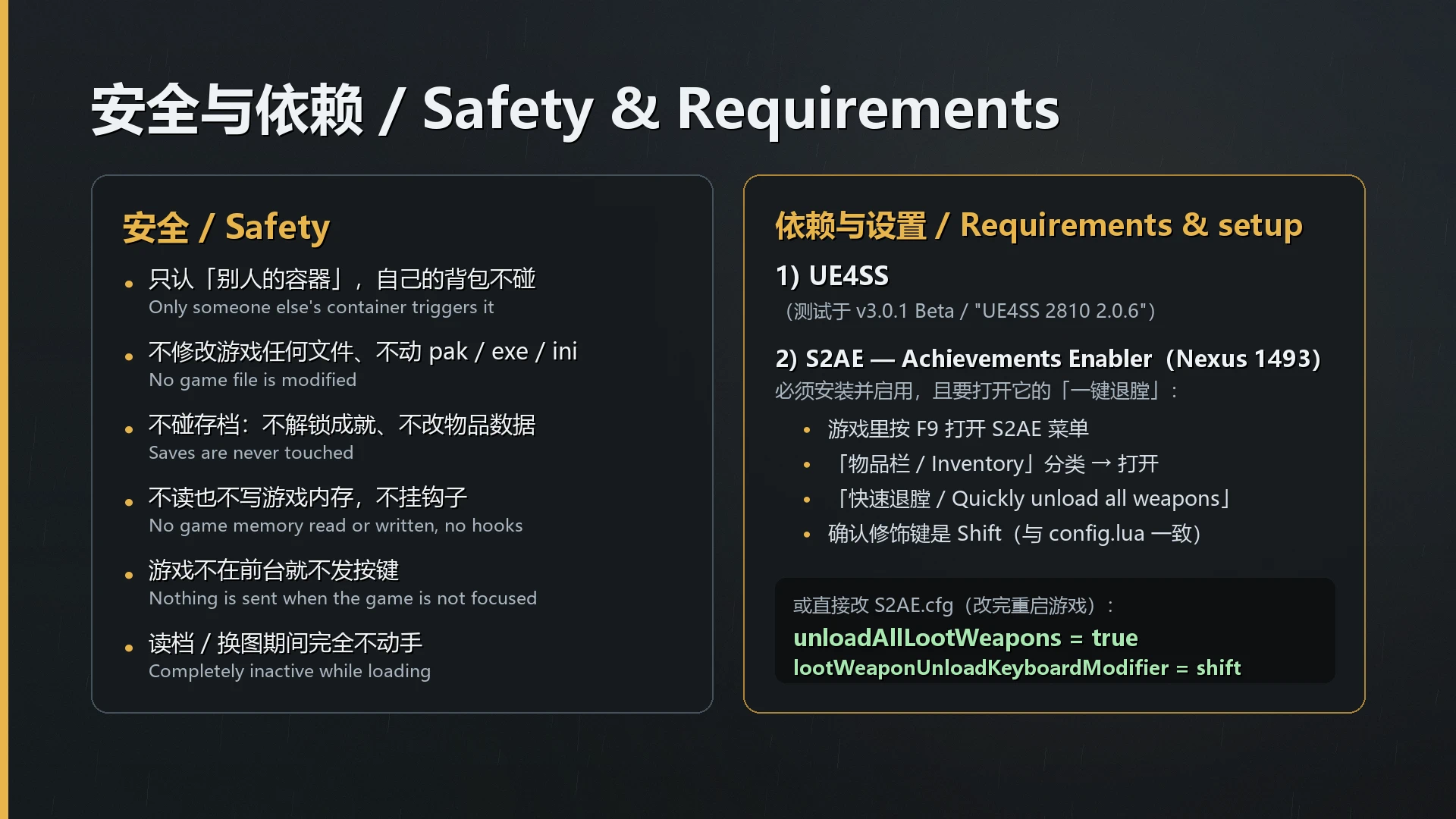
本 MOD 不修改游戏任何文件、不碰存档、不读也不写游戏内存, 因此它和游戏版本无关,游戏更新后也不会失效。
[b]English[/b] Looting a corpse, a stash or a box normally means: open the container, then hold Shift and press G once, so that S2AE's "unload all loot weapons" empties every loaded weapon in that container at once.
This mod automates that last step: you just open the container and it presses the keys for you. It does exactly one thing - recognise that a container belonging to someone else is open, then send "modifier + unload key" (Shift + G by default) inside the game process. The actual unloading is still done by S2AE, so the feel, the volume and the speed are identical to pressing Shift+G yourself: silent, instant, all at once instead of one beep per weapon.
This mod does not modify any game file, does not touch your saves, and never reads or writes game memory - which is why it is independent of the game version and will not break when the game updates.
[size=5]◆ 前置需求(务必要做)/ Requirements (please read)[/size]
- UE4SS —— 本 MOD 是 UE4SS 的 Lua MOD(附带一个很小的原生 DLL,只用来发按键)。 本 MOD 在 UE4SS v3.0.1 Beta(打包名 "UE4SS 2810 2.0.6")上测试。 UE4SS is required. This is a UE4SS Lua mod (plus a tiny native DLL used only to send the key combo). Tested with UE4SS v3.0.1 Beta ("UE4SS 2810 2.0.6").
- S2AE — Achievements Enabler(Nexus 1493) —— 必须安装并启用, 而且必须打开它的「一键退膛」功能,否则本 MOD 不会产生任何效果。 S2AE (Nexus 1493) is required and must be enabled, with its "unload all loot weapons" feature turned on - otherwise this mod does nothing.
[size=4]在 S2AE 里要打开什么(重要)/ What to enable in S2AE (important)[/size]
[b]中文[/b] 1)**打开 S2AE 的悬浮菜单:**游戏里按 F9。 2)进入 **「物品栏 / Inventory」**分类,把 「快速退膛」 (英文界面:Quickly unload all weapons)这一项打开。 打开后你可以先自己试一下:搜刮一具尸体,按住 Shift 再按 G —— 容器里所有上了膛的枪 应该一次性退膛。 3)确认 修饰键:同一分类里的 「退膛修饰键」 (英文:lootWeaponUnloadKeyboardModifier)默认是 Shift。 本 MOD 默认发的也是 Shift + G;两边必须一致(不一致时本 MOD 会在日志里警告你)。
也可以直接改配置文件(改完重启游戏):
S2AE.cfg
unloadAllLootWeapons=true
lootWeaponUnloadKeyboardModifier=shift
[b]English[/b]
- Open S2AE's overlay menu: press F9 in game.
- Go to the Inventory section and turn on "Quickly unload all weapons". Then test it yourself: loot a corpse, hold Shift and press G - every loaded weapon in the container should be unloaded at once.
- Check the modifier: lootWeaponUnloadKeyboardModifier defaults to Shift. This mod also sends Shift + G by default; the two must match (if they do not, this mod will warn you in its log).
Or edit the config file directly (restart the game afterwards):
S2AE.cfg
unloadAllLootWeapons=true
lootWeaponUnloadKeyboardModifier=shift
[size=4]关于游戏里的「退膛键」/ About the game's unload key[/size]
中文:本 MOD 默认发的是 G(游戏默认的退膛键)。如果你在游戏里把退膛键改成了 别的键(例如 H),请把本 MOD config.lua 里的
Key = "G"
改成你实际用的那个键。 English: this mod sends G by default. If you rebound the unload key in game (e.g. to H), change
Key = "G"
in config.lua to your key.
[size=5]◆ 安装 / Installation[/size]
中文:
- 把压缩包里的 Stalker2 文件夹解压到游戏根目录(就是 Stalker2.exe 所在的那一层)。 解压后应当是这样:
S.T.A.L.K.E.R. 2 Heart of Chornobyl\
    Stalker2\
        Binaries\
            Win64\
                ue4ss\
                    Mods\
                        AutoUnloadLoot\        <- 这个 MOD
                            AutoUnloadLootNative.dll
                            enabled.txt
                            Scripts\main.lua
                            Scripts\config.lua
- 不需要改 mods.txt:MOD 自带 enabled.txt,UE4SS 会自动加载它 (日志里会写 "Mod 'AutoUnloadLoot' has enabled.txt, starting mod.")。 如果你习惯用 mods.txt 管理,加一行
AutoUnloadLoot : 1
也可以。 3. 进游戏,搜刮一具尸体试试。
English:
- Extract the Stalker2 folder from the archive into your game root folder (the folder that contains Stalker2.exe), so the layout matches the tree shown above.
- You do not need to edit mods.txt - the mod ships an enabled.txt and UE4SS loads it automatically. Adding
AutoUnloadLoot : 1
to mods.txt also works. 3. Start the game and loot a corpse.
[size=5]◆ 配置 / Configuration[/size]
中文:文件是
Scripts\config.lua
,用记事本就能改,改完必须完全重启游戏。 文件里每一项都是中英对照注释。
English: the file is
Scripts\config.lua
(any text editor). Restart the game completely after editing. Every option has a bilingual comment in the file.
Enabled = true—— 总开关。Master switch.Key = "G"—— 游戏里的退膛键。The game's unload key.Modifier = "SHIFT"—— 修饰键,必须和 S2AE 一致。Must match S2AE.SendDelayMs = 600—— 打开容器后等多少毫秒再发键。没反应就调大(例如 1000)。 Delay in ms before sending keys. Raise it if nothing happens.FallbackScanSeconds = 5—— 兜底扫描间隔。正常情况下界面对象是被 「创建通知」送到 MOD 手里的,一次都不用扫描;这一项只在异常时兜底。 填
0
可以完全关掉它。Fallback scan interval; normally never used.
ManualTestKey = "F6"—— 手动测试键:开着容器按一下,立刻再触发一次 (排查用)。填
nil
关掉。Manual test key / set to nil to disable.
Debug = false——
true
会在日志里打印详细过程。 Verbose logging.
[size=5]◆ 它是怎么工作的 / How it works[/size]
中文:
- MOD 通过 UE4SS 的「对象创建通知」拿到游戏物品栏界面的对象(事件驱动, 不轮询、不扫描,所以不会造成周期性的卡顿)。
- 每次界面出现时,它检查四件事:界面可见、你那一侧的格子控件和容器侧的格子控件 都存在且是两个不同的控件、不是商人/交易界面、容器侧确实可见。 全部满足才动手。
- 满足之后,它把按键交给自带的原生 DLL —— DLL 就在游戏进程里,会先确认 前台窗口属于游戏自己,然后在独立线程里发「修饰键 → 退膛键 → 抬起」。 用真实扫描码发送,和真人按键走同一条输入路径。
- 剩下的事由 S2AE 完成(它才是真正退膛的那个)。
English:
- The mod receives the inventory view object through UE4SS's object-creation notification - it is event driven, so it never polls or scans and cannot cause periodic stutter.
- Each time the view appears it checks four things: the view is visible, both your own grid widget and the container's grid widget exist and are two different widgets, it is not a trader/trade screen, and the container side is visible. Only then does it act.
- It then hands the key combo to the bundled native DLL. The DLL lives inside the game process, first confirms that the foreground window belongs to the game itself, and then sends "modifier down -> key down -> key up" on its own thread, using real scan codes - the same input path as a human keypress.
- S2AE does the rest (it is what actually unloads the weapons).
[size=5]◆ 安全性 / Safety[/size]
中文:
- 你背包里的枪永远不会被碰。 只有「别人的容器界面」才会触发; 自己的背包没有容器侧那一格,判定过不去。
- 不修改游戏文件:MOD 只是发按键,不改 pak、不改 exe、不改 ini。
- 不碰存档:不解锁成就、不改物品数据、不写入任何存档内容。
- 不读写游戏内存:DLL 不挂钩子、不读写任何游戏对象,只调用系统的按键 API。
- 游戏不在前台就不发按键:多显示器下切出去看网页时不会误触发。
- 读档 / 换图期间完全不动手:这一整段时间内不读取任何游戏对象。
English:
- Weapons in your own backpack are never touched. Only "someone else's container" triggers it; your backpack has no container-side grid, so the check fails there.
- No game file is modified - it only sends a key stroke.
- Your saves are never touched - no achievement unlocking, no item data edits, nothing written into a save.
- No game memory is read or written - the DLL installs no hooks and touches no game object; it only calls the system's keyboard API.
- Nothing is sent while the game is not the foreground window, so alt-tabbing to a browser cannot trigger it.
- Completely inactive during save loading / map changes - no game object is read while a load is in progress.
[size=5]◆ 排查 / Troubleshooting[/size]
中文:日志在
Stalker2\Binaries\Win64\ue4ss\UE4SS.log
里,搜
AutoUnloadLoot
。正常启动时应当能看到这几行:
[AutoUnloadLoot] 原生助手 v1.0.0 已就绪(进程内发键)
[AutoUnloadLoot] 界面对象创建通知已注册:/Game/.../W_Inventory.W_Inventory_C
[AutoUnloadLoot] 已加载。版本 v1.0.0;修饰键 SHIFT + 退膛键 G(VK 0x10/0x47);延迟 600ms
[AutoUnloadLoot] S2AE 的 unloadAllLootWeapons 已开启
[AutoUnloadLoot] 修饰键一致:shift
搜刮一次会出现:
[AutoUnloadLoot] 第一次检测到战利品界面
[AutoUnloadLoot] 已发出按键(自动):0x10 + 0x47 → 交给 S2AE 一次性退膛
- 看到「警告:S2AE 的 unloadAllLootWeapons = false」→ 见上面「在 S2AE 里要打开什么」。
- 看到「警告:修饰键不一致」→ 把 S2AE 和 config.lua 的修饰键改成同一个值。
- 看到「没能发按键:游戏不在前台」→ 那一刻游戏不是前台窗口,属正常保护。
- 什么都没发生 → 先确认你能用手按出 Shift+G 的效果(说明 S2AE 那边正常), 然后打开日志搜 AutoUnloadLoot,把相关几行发到评论区。 开着容器按 F6 也可以强制触发一次,方便排查。
English: the log is in
Stalker2\Binaries\Win64\ue4ss\UE4SS.log
; search for
AutoUnloadLoot
. If nothing happens, first check that manual Shift+G still works (so S2AE is fine), then send the AutoUnloadLoot log lines. Pressing F6 with a container open forces one trigger for testing.
[size=5]◆ 已知限制 / Known limitations[/size]
中文:
- 必须依赖 S2AE:真正退膛的是它,本 MOD 只负责替你按键。
- 容器里没有上膛的枪时,什么都不会发生(S2AE 无事可做)。
- 商人 / 交易界面被有意排除,不会触发。
- 附带的 DLL 没有数字签名,个别杀毒软件可能提示(源码与编译说明在压缩包外单独提供, 可以自行编译核对)。
- 本 MOD 不处理「你自己背包里」的枪 —— 那是设计如此。
English:
- S2AE is required - it does the unloading; this mod only sends the keys.
- If the container has no loaded weapon, nothing happens (S2AE has nothing to do).
- Trader / trade screens are deliberately excluded and never trigger the mod.
- The bundled DLL is unsigned, so some antivirus software may flag it (the source and build instructions are provided separately so you can compile it yourself).
- Weapons in your own backpack are intentionally left alone.
[size=5]◆ 卸载 / Uninstalling[/size]
中文:删掉
Stalker2\Binaries\Win64\ue4ss\Mods\AutoUnloadLoot
整个文件夹即可, 不留任何其它痕迹(没有写入游戏目录之外的地方,也没有覆盖游戏文件)。
English: delete the
AutoUnloadLoot
folder. Nothing else is left behind.
[size=5]◆ 致谢 / Credits[/size]
中文:感谢 S2AE — Achievements Enabler 的作者 Antrix —— 真正的「一键退膛」功能 由它提供,本 MOD 只是把「打开容器」到「按下一键退膛」之间的那一步自动化。 也感谢 UE4SS 团队提供脚本加载框架。
English: thanks to Antrix for S2AE — Achievements Enabler (it provides the actual "unload all loot weapons" feature) and to the UE4SS team for the script loader.
[size=3]v1.0.0 —— 中英对照说明 / bilingual description[/size]
[size=2]欢迎在评论区反馈问题,附上 UE4SS.log 里 AutoUnloadLoot 相关的几行会快很多。 Feedback is welcome - attaching the AutoUnloadLoot lines from UE4SS.log helps a lot.[/size]
正在加载版本记录…
正在加载评论…
评论在新手盒子客户端中发表,这里同步展示。