Sekrio Save Editor
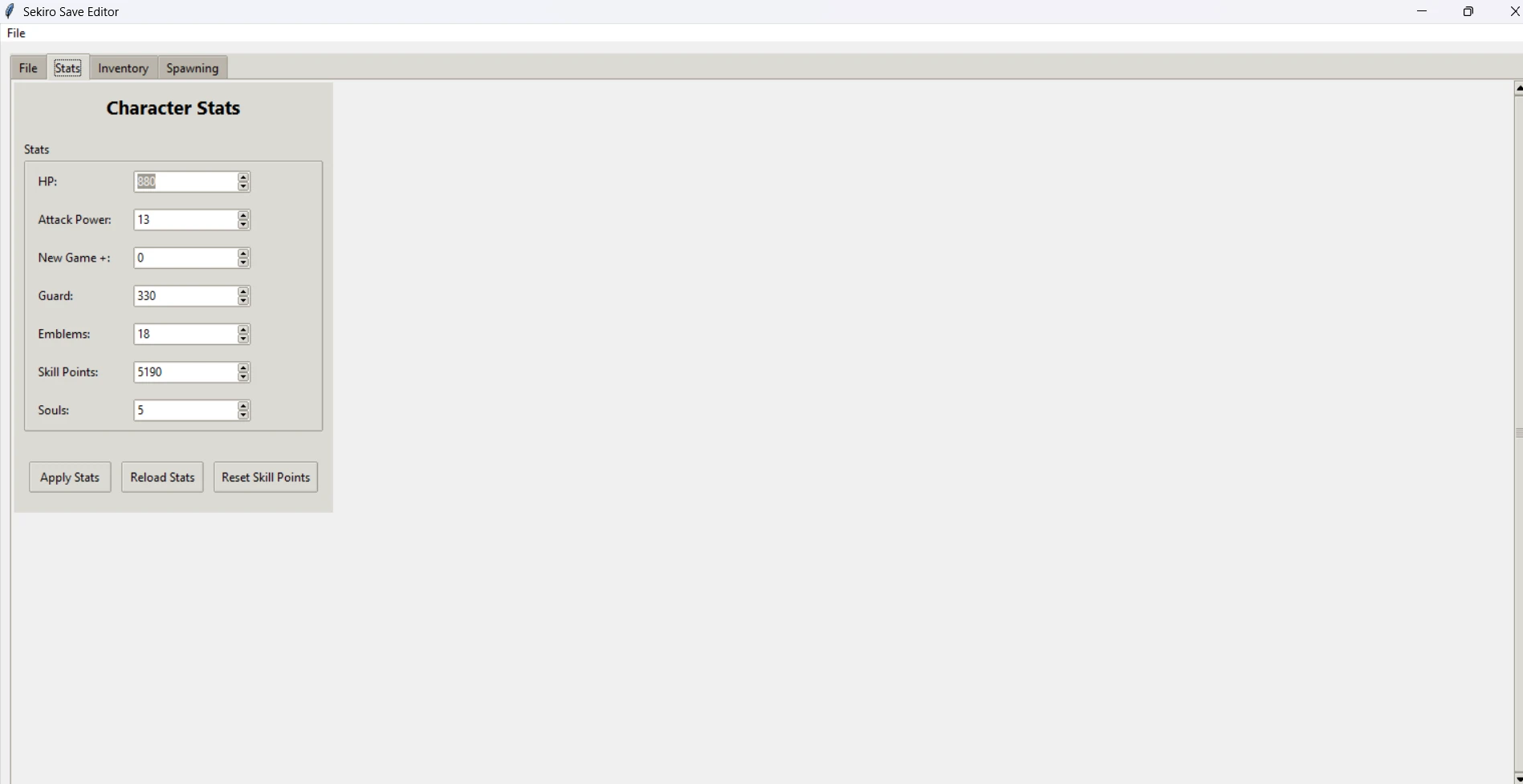
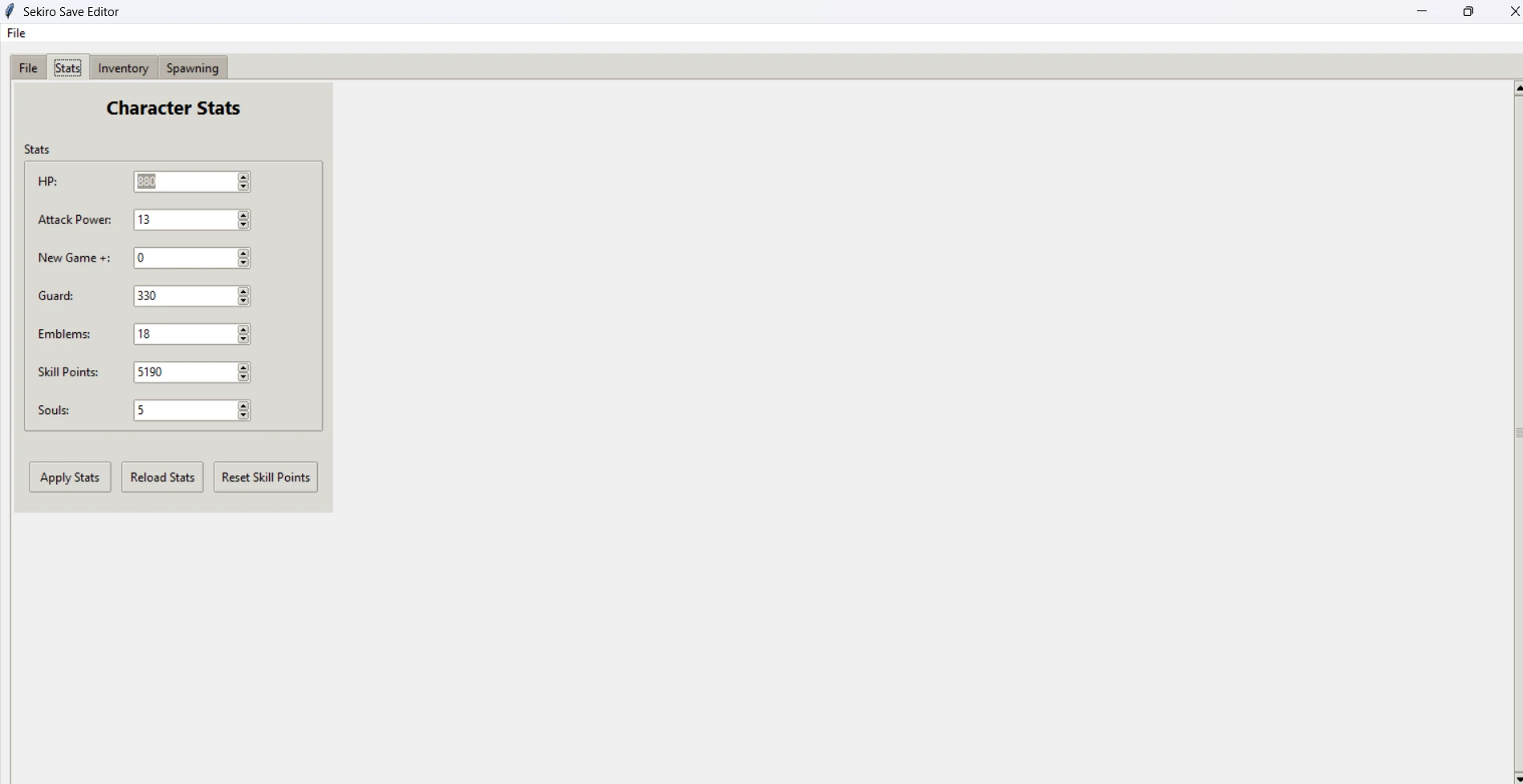
A comprehensive GUI-based save file editor for Sekiro: Shadows Die Twice. Edit character stats, manage inventory, spawn items, and import save slots with a user-friendly interface. Github: https://github.com/alfizari/Sekiro-Save-Editor
 查看大图
查看大图Sekiro Save Editor
A comprehensive GUI-based save file editor for Sekiro: Shadows Die Twice. Edit character stats, manage inventory, spawn items, and import save slots with a user-friendly interface.



## Features
### 📊 Character Stats
- Modify HP, Attack Power, Guard, Emblems, and Skill Points
- Adjust New Game+ level
- Adjust Souls
- Reset skill points with one click
- Real-time stat validation with min/max limits
### 🎒 Inventory Management
- **Weapons Tab**: View and manage equipped weapons
- **Armor Tab**: View and manage armor pieces
- **Goods Tab**: Edit consumable items with dedicated control panel
- **Storage Tab**: Manage stored items with quantity control
- Inline quantity editor with spinbox controls
- Visual item tracking with IDs and quantities
### ⚔️ Item Spawning
- **Spawn Weapons**: Add any weapon to your inventory
- **Spawn Armor**: Add armor sets and pieces
- **Spawn Goods**: Create consumables with custom quantities (1-99)
- Searchable dropdowns for easy item selection
- Real-time search filtering (case-insensitive)
- Automatic inventory management
### 💾 Save File Management
- Support for both **PC** (S0000.sl2) and **PS4** save files
- Multi-slot support for PC saves
- Slot switching and individual slot editing
- File information display
- Auto-detection of save format
### 📥 Import Slot
- Import save slots from other files
- Automatic Steam ID preservation
- Full PC save extraction and handling
- Single-click slot replacement
- Works with both full saves and individual slot files
### 🔍 Quality of Life
- Searchable/filterable spawn dropdowns
- Control panel-based quantity editing
- Real-time data updates
- Status bar for operation feedback
- Comprehensive error handling and user feedback
## Installation
### Requirements
- Python 3.7 or higher
- tkinter (usually comes with Python)
- Windows, macOS, or Linux
### Setup
1. **Clone the repository**
```bash
git clone https://github.com/yourusername/sekiro-save-editor.git
cd sekiro-save-editor
```
2. **Install Python dependencies** (if any)
```bash
pip install -r requirements.txt
```
3. **Prepare JSON files**
Create the following JSON files in the same directory as the editor:
- `weapons.json`
- `armor.json`
- `goods.json`
Each JSON should have the format:
```json
[
{"id": "12345", "name": "Item Name"},
{"id": "12346", "name": "Another Item"}
]
```
4. **Run the editor**
```bash
python sekiro_editor.py
```
## Usage Guide
### Opening Save Files
1. **Click "Open Save File"** in the File tab
2. Select your Sekiro save file:
- **PC**: `S0000.sl2` (from AppData/Local/FromSoftware/Sekiro/[SteamID])
- **PS4**: `.sl2` file exported from your PS4
3. **For PC saves**: Select which slot to edit from the dropdown menu
### Editing Character Stats
1. Go to the **Stats** tab
2. Modify any stat value:
- Use the spinbox or type directly
- Values are validated against limits
3. Click **"Apply Stats"** to save changes
4. Use **"Reload Stats"** to revert unsaved changes
5. Click **"Reset Skill Points"** to clear all skill point allocation
### Managing Inventory
#### Weapons & Armor
- **View only** - displays all equipped items with IDs and quantities
- Useful for tracking what you have
#### Goods (Consumables)
1. Click on any item in the Goods tree
2. The **Edit Quantity** panel on the right will populate
3. Adjust the quantity using the spinbox (0-99)
4. Click **"Update Quantity"** to apply changes
#### Storage
1. Click on any item in the Storage tree
2. The **Edit Quantity** panel on the right will populate
3. Adjust the quantity using the spinbox (0-99)
4. Click **"Update Quantity"** to apply changes
### Spawning Items
#### Searchable Spawn Interface
1. Go to the **Spawning** tab
2. For each item type (Weapon, Armor, Goods):
- **Click** the dropdown to see all items
- **Type** to filter items (search is case-insensitive, supports partial matches)
- **Select** the item you want
#### Spawning Weapons
1. Select a weapon from the dropdown
2. Click **"Spawn Weapon"**
3. Status will update when complete
4. Check the Inventory > Weapons tab to verify
#### Spawning Armor
1. Select armor from the dropdown
2. Click **"Spawn Armor"**
3. Status will update when complete
4. Check the Inventory > Armor tab to verify
#### Spawning Goods
1. Select a good/consumable from the dropdown
2. Enter the quantity (1-99)
3. Click **"Spawn Good"**
4. Status will update when complete
5. Check the Inventory > Goods tab to verify
### Importing Slots
1. **Open a save file** first (PC or PS4)
2. Click **"Import Slot"** in the File tab
3. Select the `.sl2` file to import:
- Can be another player's save
- Can be a full PC save (S0000.sl2)
- Can be an individual slot file
4. Your **Steam ID is automatically preserved**
5. All data from the imported slot replaces current slot
6. Click **"Save File"** to export your changes
### Saving Changes
#### For PC Saves
1. Make your edits
2. Click **"Save File"**
3. Select output location
4. File will be automatically merged with header and other slots
#### For PS4 Saves
1. Make your edits
2. Click **"Save File"**
3. Select output location
4. Choose filename
5. Transfer the file back to your PS4
## File Structure
```
sekiro-save-editor/
├── sekiro_editor.py # Main application
├── weapons.json # Weapon database
├── armor.json # Armor database
├── goods.json # Consumables database
├── requirements.txt # Python dependencies
├── README.md # This file
└── split_files/ # Temporary folder for PC save splitting
├── header
├── userdata0000
├── userdata0001
└── ...
```
## Offsets & Technical Details
The editor uses the following memory offsets for character data:
| Stat | Offset | Size | Max Value |
|------|--------|------|-----------|
| Steam ID | 0x33E54 | 8 bytes | N/A |
| Attack Power | 0x3449C | 1 byte | 0x62 (98) |
| Guard | 0x34488 | 4 bytes | 0xFFFFFFFF |
| HP | 0x3446C | 4 bytes | 0xFFFFFFFF |
| Skill Points | 0x345B4 | 4 bytes | 0x3B9AC9FF |
| Emblems | 0x3459A | 1 byte | 0x62 (98) |
| Souls | 0x344D0 | 4 bytes | 0xFFFFFFFF |
| NG+ Level | 0x33F34 | 1 byte | 0xFF (255) |
### Item Type Constants
- `ITEM_TYPE_EMPTY`: 0x00000000
- `ITEM_TYPE_WEAPON`: 0x80000000
- `ITEM_TYPE_ARMOR`: 0x90000000
- `ITEM_TYPE_GOOD`: 0xB0000000
### Data Sections
- **Inventory**: 0x8F70C (0x7000 bytes)
- **Storage**: 0x987A0 (0x9000 bytes)
- **Keys**: 0x9670C (0x2000 bytes)
## Troubleshooting
### "No file loaded" Error
- **Solution**: Click "Open Save File" and select a valid Sekiro save file
### "No save slots found" (PC saves)
- **Solution**: Ensure you're using an S0000.sl2 file, not an individual slot file
- **Check**: Look in AppData/Local/FromSoftware/Sekiro/[SteamID]/
### "Failed to spawn item"
- **Solution**: Inventory might be full, or the item doesn't exist in your JSON files
- **Check**: Ensure weapons.json, armor.json, and goods.json are in the editor directory
### Item spawning creates duplicates or doesn't work
- **Solution**: Click "Reload Stats" to refresh the inventory view
- **Note**: Some items may not stack properly if they already exist in inventory
### "Invalid quantity value"
- **Solution**: Quantity must be a number between 0-99
- **Note**: For goods with value 0, they may disappear from inventory
### Steam ID not preserving on import
- **Solution**: This is automatic - check that you're using a valid save file
- **Debug**: Look at the success message to confirm your Steam ID
### PC save won't merge properly
- **Solution**: The editor automatically handles this, ensure all split files are complete
- **Check**: Verify that split_files/ folder contains header and all userdata files
## Requirements.txt
```
# No external dependencies required - uses only Python standard library
# tkinter (included with Python)
```
## Platform Support
| Platform | Support | Notes |
|----------|---------|-------|
| Windows | ✅ Full | Tested on Windows 10/11 |
| macOS | ✅ Full | Tested on macOS 10.15+ |
| Linux | ✅ Full | Requires tkinter (usually available) |
### macOS Installation
```bash
# If tkinter is missing, install via Homebrew:
brew install python-tk@3.9
```
### Linux Installation
```bash
# Ubuntu/Debian:
sudo apt-get install python3-tk
# Fedora:
sudo dnf install python3-tkinter
```
## Known Limitations
- ⚠️ **No validation for item compatibility**: You can spawn items that don't make sense together
- ⚠️ **Quest progression**: Editing stats won't affect completed quests or bosses
- ⚠️ **Online features**: This editor is for offline/local play only
- ⚠️ **Version compatibility**: Built for Sekiro 1.06 - may not work with other versions
- ⚠️ **Backup recommended**: Always backup saves before extensive editing
## Advanced Usage
### Command Line (Future Feature)
Currently, the editor only supports GUI mode. Command-line support may be added in future versions.
### Batch Operations
- Edit one slot, import it to multiple saves using the Import Slot feature
- Export, modify externally, then import back
### JSON File Customization
You can add or modify items in the JSON files. Format:
```json
[
{
"id": "12345",
"name": "Custom Item Name"
}
]
```
## Contributing
Contributions are welcome! Please feel free to:
1. **Report bugs** via GitHub Issues
2. **Suggest features** with detailed descriptions
3. **Submit pull requests** for improvements
4. **Improve documentation** and translations
### Development Setup
```bash
git clone https://github.com/yourusername/sekiro-save-editor.git
cd sekiro-save-editor
# Make your changes
git commit -am "Description of changes"
git push origin your-branch-name
```
## License
This project is licensed under the MIT License - see the [LICENSE](LICENSE) file for details.
## Disclaimer
⚠️ **Use at your own risk**
- This tool modifies game save files directly
- Always backup your saves before using this editor
- Use only on your own saves or with permission
- The developers are not responsible for corrupted or lost save data
- This tool is for single-player offline use only
## Credits
- Some offsets for stats from the Save Wizard discord excel sheet https://docs.google.com/spreadsheets/d/1pln64WRA8QhhrW1QBDEn97HEbp4gdvBNd3GnrC4Bg5c/edit?pli=1&gid=1571674996#gid=1571674996
还没有人评论,去客户端里说两句吧。
评论在新手盒子客户端中发表,这里同步展示。