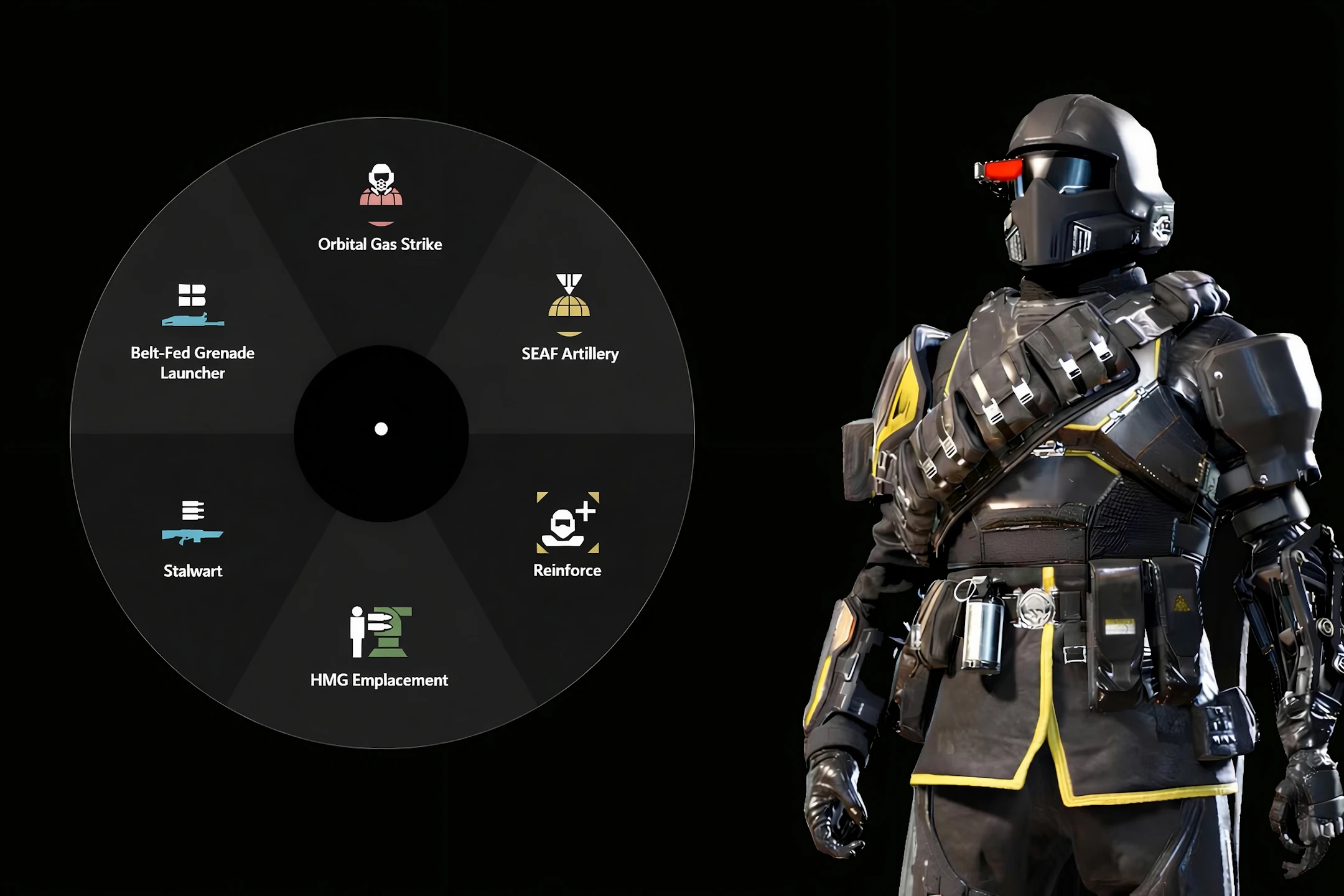
策略径向菜单
Helldivers 2的AutoHotkey脚本,旨在通过提供具有广泛自定义和多种功能的战略配备输入自动化,改变玩家的游戏风格。
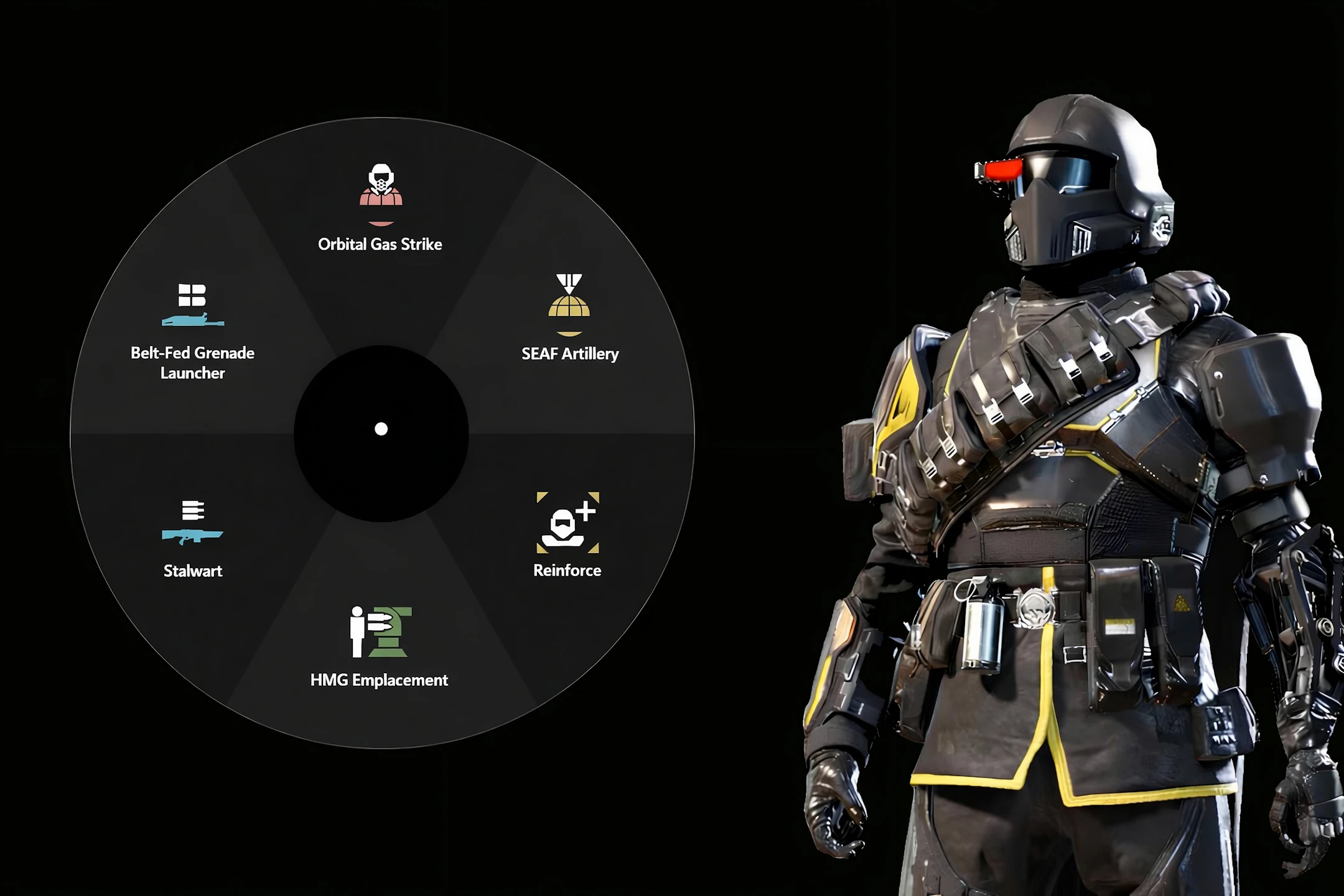 查看大图
查看大图此 AutoHotkey 脚本专为《绝地潜兵 2》打造,旨在通过高级自动化和可自定义的径向菜单简化按键组合。现在,你无需再记忆复杂的按键组合,也不必用几十个绑定塞满键盘,只需通过直观的可视化界面即可调用任意战略配备。[b]
鸣谢:[/b]
[list]
[]原始创意:[url=https://www.reddit.com/user/RuggedTheDragon/]RuggedTheDragon[/url]([url=https://www.reddit.com/r/Helldivers/comments/1n1t6jk/ok_hear_me_outa_radial_menu_for_stratagems/]Reddit 链接[/url])[/]
[]实现建议:[url=https://next.nexusmods.com/profile/piedras8negras]piedras8negras[/url]([url=https://www.nexusmods.com/helldivers2/mods/6584?tab=posts]Nexus Mods 链接[/url])[/]
[]更新的 GDI+ 库:[url=https://github.com/buliasz]buliasz[/url]([url=https://github.com/buliasz/AHKv2-Gdip]GitHub 链接[/url])[/]
[]战略配备图标:[url=https://github.com/nvigneux]nvigneux[/url]([url=https://github.com/nvigneux/Helldivers-2-Stratagems-icons-svg]GitHub 链接[/url])[/]
[]改进的战略配备图标(1.2+):[url=https://www.nexusmods.com/profile/DovahPumpkin]DovahPumpkin [/url]([url=https://github.com/Kungull]GitHub 链接[/url])[/]
[/list][b]
主要功能:[/b]
[list]
[]径向战略配备菜单:一个简洁的屏幕圆形菜单,让你可以用鼠标快速选择并激活战略配备。[/]
[]一键激活:将径向菜单分配给单个热键(键盘或鼠标)以便即时访问。[/]
[]输入模式选择:在方向键、WASD 或任意自定义布局之间选择战略配备输入方式,以匹配你的游戏内设置。[/]
[]用户友好的 GUI:通过图形界面轻松管理你的战略配备列表、配置文件和设置。[/]
[]自动暂停/关闭:启用此选项可自动管理脚本状态。[/]
[]战略配备自定义:随着游戏更新添加新战略配备或编辑现有战略配备。[/]
[/list]
[b]使用说明:
[/b]1. 安装
[list=1]
[]确保你已安装 [url=https://www.autohotkey.com/]AutoHotkey v2[/url]。[/]
[]解压压缩包并运行 Radial_menu.ahk。[/]
[/list]2. 初始设置
[list=1]
[]打开 Settings 标签页。[/]
[]设置你想要的径向菜单键(默认:[b]鼠标中键[/b])。[/]
[]将脚本中的战略配备菜单键与你的游戏内按键匹配(默认:[b]左 Ctrl[/b])。[/]
[]将战略配备输入布局设置为脚本与游戏之间一致(脚本中默认:[b]方向键[/b],游戏内默认:[b]WASD[/b])。[/]
[/list]3. 管理绑定
[list=1]
[]使用 GUI 为你的当前配置文件添加(+)或移除(-)战略配备。[/]
[]在列表弹窗中双击(鼠标左键)某个战略配备,将其标记为收藏。这样你可以高亮显示关键战略配备(如增援或补给),并通过单击对其进行排序。[/]
[/list]4. 使用径向菜单
[list=1]
[]按下径向菜单键以触发菜单。[/]
[]按住该键时,将鼠标移向所需战略配备并松开,即可执行宏。[/]
[/list]
[b]重要说明:[/b]
[list]
[]窗口模式:游戏必须设置为窗口化或无边框窗口化模式,径向菜单 GUI 才能正确覆盖显示。[/]
[]管理员权限:如果 Steam 或《绝地潜兵 2》以管理员身份运行,你也必须以管理员身份运行脚本。[/]
[]布局敏感性:该脚本在英语键盘布局下效果最佳。如果你遇到任何问题,请手动编辑 Settings.ini 文件,或直接删除它(这将重置所有已保存的设置和绑定),然后重启脚本。[/]
[/list]
[b]默认热键:[/b]
[list]
[]鼠标中键 — 径向菜单 [/]
[]F1 — 显示/隐藏主 GUI[/]
[]F2 — 显示/隐藏按键绑定配置文件的浮动列表[/]
[]F3 — OCR 战略配备扫描[/]
[]F4 — 干扰器绕过开关[/]
[]Insert — 暂停/恢复脚本 [/]
[]End — 关闭脚本[/]
[]Page Up / Page Down — 向前/向后切换配置文件(仅在按住径向菜单或浮动列表键时有效)[/]
[/list][b]
b[/b]复选框功能说明:[/b]
这会将 * 运算符添加到你的热键中。这意味着无论当时是否按住其他修饰键(如 Ctrl、Alt、Shift 或 Win),它都会触发。
[b]AHK 标识:[/b]
[list]
[]LButton - 鼠标左键单击[/]
[]RButton - 鼠标右键单击[/]
[]MButton - 鼠标中键 / 滚轮(单击)[/]
[]XButton1 - 第四个鼠标按键(通常是浏览器中的“后退”按钮)[/]
[]XButton2 - 第五个鼠标按键(通常是浏览器中的“前进”按钮)[/]
[]WheelUp - 向上滚动鼠标滚轮[/]
[]WheelDown - 向下滚动鼠标滚轮[/]
[]^ - Ctrl 键[/]
[]! - Alt 键[/]
[]+ - Shift 键[/]
[] - “任意修饰键”运算符。使热键通用。即使当时按住其他修饰键(Ctrl、Alt、Shift、Win),该热键也会触发。[/]
[]~ - “直通”运算符。使热键执行其操作时,不会阻止原始按键到达应用程序。[/]
[/list]
[b]OCR 功能说明:[/b]
允许脚本在任务期间检测你当前装备的战略配备,并在径向菜单中使用它们。其功能基于读取每个战略配备的特定方向键序列。
[list]
[]战略配备扫描(默认:F3):按下热键后,OCR 会读取你当前战略配备的方向键,自动创建并切换到 OCR 配置文件,并用检测到的战略配备填充它以供立即使用。[/]
[]干扰器绕过(默认:F4):启用后,脚本会在每次打开径向菜单时识别可用战略配备并显示它们。选定某个战略配备后,OCR 会读取屏幕上当前的方向键序列并自动执行。[/]
[]OCR 目标:此功能会读取并执行屏幕上可见的战略配备,而无需打开战略配备菜单。这些通常是出现在特定位置的特定任务战略配备,例如升旗、地狱火炸弹、上传数据等。[/]
[/list]关于性能的说明:OCR 对调色板较为敏感,在极端明亮的地图区域可能无法正常工作。如果你使用 ReShade 或其他色彩分级工具,OCR 可能会完全停止工作。在这种情况下,你必须手动提取修改后的战略配备方向键 HEX 颜色代码,并更新 OCR 设置中的 ArrowColor 字段。
[b]来自其他模组作者的替代方案:[/b]
[list]
[][url=https://www.nexusmods.com/helldivers2/mods/10949]Helldivers 2 - Strat Commander[/url]([url=https://www.nexusmods.com/helldivers2/users/119945138]ST4RL0RD770[/url])[/*]
[][url=https://www.nexusmods.com/helldivers2/mods/10841]SCS - Stratagem Control System[/url]([url=https://www.nexusmods.com/helldivers2/users/18494104]kwebber321[/url])[/]
[][url=https://www.nexusmods.com/helldivers2/mods/11051]Helldivers 2 Tactical Stratagem Macro Manager[/url]([url=https://www.nexusmods.com/helldivers2/users/71083573]xEDWARDSZz[/url])[/]
[][url=https://www.nexusmods.com/helldivers2/mods/12225]Voice Macro - Hellcall[/url]([url=https://www.nexusmods.com/helldivers2/users/117769223]lyceum[/url])[/]
[][url=https://www.nexusmods.com/helldivers2/mods/3303]Voice Activated Stratagem[/url]([url=https://www.nexusmods.com/helldivers2/users/162378163]CLxJames[/url])[/]
[/list][b]其他实用工具:[/b]
[list]
[][url=https://www.nexusmods.com/helldivers2/mods/10732]SEAF Loadout Manager[/url]([url=https://www.nexusmods.com/helldivers2/users/175192317]buoy81[/url])[/]
[][url=https://www.nexusmods.com/helldivers2/mods/14756]HD2 Preset Helper[/url]([url=https://www.nexusmods.com/helldivers2/users/166975768]xmg0[/url])[/]
[/list]
我之前的作品:[url=https://www.nexusmods.com/helldivers2/mods/6584]Stratagem Hotkey Manager[/url]
GitHub:[url=https://github.com/Zyxtis/Stratagem-Radial-Menu]Stratagem Radial Menu[/url]
捐赠:
[list]
[][url=https://ko-fi.com/zyxtis][img width=128]https://i.imgur.com/xL8l6ky.png[/img][/url][/]
[][url=https://buymeacoffee.com/zyxtis][img width=128]https://i.imgur.com/VAyMNYd.png[/img][/url][/]
[/list]
![https://i.imgur.com/xL8l6ky.png[/img][/url][/](https://i.imgur.com/xL8l6ky.png%5B/img%5D%5B/url%5D%5B/)
![https://i.imgur.com/VAyMNYd.png[/img][/url][/](https://i.imgur.com/VAyMNYd.png%5B/img%5D%5B/url%5D%5B/)
正在加载版本记录…
正在加载评论…
评论在新手盒子客户端中发表,这里同步展示。