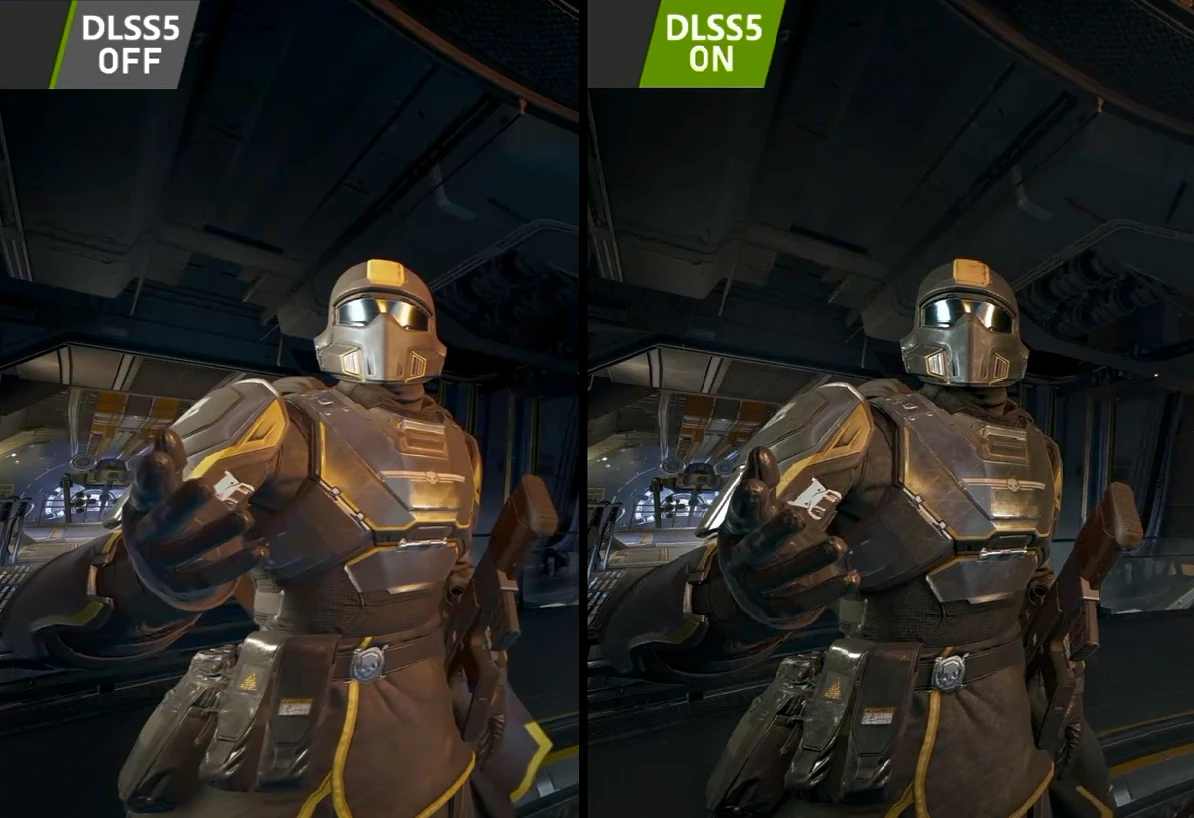
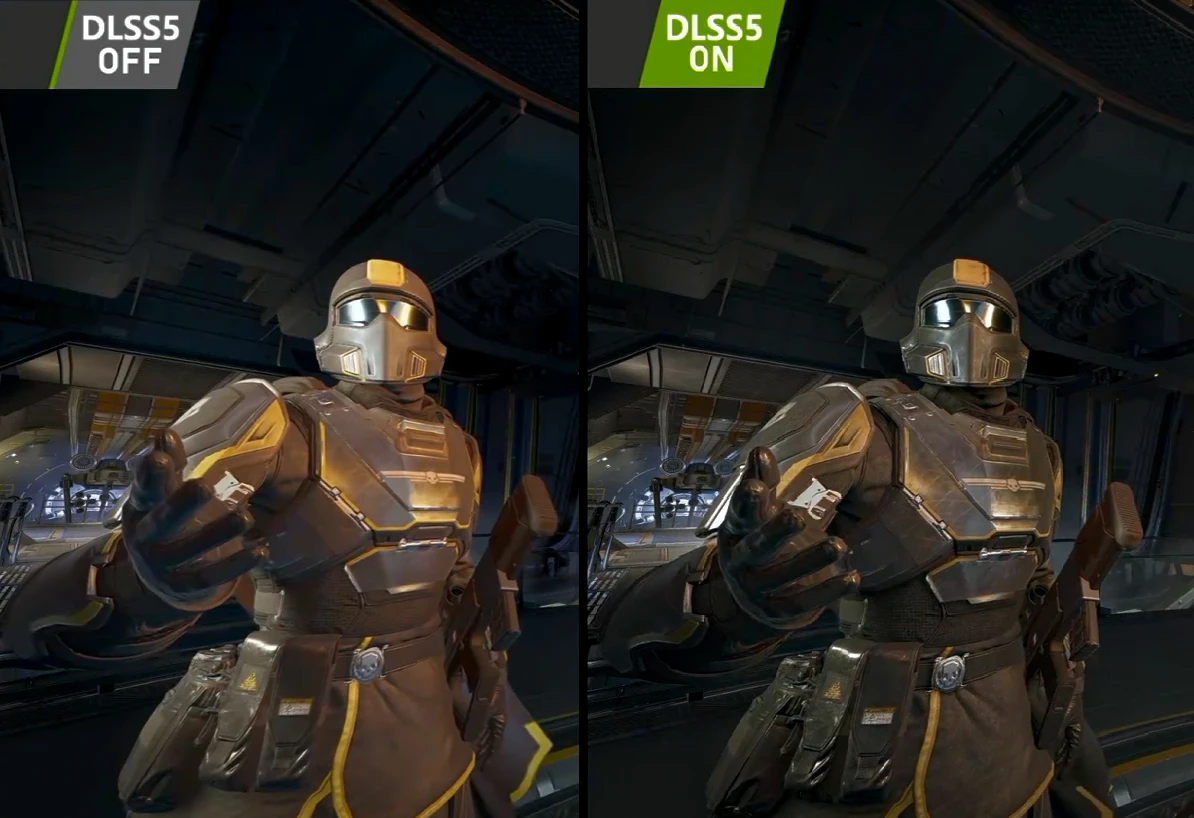
HD2 非官方 DLSS 5 抢先体验版
《地狱潜者2》DLSS 5 神经渲染,改编自 RenoDX DLSS 5 插件。本整合包适用于无法在《地狱潜者2》中正常运行原版 RenoDX 插件的用户。它包含《地狱潜者2》专属修复、DLSS 神经渲染,以及用于降低渲染开销的 DLSS-NR 开销缩放器。支持 NVIDIA RTX 40/50 系列 GPU(20?30?)
 查看大图
查看大图Description / 描述
Unofficial DLSS 5 Early Access support for Helldivers 2. This addon enables DLSS 5 through ReShade and includes a customized compatibility fix for Helldivers 2.Since this is an unofficial experimental version, there may be some issues. It can cause a significant drop in FPS, although you may see some improvements in image quality. Based on my own experience, it works reasonably well.
I'm sharing this specifically for those who couldn't get the original plugin from the channel( Discord )to work.
PS: DLSS 5 Neural Rendering uses AI to reconstruct and enhance the image, but DLSS 4 also makes extensive use of AI-based technologies, including Super Resolution, Ray Reconstruction, and Frame Generation . If you don't like AI-based technologies, you can simply choose not to use DLSS. Please keep discussions about AI usage out of the comment section. I'd appreciate it if we could keep the comments focused on the mod. Thank you.
《绝地潜兵2》非官方 DLSS 5 抢先体验支持插件。通过 ReShade 启用 DLSS 5,并针对《绝地潜兵2》进行了兼容性优化。由于这是非官方的体验版本,可能会有些瑕疵,会让你的FPS骤降,画面会有一些提升。仅以我本人的体验来看还可以。
特此分享出来给那些直接使用频道( Discord ) 里原始插件不起作用的人。
Installation instructions / 安装说明
English:
Run ReShade_Setup_6.8.0_Addon.exe and install ReShade for Helldivers2
- you can download from ReShade Home ( Download ReShade 6.8.0 with full add-on support )
- Open the exe application, find Helldivers2, select the DX11/12 option (it should be the default), and keep clicking Next to complete the installation.
- Make sure it is the Addon version.
Copy all files inside the "ALLINONE" folder into the Helldivers 2 game root directory\bin folder.
- You can right-click the game in your Steam library → Manage → Browse local files to open the game directory, then enter the bin folder. You should see "helldivers2.exe" inside.
Chinese:
运行 ReShade_Setup_6.8.0_Addon.exe 并对 Helldivers2 进行安装 reshade
- 即打开该 exe 应用后,找到 helldivers2,选中 DX11/12 项(应该是默认),然后一直点 next 安装即可。
- 你可以在 ReShade Home 下载
- 注意是 Addon 版本。
将“ALLINONE”文件夹里的 所有文件 都扔到 Helldivers2“游戏根目录\bin”里(可以使用 steam 右键左列表游戏-管理-打开本地文件进入根目录,再点进去 bin 文件夹;你应该能在文件夹里看到 "helldivers2.exe")。
usage / 使用说明
Press ESC to open Settings → Display → Anti-Aliasing, and switch it to DLSS. Press HOME to open the ReShade interface, find and enable RenoDX-DLSSNR, and make sure you have checked "Enable DLSS Neural Rendering".
After that, you should see the word ACTIVE below, for example: "RenoDX DLSS5 Generic v4.7 DLSSNR v310.8.0: ACTIVE - NR INJECTED" This means DLSS5 has been successfully enabled.
You can manually enable AI Frame Generation in the NVIDIA App to increase FPS.
You can enter DLSS-NR Cost Scaler and adjust Resolution Scale (25%-100%) to reduce performance consumption. For example, my GPU is a laptop RTX 5070. Using a 50% resolution scale increased my FPS from the 40+ to around 80 FPS.
按 ESC 键打开设置-显示-抗锯齿栏切换到 DLSS,按 HOME 键打开 Reshade 界面,找到并打开 RenoDX-DLSSNR,确保你勾选了 "Enable DLSS Neural Rendering",之后你可以在下方位置看到 ACTIVE 字样,例如(RenoDX DLSS5 Generic v4. 7 DLSSNR v310.8. 0: ACTIVE - NR INJECTED),表示 DLSS5 启动成功。
你可以去英伟达 APP 手动打开 AI 插帧 以提升帧数。
你可以进入 DLSS-NR Cost Scaler,通过调整 Resolution Scale(25%-100%)来降低性能消耗,比如我的 GPU 是笔记本 5070,使用 50%解析,FPS 从 40 多帧涨到了 80 帧上下。
Main features / 主要功能
DLSS 5 Early Access support for Helldivers 2.
ISupport for NVIDIA 40,50-series GPU( 20?30?).
Customized compatibility fix for Helldivers 2.
Fixes the Hellpod deployment crash found in the previous version.
为《绝地潜兵2》提供 DLSS 5 抢先体验支持。
支持 NVIDIA 40,50 系列显卡(20?30?)。
针对《绝地潜兵2》进行兼容性优化。
修复之前版本中使用 Hellpod 降落时的游戏崩溃问题。
Requirements / 环境要求
NVIDIA 40,50-series GPU(20?30?).
ReShade 6.8.0Addon.
Helldivers 2 DX12 version. Make sure DLSS is enabled in the in-game settings.
The latest NVIDIA graphics driver(if it's don't work, plz try to update your driver).
NVIDIA 40,50 系列显卡(20?30?)。
ReShade 6.8.0Addon。
《绝地潜兵2》DX12 版,确保在游戏设置里开启了 DLSS 。
最新 N 卡驱动(如果不起作用,可以试试更新显卡驱动)
uninstallation/ 卸载
- Open ReShade_Setup_6.8.0_Addon.exe and select Uninstalled to uninstall ReShade.
- Go to the game's bin folder and delete all the files you copied there.
- Open Steam and verify the integrity of the game files.
** • 打开 ReShade_Setup_6.8.0_Addon.exe,选择 uninstalled 进行卸载 reshade。 • 去游戏 bin 文件夹,把拖入的所有文件都删了。 • 打开 steam 对游戏进行 完整性验证**
Shout outs / 特别感谢
Special thanks to Discord-RenoDX( Discord )for the original DLSS 5 plugin. Thanks to @皓梦141 (https://space.bilibili.com/100404146) for providing the v4.5,v4.6 fix. Thanks to @xenmods (https://github.com/xenmods/DLSSNR-Cost-Scaler) for providing the DLSSNR-Cost-Scaler plugin.
特别感谢 Discord-RenoDX( Discord )提供原始 DLSS 5 插件 感谢@皓梦141(https://space.bilibili.com/100404146)提供的4.5,4.6版本修复. 感谢@xenmods(https://github.com/xenmods/DLSSNR-Cost-Scaler)提供的DLSSNR-Cost-Scaler插件。
Video demonstration / 视频演示
DLSS 5 for Helldivers 2 – Early Access Demol / DLSS5 绝地潜兵2 抢先体验版演示 [https://www.bilibili.com/video/BV1C2426rEdG]Bilibili](https://www.bilibili.com/video/BV1C2426rEdG)
正在加载版本记录…
正在加载评论…
评论在新手盒子客户端中发表,这里同步展示。