更多连帽衫
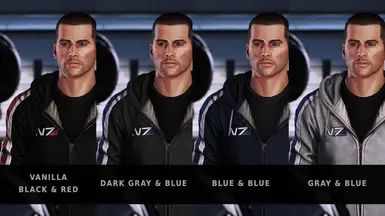
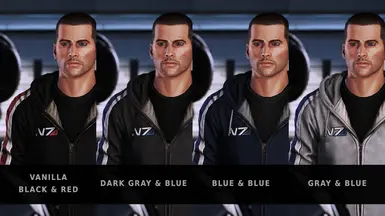
薛帕德连帽衫的多种颜色(ME2LE & ME3LE)
 查看大图
查看大图[color=#f1c232][size=4]这是什么模组?[/size][/color]
这个模组替换了薛帕德连帽衫的纹理(男性和女性版本)。
你也可以查看我的其他模组:
- 自定义 Mako 装甲车
- 更好的联盟制服
- 新弹药图标
- 自定义机甲 (LE2)
- 自定义机甲 (LE3)
- 莉亚拉的新服装
- 白色军团
- 自定义锤头舰
- 白色 M-96 玛托克突击步枪
- M-920 凯恩核弹枪重新纹理
- 霞的新服装 (LE2)
- 杰克的新服装 (LE2)
- 塔莉的更好的面罩 (LE2)
- 自定义穿梭机
- 萨玛拉的新服装和眼睛
- 金色马桶
- 古朗特的更好面罩(以及减少其备用盔甲的光泽)
- 莫丁的新服装
- 米兰达的更好面罩 (LE2)
- 米兰达的新服装
- 薛帕德的皮夹克重新纹理
- Joker 的新帽子(以及更深的制服)
[color=#f1c232][size=4]连帽衫颜色:[/size][/color]
灰色连帽衫 & 蓝色线条
灰色连帽衫 & 红色线条
深灰色连帽衫 & 蓝色线条
深灰色连帽衫 & 红色线条
蓝色连帽衫 & 蓝色线条
蓝色连帽衫 & 红色线条
黑色连帽衫 & 蓝色线条
黑色连帽衫 & 红色线条(原版文件。如果你想移除这个模组,请使用这个)
[color=#f1c232][size=4]版本 1.1[/size][/color]
- 现在兼容《质量效应 3 传奇版》
[color=#f1c232][size=4]未来版本计划?[/size][/color]
- 也许会增加更多颜色
[color=#f1c232][size=4]我该如何安装这个东西?[/size][/color]
- 下载最新版本的 Mass Effect Modder 并解压 zip 文件
- 下载我的模组,解压 zip 文件
- 在 Mass Effect Modder 中点击 Mods Manager > Mods Installer
- 点击 Add to list 并从我的模组文件夹中选择一个 .mem 文件
- 从列表中选择该模组,然后点击 Install selected mods
[color=#f1c232][size=4]如何移除它?[/size][/color]
- 压缩包中包含一个带有原版文件的文件夹。安装这些文件即可移除本模组。
正在加载版本记录…
正在加载评论…
评论在新手盒子客户端中发表,这里同步展示。