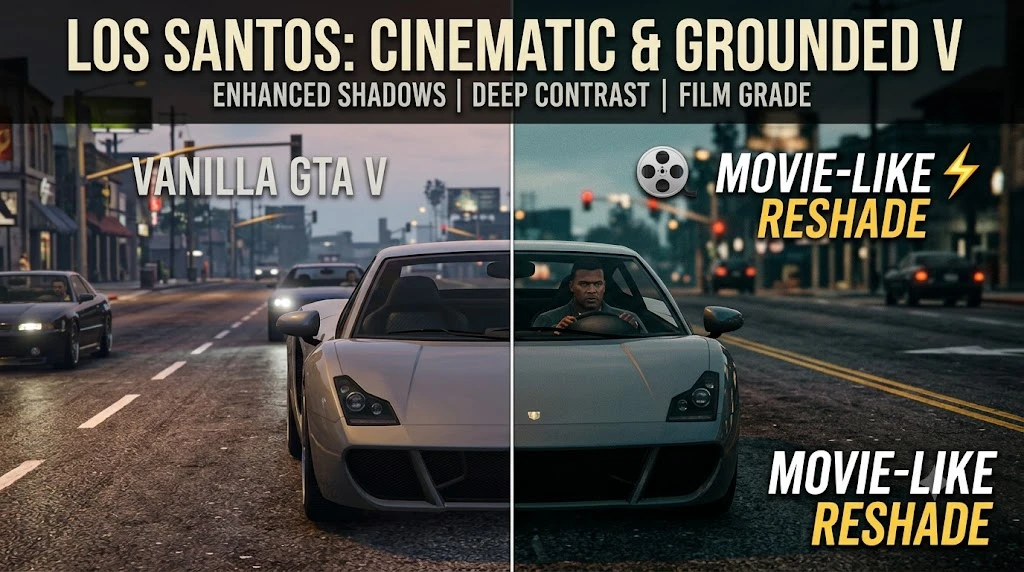
Movie-Like ReShade V1.0
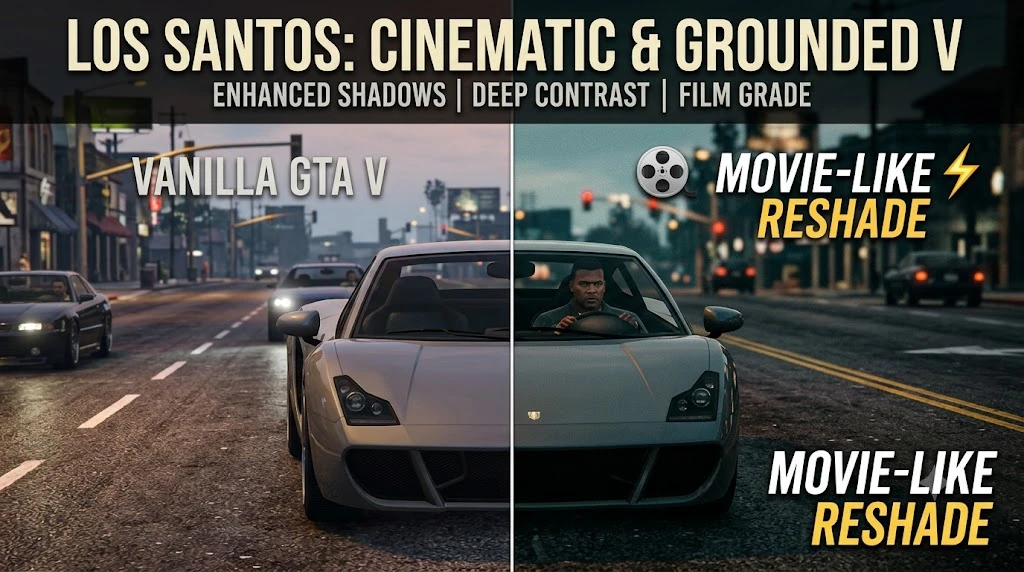
Looking to strip away GTA V’s Vanilla look for a true cinematic experience? This ReShade preset transforms Los Santos with a grounded, movie-like aesthetic. Featuring deep shadows, enhanced contrast, and a refined color grade, it crafts a filmic world that feels immersive, atmospheric, and realistic without sacrificing gameplay clarity.
 查看大图
查看大图[size=4][b]Description[/b][/size]
🎬 [b]Movie-Like ReShade Preset[/b]
Transform the bright, washed-out look of vanilla Los Santos into a grounded, atmospheric film stock experience! 🎞️ Designed with a focus on movie-grade color balance and high dynamic range, this preset dials back unrealistic saturation and sharpens shadow depth to make GTA V feel like a live-action cinema release. 🍿
[size=4][b]Installation instructions[/b][/size]
[list=1]
[]Download and install the latest version of [b]ReShade[/b] (with full addon support).[/]
[] Direct the ReShade installer to your
[code]GTA5.exe[/code].[/]
[] Select the DirectX 10/11/12 pipeline and download standard shader packs.[/]
[]📂 Extract the
[code]Movie-Like.ini[/code]file from this download into your main GTA V folder.[/]
[]🎮 In-game, press
[code]Home[/code]to open the ReShade menu and select the preset from the top dropdown.[/]
[/list]
[size=4][b]Main features[/b][/size]
[]🎨 [b]Grounded Color Grade:[/b] Desaturates overly bright tones for a natural, film-processed palette.[/]
[]🌒 [b]Enhanced Contrast & Shadows:[/b] Deepens ambient occlusion and shadow detail without crushing dark areas.[/]
[]💡 [b]Cinematic Dynamic Range:[/b] Highlights are controlled to reduce glare while keeping reflections crisp.[/]
[]⚡ [b]Performance Friendly:[/b] Fine-tuned to deliver a distinct visual upgrade with less FPS impact!
[size=4][b]Requirements[/b][/size]
Reshade(Latest)
[size=4][b]Shout outs[/b][/size]
[color=#D4D4D8]If this preset helped bring Los Santos to life for you, please consider leaving an [b]Endorsement[/b] and a [b]Like[/b]! 🌟 It takes just a second, helps more players discover the mod, and means a lot to creator momentum.
Got feedback or screenshots? Drop them in the comments section—I’d love to see your cinematic shots! [/color]
[/]
还没有人评论,去客户端里说两句吧。
评论在新手盒子客户端中发表,这里同步展示。