管理员之锤
Jatify 设计中的管理工具:像锤子放置部件一样生成生物,像破损的箱子一样掉落物品,并在你的服务器上实时更改世界修饰符。
 查看大图
[url=https://discord.gg/Ru9t2KdfVK][img]https://jatify.com/badges/discord.png[/img][/url] [url=https://buymeacoffee.com/imdizmo][img]https://jatify.com/badges/coffee.png[/img][/url]
![https://discord.gg/Ru9t2KdfVK][img]https://jatify.com/badges/discord.png[/img][/url]](https://discord.gg/Ru9t2KdfVK%5D%5Bimg%5Dhttps://jatify.com/badges/discord.png%5B/img%5D%5B/url%5D)
![https://buymeacoffee.com/imdizmo][img]https://jatify.com/badges/coffee.png[/img][/url]](https://buymeacoffee.com/imdizmo%5D%5Bimg%5Dhttps://jatify.com/badges/coffee.png%5B/img%5D%5B/url%5D)
一款面向服主与游戏管理员的 Jatify 风格管理工具。安装 [url=https://jatify.com]Jatify UI[/url] 后,外观与 Jatify UI 完全一致;未安装时,则使用 Valheim 的字体呈现相同设计。无需其他 UI 模组。
[url=https://thunderstore.io/c/valheim/p/Jatify/AdminHammer/]Thunderstore[/url] · [url=https://github.com/imdizmo/AdminHammer]GitHub[/url] · [url=https://jatify.com/mods/adminhammer/]jatify.com[/url]
[size=5][b]功能[/b][/size]
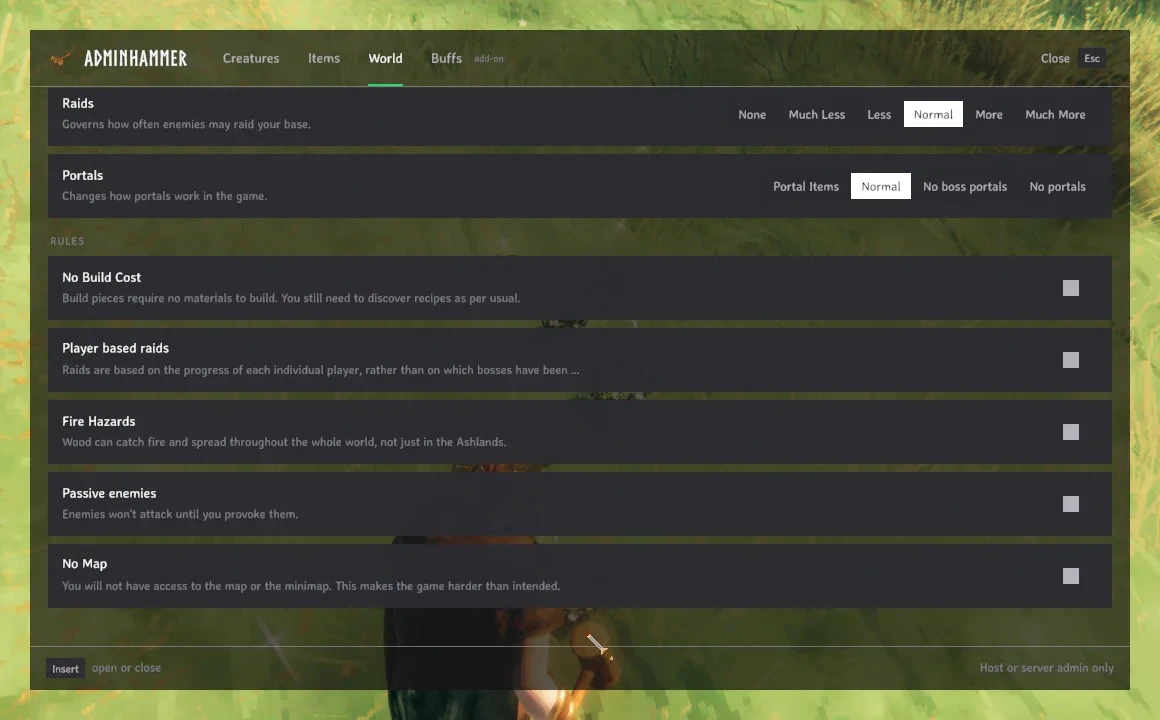
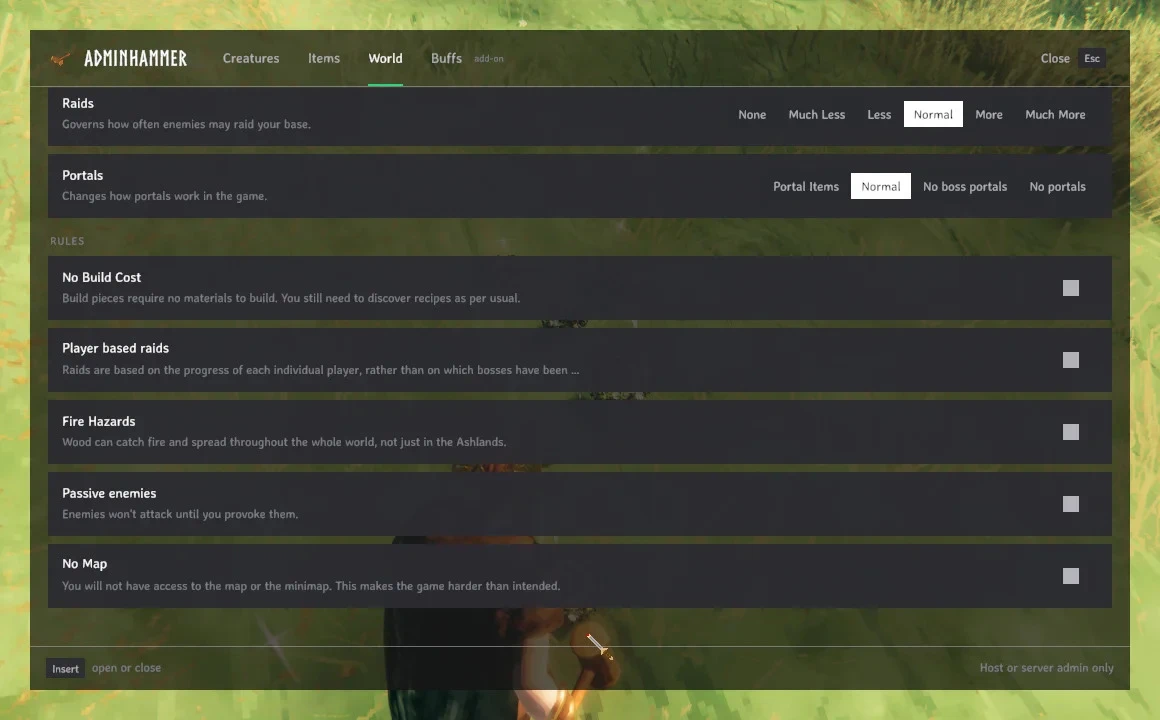
[list] [][b]管理员锤子。[/b] 专为管理员设计的金色锤子。右键打开管理面板,就像锤子打开建造菜单一样。[/] [][b]像建造一样生成生物。[/b] 选择生物,设置其星级(0-2)和数量,它的幽灵会跟随你的准星。左键放置,鼠标滚轮旋转,右键返回菜单。你也可以在任意在线玩家旁边生成生物。[/] [][b]掉落物品。[/b] 选择物品和数量(1、10、50 或一整组),它会散落在你面前,或选定的玩家面前,就像开启一个箱子一样。[/] [][b]实时世界修饰符。[/b] 与 Valheim 世界修饰符界面相同的滑块和开关(战斗、死亡惩罚、资源、袭击、传送门、建造无消耗、被动生物……),立即在服务器上生效。仅使用菜单自身的设置,因此世界永远不会被标记为作弊。[/] [][b]按生物群系划分的每一种生物[/b] 以及每个生物的渲染头像(首次加载后缓存),包括 Deep North 和 Ashlands。悬停查看详情。[/] [][b]附加选项卡。[/b] 其他模组可以为面板添加自己的选项卡([font=Courier New]AdminHammerApi.AddTab[/font])。[/] [/list]
[size=5][b]附加组件[/b][/size]
[list] [][url=https://thunderstore.io/c/valheim/p/Jatify/BuffMeDaddy/]BuffMeDaddy[/url]:一个 Buffs 选项卡,可为自己或其他玩家施加任意状态效果,并关闭其时间限制。可选;AdminHammer 无需它也能正常运行。[/] [/list]
[size=5][b]截图[/b][/size]
[img]https://raw.githubusercontent.com/imdizmo/AdminHammer/main/screenshots/creatures.webp[/img]

[img]https://raw.githubusercontent.com/imdizmo/AdminHammer/main/screenshots/placing.webp[/img]

[img]https://raw.githubusercontent.com/imdizmo/AdminHammer/main/screenshots/items.webp[/img]

[img]https://raw.githubusercontent.com/imdizmo/AdminHammer/main/screenshots/placed-items.webp[/img]

[img]https://raw.githubusercontent.com/imdizmo/AdminHammer/main/screenshots/world-modifiers.webp[/img]

[img]https://raw.githubusercontent.com/imdizmo/AdminHammer/main/screenshots/world-rules.webp[/img]

截图中的 Buffs 选项卡来自 [url=https://thunderstore.io/c/valheim/p/Jatify/BuffMeDaddy/]BuffMeDaddy[/url] 附加组件,不属于 AdminHammer 的一部分。
[size=5][b]前置需求[/b][/size]
[list] [][url=https://thunderstore.io/c/valheim/p/denikson/BepInExPack_Valheim/]BepInExPack Valheim[/url] 5.4.2202 或更新版本[/] [][url=https://thunderstore.io/c/valheim/p/ValheimModding/Jotunn/]Jotunn[/url] 2.30.2 或更新版本[/] [/list] 模组管理器(r2modman、Gale、Thunderstore App)会自动为你安装。
[size=5][b]获取锤子[/b][/size]
[list] []在聊天中输入 [font=Courier New]/adminhammer[/font](或在 F5 控制台中输入 [font=Courier New]adminhammer[/font]),或者[/] []在工作台制作:1 木材,1 石头。[/] [/list] [font=Courier New]Insert[/font] 键也会打开面板(可在 [font=Courier New]jatify.adminhammer.cfg[/font] 中配置)。
[size=5][b]谁可以使用[/b][/size]
本地世界的主机,或专用服务器的管理员。将你的 Steam ID 以[b]两种形式[/b]写入服务器的 [font=Courier New]adminlist.txt[/font] 中,每行一个:
76561198000000000
Steam_76561198000000000
服务器接受纯数字 ID 用于管理员命令,但游戏自身的客户端检查只匹配 [font=Courier New]Steam_[/font] 形式。
只有你需要安装此模组:服务器或其他玩家的客户端上无需任何东西。未安装的玩家在你手持锤子时会看到你的手是空的。
[size=5][b]须知[/b][/size]
[list] []你生成的物品[b]不会[/b]被标记为作弊(Valheim 自带的 [font=Courier New]spawn[/font] 命令会标记它们)。[/] []放置生物需要手持管理员锤子;切换到其他任何物品会清除选择。[/] []如果你移除了此模组,管理员锤子会在你下次加载时从物品栏中消失。[/] [/list]
[size=5][b]致谢[/b][/size]
[list] []界面:Jatify 设计;安装 Jatify UI 后,使用其字体、面板和颜色。[/] []物品和命令注册:[url=https://thunderstore.io/c/valheim/p/ValheimModding/Jotunn/]Jotunn[/url],由 Valheim Modding 团队制作。[/] []模组加载器:[url=https://github.com/BepInEx/BepInEx]BepInEx[/url]。[/] []生物群系:Valheim 自带的生成表,以及 [url=https://valheim.weirdgloop.org/w/Creatures]Valheim Wiki[/url] 的生物列表。[/] []代码:与 Claude(Anthropic 的 AI)共同编写,其在提交历史中列为共同作者。[/] [/list]
AdminHammer 是一个非官方的粉丝制作模组。它并非由 Iron Gate AB 制作、认可或支持。请在 [url=https://github.com/imdizmo/AdminHammer/issues]GitHub[/url] 上报告 AdminHammer 的错误。Valheim 是 Iron Gate AB 的商标。
来源:https://github.com/imdizmo/AdminHammer(MIT;MIT 许可证仅涵盖 AdminHammer 自身的代码)
正在加载版本记录…
正在加载评论…
评论在新手盒子客户端中发表,这里同步展示。