浅色
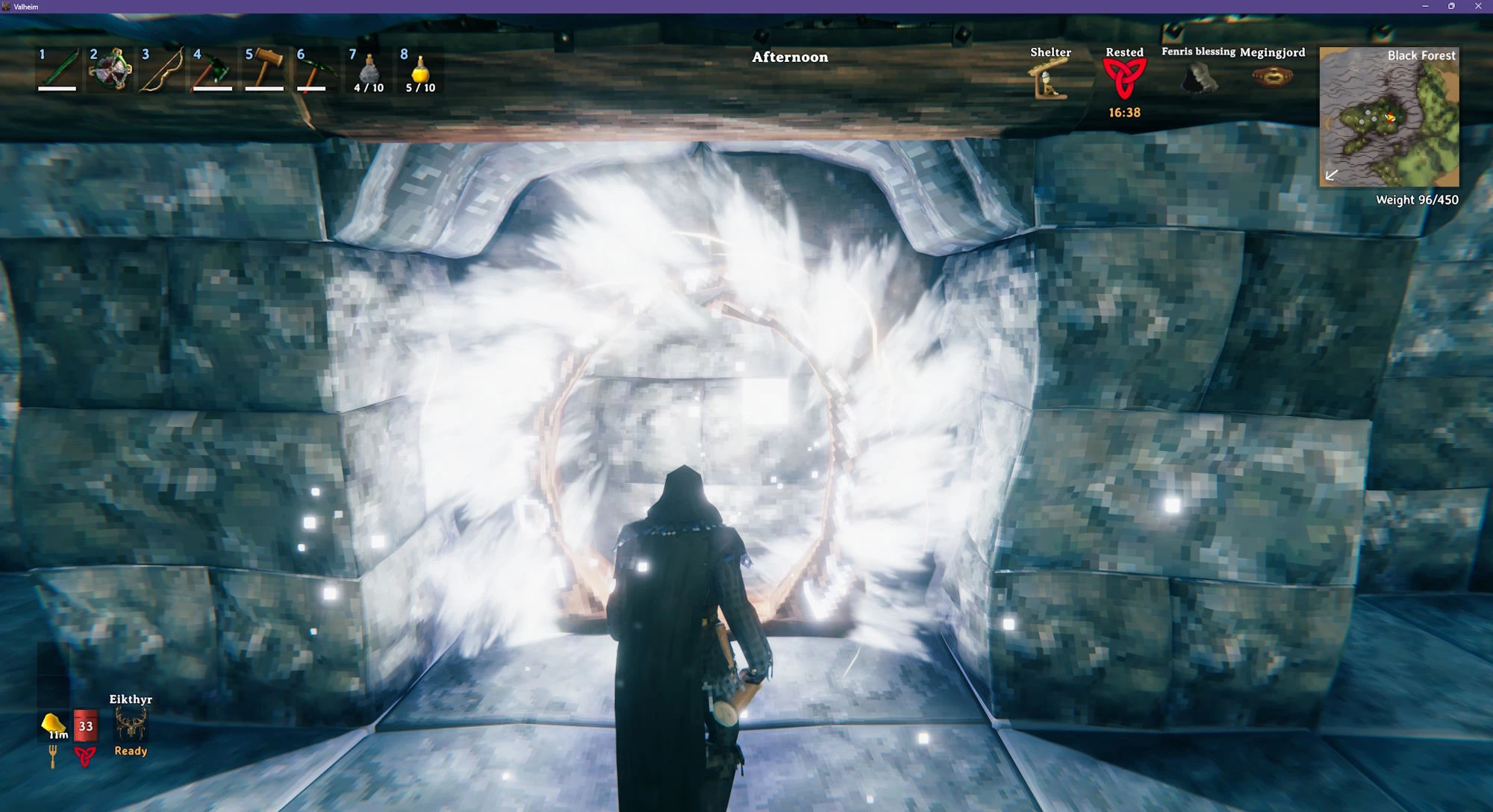
将鼠标悬停在会发光的物体上(如壁灯、篝火、传送门),按 L 键为其灯光输入颜色、亮度和范围。它能让标牌上的文字发出带彩色光晕的光芒,呈现发光字母或轮廓效果。
 查看大图
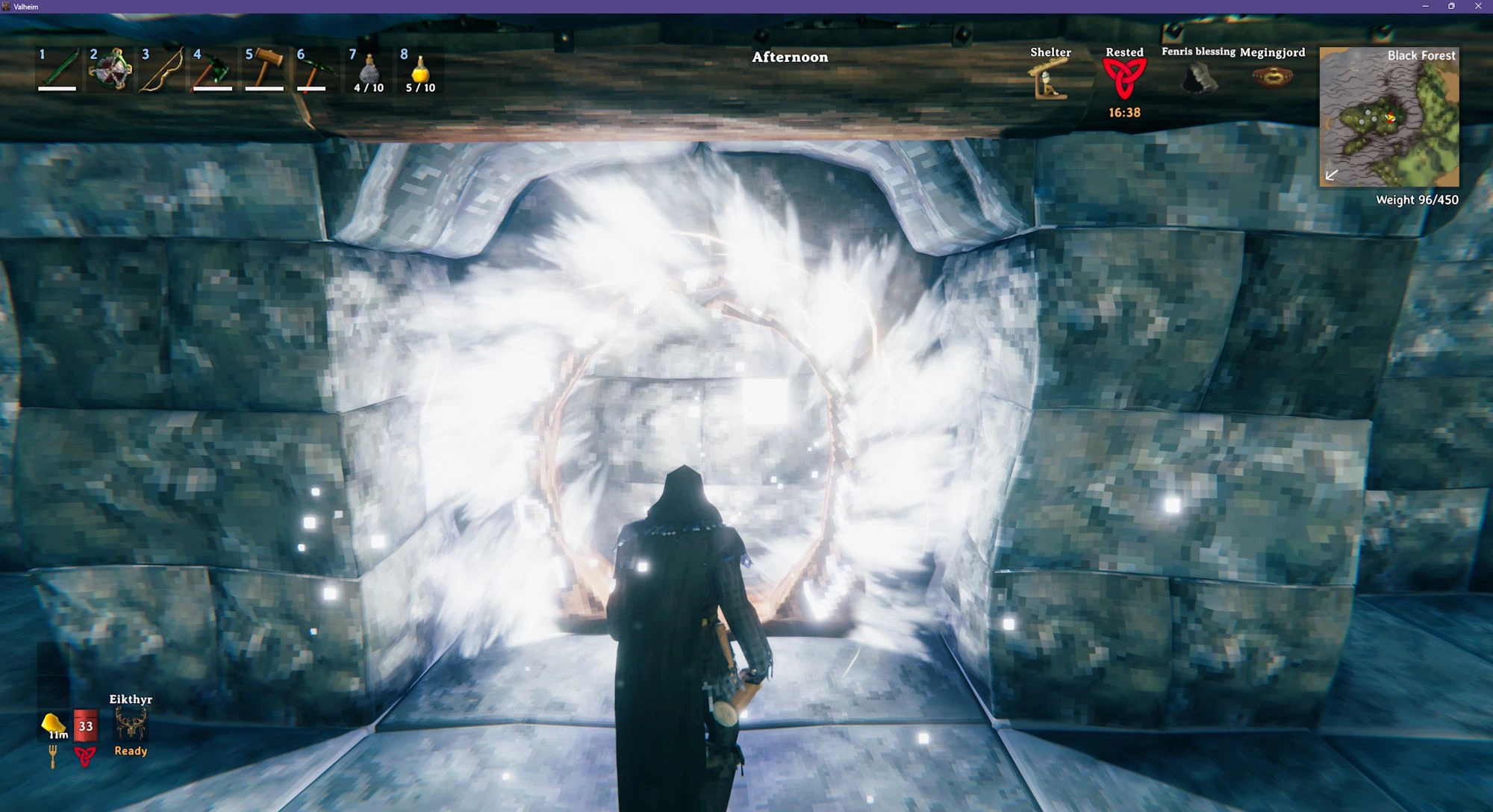
将鼠标悬停在会发光的物体上(例如壁灯、营火、传送门),然后按 L 键,输入其灯光的颜色、亮度和范围。它还能让告示牌上的文字发出带颜色的光晕、发光字母或描边。
[list]
[]输入颜色名称,例如 [font=Courier New]red[/font]、[font=Courier New]yellow[/font] 或 [font=Courier New]purple[/font],或十六进制颜色,例如 [font=Courier New]#0F0[/font] 或 [font=Courier New]#002B49[/font]
[]在颜色后面添加亮度和范围,例如 [font=Courier New]blue 150% 20m[/font]——参见[url=https://github.com/kriona/valheim/tree/main/LightColor/#brightness-and-range]亮度和范围[/url]
[]同样适用于物品架——颜色会应用到所展示的矮人圆环、火把或其他任何发光物品上,并且当你更换物品时,颜色仍保留在物品架上
[]穿过有颜色的传送门时,加载画面上的漩涡会变成该传送门的颜色,然后从中心向外逐环淡出,最终变为你抵达的传送门的颜色
[]同样适用于告示牌——文字会以该颜色发光,即使在夜晚也易于阅读——参见[url=https://github.com/kriona/valheim/tree/main/LightColor/#signs]告示牌[/url]
[]设置 [font=Courier New]Helmet[/font] 选项可为你佩戴的矮人圆环上色——参见[url=https://github.com/kriona/valheim/tree/main/LightColor/#configuration]配置[/url]
[]输入 [font=Courier New]default[/font] 或留空可恢复为原始颜色
[]悬停文字会显示所有适用物体上的按键
[]遵守结界——你无法更改你无权访问的结界内的灯光
[/list]
[img]https://raw.githubusercontent.com/kriona/valheim/main/LightColor/images/white-portal.jpg[/img]
[size=5][b]多人服务器[/b][/size]
物体的颜色/亮度/范围存储在物体上并随世界一起保存。服务器无需安装此模组即可保存颜色。
颜色会与所有使用此模组的玩家共享,更改对所有玩家可见。
[font=Courier New]Helmet[/font] 设置会复制到你的角色上;安装了此模组的其他玩家会看到你所设置颜色的矮人圆环。
[size=5][b]截图[/b][/size]
[size=4][b]物品架上的紫色矮人圆环[/b][/size]
[img]https://raw.githubusercontent.com/kriona/valheim/main/LightColor/images/purple-dverger-circlet.jpg[/img]
[size=4][b]蓝色营火和壁灯[/b][/size]
[img]https://raw.githubusercontent.com/kriona/valheim/main/LightColor/images/blue-campfire-sconce.jpg[/img]
[size=4][b]Cosplay 成 X 战警中的镭射眼[/b][/size]
[font=Courier New]Helmet[/font] 设置为 [font=Courier New]#F00 500% 50m[/font]。
[img]https://raw.githubusercontent.com/kriona/valheim/main/LightColor/images/cyclops.jpg[/img]
[size=4][b]多种颜色的传送门枢纽[/b][/size]
[img]https://raw.githubusercontent.com/kriona/valheim/main/LightColor/images/portal-hub.jpg[/img]
[size=4][b]从黄色传送门前往蓝色传送门(过渡中)[/b][/size]
[img]https://raw.githubusercontent.com/kriona/valheim/main/LightColor/images/yellow-to-blue-portal.jpg[/img]
[size=5][b]颜色亮度[/b][/size]
游戏将黑色视为“无光”。如果将物体的颜色设为黑色,它就不会发光。[font=Courier New]#111[/font](深灰色)发出的光很少,而 [font=Courier New]#FFF[/font](白色)发出的光很多。
左侧传送门设置为 [font=Courier New]#0F0[/font](亮绿色),右侧传送门设置为 [font=Courier New]#010[/font](深绿色)。
[img]https://raw.githubusercontent.com/kriona/valheim/main/LightColor/images/green-portals.jpg[/img]
[size=5][b]亮度和范围[/b][/size]
在颜色后面添加以 [font=Courier New]%[/font] 结尾的亮度或以 [font=Courier New]m[/font] 结尾的范围。两者都是可选的,也可以不指定颜色单独使用:
[list]
[][font=Courier New]blue 150%[/font]——蓝色,亮度为原来的一倍半
[][font=Courier New]blue 150% 20m[/font]——蓝色,更亮,照亮周围 20 米
[][font=Courier New]50%[/font]——物体原始颜色,亮度减半
[][font=Courier New]0%[/font]——关闭灯光,但火焰或光晕仍保留
[/list]
亮度可设置为 0% 至 500%,范围可设置为 1m 至 50m。范围决定物体最大光源的大小,其其他光源会按比例缩放,因此燃料不足的火焰仍会缩小。火焰和发光部分只改变颜色——它们的大小保持不变。
更大的光源会照亮周围更多的世界,当数量很多时会消耗更多性能。
设置为 500% 亮度和 50m 范围的营火。
[img]https://raw.githubusercontent.com/kriona/valheim/main/LightColor/images/apocalypse.jpg[/img]
[size=5][b]告示牌[/b][/size]
将鼠标悬停在告示牌上并按 L 键,使其文字发光。输入颜色、亮度以及以下任意样式:
[list]
[][font=Courier New]halo[/font]——字母后方柔和的彩色光晕
[][font=Courier New]lit[/font]——字母以该颜色绘制并从内部发光
[][font=Courier New]outline[/font]——字母周围清晰的彩色描边
[/list]
[font=Courier New]white[/font] 产生白色光晕,[font=Courier New]lit[/font] 产生白色发光字母,[font=Courier New]yellow 200% halo outline[/font] 产生亮黄色光晕和描边。默认样式为光晕,默认颜色为白色。高亮度值会很快变成发光的光球而非文字。
发光文字不受周围光照的影响,因此白天和夜晚阅读效果相同。用 [font=Courier New]<color=...>[/font] 输入到告示牌文字中的颜色仍会显示(不过 [font=Courier New]lit[/font] 可能会将其冲淡)。
[img]https://raw.githubusercontent.com/kriona/valheim/main/LightColor/images/sign-effects.jpg[/img]
[img]https://raw.githubusercontent.com/kriona/valheim/main/LightColor/images/sign-effects-extreme.jpg[/img]
[img]https://raw.githubusercontent.com/kriona/valheim/main/LightColor/images/gosh-its-dark.jpg[/img]
[size=5][b]默认颜色[/b][/size]
[font=Courier New]default[/font] 或留空可将物体恢复为原始颜色。燃料耗尽时燃烧微弱的火焰会切换为更小、更暗的光源。拥有多个光源的物体列出了每种颜色的一个——你输入的颜色将用于所有光源。
[list]
[][b]工匠台[/b](灯光颜色:[font=Courier New]#87DCFF[/font])
[][b]攻城槌[/b](灯光颜色:[font=Courier New]#FF7A00[/font])
[][b]黑熔炉[/b](灯光颜色:[font=Courier New]#FF7B99[/font]、[font=Courier New]#FF9E7B[/font])
[][b]高炉[/b](灯光颜色:[font=Courier New]#FFA400[/font])
[][b]蓝色立式火盆[/b](灯光颜色:[font=Courier New]#7BC5FF[/font],燃料不足:[font=Courier New]#BFFEFF[/font])
[][b]篝火[/b](灯光颜色:[font=Courier New]#FF8153[/font],燃料不足:[font=Courier New]#FF8153[/font])
[][b]营火[/b](灯光颜色:[font=Courier New]#FF8153[/font],燃料不足:[font=Courier New]#D68669[/font])
[][b]大锅[/b](灯光颜色:[font=Courier New]#FFAC53[/font])
[][b]炭窑[/b](灯光颜色:[font=Courier New]#FF7A00[/font])
[][b]龙船[/b](灯光颜色:[font=Courier New]#F4C7AE[/font])
[][b]物品架上的矮人圆环[/b](灯光颜色:[font=Courier New]#A0F8EE[/font])
[][b]矮人柱灯[/b](灯光颜色:[font=Courier New]#FFC849[/font])
[][b]矮人壁灯[/b](灯光颜色:[font=Courier New]#FFC849[/font])
[][b]埃特尔精炼厂[/b](灯光颜色:[font=Courier New]#53E1FF[/font]、[font=Courier New]#FF53C6[/font]、[font=Courier New]#FF7B99[/font])
[][b]永恒之火[/b](灯光颜色:[font=Courier New]#FF7400[/font])
[][b]妖精之光[/b](灯光颜色:[font=Courier New]#8DB8FF[/font])
[][b]熔炉[/b](灯光颜色:[font=Courier New]#FF9E7B[/font])
[][b]冰霜之窑[/b](灯光颜色:[font=Courier New]#77D9FF[/font])
[][b]冰霜铸造厂[/b](灯光颜色:[font=Courier New]#52E4FF[/font])
[][b]加尔德尔桌[/b](灯光颜色:[font=Courier New]#FF31DC[/font])
[][b]悬挂火盆[/b](灯光颜色:[font=Courier New]#FF9E7B[/font],燃料不足:[font=Courier New]#D68669[/font])
[][b]壁炉[/b](灯光颜色:[font=Courier New]#FF9E7B[/font],燃料不足:[font=Courier New]#D68669[/font])
[][b]带罩灯笼[/b](灯光颜色:[font=Courier New]#FFECC2[/font])
[][b]热水浴缸[/b](灯光颜色:[font=Courier New]#FF8153[/font])
[][b]铁火坑[/b](灯光颜色:[font=Courier New]#FF8153[/font],燃料不足:[font=Courier New]#D68669[/font])
[][b]南瓜灯[/b](灯光颜色:[font=Courier New]#FF9E7B[/font])
[][b]熔岩灯笼[/b](灯光颜色:[font=Courier New]#FF9E7B[/font])
[][b]长船[/b](灯光颜色:[font=Courier New]#F4C7AE[/font])
[][b]蜜酒壶[/b](灯光颜色:[font=Courier New]#FFAC53[/font])
[][b]传送门[/b](灯光颜色:[font=Courier New]#FF6400[/font])
[][b]树脂蜡烛[/b](灯光颜色:[font=Courier New]#FFA539[/font])
[][b]树液提取器[/b](灯光颜色:[font=Courier New]#ADFF5D[/font])
[][b]壁灯[/b](灯光颜色:[font=Courier New]#FF9E7B[/font])
[][b]护盾发生器[/b](灯光颜色:[font=Courier New]#FFAF8B[/font])
[][b]冶炼炉[/b](灯光颜色:[font=Courier New]#FFA400[/font]、[font=Courier New]#FF8400[/font])
[][b]雪灯笼[/b](灯光颜色:[font=Courier New]#FFA539[/font])
[][b]立式蓝色火焰铁火把[/b](灯光颜色:[font=Courier New]#7BC5FF[/font])
[][b]立式火盆[/b](灯光颜色:[font=Courier New]#FF9E7B[/font],燃料不足:[font=Courier New]#D68669[/font])
[][b]立式绿色火焰铁火把[/b](灯光颜色:[font=Courier New]#A1FF7B[/font])
[][b]立式铁火把[/b](灯光颜色:[font=Courier New]#FF9E7B[/font])
[][b]立式木火把[/b](灯光颜色:[font=Courier New]#FF9E7B[/font])
[][b]石炉[/b](灯光颜色:[font=Courier New]#FF8153[/font])
[][b]石制传送门[/b](灯光颜色:[font=Courier New]#FF0E00[/font])
[][b]不灭蜡烛[/b](灯光颜色:[font=Courier New]#FF31DC[/font])
[][b]结界[/b](灯光颜色:[font=Courier New]#FCDFC1[/font])
[][b]妖精喷泉[/b](灯光颜色:[font=Courier New]#CB00FF[/font])
[][b]妖精火把[/b](灯光颜色:[font=Courier New]#7BC8FF[/font])
[][b]圣诞树[/b](灯光颜色:[font=Courier New]#FFAD31[/font])
[/list]
输入这些颜色而非 [font=Courier New]default[/font] 或留空,可获得相同的光,但火焰会比原始颜色更苍白。
[size=5][b]配置[/b][/size]
首次运行时创建 [font=Courier New]BepInEx\config\kriona.LightColor.cfg[/font],保存文件后更改立即生效。无需重启 Valheim 或重新加入世界。
[list]
[][font=Courier New]ColorKey[/font]——看向灯光时按下的按键,可带修饰键,例如 [font=Courier New]L[/font] 或 [font=Courier New]LeftControl + L[/font](默认 [font=Courier New]L[/font])
[][font=Courier New]Helmet[/font]——你所装备的矮人圆环灯光的颜色、亮度和范围。安装了此模组的其他玩家可见(默认留空,保留圆环自身的光)
[/list]
[size=5][b]安装[/b][/size]
[list=1]
[]安装 [url=https://www.nexusmods.com/valheim/mods/3605]BepInExPack for Valheim[/url]
[]将 zip 解压到你的 Valheim 文件夹,或将 [font=Courier New]LightColor.dll[/font] 复制到 [font=Courier New]BepInEx\plugins[/font]
[/list]
仅客户端——服务器不需要。其他玩家只需安装它才能看到颜色。
[size=5][b]更新日志[/b][/size]
[size=4][b]1.4.1[/b][/size]
[list]
[]黑色传送门的边框现在不再发光
[/list]
[size=4][b]1.4.0[/b][/size]
[list]
[]护盾发生器会保持其颜色,而不会闪回自身颜色
[]护盾发生器的穹顶会采用其颜色
[/list]
[size=4][b]1.3.0[/b][/size]
[list]
[]在告示牌上按 L 键可使其文字发光,带有光晕、发光字母或彩色描边,例如 [font=Courier New]white 150% lit[/font]
[/list]
[size=4][b]1.2.2[/b][/size]
[list]
[]石制传送门框架上的符文会采用传送门的颜色,就像木制传送门上的雕刻一样
[/list]
[size=4][b]1.2.1[/b][/size]
[list]
[]保存配置文件不再触发模组将其写回,因此打开该文件的编辑器不会报告其已更改
[]配置文件重新加载时显示消息
[/list]
[size=4][b]1.2.0[/b][/size]
[list]
[]配置更改在文件保存后立即生效;无需重启 Valheim 或重新加入世界
[/list]
[size=4][b]1.1.0[/b][/size]
[list]
[]穿过有颜色的传送门时,加载画面上的漩涡会变成该传送门的颜色,然后从中心向外逐环淡出,最终变为你抵达的传送门的颜色
[]修复了单人世界中传送门颜色未被保存的问题
[/list]
[size=4][b]1.0.0[/b][/size]
[list]
[]初始发布
[/list]
[size=5][b]我的其他模组[/b][/size]
[list]
[][url=https://www.nexusmods.com/valheim/mods/4341]Chest Peek[/url]——将鼠标悬停在箱子上即可查看其中的内容,无需打开
[][url=https://www.nexusmods.com/valheim/mods/4427]Craft More[/url]——按住 Ctrl 一次制作整组,或按住 Alt 制作你材料允许的最大数量。每次制作都会获得经验,而非每批制作获得经验。
[][url=https://www.nexusmods.com/valheim/mods/4342]Creature Marker[/url]——在附近生物上方显示彩色箭头,当它们不在屏幕内时显示在屏幕边缘,并在地图上显示对应的圆点
[][url=https://www.nexusmods.com/valheim/mods/4343]Quick Fill[/url]——按住 Shift 并按 E 可一次填满冶炼炉、窑、炉子、火堆或护盾发生器。鼠标目标范围也已扩展
[][url=https://www.nexusmods.com/valheim/mods/4370]Snap Points[/url]——为箱子、资源堆、桌子、长凳、旗帜、盔甲架、物品架和传送门提供吸附点,使它们整齐排列,并让你选择哪些建筑部件可吸附
[][url=https://www.nexusmods.com/valheim/mods/4344]Swap Gear[/url]——将你穿戴的装备与盔甲架上的装备互换
[][url=https://www.nexusmods.com/valheim/mods/4345]Too Low[/url]——当你的镐达到 8 米挖掘限制时显示“Too low”消息
[][url=https://www.nexusmods.com/valheim/mods/4363]Tweak Stats[/url]——更改任何物品、配方、生物、建筑部件或状态效果的属性——武器伤害、攻击耐力、护甲、格挡值、食物、耐久度、重量、堆叠数量、制作成本、生物生命值和掉落物、建筑生命值等
[][url=https://www.nexusmods.com/valheim/mods/4346]Weight Display[/url]——在小地图下方显示你当前和最大负重以及已使用的物品栏槽位数量
[][url=https://www.nexusmods.com/valheim/mods/4347]Who's Online[/url]——加入时列出服务器上的其他玩家
[/list]
[size=5][b]源代码[/b][/size]
源代码位于 [url=https://github.com/kriona/valheim/tree/main/LightColor]GitHub[/url]。
[size=5][b]我使用的其他模组[/b][/size]
[list]
[][url=https://old.thunderstore.io/c/valheim/p/Azumatt/Build_Camera_Custom_Hammers_Edition/]Build Camera[/url] 作者 Azumatt
[][url=https://www.nexusmods.com/valheim/mods/85]Clock[/url] 作者 aedenthorn
[][url=https://www.nexusmods.com/valheim/mods/1981]Quiet Portals[/url] 作者 Neobotics
[][url=https://old.thunderstore.io/c/valheim/p/MagiCorp/RememberServerPassword/]Remember Server Password[/url] 作者 MagiCorp
[][url=https://www.nexusmods.com/valheim/mods/3771]Tools in Water[/url] 作者 Lilizzll
[/list]


正在加载版本记录…
正在加载评论…
评论在新手盒子客户端中发表,这里同步展示。