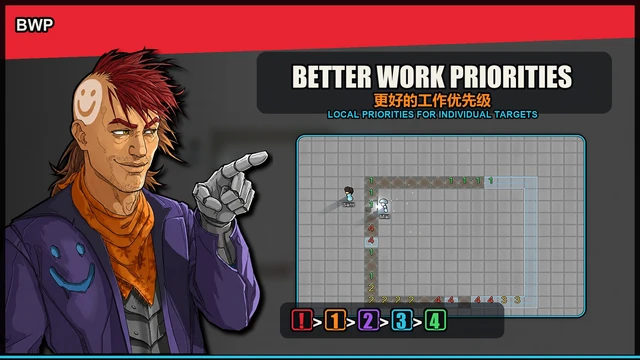
更好的工作优先级
让你为特定的工作来源分配本地优先级1-4。优先级1为最高,优先级4为最低。
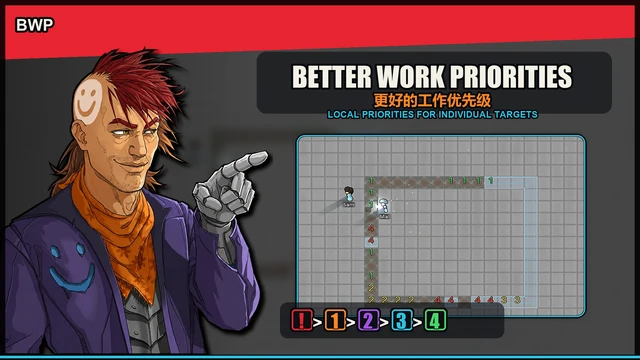 查看大图
查看大图Better Work Priorities - 更好的工作优先级
Better Work Priorities is a utility mod for RimWorld 1.6. Better Work Priorities 是一个 RimWorld 1.6 工具类 Mod。
It allows you to assign local priorities to specific work sources. 允许你为某个具体工作来源设置局部优先级。
Vanilla work priorities mainly decide which type of work a colonist should care about. BWP focuses on which specific target should be handled first within the same type of work. 原版工作优先级通常控制的是“殖民者更重视哪一类工作”,而 BWP 更关注“同一类工作里,哪个具体目标应该先做”。
For example: 例如:
- Build this wall before another wall.
- 先建这段墙,而不是另一段墙。
- Repair this critical machine before ordinary furniture.
- 先修这个关键设备,而不是普通家具。
- Use this workbench first.
- 先使用这张高优先级工作台。
- Prioritize a specific research or scanning facility.
- 先研究、扫描或处理某个指定设施。
- Prefer a certain dining table.
- 优先去某张餐桌附近用餐。
Local priorities are: 局部优先级为:
! Urgent > 1 > 2 > Default 3 > 4
Where:
1is the highest normal priority.- 为最高普通优先级。
4is the lowest normal priority.- 为最低普通优先级。
- Unmarked targets do not show numbers, but are treated as the default priority internally.
- 未手动设置的对象不会显示数字,但逻辑上按默认优先级处理。
- The default priority can be changed in mod settings.
- 默认优先级可在 Mod 设置中调整。
!is an urgent priority that can actively interrupt suitable colonists and send them to work.- 为紧急优先级,用于主动打断合适殖民者并派遣工作。
Inspired by the priority system in Oxygen Not Included. 灵感来源于《缺氧》的局部优先级系统。
Supported Targets
The current version supports: 当前版本支持以下工作来源:
- Production buildings
- 生产设备
- Blueprints
- 蓝图
- Construction frames
- 建筑框架
- Construction work
- 建造任务
- Deconstruction work
- 拆除任务
- Repair work
- 修理任务
- Workbench jobs
- 工作台任务
- Research and scanning facilities
- 研究与扫描设施
- Dining locations
- 用餐地点
Only one local priority per object. 同一个对象只保存一套局部优先级。
If a building can be used, repaired, and deconstructed, all supported work types read the same local priority instead of storing separate priorities. 如果一个设备既可以被使用、修理、拆除,那么它们会读取同一个局部优先级,而不是分别保存三套数字。
Features
1. Assign Local Priorities 1. 布置局部优先级
Enter BWP mode, choose 进入 BWP 模式后,可以选择:
1 / 2 / 3 / 4
then click or drag over targets to assign local priorities. 然后点击或框选地图上的目标,为它们设置局部优先级。
Useful for: 适合用于:
- Choosing which blueprints should be built first.
- 指定先建某一批蓝图。
- Controlling the order of construction frames.
- 控制建筑框架完成顺序。
- Prioritizing important workbenches.
- 让小人优先处理关键工作台。
- Raising repair/deconstruction priority for critical buildings.
- 给重要设备设置更高修理/拆除优先级。
- Lowering the priority of less important targets.
- 降低暂时不重要目标的处理顺序。
Marked targets display their priority numbers on the map. 已经设置过的目标会在地图上显示对应数字。 Unmarked targets use the default priority but usually do not display a number. 未设置的目标默认按设置中的默认优先级处理,但通常不会显示数字,以减少画面干扰。
2. Urgent Priority 2. 紧急优先级
! is a special urgent priority.
是特殊的紧急优先级。
The urgent priority "!" is designed for work that should be handled immediately. 紧急优先级 "!" 用于需要立即处理的工作。
It can interrupt suitable colonists and send them to the urgent target. 它可以打断合适的小人,并派遣他们处理紧急目标。
BWP includes checks to reduce repeated job attempts, waiting, or standing caused by unusable high-priority targets. BWP 加入了检查机制,以减少不可操作高优先级目标导致的反复派工、等待或站立。
3. Dining Priority 3. 用餐优先级
Version 0.2.0 introduces the first experimental version of dining priority. You can assign local priority to dining tables, making colonists prefer higher-priority tables when choosing where to eat. BWP treats the table as the priority target, not the chair:
- Players assign priority to the table.
- Vanilla logic still chooses an available nearby seat.
- If a high-priority table is full or unavailable, other valid tables can be considered.
- Clearing the priority should return the behavior closer to vanilla dining selection.
Note: dining priority is still experimental. If you encounter strange dining paths or incorrect table choices, enable diagnostic logging and report the relevant logs.
4. Mod Settings 4. Mod 设置
BWP provides several settings sections. Main settings include:
- Default local priority
- Nearby implicit default priority display
- Repair/deconstruction priority extension
- Dining priority extension
- Hotkey settings
- Error diagnostics
Configurable hotkeys include:
- Toggle BWP mode
- Urgent priority
1 / 2 / 3 / 4- Clear priority
- Cycle targets on the same cell
- New blueprint default priority menu
The diagnostics section can:
- Output BWP-related diagnostic logs.
- Copy relevant error logs.
- Help investigate repeated jobs, unusable high-priority targets, dining issues, and urgent-job problems.
Compatibility Notes
兼容性说明
BWP generally only changes the ordering of targets within the same type of work. BWP 通常只影响同类工作候选目标之间的排序。
It does not directly replace the vanilla global work priority system. MOD不直接修改殖民者的全局工作类型优先级。
Therefore: 因此:
- It usually should not directly conflict with mods like Complex Jobs or Work Tab.
- 与 Complex Jobs、Work Tab 等修改全局工作分类或工作优先级的 Mod 通常不会直接冲突。
- However, those mods can change global work categories and work priority rules, so BWP cannot guarantee priority across different work types.
- 但这些 Mod 会改变“哪类工作先做”的规则,BWP 不能保证跨工作类型强行压过它们。
- Custom WorkGivers or custom Jobs may require dedicated compatibility patches if they do not use standard target objects.
- 自定义 WorkGiver 或自定义 Job 如果没有使用标准目标对象,可能需要单独兼容。
- Multiplayer compatibility is not guaranteed. Map data changes, UI actions, urgent job dispatch, and diagnostic logging may require dedicated sync handling.
- Multiplayer 暂不能宣称完全兼容,尤其是地图数据、UI 操作、紧急派工和诊断日志等内容都需要专门同步处理。
- Theoretically supports all large mods and race mods.
- 理论上支持所有大型模组和种族模组。
Can It Be Added Mid-Save?
是否可以中途加入存档?
It can usually be added to an existing save, but backing up first is recommended. 通常可以中途加入已有存档,但建议先备份。
Manual Installation
手动安装方法
Steps:
- Download the Better Work Priorities mod files.
- 下载 Better Work Priorities 的 Mod 文件。
- Extract the archive.
- 解压。
- Make sure the mod folder contains:
- 确认文件夹内包含:
AboutAssembliesLanguagesTextures
- 确认文件夹内包含:
- Place the whole mod folder into RimWorld’s local Mods directory.
- 将整个 Mod 文件夹放入 RimWorld 的本地 Mods 目录。
Example path: 常见路径示例:
D:\Steam\steamapps\common\RimWorld\Mods\
- Start RimWorld.
- 启动游戏。
- Enable:
- 在 Mod 列表中启用:
- Harmony
- Better Work Priorities
- Make sure Harmony loads before BWP.
- 确保 Harmony 排在 BWP 前面。
- Save the mod list and restart the game.
- 保存并重启游戏。
Enjoy! 享受!
Note: This mod was created by me and refined with AI assistance. It is still a test version, so there may be rough edges or unexpected behavior. Thank you for your understanding and feedback. 提示: 此 Mod 由我制作,并经过 AI 辅助修改,目前仍然是测试版,可能存在不完善或意料之外的问题,感谢理解与反馈。
还没有人评论,去客户端里说两句吧。
评论在新手盒子客户端中发表,这里同步展示。