Smart Encyclopedia
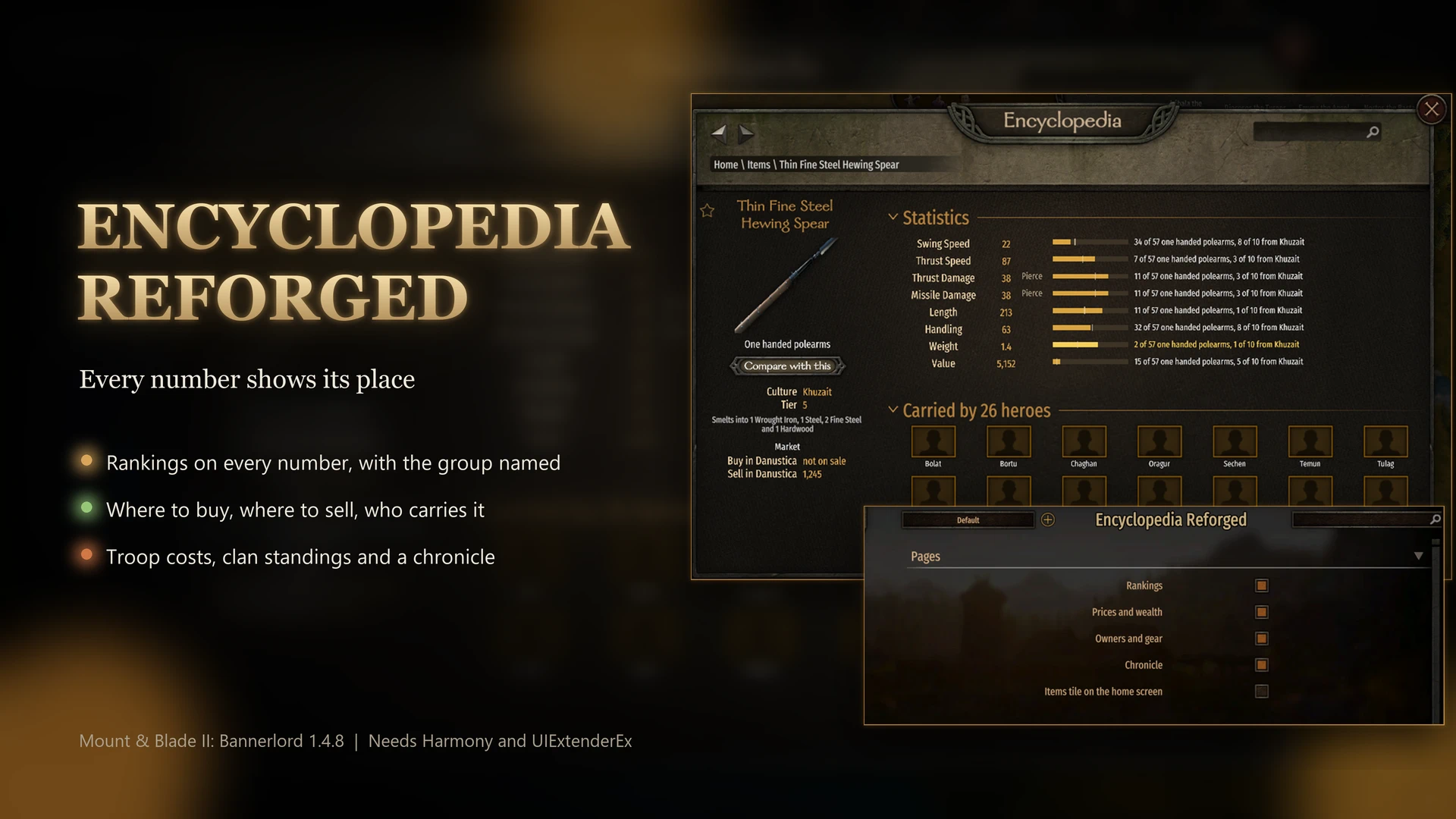
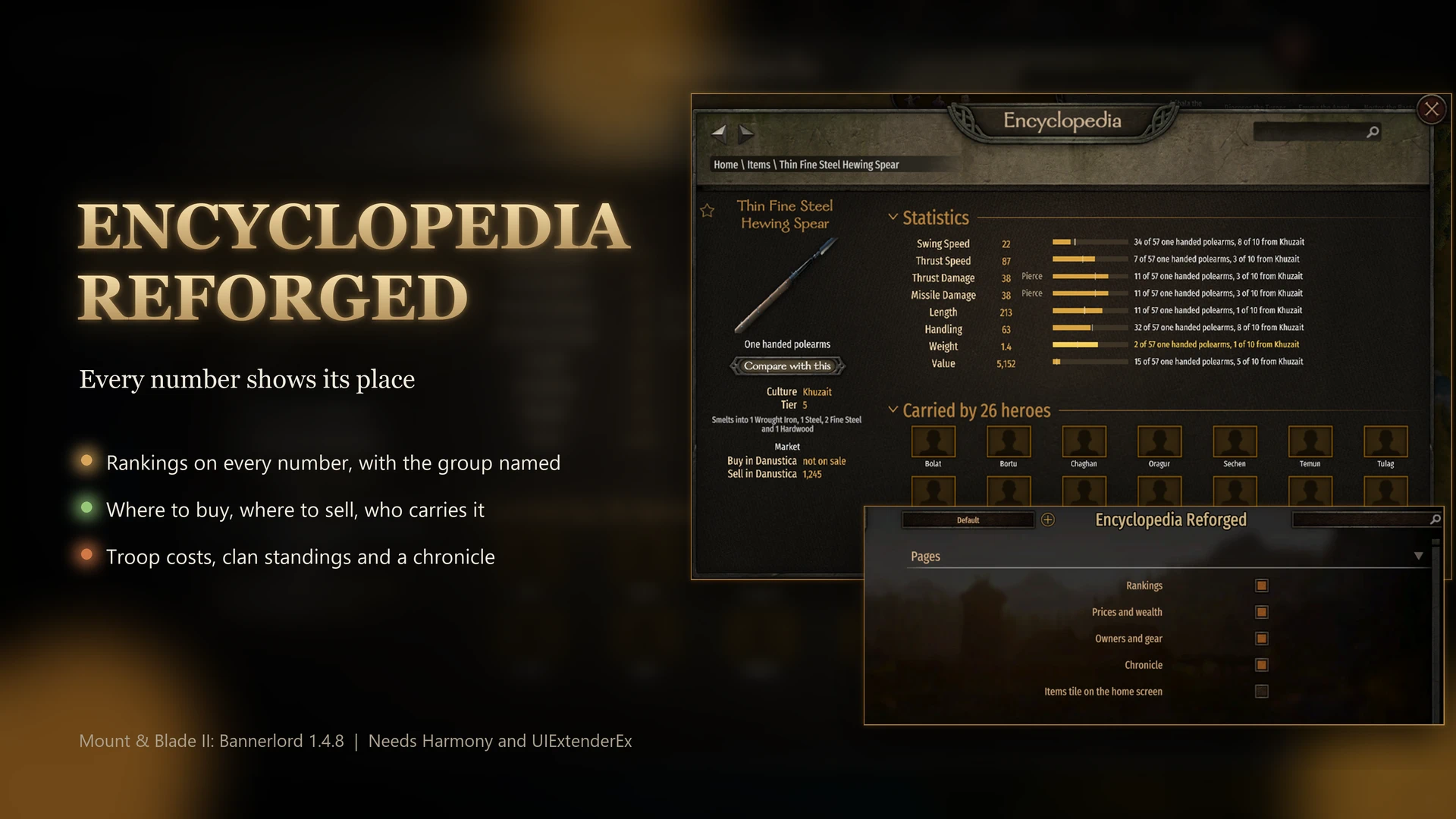
The encyclopedia starts comparing. Every stat is ranked against its group. Each item page names the best towns to buy and sell it and the heroes who carry it. Nothing is written to your save.
 查看大图
[center][size=5][color=#EBD55A][b]SMART ENCYCLOPEDIA[/b][/color][/size]
[size=3][color=#EBD55A]Every stat on item, troop, hero, clan and kingdom pages is ranked, as in 8 of 84 large shields or 3 of 9 tier 4 infantry. Items get their own encyclopedia pages, with the best towns to buy and sell each one and the heroes who carry it.[/color][/size][/center]
[line]
[size=4][color=#EBD55A][b]SETUP[/b][/color][/size]
[list]
[][size=3]Bannerlord 1.4.8, with or without War Sails. Needs Harmony 2.3.3 and UIExtenderEx 2.13.0. Mod Options (MCM) is optional, and without it the mod runs on the defaults under Settings.[/size]
[][size=3]Install with a mod manager, or extract the EncyclopediaReforged folder into Modules in your game folder and tick it in the launcher.[/size]
[][size=3]Load after Harmony, UIExtenderEx, Mod Options and the official modules, and after Diplomacy if you use it.[/size]
[][size=3]Nothing is written to your save, so the mod can join a running campaign and leave it at any time.[/size]
[][size=3]The mod is in English. The translation kit in the Files tab has a READ ME FIRST file with the steps.[/size]
[][size=3]Do not run it alongside Item Encyclopedia or Encyclopedia Extender, since it covers what both showed.[/size]
[/list]
[line]
[size=4][color=#EBD55A][b]RANKINGS[/b][/color][/size]
[list]
[][size=3]Weapons rank within their class and armor within its slot. Small shields, large shields, mounts, trade goods, animals and books each form their own group.[/size]
[][size=3]Items with a culture get a second place within it when that group is smaller. A Vlandian mount reads 2 of 31 mounts, 1 of 9 from Vlandia.[/size]
[][size=3]Troops rank against others of the same tier and role. Heroes rank among their own kind: lords, wanderers, notables or children. Clans rank within their kingdom or among the independent clans.[/size]
[][size=3]The bar beside each stat grows with the value, so a close second and a distant second look different. A light mark on the bar shows the group's median, and hovering the bar gives the median value.[/size]
[][size=3]In the top tenth of a group, the place and the bar turn gold. In the bottom quarter, the bar turns bronze. Ties share a place.[/size]
[][size=3]Smithed weapons are ranked but stay out of the group, so they never push another item down.[/size]
[/list]
[line]
[size=4][color=#EBD55A][b]THE ITEMS PAGE[/b][/color][/size]
[list]
[][size=3]Open it from encyclopedia search, or click any item icon on a troop, hero or settlement page.[/size]
[][size=3]The list filters by kind, culture, tier and civilian use, and sorts by name, tier or value. [b]Nowhere yet[/b] shows the items nobody in your campaign carries, uses or makes, and [b]In the world[/b] shows the rest.[/size]
[][size=3]Each item shows its statistics and what it smelts into. The skill it needs appears beside yours in green or red, and the page counts how many you already carry.[/size]
[][size=3]Click [b]Compare with this[/b], then open another item of the same kind. Every line shows the difference in green or red, and a white marker on each bar shows where the first item sits. Loading another campaign drops the comparison.[/size]
[/list]
[size=4][color=#EBD55A][b]WHERE TO BUY, WHERE TO SELL[/b][/color][/size]
[list]
[][size=3]The [b]Market[/b] box starts with the town you are in, or else the one closest to your party. [b]Buy in[/b] shows that town's price, or "not on sale", and [b]Sell in[/b] shows what the town pays you.[/size]
[][size=3][b]Cheapest in[/b] names the lowest price among towns with the item on the stall today. [b]Sells best in[/b] names the town that pays most. Each appears only when it beats the Buy in or Sell in price, and shows your travel time there.[/size]
[][size=3]Hovering any price lists what every town charges or pays. [b]On sale in[/b] lists every town with the item in stock right now.[/size]
[/list]
[size=4][color=#EBD55A][b]WHO CARRIES IT, WHERE IT IS MADE[/b][/color][/size]
[list]
[][size=3][b]Carried by[/b] shows the heroes who have the item equipped right now, heroes you have met first. Its title gives the full count.[/size]
[][size=3][b]Used by[/b] shows the troop types that carry it as standard. [b]Made in[/b] names the villages that produce it.[/size]
[][size=3]A village page lists what the village produces, and a town or castle page what its villages produce.[/size]
[/list]
[line]
[size=4][color=#EBD55A][b]TROOPS[/b][/color][/size]
[list]
[][size=3]Each troop shows its wage per day, what recruiting it costs you with your perks, and its ransom as a prisoner.[/size]
[][size=3]Armor is split into head, body, arms and legs for the outfit on screen. The arrows under the troop change the outfit. The troop's place among its tier and role counts all its outfits.[/size]
[][size=3]Hover an equipment icon for its stats. The troop list sorts by [b]Armor[/b] and by [b]Wage[/b].[/size]
[/list]
[size=4][color=#EBD55A][b]HEROES[/b][/color][/size]
[list]
[][size=3]A hero's level, every skill and the worth of their equipment are ranked among heroes of the same kind. Equipment is priced in one town for every hero, and the page names that town.[/size]
[][size=3]The six attributes sit on one line. [b]In battle[/b] shows what the hero wields and wears, and hovering a skill lists the perks taken in it.[/size]
[][size=3][b]Prisoner of[/b] links to the castle or the captor holding the hero. The hero list gains [b]Kingdom[/b], [b]Free[/b] and [b]Prisoner[/b] filters and a [b]Level[/b] sort.[/size]
[/list]
[size=4][color=#EBD55A][b]CLANS AND KINGDOMS[/b][/color][/size]
[list]
[][size=3]A clan ranks its strength, renown, fiefs and wealth. A kingdom ranks its strength, fiefs, clans, treasury and the wealth of its clans.[/size]
[][size=3]A clan's wealth is its leader's gold minus the clan's debt to its kingdom. A clan without a leader counts as zero wealth.[/size]
[][size=3]On a clan or kingdom page, [b]In enemy hands[/b] lists its lords held by someone else, and [b]Its prisoners[/b] lists the lords it holds. A line under Rankings gives both counts.[/size]
[][size=3]With [url=https://www.nexusmods.com/mountandblade2bannerlord/mods/9339]Living Wanderers[/url] 2.1.6 or [url=https://www.nexusmods.com/mountandblade2bannerlord/mods/9492]Bodyguards[/url] 1.2.8, a hero's page also shows a wanderer's class and hire price, or who a guard protects.[/size]
[][size=3]With [url=https://www.nexusmods.com/mountandblade2bannerlord/mods/9339]Living Wanderers[/url], the Heroes list gains a [b]Class[/b] filter and a [b]Hire price[/b] sort, so you can find the wanderer you need among the ones you have met.[/size]
[][size=3]With Living Wanderers 2.1.10, a wanderer's page also shows the bonus their class gives your party. Your clan's page lists the classes in your party and the ones missing.[/size]
[][size=3]Heroes you have not met stay hidden: no [b]Prisoner of[/b] line, and they are left out of the filters and the captive counts.[/size]
[][size=3]The [b]Chronicle[/b] lists what happened to the clan or kingdom in date order, with names as links. A campaign started before the mod still has its chronicle from day one.[/size]
[/list]
[line]
[size=4][color=#EBD55A][b]SETTINGS[/b][/color][/size]
[size=3]The settings are under Smart Encyclopedia in Mod Options.[/size]
[list]
[][size=3][b]Rankings[/b] (on): places and bars on every page.[/size]
[][size=3][b]Prices and wealth[/b] (on): town prices, troop wages and costs, equipment worth, and clan and kingdom wealth.[/size]
[][size=3][b]Owners and gear[/b] (on): who carries, sells and makes each item, troop and hero gear, village goods and captive lords.[/size]
[][size=3][b]Chronicle[/b] (on): clan and kingdom history.[/size]
[][size=3][b]Items tile on the home screen[/b] (off): puts an Items tile on the encyclopedia home screen, which squeezes its tiles to fit. With War Sails, an eighth tile can get too narrow to click. Search and item icons open the Items page anyway.[/size]
[/list]
[size=4][color=#EBD55A][b]COMPATIBILITY[/b][/color][/size]
[list]
[][size=3]If one of the mod's sections fails on a game page, it is left out and the rest of the page works.[/size]
[][size=3]Tested with Diplomacy, whose Factions button shares the kingdom page with this mod's sections, and with Bodyguards Reloaded.[/size]
[][size=3]If another mod already adds a Kingdom filter to the Heroes list, this mod does not add a second one.[/size]
[][size=3]Not tested with a controller.[/size]
[/list]
[size=4][color=#EBD55A][b]MY OTHER MODS[/b][/color][/size]
[list]
[][size=3][b][url=https://www.nexusmods.com/mountandblade2bannerlord/mods/9492]Bodyguards[/url][/b]: companions you pick and your strongest troops guard you in battle, in hideouts and in town.[/size]
[][size=3][b][url=https://www.nexusmods.com/mountandblade2bannerlord/mods/9339]Living Wanderers[/url][/b]: every wanderer has a class and a price to match, and lords hire them first if you wait too long.[/size]
[][size=3][b][url=https://www.nexusmods.com/mountandblade2bannerlord/mods/13670]Companion Smithing[/url][/b]: your best smith melts scrap weapons into iron in town and forges what the party lacks.[/size]
[/list]
正在加载版本记录…
正在加载评论…
评论在新手盒子客户端中发表,这里同步展示。