Extra Complexion
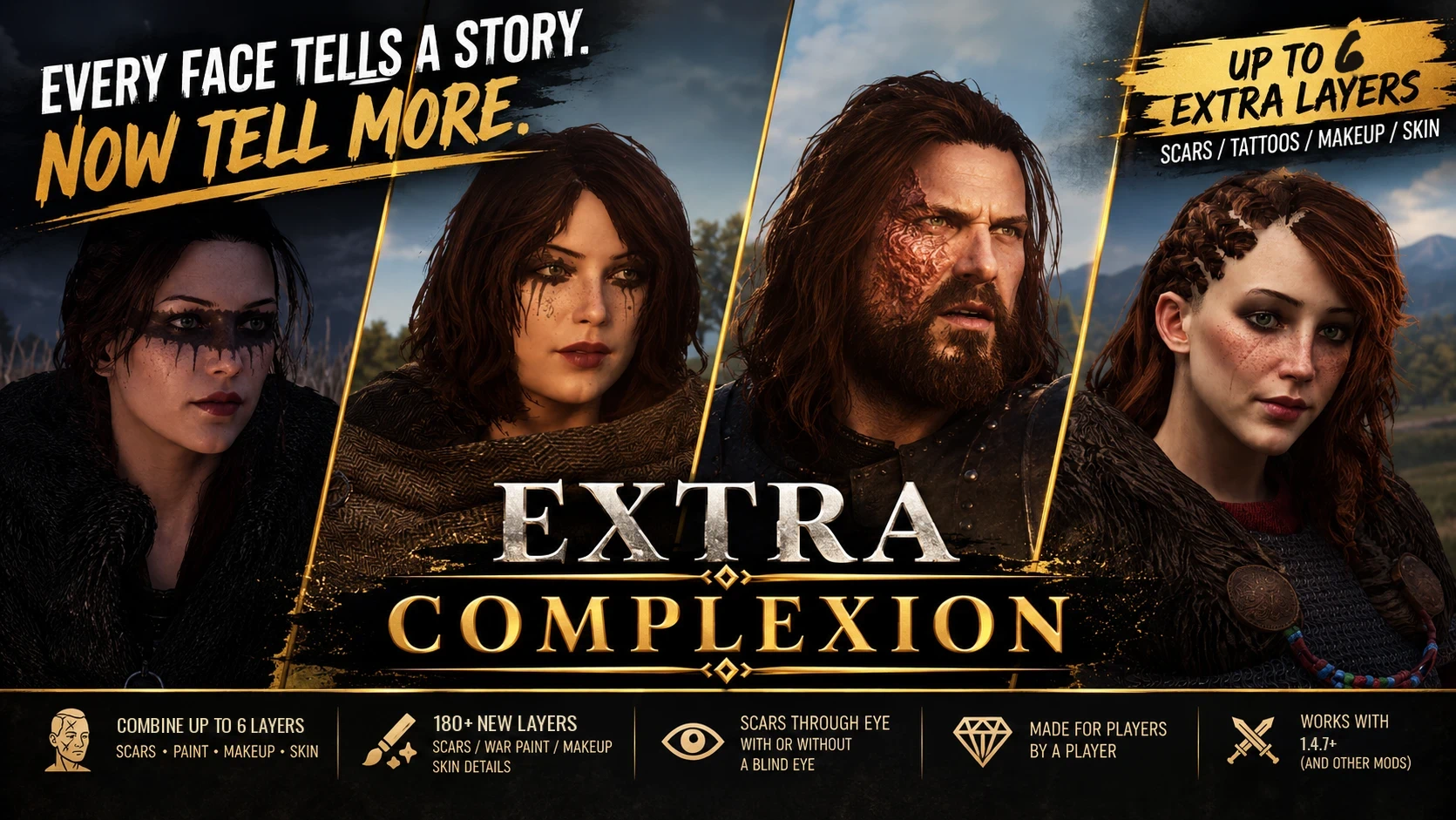
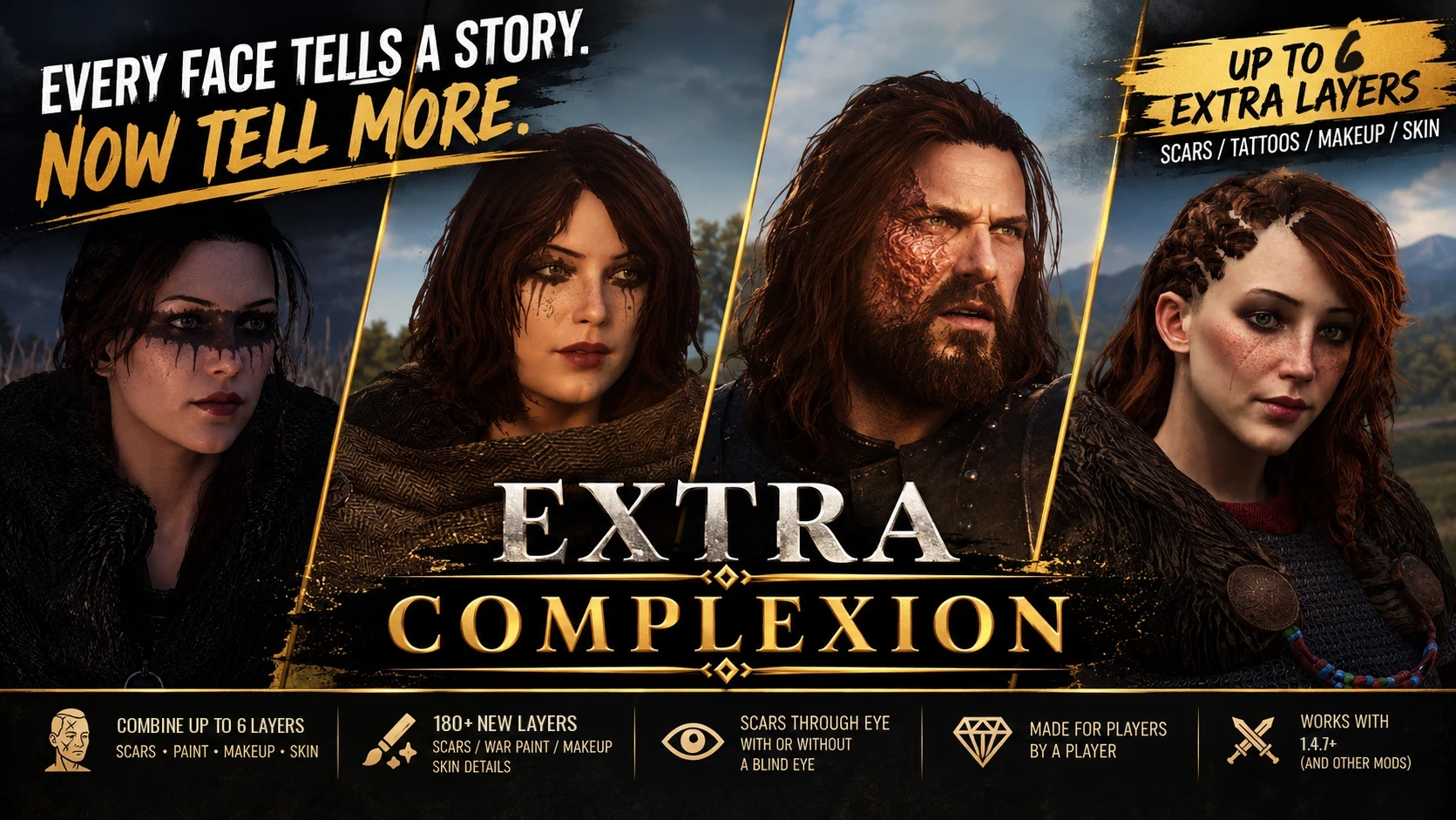
Layer up to 6 extra scars, burns, war paints, tattoos, makeup and stubble on any face - human or custom race - and edit each one: recolor, resize, move, rotate or mirror. 180+ layers, incl. faction tattoos and a Clegane style burn.
 查看大图
[center][size=6][b][color=#e0b052]EXTRA COMPLEXION[/color][/b][/size]
[size=3][i]Every face tells a story. Now tell more.[/i][/size]
[size=4][b][color=#e0b052]3.0: recolor, resize, move, rotate and mirror every layer[/color][/b][/size][/center]
[center][/center]
[center][size=4][b][color=#e0b052][size=5]See it in action[/size]
Scars: mirror, shift, weaker or stronger[/color][/b][/size][/center]
[center][/center]
[center][size=4][b][color=#e0b052][img]https://staticdelivery.nexusmods.com/mods/3174/images/13624/13624-1791597705-198854566.gif[/img][/color][/b][/size][/center]
[center][b][size=4][color=#e0b052][img]https://staticdelivery.nexusmods.com/mods/3174/images/13624/13624-1791598177-132089596.gif[/img][/color][/size][/b][/center]
[center][/center]
[center][b][size=4][color=#e0b052][b]Move, rotate, resize and recolor a tattoo[/b][/color][/size][/b][/center]
[center][b][size=4][color=#e0b052][img]https://staticdelivery.nexusmods.com/mods/3174/images/13624/13624-1791597733-258963194.gif[/img][/color][/size][/b][/center]
[center][b][size=4][color=#e0b052][img]https://staticdelivery.nexusmods.com/mods/3174/images/13624/13624-1791598081-1549906733.gif[/img][/color][/size][/b][/center]
[line]
[size=5][b][color=#e0b052]What this mod does[/color][/b][/size]
Vanilla lets a face wear exactly one scar or tattoo. [b]Extra Complexion[/b] (formerly Scars Extra) removes that limit, and adds [b]180+ new layers[/b] to stack on top - and lets you edit each one.
[list]
[][b]Up to 7 layers on one face.[/b] Pick the base in the vanilla grid (any scar, tattoo or makeup), then add up to 6 more in the new Extra panel. Mix them however you like.[/]
[][b]Layer editor (new in 3.0).[/b] Click any selected layer and change only that one: [b]color[/b] (16-color palette, incl. white, bone and gold for dark skin), [b]strength[/b], [b]size[/b], [b]position[/b], [b]rotation[/b] and [b]mirror[/b] to the other side of the face. Scar relief follows every change. Settings are saved with your character.[/]
[][b]Custom races (new in 3.1).[/b] Works with elves, orcs, dwarves, Amazons and other race mods that use their own tattoo list - automatically. Keep Extra Complexion below them in the load order.[/]
[][b]Four tabs:[/b] Scars / Makeup / Paint / Skin. Every layer has its own thumbnail.[/]
[][b]Layers over tattoos and makeup.[/b] The base tattoo keeps the colour you picked in the palette and re-colours live when you change it.[/]
[][b]No blinded eye.[/b] Five clean-eye versions of the vanilla scars that cross the eye, as new slots. The originals with the blinded eye stay untouched. NPCs can spawn with the clean versions too.[/]
[][b]Blind eye when you want it.[/b] Combos keep the blinded eye if the base scar has it.[/]
[][b]Saved with your campaign.[/b] Combos show in battles, scenes, conversations and menus with a 3D character, and survive save and load.[/]
[/list]
[size=4][b]What's inside[/b][/size]
[list]
[][b]Scars (40+):[/b] brow-to-cheek gash, stitched cut, claw marks, long slash, a fine cheek crease, cuts through the brow (single, double, notched), and small scars on the lip, chin, nose bridge, cheek, forehead and jaw. Most come in fresh and healed versions.[/]
[][b]Burns:[/b] Clegane-style burns (cheek only, or full side up to the forehead, left or right) and a healed burn over the whole face. Realm of Thrones fans: the Hound can finally look like the Hound.[/]
[][b]War paint and tattoos (50+):[/b] soot masks, raider eyes, tear streaks, a Hawke-style nose smear, woad marks, spirals and bands, dread masks, raven wings, spear marks, ritual crosses, diamond crests, a runic face tattoo in 3 inks, and ink tattoos: hand and dagger, sun and sword, serpent and sword, wolf knot, scepter and star cross through the eye.[/]
[][b]Makeup (25+):[/b] smoky, plum, copper and teal eyes, winged and cat-eye liner, blush, bronze, glitter, gold flakes, rust streaks, and 11 lip shades (red, dark, black, nude, rose, berry, brown, mauve, coral, wine, balm).[/]
[][b]Faction tattoos (35):[/b] small marks of the Aserai, Khuzaits, Vlandia and Battania - crescents, palms, wolves, lions, fleurs-de-lis, triskeles, stags and Celtic knots.[/]
[][b]Stubble (7):[/b] hair-by-hair stubble - short, dense, chin, jaw line, salt-and-pepper, sideburns, neck. Recolor it to add grey.[/]
[][b]Skin:[/b] freckles (light and heavy), moles, under-eye shadows, deep-set eyes, forehead and eye wrinkles, frown and smile lines, nasolabial folds, weathered skin, light stubble.[/]
[/list]
[line]
[size=5][b][color=#e0b052]Optional: ROT House Marks[/color][/b][/size]
A separate download for [b]Realm of Thrones[/b] fans: 9 house sigils (dragon, direwolf, stag, raven and more), each as a small mark near the eye or on the temple. Install it on top of the main mod; the marks show up in the Paint tab.
[line]
[size=5][b][color=#e0b052]Optional: Aphrodite Patch[/color][/b][/size]
For [b]The Sacred Goddesses - Shape of Aphrodite[/b]: female Daughters of Dabin already use all 64 tattoo slots the engine allows. The patch swaps the 10 Nord female tattoos of this race for Extra Complexion slots, so the layers work. Nothing else changes. Load it below Aphrodite and Extra Complexion.
[line]
[size=5][b][color=#e0b052]How to use[/color][/b][/size]
[list=1]
[]Open the face editor (character creation, or an editor like DCC or Character Reload) and go to the tattoo tab.[/]
[]Pick a scar, tattoo or makeup in the vanilla grid. This is the base.[/]
[]In the Extra panel on the left, choose a tab and click layers to add them (up to 6). Click again to remove. "None" clears them all.[/]
[][b]Edit a layer:[/b] click it in the row of selected layers under the grid (gold line = being edited), then use the palette and the buttons: Weaker / Stronger, Smaller / Bigger, arrows to move, Rot - / Rot + to rotate, Mirror, Original color, Reset.[/]
[]Press [b]Done[/b].[/]
[/list]
[line]
[size=5][b][color=#e0b052]Requirements[/color][/b][/size]
[list]
[]Mount & Blade II: Bannerlord 1.4.7[/]
[][url=https://www.nexusmods.com/mountandblade2bannerlord/mods/2006]Harmony[/url] [/]
[/list]
[size=4][b]Recommended[/b][/size]
[list]
[][url=https://www.nexusmods.com/mountandblade2bannerlord/mods/3700][/url][url=https://www.nexusmods.com/mountandblade2bannerlord/mods/3700]Character Reload Fix[/url] [/]
[][url=https://www.nexusmods.com/mountandblade2bannerlord/mods/118]Detailed Character Creation[/url] [/]
[/list]
[line]
[size=5][b][color=#e0b052]Installation[/color][/b][/size]
[list]
[]Extract into [b]Modules/[/b] so you have [b]Modules/ScarsExtra/[/b]. The folder name stays the same as before, so updates keep your saves.[/]
[]Enable Extra Complexion in the launcher and place it at the [b]very bottom of your load order[/b]. At minimum, it must load below every mod that changes faces, bodies, tattoos or scars (GT_CarbonBody, DCC, HotButter, etc.).[/]
[][b]ROT House Marks (optional):[/b] extract into your Bannerlord folder, or copy the files into Modules/ScarsExtra/Assets/Custom/.[/]
[/list]
[size=4][b]Updating[/b][/size]
[list]
[]From 2.x or Scars Extra 1.x: just overwrite the folder. Your saves and combos are kept.[/]
[]Many layers that differed only by color or side are kept on purpose: you can now use two copies of the same mark, recolor and mirror them.[/]
[/list]
[line]
[size=5][b][color=#e0b052]Compatibility[/color][/b][/size]
[list]
[][b]Safe to add to an existing save.[/b][/]
[][b]Load order matters.[/b] The mod adds its slots on top of the final face and skin setup. If a body or face mod loads after it, that mod may overwrite the tattoo list and the extra layers will vanish (especially on female characters). Keep Extra Complexion last and you're fine.[/]
[][b]Safe to remove:[/b] heroes simply fall back to their base scar or tattoo. (Back up your saves anyway.)[/]
[]Works with War Sails, GT_CarbonBody, DCC, Character Reload and other mods that add, reorder or replace tattoos and makeup. The mod reads the final merged list at runtime and takes tattoo pixels from the game itself.[/]
[]Large tattoo lists (War Sails and others) are handled automatically within the engine's 64-tattoo limit.[/]
[]The panel is a separate UI layer. No vanilla UI files are overwritten.[/]
[][b]NPC protection:[/b] randomly generated NPCs never get the mod's layers. Faces you edit yourself (for example through Character Reload) are remembered and kept.[/]
[/list]
[line]
[size=5][b][color=#e0b052]Custom scars, paint and makeup[/color][/b][/size]
Put [b]yourname_d.png[/b] into [b]Modules/ScarsExtra/Assets/Custom/[/b].
Optional extras:
[list]
[][b]yourname_n.png[/b]: normal map for relief;[/]
[][b]yourname_icon.png[/b]: 128x128 thumbnail.[/]
[/list]Images are 1024x1024 RGBA, same face UV as the vanilla scars. The name prefix picks the tab: [b]mk_[/b] for Makeup, [b]wp_[/b] or [b]tt_[/b] for Paint, [b]sk_[/b] for Skin; anything else goes to Scars.
[size=4][b]Made something cool?[/b][/size]
Share it in my Discord: [b]@mikku9[/b] - the best community scars and burns will be added to future versions.
[line]
[size=5][b][color=#e0b052]Known limitations / issues[/color][/b][/size]
[list]
[]Extra layers show on the 3D character, but not on 2D portraits in menus (party, clan, encyclopedia). Only the base scar or tattoo appears there.[/]
[]3 vanilla female makeups (BC7 texture format) can't be combined with extra layers. The makeup disappears while extra layers are active.[/]
[]Tattoos with two colours are baked in the single selected palette colour when combined with layers.[/]
[]NPCs are not generated with combos (only with the clean-eye scars). Use Character Reload or DCC to give combos to companions and lords.[/]
[]Undo/Redo in the editor does not track extra layers. Just click them again.[/]
[]Races whose tattoo list is already full (64 entries) need a small patch (see Aphrodite Patch). Races with a very different head shape may need layers moved or resized.[/]
[/list]
[line]
[size=5][b][color=#e0b052]Coming next[/color][/b][/size]
[list]
[]New layer packs every week or two: more scars, burns, war paint and makeup.[/]
[]Saving your edited layers as your own presets.[/]
[]Planned: an optional module that gives lords and NPCs scars, tattoos and paint based on culture, age and status, and later new skin textures.[/]
[/list]Ideas and requests are welcome in the comments.
[i]Pictured in the gallery: eye patch from Expanded Bannerlord Armoury - not included, shown with respect as an idea for the future.[/i]
[line]
[size=5][b][color=#e0b052]Credits[/color][/b][/size]
[list]
[][b]Mikku9[/b] - mod author[/]
[][b]TaleWorlds[/b] - vanilla scar and tattoo textures[/]
[/list]
[size=5][b][color=#e0b052]Permissions[/color][/b][/size]
Free mod, no donation points. Contains original textures made for this mod plus vanilla game textures. Some war paint, tattoo and scar designs were created with the help of AI image generation.
[center][b]Check out my other mod: [url=https://www.nexusmods.com/mountandblade2bannerlord/mods/12895]Hairstyles DLX Extra[/url] [/b][/center]


正在加载版本记录…
正在加载评论…
评论在新手盒子客户端中发表,这里同步展示。