Mazzle's KnowEasier Noesis debugger (KEN)
An in-game tool for modders to browse and search through live Noesis data structures.
 查看大图
查看大图Noesis is the system that BG3 uses for its user interface. This mod lets you inspect Noesis's current internal data structures in-game.
[size=5]This mod is only useful to modders who are working with Noesis. If you don't know what that is, you don't need this. [/size]
This mod requires ScriptExtender.
[quote][center][size=5][color=#ffff00][b]Overview[/b][/color][/size][/center]
[/quote]
[img]https://staticdelivery.nexusmods.com/mods/3474/images/19849/19849-1764302803-1531240799.png[/img]
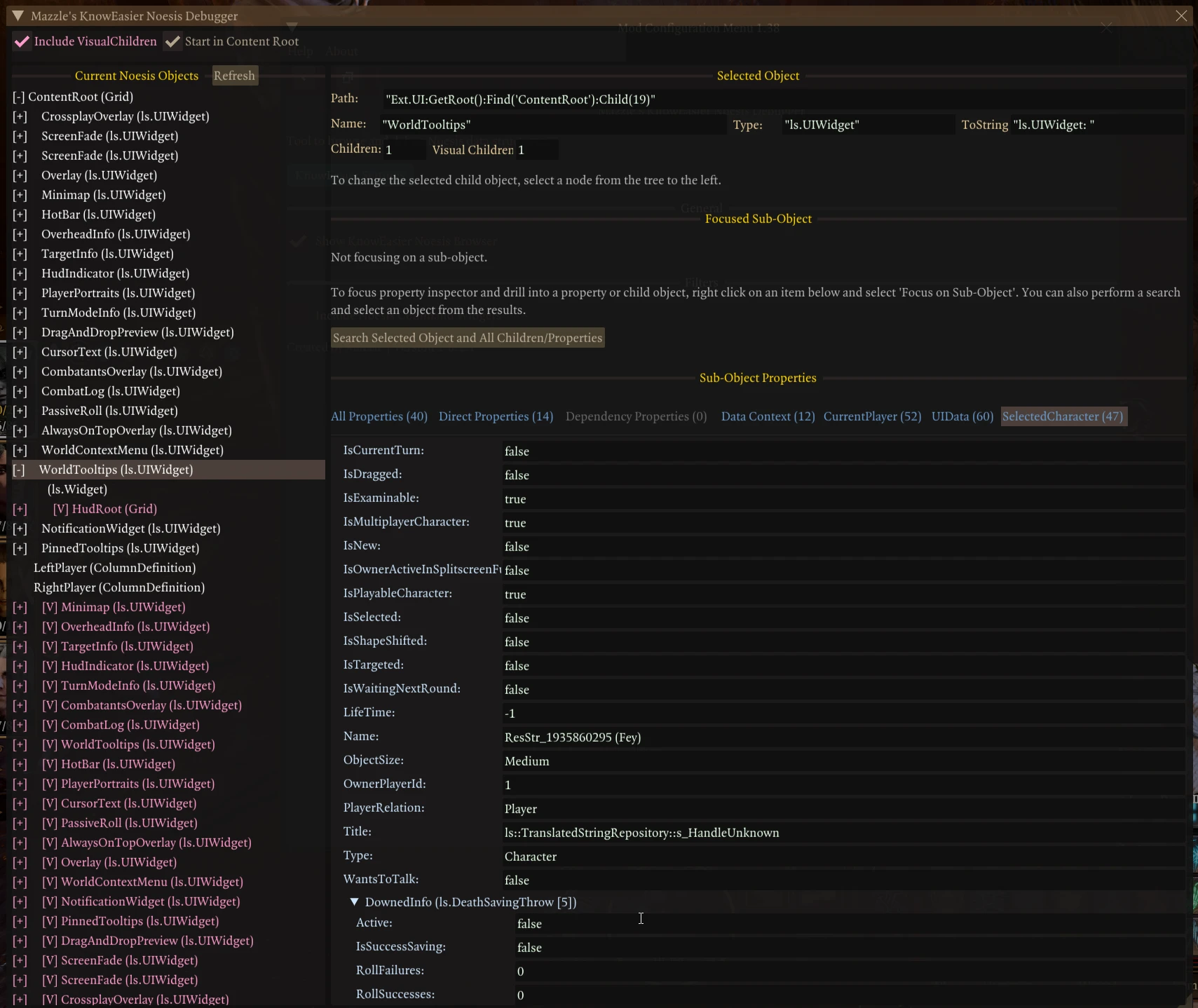
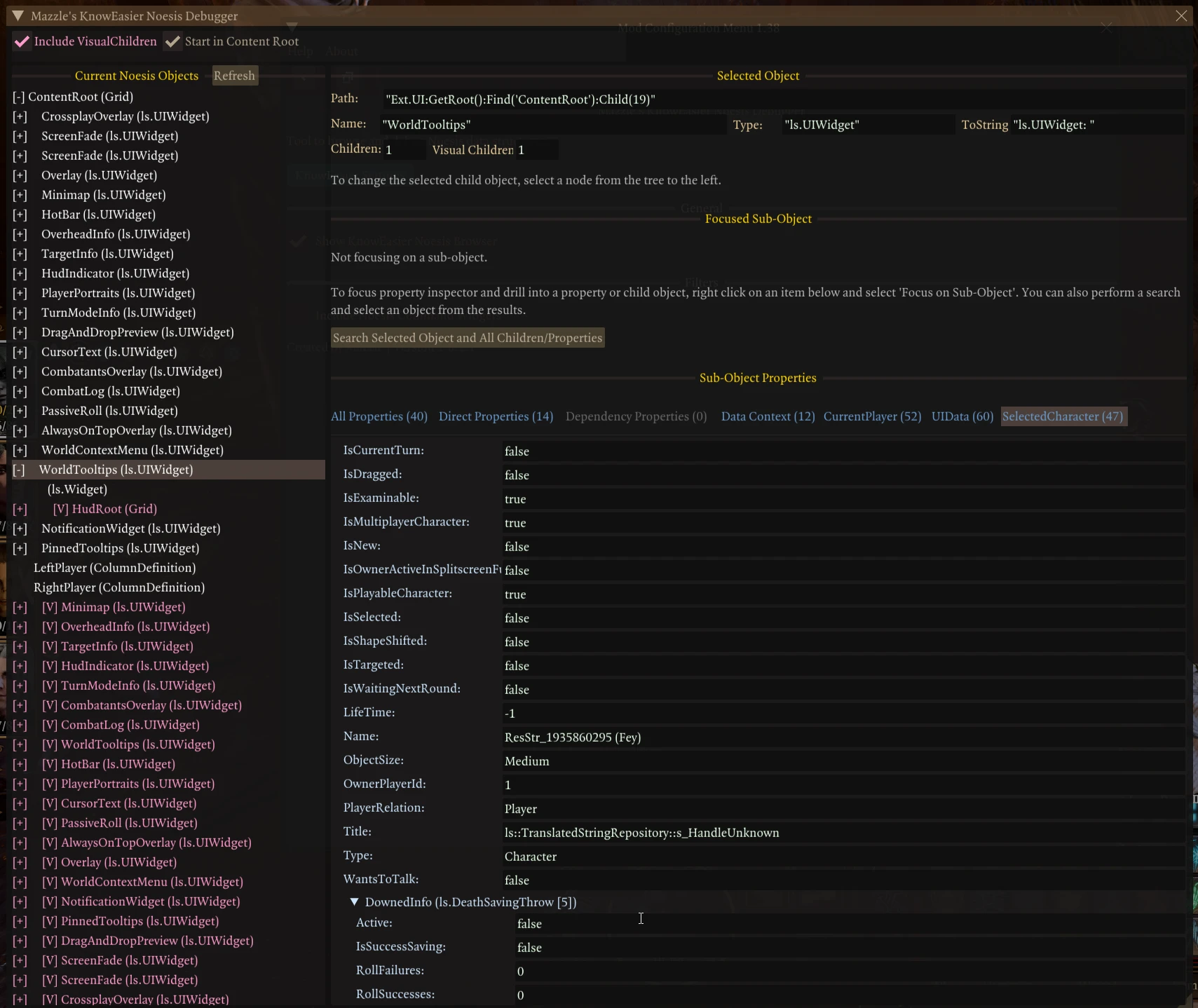
[color=#00ffff][size=4]Noesis object tree on left shows all objects that currently exist in the game[/size][/color]
- By default is rooted in ContentRoot, but can also start at the main root
- Lists both children and visual childrent (optional)
[color=#00ffff][size=4]Properties Inspector on right allows you to examine any Noesis object [/size][/color]
- See all the data it contains and is linked to
- Select an object in Noesis object list
- Properties pane will then show:
- An alphabetical list of simple data properties
- An alphabetical list of all children and complex properties
[color=#00ffff][size=4]Property Inspector lets you dig deeper into the Noesis objects [/size][/color]
- Property list is a tree. You can expand the children and complex properties to dig as deep as you want.
- That can get messy, so you can also right-click on any child or complex property to set it as the new "Focused Sub-Object"
- The properties pane will now be be rooted in the sub-object you chose.
- You can reset the focused sub-object by clicking "Clear Focused Sub-Object"
[color=#00ffff][size=4]Property view has tabs to let you find the locations with the good stuff more easily[/size][/color]
- All Properties tab shows everything
- Direct properties tab shows properties that are specific to this object
- Dependency properties tab shows properties that ?
- Data Context tab will take you right to the objects Data Context object if it has one
[color=#00ffff][size=4]Search live Noesis data to quickly find where the UI stores information![/size][/color]
- Click on button titled "Search Focused Sub-Object and All Children/Properties" to open the search window
- Enter text to search for and adjust settings (include visual children, case-senstive, exact match, search depth)
- Run search and matches will appear in a pane below the search parameters
- Click on a match to see detailed information on the right about the object and which property held the match
- Full path from UI root to found object will be presented as a series of buttons, with each object on the path having its own button.
- Click on any button to set that object as the Focused Sub-Object of the main browser.
- You can then return to the browser window to dig deeper.
- If it works as designed, it should search everything including the localized text pointed to by string handles.
[img]https://staticdelivery.nexusmods.com/mods/3474/images/19849/19849-1764302804-99147045.png[/img]
[color=#00ffff][size=4]Watch any Noesis path[/size][/color]
[list]
[]Will report when an object at that path is created, destroyed or has its value changed[/]
[]Right-click on any item and choose "Watch this property"[/]
[/list][color=#00ffff]
[size=4]Subscribe to Noesis events[/size][/color]
[list]
[]Right click and choose "Subscribe to all events" or "Subscribe to specific events"[/]
[/list][color=#00ffff]
[size=4]Now shows both an index-based path and names-based path for every object[/size][/color]
[list]
[]Index-based path always uses Child() and VisualChild() with specific indices[/]
[]Name-based path shows the name of the child object, so that your code can more reliably find the object.[/]
[]Replace FindChildWithName(<name>) and FindVisualChildWithName(<name>) with your own code to iterate through children to find the one with the matching name.[/]
[/list][color=#00ffff]
[size=4]Execute any Noesis command[/size][/color]
[list]
[]Right-click and choose "Execute()"[/]
[]"CanExecute()" is also available[/]
[]Be careful. If the command requires parameters that are not properly set up, BG3 may crash.[/]
[/list][color=#00ffff]
[size=4]Children in Noesis object list are now numbered based on their Children or VisualChildren index
Trace Window[/size][/color]
- Shows log of watch and Noesis events
- Has tabs that let you manage subscriptions and watches
[color=#00ffff][size=4]Can handle dynamic nature of Noesis data[/size][/color]
- Always keeps track of paths to objects so that it can re-fetch Noesis objects at operation time to avoid stale references.
- All paths to Noesis object can be copied to clipboard.
- More pcalls than you can shake a stick at. Content refreshed on demand.
[quote][color=#ffff00][size=5][b]Credits[/b][/size][/color][/quote]
[list]
[]Mod wouldn't be possible without [b]BG3 Script Extender[/b] by Norbyte.[/]
[]A big thanks to Focus for his help and sharing his Noesis utility functions with me that showed me how to work with Noesis data using SE.[/]
[/list]
[quote][center][color=#ffff00][size=5][b]My Mods[/b][/size][/color][/center]
[/quote]
Game Tools
[list]
[][size=4][url=https://www.nexusmods.com/baldursgate3/mods/21922]EZ-Manipulator[/url][/size] (gizmo to move, scale, rotate characters, items and scenery)
[][size=4][url=https://www.nexusmods.com/baldursgate3/mods/22888]Fricken FreeCam[/url][/size] (move the camera freely)
[][size=4][url=https://www.nexusmods.com/baldursgate3/mods/23675]MF Radio[/url][/size] (in game radio that can play native and downloaded music)
[][size=4][url=https://www.nexusmods.com/baldursgate3/mods/18219]RangeFinder[/url][/size] (visualizes movement ranges and attacks, plan/automate moves)[/]
[][size=4][url=https://www.nexusmods.com/baldursgate3/mods/19332]Tav's Journal[/url][/size] (create in-game journals with photos, export and share)[/]
[][size=4][url=https://www.nexusmods.com/baldursgate3/mods/19886]Tav's Clock[/url][/size] (a small clock and session timer you can place anywhere)[/]
[/list]QOL
[list]
[][size=4][url=https://www.nexusmods.com/baldursgate3/mods/19911]EZ-Undo[/url][/size] (undo all moves you made this turn)[/]
[][size=4][url=https://www.nexusmods.com/baldursgate3/mods/23194]Group Climbing Fix[/url][/size] (allows multiple characters to climb ladders at the same time)
[][size=4][url=https://www.nexusmods.com/baldursgate3/mods/23322]Level Directory[/url][/size] (lets you teleport to any level or installed custom level safely without messing up story progress)
[][size=4][url=https://www.nexusmods.com/baldursgate3/mods/23262]M&M Group Climbing Fix[/url][/size] (mac-compatible mod that allows multiple characters to climb ladders at the same time.)
[][size=4][url=https://www.nexusmods.com/baldursgate3/mods/22531]No More Mod warning[/url][/size] (suppresses mod conflict warnings)
[/list]Libraries and External Tools
[list]
[][size=4][url=https://www.nexusmods.com/baldursgate3/mods/18883]MazzleDocs[/url][/size] (library for showing pretty in-game documentation, tutorials, or full mod GUIs)[/]
[][size=4][url=https://www.nexusmods.com/baldursgate3/mods/18231]MazzleLib[/url][/size] (core library for my other mods)[/]
[][size=4][url=https://www.nexusmods.com/baldursgate3/mods/22530]My Assistant Ken[/url][/size] (library that helps other mods interface with Noesis)
[][size=4][url=https://www.nexusmods.com/baldursgate3/mods/19914]Oops All Characters (with Simple NPC/Enemy Spawner)[/url][/size] (lets you spawn most characters on any level)[/]
[][size=4][url=https://www.nexusmods.com/baldursgate3/mods/19560]Photo Hub[/url][/size] (external tool and mod that allows mods to access your screenshots and images)[/]
[][size=4][url=https://www.nexusmods.com/baldursgate3/mods/23671]Music Hub[/url][/size] (downloads and converts music and makes available to BG3)
[/list]Mods for Modders
[list]
[][size=4][url=https://www.nexusmods.com/baldursgate3/mods/22819]Court of Intense Judgment Outfit Reviewer[/url][/size] (spawns characters to let clothes modders see an outfit on all body types)
[][size=4][url=https://www.nexusmods.com/baldursgate3/mods/20512]Image Importer[/url][/size] (modding utility for importing images into mods)[/]
[][size=4][url=https://www.nexusmods.com/baldursgate3/mods/19849]KnowEasier Noesis Debugger[/url][/size] (modding utility for inspecting BG3's native GUI)[/]
[/list]
[quote][center][color=#FFFF00][size=5][b]Support This Mod[/b][/size][/color][/center]
[/quote]
[center]If you find this useful, please consider making a donation.
[url=https://ko-fi.com/mazzle][img]https://github.com/doodlum/nexusmods-widgets/blob/main/Ko-fi_40px_60fps.png?raw=true[/img][/url][/center]
[url=https://ko-fi.com/mazzle]
[/url]Also, if you like this mod, check out my other mod, [url=https://www.nexusmods.com/baldursgate3/mods/18219]RangeFinder[/url]. It's worth climbing the learning curve!
![https://staticdelivery.nexusmods.com/mods/3474/images/19849/19849-1764302803-1531240799.png[/img]](https://staticdelivery.nexusmods.com/mods/3474/images/19849/19849-1764302803-1531240799.png%5B/img%5D)
![https://staticdelivery.nexusmods.com/mods/3474/images/19849/19849-1764302804-99147045.png[/img]](https://staticdelivery.nexusmods.com/mods/3474/images/19849/19849-1764302804-99147045.png%5B/img%5D)
![https://ko-fi.com/mazzle][img]https://github.com/doodlum/nexusmods-widgets/blob/main/Ko-fi_40px_60fps.png?raw=true[/img][/url][/center]](https://ko-fi.com/mazzle%5D%5Bimg%5Dhttps://github.com/doodlum/nexusmods-widgets/blob/main/Ko-fi_40px_60fps.png?raw=true%5B/img%5D%5B/url%5D%5B/center%5D)
正在加载版本记录…
正在加载评论…
评论在新手盒子客户端中发表,这里同步展示。