Mazzle's Maps Unleashed with Location Codex
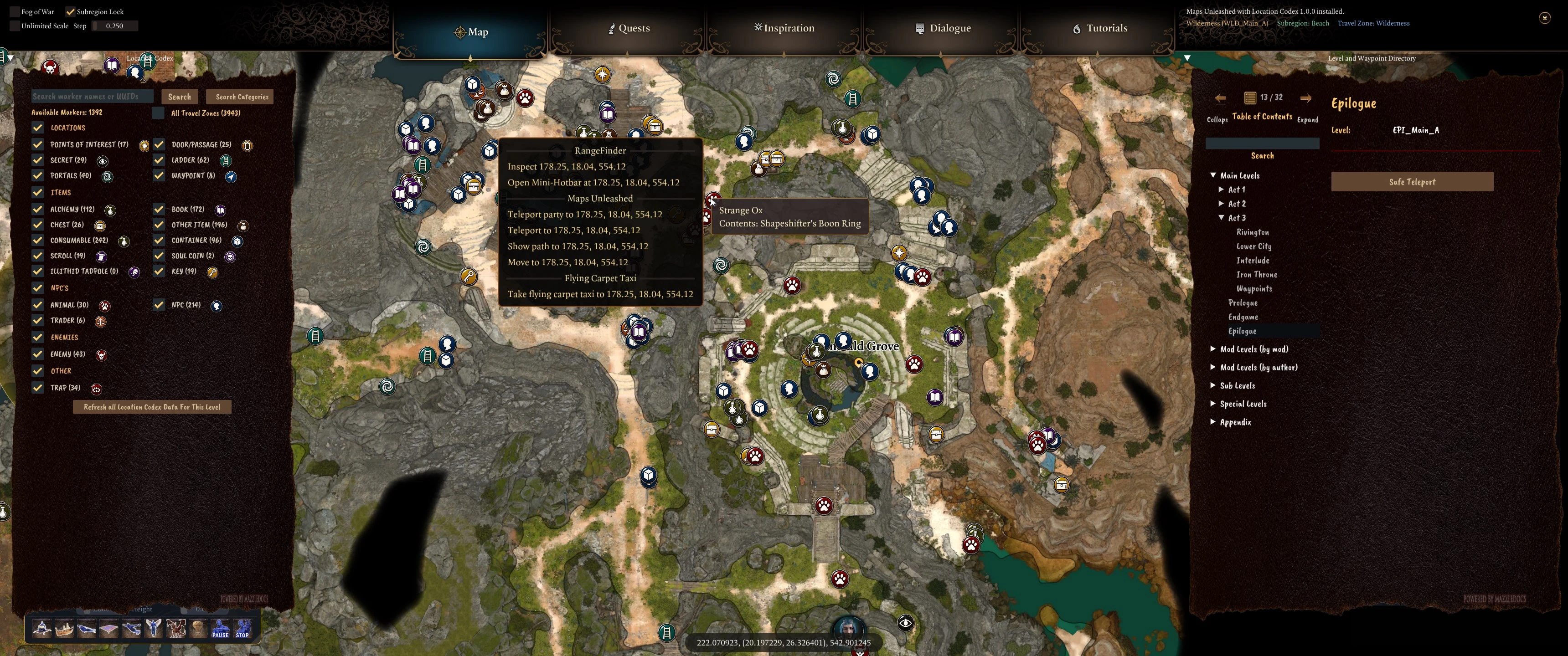
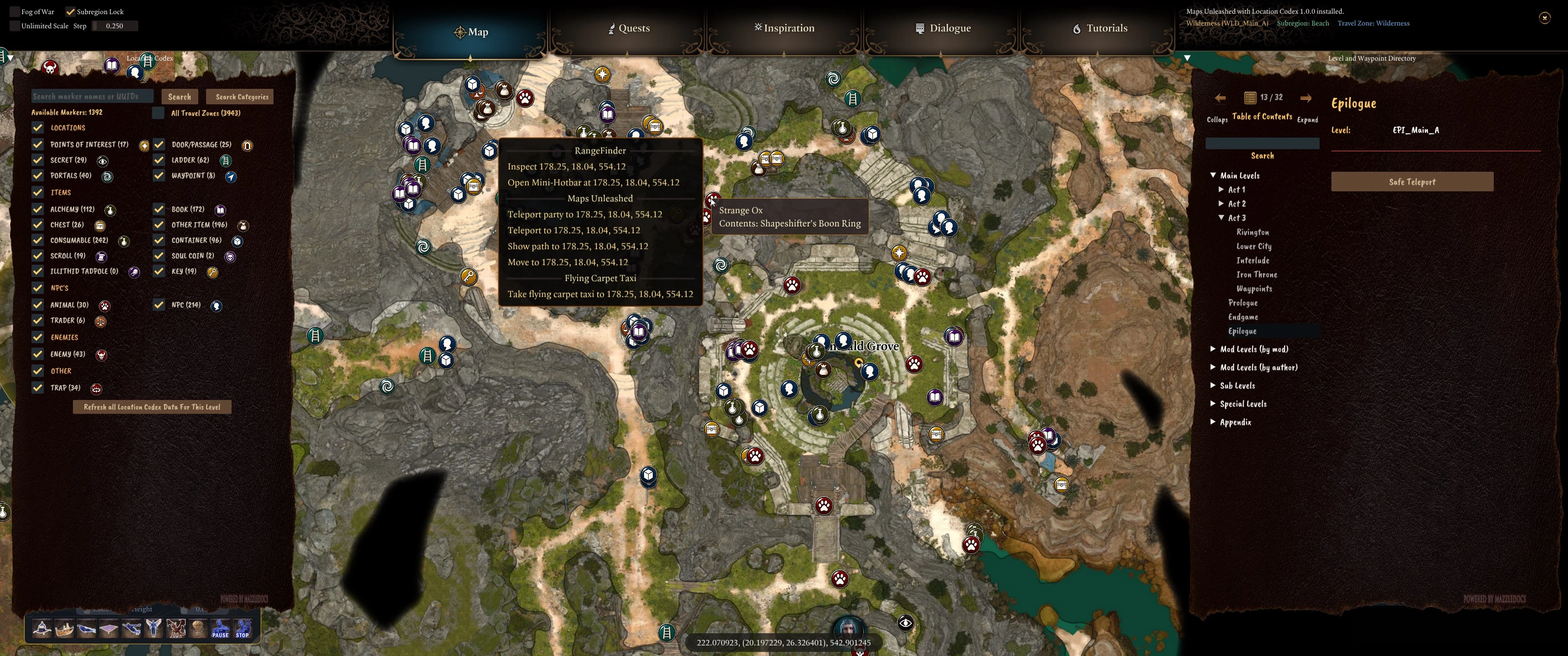
Unlock the full power of the map. Hide fog of war, unlimited zoom/pan, right-click to teleport or walk to locations. Location codex shows markers for thousands of items on the level in both map and minimap. Waypoint and Level Directory gives you quick access to any level, waypoint or modded level. Alt + Right-click in real world to teleport too!
 查看大图
查看大图[center][img]https://i.ibb.co/gbMZGFpt/2026-week-4-Fey-Labyrinths.png[/img] [/center]
[center][quote][color=#ffff00][size=6][b]Mazzle's Maps Unleashed![/b][/size][/color][/quote][/center]
[center][img width=844]https://staticdelivery.nexusmods.com/mods/3474/images/24118/24118-1785356158-1203567184.jpg[/img][/center]
Mazzle's Maps Unleashed transforms Baldur's Gate 3's journal map into a powerful exploration, search, navigation, and modding tool.
[list]
[][b]Locate anything[/b] spawned in the real world with a live, searchable Location Codex. Clear markers are shown based on categories selected. Markers will also be shown on the minimap.[/]
[][b]Browse and visit levels[/b] with a directory of all levels and waypoints, including custom modded levels. Travel through this menu does not affect story progression.[/]
[][b]Teleport to locations on the map [/b]by right-clicking .[/]
[][b]Teleport to visible locations in the the 3D world[/b] with Alt + right-click.[/]
[][b]Remove the map's normal restrictions[/b] on fog, panning, and zoom.[/]
[][b]See exact world coordinates[/b] and internal information about the current level, subregion, and Travel Zone.[/]
[/list]
Open BG3's normal journal map and the new tools appear automatically. There is no spell, hotkey, or special item required to use the map features.
[size=5][b]Location Codex[/b][/size]
The Location Codex scans the current level and builds its marker database from live game data. It can display locations, passages, secrets, ladders, portals, waypoints, books, containers, keys, scrolls, special collectibles, NPCs, traders, enemies, traps, and more.
[center][img]https://staticdelivery.nexusmods.com/mods/3474/images/24118/24118-1785356203-1073046102.png[/img][/center]
[list]
[]Choose exactly which marker categories appear on the journal map and minimap.[/]
[]Hover markers to see their names and, where available, notable contents.[/]
[]Limit the Codex to the current Travel Zone or search the whole loaded level.[/]
[]See the number of available markers in each category.[/]
[]Refresh the current level whenever NPCs move, enemies die, doors open, or loot stops sitting where you found it.[/]
[/list]
[b]Spoiler warning:[/b] the Codex can reveal secrets, enemies, loot, and locations you have not discovered normally. Leave sensitive categories unchecked and keep Fog of War visible if you want a spoiler-light playthrough.
[size=4][b]Search by Name, UUID, or Category[/b][/size]
Search by name or UUID. You can also select one or more categories and list every matching object without entering search text.
[center][img]https://staticdelivery.nexusmods.com/mods/3474/images/24118/24118-1785356208-1754718048.png[/img][/center]
Search results are grouped by marker type. Select [b]View Results[/b] to show only the matching markers, then click a result row to center the journal map on that object without changing the current zoom.
[center][img]https://staticdelivery.nexusmods.com/mods/3474/images/24118/24118-1785356208-1223638572.png[/img][/center]
[center][img]https://staticdelivery.nexusmods.com/mods/3474/images/24118/24118-1785356213-1392960169.png[/img][/center]
[size=5][b]Level and Waypoint Directory[/b][/size]
The Level and Waypoint Directory organizes BG3's maps and detected mod levels into a browsable interface.
[center][img]https://staticdelivery.nexusmods.com/mods/3474/images/24118/24118-1785356203-305523026.png[/img][/center]
[list]
[][b]Main Levels:[/b] major story maps organized by prologue, act, and endgame, with relevant waypoint buttons.[/]
[][b]Mod Levels by Mod or Author:[/b] detected custom maps grouped by the mod or creator that supplied them.[/]
[][b]Sub Levels:[/b] vanilla non-main levels grouped by their internal level-name prefix.[/]
[][b]Special Levels:[/b] global, system, cinematic, test, and otherwise uncategorized maps.[/]
[/list]
Level buttons use BG3's party transition system. When you leave a recognized main-story level, Maps Unleashed records that level and each party member's position. The directory can then offer [b]Safe Teleport Back To Main Story[/b] and restore the party to the saved location.
[size=5][b]Map Right-Click Actions[/b][/size]
Right-click a point on the journal map to open the Maps Unleashed action menu.
[center][img]https://staticdelivery.nexusmods.com/mods/3474/images/24118/24118-1785356198-2084108023.png[/img][/center]
[list]
[][b]Teleport Party:[/b] teleport all non-summon player party members to the selected coordinate.[/]
[][b]Teleport:[/b] teleport only the currently controlled character.[/]
[][b]Show Path:[/b] draw the route the controlled character would take without moving anyone.[/]
[][b]Move:[/b] ask BG3 to generate a route and make the controlled character follow it.[/]
[][b]Clear Displayed Paths:[/b] remove paths previously added by Maps Unleashed.[/]
[/list]
Some map positions contain several valid elevations. When that happens, the menu provides separate coordinate choices so you can select the correct floor. Destinations that are not walkable or otherwise problematic are marked b[/b].
[size=5][b]World Right-Click Teleport[/b][/size]
Hold [b]Alt[/b] and right-click walkable ground in the 3D world to teleport the controlled character or the party directly to that position.
[center][img]https://staticdelivery.nexusmods.com/mods/3474/images/24118/24118-1785356213-1311307701.png[/img][/center]
The required modifier can be changed in MazzleLib's MCM settings.
[center][img]https://staticdelivery.nexusmods.com/mods/3474/images/24118/24118-1785356217-860557345.png[/img][/center]
[size=5][b]Unlocked Map Controls[/b][/size]
[center][img]https://staticdelivery.nexusmods.com/mods/3474/images/24118/24118-1785356243-1914763450.png[/img][/center]
[list]
[][b]Fog of War:[/b] hide the journal map's shrouded-room and unexplored-area layers, including disconnected areas that are normally hidden. This is only a visual override; it does not mark anything as explored or change save data.[/]
[][b]Subregion Lock:[/b] disable BG3's normal drag restriction and pan across the full loaded level.[/]
[][b]Unlimited Scale:[/b] expand the zoom range from 0.25 to 30 and choose how much each mouse-wheel step changes the scale.[/]
[/list]
The top-right status panel shows the display name and internal name of the loaded level, followed by the current subregion and MazzleLib Travel Zone.
[center][img]https://staticdelivery.nexusmods.com/mods/3474/images/24118/24118-1785356243-1000469820.png[/img][/center]
The bottom coordinate display follows the map cursor and shows the corresponding world X, Y, and Z coordinates. Y is elevation, which is especially useful when several floors overlap.
[center][img]https://staticdelivery.nexusmods.com/mods/3474/images/24118/24118-1785356198-597078054.png[/img][/center]
Left-click or right-click the coordinate display to toggle Fog of War quickly.
[size=5][b]Built-In Documentation[/b][/size]
Maps Unleashed includes a complete in-game manual powered by MazzleDocs.
[list]
[]A documentation book is added to your inventory.[/]
[]You can destroy the book if you do not want to carry it.[/]
[]If you need another book, click the book button beside the Maps Unleashed entry in MazzleDocs document browser.[/]
[/list]
[size=5][b]Requirements[/b][/size]
[list]
[][url=https://github.com/Norbyte/bg3se/releases]Baldur's Gate 3 Script Extender[/url], version 29 or newer[/]
[][url=https://www.nexusmods.com/baldursgate3/mods/18231]MazzleLib[/url][/]
[][url=https://www.nexusmods.com/baldursgate3/mods/18883]Mazzle's EZ-Documentation (MazzleDocs)[/url][/]
[][url=https://www.nexusmods.com/baldursgate3/mods/9162]Mod Configuration Menu (MCM)[/url][/]
[/list]
[size=5][b]Installation[/b][/size]
[list=1]
[]Install the four requirements listed above.[/]
[]Install the Maps Unleashed .pak with BG3 Mod Manager or another BG3-compatible mod manager.[/]
[]Enable the mod and export your load order to the game.[/]
[]Load a save and open the normal journal map.[/]
[/list]
Keep MCM, MazzleLib, and MazzleDocs before Maps Unleashed in the load order.
[size=5][b]Settings[/b][/size]
You can
[list]
[][b]Enable Location Codex[/b][/]
[][b]Enable Level and Waypoint Directory[/b][/]
[/list]
from the MCM settings. The coordinate display, map status, fog controls, expanded zoom, subregion unlocking, and right-click actions remain available even if both options are disabled.
The world right-click modifier is configured through MazzleLib's MCM settings.
[quote][center][color=#ffff00][size=5][b]Credits[/b][/size][/color][/center]
[/quote]
[list]
[]Level travel interface utilizes my Level Directory mod, which incorporated [b]For_Kiramay's excellent SafeTravel scripts[/b]. I don't really understand how they work, but they protect your story progression from being affected by teleports to modded levels.[/]
[]This mod wouldn't be possible without Norbyte's Script Extender.[/]
[]And a big thanks to Lyxxy who repeatedly tested this mod for me! And nzx for suggesting I use live data instead of a curated database.
[/]
[/list][quote][center][color=#ffff00][size=5][b]My Mods[/b][/size][/color][/center]
[/quote]
Game Tools
[list]
[][size=4][url=https://www.nexusmods.com/baldursgate3/mods/21922]EZ-Manipulator[/url][/size] (gizmo to move, scale, rotate characters, items and scenery)[/]
[][size=4][url=https://www.nexusmods.com/baldursgate3/mods/22888]Fricken FreeCam[/url][/size] (move the camera freely)[/]
[][size=4][url=https://www.nexusmods.com/baldursgate3/mods/23675]MF Radio[/url][/size] (in game radio that can play native and downloaded music)[/]
[][size=4][url=https://www.nexusmods.com/baldursgate3/mods/18219]RangeFinder[/url][/size] (visualizes movement ranges and attacks, plan/automate moves)[/]
[][size=4][url=https://www.nexusmods.com/baldursgate3/mods/19332]Tav's Journal[/url][/size] (create in-game journals with photos, export and share)[/]
[][size=4][url=https://www.nexusmods.com/baldursgate3/mods/19886]Tav's Clock[/url][/size] (a small clock and session timer you can place anywhere)[/]
[/list]QOL
[list]
[][size=4][url=https://www.nexusmods.com/baldursgate3/mods/19911]EZ-Undo[/url][/size] (undo all moves you made this turn)[/]
[][size=4][url=https://www.nexusmods.com/baldursgate3/mods/23194]Group Climbing Fix[/url][/size] (allows multiple characters to climb ladders at the same time)[/]
[][size=4][url=https://www.nexusmods.com/baldursgate3/mods/23322]Level Directory[/url][/size] (lets you teleport to any level or installed custom level safely without messing up story progress)[/]
[][size=4][url=https://www.nexusmods.com/baldursgate3/mods/23262]M&M Group Climbing Fix[/url][/size] (mac-compatible mod that allows multiple characters to climb ladders at the same time.)[/]
[][size=4][url=https://www.nexusmods.com/baldursgate3/mods/22531]No More Mod warning[/url][/size] (suppresses mod conflict warnings)[/]
[/list]Libraries and External Tools
[list]
[][size=4][url=https://www.nexusmods.com/baldursgate3/mods/18883]MazzleDocs[/url][/size] (library for showing pretty in-game documentation, tutorials, or full mod GUIs)[/]
[][size=4][url=https://www.nexusmods.com/baldursgate3/mods/18231]MazzleLib[/url][/size] (core library for my other mods)[/]
[][size=4][url=https://www.nexusmods.com/baldursgate3/mods/22530]My Assistant Ken[/url][/size] (library that helps other mods interface with Noesis)[/]
[][size=4][url=https://www.nexusmods.com/baldursgate3/mods/19914]Oops All Characters (with Simple NPC/Enemy Spawner)[/url][/size] (lets you spawn most characters on any level)[/]
[][size=4][url=https://www.nexusmods.com/baldursgate3/mods/19560]Photo Hub[/url][/size] (external tool and mod that allows mods to access your screenshots and images)[/]
[][size=4][url=https://www.nexusmods.com/baldursgate3/mods/23671]Music Hub[/url][/size] (downloads and converts music and makes available to BG3)[/]
[/list]Mods for Modders
[list]
[][size=4][url=https://www.nexusmods.com/baldursgate3/mods/22819]Court of Intense Judgment Outfit Reviewer[/url][/size] (spawns characters to let clothes modders see an outfit on all body types)[/]
[][size=4][url=https://www.nexusmods.com/baldursgate3/mods/20512]Image Importer[/url][/size] (modding utility for importing images into mods)[/]
[][size=4][url=https://www.nexusmods.com/baldursgate3/mods/19849]KnowEasier Noesis Debugger[/url][/size] (modding utility for inspecting BG3's native GUI)[/]
[/list]
[quote][center][color=#FFFF00][size=5][b]Support This Mod[/b][/size][/color][/center]
[/quote]
[center]If you find this useful, please consider making a donation.
[url=https://ko-fi.com/mazzle][img]https://github.com/doodlum/nexusmods-widgets/blob/main/Ko-fi_40px_60fps.png?raw=true[/img][/url][/center]
Also, if you like this mod, check out my other mod, [url=https://www.nexusmods.com/baldursgate3/mods/18219]RangeFinder[/url]. It's got some capabilities related to this one and worth climbing the learning curve!
![https://i.ibb.co/gbMZGFpt/2026-week-4-Fey-Labyrinths.png[/img]](https://i.ibb.co/gbMZGFpt/2026-week-4-Fey-Labyrinths.png%5B/img%5D)
![https://staticdelivery.nexusmods.com/mods/3474/images/24118/24118-1785356158-1203567184.jpg[/img][/center]](https://staticdelivery.nexusmods.com/mods/3474/images/24118/24118-1785356158-1203567184.jpg%5B/img%5D%5B/center%5D)
![https://staticdelivery.nexusmods.com/mods/3474/images/24118/24118-1785356203-1073046102.png[/img][/center]](https://staticdelivery.nexusmods.com/mods/3474/images/24118/24118-1785356203-1073046102.png%5B/img%5D%5B/center%5D)
![https://staticdelivery.nexusmods.com/mods/3474/images/24118/24118-1785356208-1754718048.png[/img][/center]](https://staticdelivery.nexusmods.com/mods/3474/images/24118/24118-1785356208-1754718048.png%5B/img%5D%5B/center%5D)
![https://staticdelivery.nexusmods.com/mods/3474/images/24118/24118-1785356208-1223638572.png[/img][/center]](https://staticdelivery.nexusmods.com/mods/3474/images/24118/24118-1785356208-1223638572.png%5B/img%5D%5B/center%5D)
![https://staticdelivery.nexusmods.com/mods/3474/images/24118/24118-1785356213-1392960169.png[/img][/center]](https://staticdelivery.nexusmods.com/mods/3474/images/24118/24118-1785356213-1392960169.png%5B/img%5D%5B/center%5D)
![https://staticdelivery.nexusmods.com/mods/3474/images/24118/24118-1785356203-305523026.png[/img][/center]](https://staticdelivery.nexusmods.com/mods/3474/images/24118/24118-1785356203-305523026.png%5B/img%5D%5B/center%5D)
![https://staticdelivery.nexusmods.com/mods/3474/images/24118/24118-1785356198-2084108023.png[/img][/center]](https://staticdelivery.nexusmods.com/mods/3474/images/24118/24118-1785356198-2084108023.png%5B/img%5D%5B/center%5D)
![https://staticdelivery.nexusmods.com/mods/3474/images/24118/24118-1785356213-1311307701.png[/img][/center]](https://staticdelivery.nexusmods.com/mods/3474/images/24118/24118-1785356213-1311307701.png%5B/img%5D%5B/center%5D)
![https://staticdelivery.nexusmods.com/mods/3474/images/24118/24118-1785356217-860557345.png[/img][/center]](https://staticdelivery.nexusmods.com/mods/3474/images/24118/24118-1785356217-860557345.png%5B/img%5D%5B/center%5D)
![https://staticdelivery.nexusmods.com/mods/3474/images/24118/24118-1785356243-1914763450.png[/img][/center]](https://staticdelivery.nexusmods.com/mods/3474/images/24118/24118-1785356243-1914763450.png%5B/img%5D%5B/center%5D)
![https://staticdelivery.nexusmods.com/mods/3474/images/24118/24118-1785356243-1000469820.png[/img][/center]](https://staticdelivery.nexusmods.com/mods/3474/images/24118/24118-1785356243-1000469820.png%5B/img%5D%5B/center%5D)
![https://staticdelivery.nexusmods.com/mods/3474/images/24118/24118-1785356198-597078054.png[/img][/center]](https://staticdelivery.nexusmods.com/mods/3474/images/24118/24118-1785356198-597078054.png%5B/img%5D%5B/center%5D)
![https://ko-fi.com/mazzle][img]https://github.com/doodlum/nexusmods-widgets/blob/main/Ko-fi_40px_60fps.png?raw=true[/img][/url][/center]](https://ko-fi.com/mazzle%5D%5Bimg%5Dhttps://github.com/doodlum/nexusmods-widgets/blob/main/Ko-fi_40px_60fps.png?raw=true%5B/img%5D%5B/url%5D%5B/center%5D)
正在加载版本记录…
正在加载评论…
评论在新手盒子客户端中发表,这里同步展示。