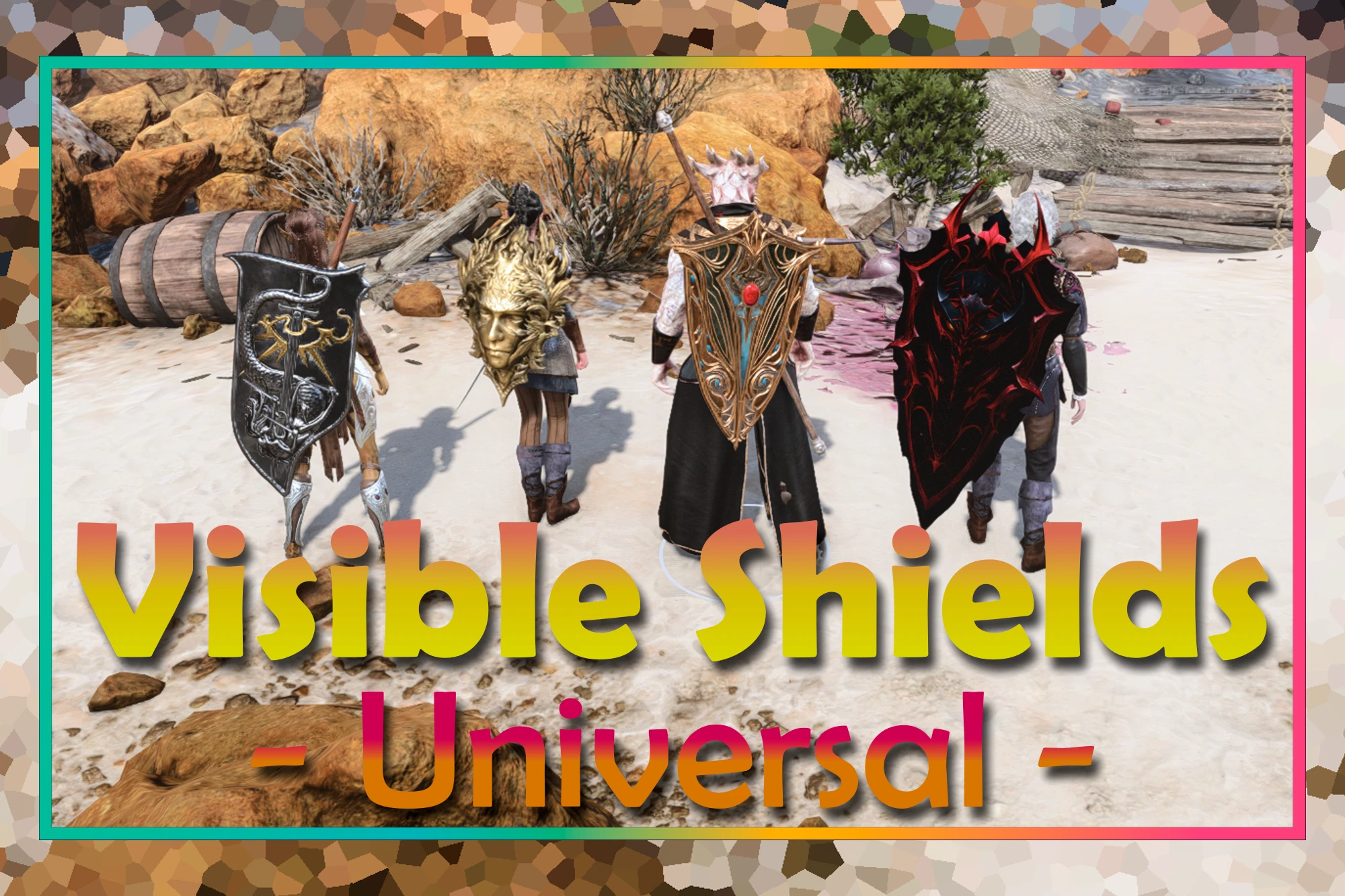
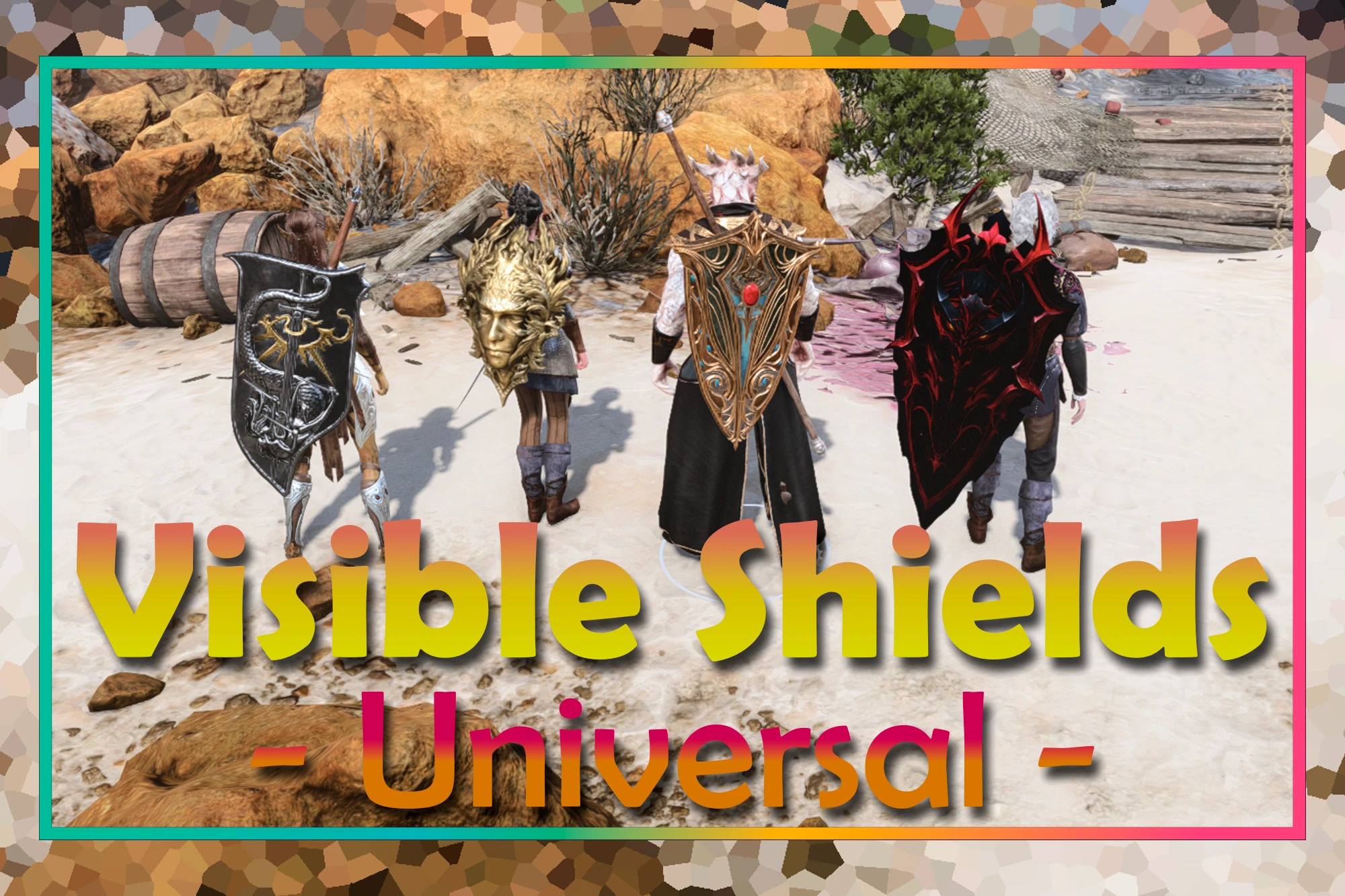
Visible Shields and Weapons - Universal (Patch 8 Compatible)
Shields stay on your back when your weapons are away. Any shield, vanilla or modded -- no item swap, no stat changes, nothing to configure.
 查看大图
查看大图[quote][center][font=Trebuchet MS][size=5][b]" [color=#cc0000]ἢ τὰν ἢ ἐπὶ τᾶς (Come back with your shield — or on it.)[/color]"[/b][/size]
[b](방패를 들고 돌아오거나, 그 위에 얹혀 돌아오거라.)[/b][/font][/center]
[right][font=Trebuchet MS]— A Spartan mother, as recorded by Plutarch, "Sayings of Spartan Women" (Moralia)
( 플루타르코스가 전하는 스파르타 어머니의 말 )[/font][/right]
[/quote][right][/right]
[font=Trebuchet MS][b]한국어 설명 보기 (Korean description)[/b][/font]
[spoiler]
[center][font=Trebuchet MS][color=#cc0000][size=6][b]개요[/b][/size][/color][/font][/center]
[line]
[font=Trebuchet MS]발더스 게이트 3에서 무기를 집어넣으면 [b]방패도 같이 사라집니다[/b]. 등에는 검만 남고, 방패는 어디에도 없습니다.[/font]
[font=Trebuchet MS]이 모드는 방패를 등에 남겨 둡니다. 방패를 다른 아이템으로 바꾸지 않고, 스탯을 건드리지 않고, 대응 목록도 두지 않습니다. [b]바닐라 방패든 모드 방패든 그냥 됩니다.[/b][/font]
[center][font=Trebuchet MS][color=#cc0000][size=6][b]비지블 쉴드의 역사[/b][/size][/color][/font][/center]
[line]
[font=Trebuchet MS][b][size=4][color=#f1c232]레거시 방식[/color] ([url=https://www.nexusmods.com/baldursgate3/mods/492]Visible Shields[/url])[/size][/b][/font]
[font=Trebuchet MS]발더스 게이트 3에서는 모든 장비가 수납될 때 캐릭터 골격의 어느 지점에 붙을지를 지정받습니다. 초기의 비지블 쉴드는 그 지점을 방패에 지정해 주는 것만으로 등에 방패를 올렸습니다. 데이터 한 곳이면 되는 일이었고, 그래서 깔끔했습니다.[/font]
[font=Trebuchet MS]그러다 패치 8에서, 알려지지 않은 이유로, 라리안이 [b]방패에 한해 "어디에 붙일까"를 묻는 경로를 엔진에서 없앴습니다[/b]. 지정할 자리 자체가 사라졌으니 이 방식은 그대로 폐기됐습니다.[/font]
[font=Trebuchet MS][b][size=4][color=#f1c232]보조무기 방식[/color] ([url=https://www.nexusmods.com/baldursgate3/mods/18667]Visible Shields for Patch 8[/url])[/size][/b][/font]
[font=Trebuchet MS]그 뒤에 나온 방법은 우회였습니다. 방패 대신 [b]방패의 모양과 성능을 그대로 지닌 보조무기[/b]를 쥐여 주는 것입니다. 무기는 여전히 부착 지점을 묻기 때문에 등에 올라갑니다.[/font]
[font=Trebuchet MS][b]영리한 해법이고, 지금도 유효합니다.[/b] 방패의 성능도 충실히 옮겨 왔습니다. 다만 게임이 보기에 그것은 방패가 아니라 방패 모양의 보조무기이므로 대가가 따릅니다 — 방패를 다루는 다른 모드와의 완전한 호환을 보장할 수는 없고(대부분은 됩니다), 바닐라 방패는 그 모드가 따로 만든 변형본을 써야 하며, 모드 방패는 그 시스템에 맞춰 미리 만들어진 호환본이 있어야 합니다.[/font]
[font=Trebuchet MS][b][color=#cc0000][size=4]그리고 이 모드[/size][/color][size=4] (Visible Shields - Universal)[/size][/b][/font]
[font=Trebuchet MS]그리고 이 모드는 아이템을 아예 건드리지 않습니다. 방패는 방패인 채로 둡니다.[/font]
[font=Trebuchet MS]데이터에 경로를 적어 두고 엔진이 읽어 주기를 기대하지 않습니다. 그 읽는 경로는 이미 사라졌으니까요. 대신 [b]스크립트 후킹으로 엔진에 직접 적어 넣습니다.[/b][/font]
[font=Trebuchet MS]그래서 치환도, 변형본도, 대응 목록도 없습니다. 게임이 방패라고 아는 것은 그대로 방패이고, 어떤 방패가 나오든 그 자리에서 판정해서 올립니다. [b]바닐라 방패 전부가 그대로 되고, 모드 방패도 대응본을 기다릴 필요가 없습니다.[/b][/font]
[center][font=Trebuchet MS][color=#cc0000][size=6][b]기능[/b][/size][/color][/font][/center]
[line]
[font=Trebuchet MS][b][size=4]1. [color=#f1c232]아무 방패나[/color][/size][/b][/font]
[font=Trebuchet MS]대응 목록이 없습니다. 보조손에 든 것이 방패인지를 [b]그 자리에서 판정[/b]하고, 방패면 그 방패의 생김새를 그대로 등에 올립니다.[/font]
[list]
[][font=Trebuchet MS][b]모드 방패도 그대로[/b] — 새 방패가 나와도 패치를 기다릴 필요가 없습니다.[/font][/]
[][font=Trebuchet MS][b]보조손의 단검·쌍수 무기는 건드리지 않습니다[/b] — 방패가 아닌 것을 등에 붙이지 않도록 두 갈래로 확인합니다.[/font][/]
[/list]
[font=Trebuchet MS][b][size=4]2. [color=#f1c232]파티도, 지나가는 NPC도[/color][/size][/b][/font]
[font=Trebuchet MS]주인공만이 아닙니다. [b]동행 중인 동료, 야영지에서 기다리는 동료, 그리고 길에서 마주치는 NPC[/b]까지 같은 규칙으로 처리합니다. 방패를 든 경비병은 방패를 등에 지고 서 있습니다.[/font]
[list]
[][font=Trebuchet MS][b]마주치는 대로[/b] — 거리 제한을 두지 않습니다. 화면에 나타나는 순간 처리되고, 시야를 벗어나면 조용히 정리됩니다.[/font][/]
[][font=Trebuchet MS][b]컷신에서도 보입니다.[/b] (일부 컷신에서는 방패가 보이지 않습니다.)[/font][/]
[/list]
[font=Trebuchet MS][b][size=4]3. [color=#f1c232]아이템은 그대로[/color][/size][/b][/font]
[font=Trebuchet MS]방패를 [b]방패의 외형을 한 보조무기 변형으로 바꾸지 않습니다.[/b] 원래의 방패를 그대로 착용한 채로, 그리기 요청 하나만 고쳐 씁니다.[/font]
[list]
[][font=Trebuchet MS][b]게임플레이 영향 0[/b] — 방어도도, 특성도, 판정도 그대로입니다.[/font][/]
[][font=Trebuchet MS][b]설정할 것 없습니다[/b] — 설치하면 바로 작동하고, 보이는 것을 바꾸고 싶을 때만 메뉴를 쓰면 됩니다.[/font][/]
[/list]
[font=Trebuchet MS][b][size=4]4. [color=#f1c232]원한다면 두 세트 다[/color][/size][/b][/font]
[font=Trebuchet MS]게임은 손에 든 무기 세트만 그립니다. 이 모드는 반대쪽 세트까지 그릴 수 있어서, [b]검과 활이 동시에 등에 붙습니다[/b]. MCM의 "등에 보이는 것"에서 고르세요.[/font]
[list]
[][font=Trebuchet MS][b]근거리 + 방패 / 원거리[/b] — 방패가 근거리 세트에만 따라다닙니다. 기본값이고, 게임 자체의 동작과 같습니다.[/font][/]
[][font=Trebuchet MS][b]근거리 + 방패 / 원거리 + 방패[/b] — 어느 세트에서든 방패가 등에 남습니다.[/font][/]
[][font=Trebuchet MS][b]근거리 + 원거리 + 방패 / 근거리 + 원거리 + 방패[/b] — 두 무기 세트와 방패를 항상 함께. [b]파티원만[/b] 적용되고, 그 외 캐릭터는 방패만 보입니다.[/font][/]
[][font=Trebuchet MS][b]대화 중[/b] — 게임이 손에 든 세트만 다시 그려서 반대쪽 세트는 안 보입니다. 무기 세트를 한 번 바꾸면 돌아옵니다.[/font][/]
[/list]
[center][font=Trebuchet MS][color=#cc0000][size=6][b]노트[/b][/size][/color][/font][/center]
[line]
[list]
[][font=Trebuchet MS][b]소환수는 대상이 아닙니다.[/b][/font][/]
[][font=Trebuchet MS][b]멀티플레이는 검증하지 않았습니다.[/b] 지금은 싱글 플레이에서 써 주세요.[/font][/]
[][font=Trebuchet MS]갱신될 때 방패가 손에 한 번 쥐였다 등으로 붙는 것이 보일 수 있습니다. 엔진이 그 자리를 만들어 주는 유일한 방법이라 남겨 두었습니다.[/font][/]
[][font=Trebuchet MS]등에 안 올라가는 방패를 만나시면 알려 주세요. [b]"어떤 방패든"이 이 모드의 전제[/b]라, 안 되는 방패가 하나 나오면 그게 첫 제보입니다.[/font][/]
[/list]
[center][font=Trebuchet MS][color=#cc0000][size=6][b]요구 사항[/b][/size][/color][/font][/center]
[line]
[list]
[][font=Trebuchet MS][b][url=https://github.com/Norbyte/bg3se]Script Extender[/url][/b] — 필수[/font][/]
[][font=Trebuchet MS][b][url=https://www.nexusmods.com/baldursgate3/mods/9162]Mod Configuration Menu[/url][/b] — 필수[/font][/]
[/list][font=Trebuchet MS]그 외에는 없습니다.[/font]
[center][font=Trebuchet MS][color=#cc0000][size=6][b]설치 & 제거[/b][/size][/color][/font][/center]
[line]
[font=Trebuchet MS][size=3][b]설치[/b][/size][/font]
[font=Trebuchet MS]모드 매니저로 설치하고 게임을 실행하면 됩니다. [b]안내창은 없습니다[/b] — 세이브를 불러오면 그때부터 등에 방패가 있습니다. 등에 보이는 것은 나중에 MCM에서 바꿀 수 있습니다.[/font]
[font=Trebuchet MS][size=3][b]제거[/b][/size][/font]
[font=Trebuchet MS]아이템이나 커스텀 템플릿을 만들지 않으므로 [b]언제든 그냥 지우셔도 됩니다.[/b] 사전 정리 작업은 필요 없습니다.[/font][/spoiler]
[center][img width=600]https://staticdelivery.nexusmods.com/mods/3474/images/24766/24766-1788410133-1556155317.gif[/img][/center]
[center][font=Trebuchet MS][color=#cc0000][size=6][b]Overview[/b][/size][/color][/font][/center]
[line]
[font=Trebuchet MS]In Baldur's Gate 3, putting your weapons away [b]takes the shield with them[/b]. The sword stays on your back; the shield is simply gone.[/font]
[font=Trebuchet MS]This mod leaves it there. It does not swap your shield for another item, it does not touch its stats, and it keeps no list of supported shields. [b]Vanilla or modded, it just works.[/b][/font]
[center][font=Trebuchet MS][color=#cc0000][size=6][b]A Short History of Visible Shields[/b][/size][/color][/font][/center]
[line]
[font=Trebuchet MS][b][size=4][color=#f1c232]The legacy approach[/color] ([url=https://www.nexusmods.com/baldursgate3/mods/492]Visible Shields[/url])[/size][/b][/font]
[font=Trebuchet MS]In Baldur's Gate 3, every piece of equipment is told where on the character's skeleton it attaches when it is put away. The early Visible Shields did nothing more than name that spot for shields, and the shield went on the back. One place in the data, and it was clean.[/font]
[font=Trebuchet MS]Then, in Patch 8 and for reasons never made public, Larian [b]removed the path that asks where a shield attaches[/b]. There was no longer a spot to name, and that approach died with it.[/font]
[font=Trebuchet MS][b][size=4][color=#f1c232]The off-hand weapon approach[/color] ([url=https://www.nexusmods.com/baldursgate3/mods/18667]Visible Shields for Patch 8[/url])[/size][/b][/font]
[font=Trebuchet MS]What came next went around the problem. Instead of a shield, you are handed [b]an off-hand weapon carrying the shield's look and its stats[/b]. Weapons are still asked where they attach, so it goes on the back.[/font]
[font=Trebuchet MS][b]It is a clever solution and it still works today[/b], and it carries the shield's numbers faithfully. But as far as the game is concerned it is not a shield -- it is an off-hand weapon shaped like one, and that costs something. Full compatibility with other shield-aware mods cannot be guaranteed (most are fine), vanilla shields have to go through variants that mod makes itself, and a modded shield only works if someone has already built a compatible version on top of that system.[/font]
[font=Trebuchet MS][b][color=#cc0000][size=4]And this mod[/size][/color][size=4] (Visible Shields - Universal)[/size][/b][/font]
[font=Trebuchet MS]This mod does not touch the item at all. The shield stays a shield.[/font]
[font=Trebuchet MS]It does not leave an answer in the data and hope the engine comes to read it -- that path is already gone. Instead it [b]writes into the engine directly, through a script hook.[/b][/font]
[font=Trebuchet MS]So there is no swap, no variant, and no supported-shields list. What the game knows as a shield stays a shield, and whatever shield turns up is judged on the spot and put on the back. [b]Every vanilla shield works as it is, and a modded shield does not have to wait for anyone to build a compatible version.[/b][/font]
[center][font=Trebuchet MS][color=#cc0000][size=6][b]Features[/b][/size][/color][/font][/center]
[line]
[font=Trebuchet MS][b][size=4]1. [color=#f1c232]Any Shield[/color][/size][/b][/font]
[font=Trebuchet MS]There is no supported-shields list. Whether the thing in the off-hand is a shield is [b]decided on the spot[/b], and if it is, that shield's own look goes on the back.[/font]
[list]
[][font=Trebuchet MS][b]Modded shields included[/b] — a new shield does not have to wait for a patch.[/font][/]
[][font=Trebuchet MS][b]Daggers and dual-wielded weapons are left alone[/b] — two separate checks keep anything that is not a shield off your back.[/font][/]
[/list]
[font=Trebuchet MS][b][size=4]2. [color=#f1c232]Your Party, and the NPCs You Pass[/color][/size][/b][/font]
[font=Trebuchet MS]Not just you. [b]Companions travelling with you, companions waiting at camp, and the NPCs you meet on the road[/b] all follow the same rule. A guard with a shield stands there with it on their back.[/font]
[list]
[][font=Trebuchet MS][b]As you meet them[/b] — no distance setting. They are handled the moment they appear, and quietly released when they leave.[/font][/]
[][font=Trebuchet MS][b]Visible in cutscenes.[/b] (Some cutscenes will not show it.)[/font][/]
[/list]
[font=Trebuchet MS][b][size=4]3. [color=#f1c232]The Item Is Untouched[/color][/size][/b][/font]
[font=Trebuchet MS]Your shield is [b]not replaced by an off-hand weapon shaped like a shield.[/b] You wear the shield you had, and one drawing request is rewritten.[/font]
[list]
[][font=Trebuchet MS][b]No gameplay effect[/b] — armour class, features and rolls are exactly as they were.[/font][/]
[][font=Trebuchet MS][b]Nothing you have to set[/b] — it works out of the box; the menu is there if you want to change what shows.[/font][/]
[/list]
[font=Trebuchet MS][b][size=4]4. [color=#f1c232]Both Weapon Sets, If You Want[/color][/size][/b][/font]
[font=Trebuchet MS]The game only draws the weapon set you are holding. This mod can draw the other one as well, so [b]a sword and a bow are both on your back at once[/b]. Pick what you want in the Mod Configuration Menu, under "What shows on your back".[/font]
[list]
[][font=Trebuchet MS][b]Melee + shield / Ranged[/b] — the shield rides with the melee set only. This is the default, and it is how the game itself behaves.[/font][/]
[][font=Trebuchet MS][b]Melee + shield / Ranged + shield[/b] — the shield stays on your back in both sets.[/font][/]
[][font=Trebuchet MS][b]Melee + ranged + shield / Melee + ranged + shield[/b] — both weapon sets and the shield, always. [b]Your party only[/b]; other characters keep the shield.[/font][/]
[][font=Trebuchet MS][b]During dialogue[/b] — the game rebuilds only the set you are holding, so the other one is not drawn in a conversation. It comes back at the next weapon set switch.[/font][/]
[/list]
[center][font=Trebuchet MS][color=#cc0000][size=6][b]Notes[/b][/size][/color][/font][/center]
[line]
[list]
[][font=Trebuchet MS][b]Summons are not handled.[/b][/font][/]
[][font=Trebuchet MS][b]Multiplayer is untested.[/b] Please play it in single player for now.[/font][/]
[][font=Trebuchet MS]When the shield is refreshed you may see it pass through the hand on its way to the back. That is the only way the engine will make room for it, so it stays.[/font][/]
[][font=Trebuchet MS]If you find a shield that will not go on the back, please tell me. [b]"Any shield" is the whole premise[/b] of this mod, so the first one that fails is the report I want.[/font][/]
[/list]
[center][font=Trebuchet MS][color=#cc0000][size=6][b]Requirements[/b][/size][/color][/font][/center]
[line]
[list]
[][font=Trebuchet MS][b][url=https://github.com/Norbyte/bg3se]Script Extender[/url][/b] — required[/font][/]
[][font=Trebuchet MS][b][url=https://www.nexusmods.com/baldursgate3/mods/9162]Mod Configuration Menu[/url][/b] — required[/font][/]
[/list][font=Trebuchet MS]Nothing else.[/font]
[center][font=Trebuchet MS][color=#cc0000][size=6][b]Installation & Uninstallation[/b][/size][/color][/font][/center]
[line]
[font=Trebuchet MS][size=3][b]Installation[/b][/size][/font]
[font=Trebuchet MS]Install with your mod manager and launch the game. [b]There are no prompts[/b] — load a save and the shield is there. What shows on your back can be changed later in the Mod Configuration Menu.[/font]
[font=Trebuchet MS][size=3][b]Uninstallation[/b][/size][/font]
[font=Trebuchet MS]It creates no items and no custom templates, so [b]you can simply remove it whenever you like.[/b] There's no clean-up step.[/font]
[center][font=Trebuchet MS][color=#cc0000][size=6][b]Credits[/b][/size][/color][/font][/center]
[line]
[font=Trebuchet MS]Mods used in the screenshots:[/font]
[list]
[][font=Trebuchet MS][url=https://www.nexusmods.com/baldursgate3/mods/6345]Helm's Armory - Shield and Longsword for Paladin Cleric[/url][/font][/]
[][font=Trebuchet MS][url=https://www.nexusmods.com/baldursgate3/mods/15393]Extra Shields (Updated)[/url][/font][/]
[][font=Trebuchet MS][url=https://www.nexusmods.com/baldursgate3/mods/23225]Dark Urge Sword and Shield Pack[/url][/font][/]
[/list]
[quote][size=5][b][color=#93c47d]If you have a moment, take a look at my other works as well![/color][/b][/size]
[list]
[][size=4][url=https://www.nexusmods.com/games/baldursgate3/mods?keyword=AODHID&sort=endorsements&uploader=Eolaloe]View my "Icon mods(AODHID)"[/url][/size][/]
[/list][img]https://i.imgur.com/Nvb4eXX.png[/img]
[list]
[][size=4][url=https://www.nexusmods.com/games/baldursgate3/mods?keyword=&sort=endorsements&uploader=Eolaloe&excludedTag=Translation&excludedTag=Replacer]View my "Other mods"[/url][/size][/]
[/list][list=1]
[][url=https://www.nexusmods.com/baldursgate3/mods/23204][/url][url=https://www.nexusmods.com/baldursgate3/mods/23204]BG3 Mod Helper - Update Helper Edition[/url][/]
[][url=https://www.nexusmods.com/baldursgate3/mods/23204][/url][url=https://www.nexusmods.com/baldursgate3/mods/23204][/url][url=https://www.nexusmods.com/baldursgate3/mods/23672]Nearby Loot Scan[/url][/]
[][url=https://www.nexusmods.com/baldursgate3/mods/23204][/url][url=https://www.nexusmods.com/baldursgate3/mods/23204][/url][url=https://www.nexusmods.com/baldursgate3/mods/21566]Item Prefix for Sorting[/url][/]
[][url=https://www.nexusmods.com/baldursgate3/mods/23822]Shared Bags for Your Party[/url][/]
[][url=https://www.nexusmods.com/baldursgate3/mods/23888]Fullmeddle Alchemist - (Convenient Alchemy)[/url][/]
[][url=https://www.nexusmods.com/baldursgate3/mods/24369]Auto-Sorting Hotbar[/url][/]
[/list][list]
[][size=4][url=https://www.nexusmods.com/games/baldursgate3/mods?keyword=&sort=endorsements&author=Eolaloe]View our "Collaboration mods"[/url][/size][/]
[][size=4][url=https://www.nexusmods.com/games/baldursgate3/mods?keyword=&sort=endorsements&uploader=Eolaloe&tag=Translation&title=Korean]View my "Translation mods" - Korean[/url][/size][/]
[][size=4][url=https://www.nexusmods.com/games/baldursgate3/mods?keyword=&sort=endorsements&uploader=Eolaloe&tag=Translation&title=Japanese]View my "Translation mods" - Japanese[/url][/size][/]
[/list][/quote]
![https://staticdelivery.nexusmods.com/mods/3474/images/24766/24766-1788410133-1556155317.gif[/img][/center]](https://staticdelivery.nexusmods.com/mods/3474/images/24766/24766-1788410133-1556155317.gif%5B/img%5D%5B/center%5D)
![https://i.imgur.com/Nvb4eXX.png[/img]](https://i.imgur.com/Nvb4eXX.png%5B/img%5D)
正在加载版本记录…
正在加载评论…
评论在新手盒子客户端中发表,这里同步展示。