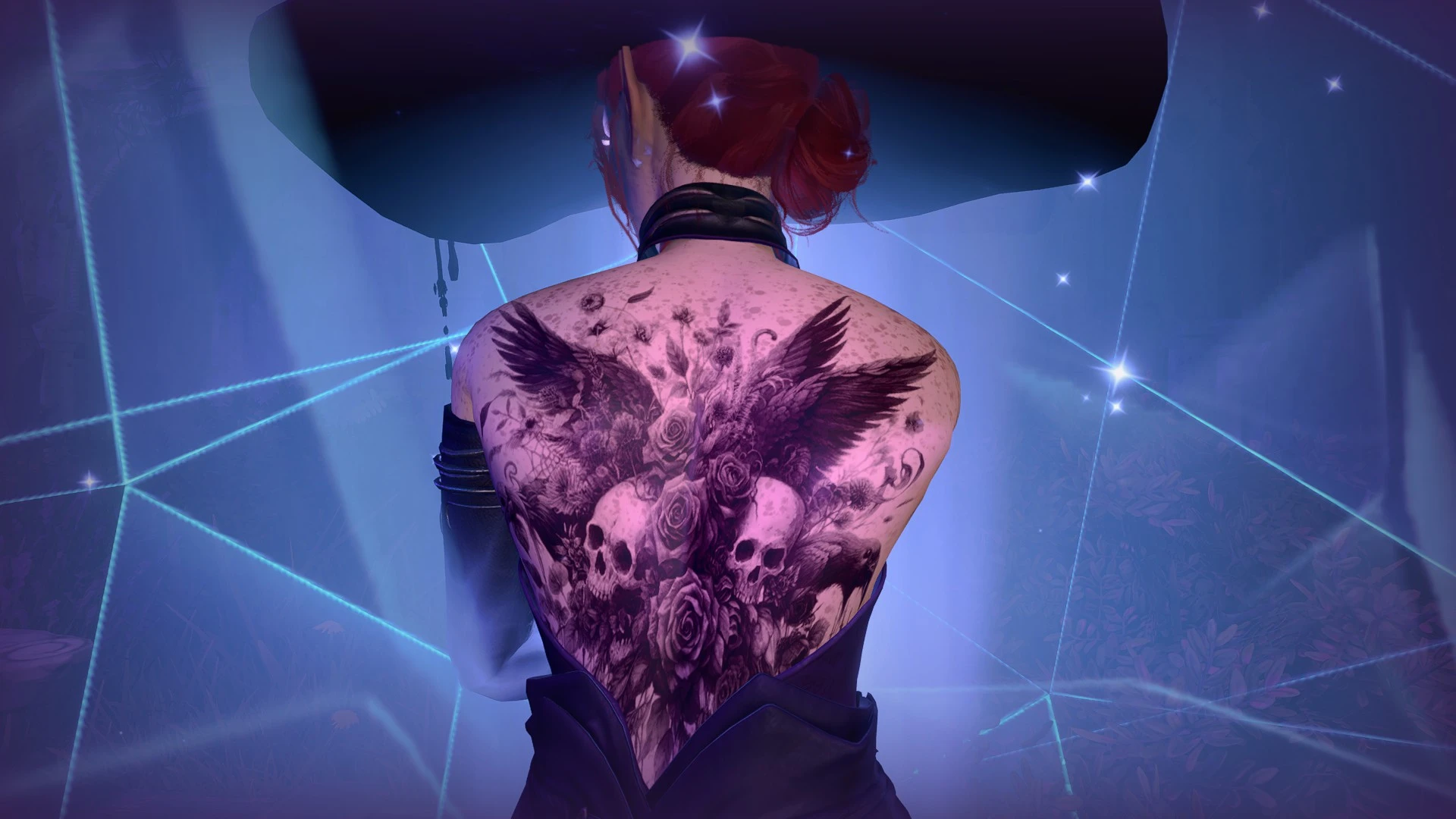
神秘鸦群 - 身体纹身
一套60个魔法乌鸦主题的身体纹身
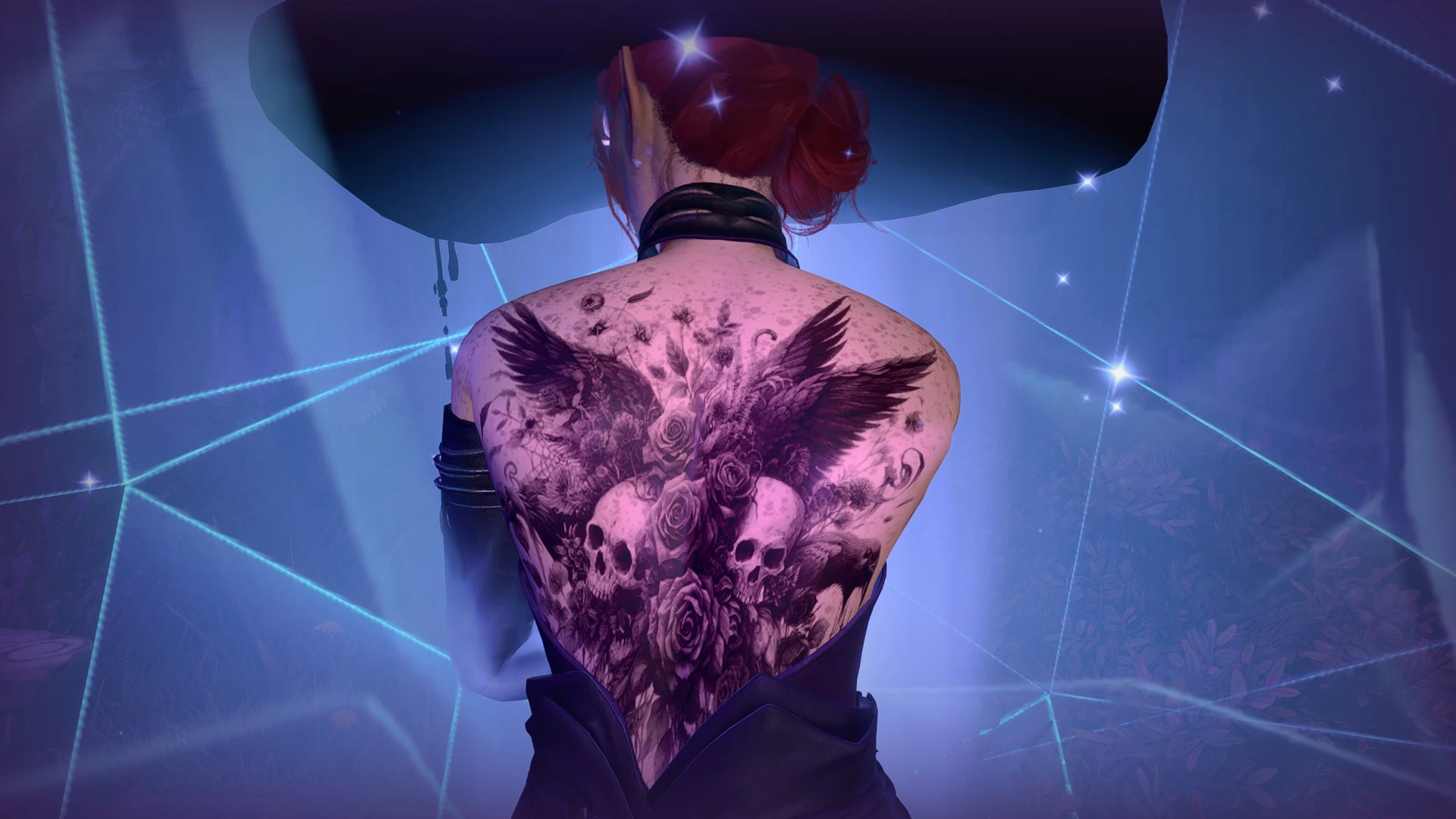 查看大图
查看大图[center][img]https://i.postimg.cc/L8tWK84q/information.png[/img][/center]
更新于 2026年8月8日 - 已添加 STAV 文件
祝大家节日快乐。我知道这个季节可能有点不合时宜,但我受到了最近推出的各种乌鸦主题服装的启发,制作了一套纹身。感谢所有为这个包投票的人。
我已经回归本源,制作了全套 60 个纹身。共有 8 个文件可供选择,所以请务必阅读下面的描述和安装说明。
所有使用的模组列表都放在了一篇文章中。玩得开心!
[center]
[img]https://i.postimg.cc/XYfPSYNq/indi-body.png[/img][/center]
此版本的模组包含 60 个文件夹,每个纹身一个。这适合那些每次只使用一个纹身的玩家。
通常,使用 [url=https://www.nexusmods.com/baldursgate3/mods/2754]Unique Tav[/url] 时,每次只能看到一个/安装一个身体纹身。这通常是 DDS 文件红色通道中的第一个纹身。
从“Separated”ZIP 文件中,你可以选择你想要的单个纹身,并将其放入你的 Data 文件夹中。
[center][img]https://i.postimg.cc/cJdbsG6d/install.png[/img][/center]
对于分离版本,下载文件,解压缩文件,选择你想要的纹身编号的文件夹,然后将 [color=#ea9999]"Generated"[/color] 文件夹拖入你的 [color=#ea9999]"Data"[/color] 文件夹,该文件夹的路径应该类似于:[color=#ea9999](disk:\SteamLibrary\steamapps\common\Baldurs Gate 3\Data)[/color]
[center][img]https://i.postimg.cc/nLnPHfMr/Merged.png[/img][/center]
此版本将所有 60 个纹身合并到一个 DDS 文件中。需要使用 [url=https://www.nexusmods.com/baldursgate3/mods/2754]Unique Tav[/url]、KAVT NVP 或 KAVT,因为该文件需要放入 UTAV 的身体纹身文件夹中。
此文件与 UTAV、KAVT 和 KAVT NVP 兼容。
为了查看全部 60 个纹身,你需要使用 [url=https://www.nexusmods.com/baldursgate3/mods/7258]Magic Mirror Menu (MMM)[/url] 或 Rakor 制作的 [url=https://www.nexusmods.com/baldursgate3/mods/17123]CCEE[/url]。我目前不知道还有其他模组可以在所有三个 RGB 通道上显示纹身。纹身 1-20 位于红色通道。纹身 21-40 位于绿色通道。纹身 41-60 位于蓝色通道。
与其他文件和附带的图片相比,此文件中的纹身顺序略有不同。这是因为当身体纹身在通道上重叠时,有时会导致它们变得像素化和模糊,为了避免这种情况,我稍微调整了它们的顺序,但它们都在里面。
这些纹身可以与 Kaz 的 CC 纹身选择器配合使用,但颜色可能会偏移,并且你会同时看到多个纹身,因此如果你使用选择器,我不推荐使用此版本。
[center]
[img]https://i.postimg.cc/cJdbsG6d/install.png[/img][/center]
如果你使用合并版本之一,解压缩 Zip 文件,然后将 [color=#ea9999]"Generated"[/color] 文件夹拖入你的 [color=#ea9999]"Data"[/color] 文件夹,该文件夹的路径应该类似于:
[color=#ea9999](disk:\SteamLibrary\steamapps\common\Baldurs Gate 3\Data)[/color]
[center][img]https://i.postimg.cc/sx78PrYt/switcher-body.png[/img][/center]
这些纹身与 UTAV、KAVT、KAVT NVP 和 Rogue Tattoo(当与 utav 或其等效模组一起使用时)兼容。
共有三个文件,将 60 个纹身分成 3 组:1-20、21-40 和 41-60。
这是为了增加与纹身切换器的兼容性,例如 [url=https://www.nexusmods.com/baldursgate3/mods/17702]Kaz 的 CC 纹身选择器[/url] 或 Rogue Tattoo,它们一次只显示 20 个身体纹身。
[center][img]https://i.postimg.cc/cJdbsG6d/install.png[/img][/center]
选择三个文件之一,然后解压缩 Zip 文件,并将 [color=#ea9999]"Generated"[/color] 文件夹拖入你的 [color=#ea9999]"Data"[/color] 文件夹,该文件夹的路径应该类似于:
[color=#ea9999](disk:\SteamLibrary\steamapps\common\Baldurs Gate 3\Data)[/color]
[center][color=#ea9999]
[img]https://i.postimg.cc/q7p5kHgt/rogue-tattoo.png[/img][/color][/center]
有一个适用于 [url=https://www.nexusmods.com/baldursgate3/mods/15308]Rogue Tattoo[/url] 的版本。
非常感谢 [size=3][url=https://www.nexusmods.com/baldursgate3/users/231355020]HastursQueen[/url][/size] 让我进行实验,以便我能为你们制作这些。
与上面的版本类似,这些也被分成了 3 个文件:1-20、21-40 和 41-60。
有关如何使用 Rogue Tattoo 的详细说明,请前往其模组页面。
使用 Rogue Tattoo 不需要 UTAV,但可以同时使用。如果你同时使用 UTAV/KAVT/KAVT NVP 和 Rogue tattoo,请不要使用此版本的身体纹身,请使用上面列出的分离版本或合并版本。它们可以与 Rogue Tattoo 配合使用。
这个专用版本是为那些使用 RT 但不使用 UTAV 或其等效模组的玩家准备的。
经过测试,我们发现将这些文件与 Rogue Tattoo 一起使用不会影响盖尔胸部的纹身,但可能会像替换面部纹身一样覆盖其他 NPC 的纹身。
有趣的事实:按照 RT 的说明(重新指定角色等),你应该可以在阿斯代伦、明萨拉、影心、贾希拉、莱埃泽尔(尽管会移除她的吉斯斑点)、明斯克和哈尔辛身上使用这些纹身。
在替换游戏原版资源时,请备份你的文件。此版本替换的文件可以在这里找到:
disk:\SteamLibrary\steamapps\common\Baldurs Gate 3\Data\Generated\Public\Shared\Assets\Characters\_Models\_SharedAssets\SHARED_Atlas\Resources/
Skin_Atlas_Body_UNI_Tattoo_A_MSK1.DDS
[center][img]https://i.postimg.cc/cJdbsG6d/install.png[/img][/center]
如果你使用 Rogue Tattoo 版本,解压缩 Zip 文件,并将 [color=#ea9999]"Generated"[/color] 文件夹拖入你的 [color=#ea9999]"Data"[/color] 文件夹,该文件夹的路径应该类似于:
[color=#ea9999](disk:\SteamLibrary\steamapps\common\Baldurs Gate 3\Data)
[img]https://i.postimg.cc/g2V7F2cx/info.png[/img][/color]
⋆ 使用 UTAV/KAVT 版本时,请确保 Unique Tav/KAVT/KAVT NVP 是最新的
* KAVT 最近已更新。此模组中需要 KAVT 的文件 不适用于 V1.4 之前的 KAVT 版本
⋆ 我计划制作其他主题的纹身包,如果你有任何建议,请告诉我
⋆ 这些图片大部分来自 Wonder Artist 和 Creative Fabrica,我有这两个网站的订阅,我相信它们都托管 AI 图像。
⋆ 有人告诉我,我的纹身模组可以与 Jawstarion 的 [url=https://www.nexusmods.com/baldursgate3/mods/13657]Variety Framework[/url] 和 [url=https://www.nexusmods.com/baldursgate3/mods/16955]Character creation Overhaul[/url] 配合使用,虽然我自己没用过,所以我不太确定具体如何运作。
* 我很想看到你们的截图,所以欢迎上传!
[img]https://i.postimg.cc/TPYYwkV0/permissions.png[/img]
像往常一样,你可以随心所欲地修改我的图集。我允许个人编辑,但 未经我的许可,请勿重新上传或重新分发 我的模组,否则请尽情享受,你也可以随时联系我,我知道我做了很多纹身,我非常乐意为你制作由我的纹身组成的免费自定义纹身图集。
[center][img]https://i.postimg.cc/PqdRtnNN/mods.png[/img]
将附在随附的文章中
[img]https://i.postimg.cc/R0vDMxq6/thanks.png[/img]
[size=5][url=https://www.nexusmods.com/baldursgate3/users/231355020]HastursQueen[/url]
[url=https://next.nexusmods.com/profile/Hashthrough?gameId=3474]Hashthough[/url]
SatanFish [/size][/center]
![https://i.postimg.cc/L8tWK84q/information.png[/img][/center]](https://i.postimg.cc/L8tWK84q/information.png%5B/img%5D%5B/center%5D)
![https://i.postimg.cc/XYfPSYNq/indi-body.png[/img][/center]](https://i.postimg.cc/XYfPSYNq/indi-body.png%5B/img%5D%5B/center%5D)
![https://i.postimg.cc/cJdbsG6d/install.png[/img][/center]](https://i.postimg.cc/cJdbsG6d/install.png%5B/img%5D%5B/center%5D)
![https://i.postimg.cc/nLnPHfMr/Merged.png[/img]](https://i.postimg.cc/nLnPHfMr/Merged.png%5B/img%5D)
![https://i.postimg.cc/sx78PrYt/switcher-body.png[/img][/center]](https://i.postimg.cc/sx78PrYt/switcher-body.png%5B/img%5D%5B/center%5D)
![https://i.postimg.cc/q7p5kHgt/rogue-tattoo.png[/img][/color][/center]](https://i.postimg.cc/q7p5kHgt/rogue-tattoo.png%5B/img%5D%5B/color%5D%5B/center%5D)
![https://i.postimg.cc/g2V7F2cx/info.png[/img][/color]](https://i.postimg.cc/g2V7F2cx/info.png%5B/img%5D%5B/color%5D)
![https://i.postimg.cc/TPYYwkV0/permissions.png[/img]](https://i.postimg.cc/TPYYwkV0/permissions.png%5B/img%5D)
![https://i.postimg.cc/PqdRtnNN/mods.png[/img]](https://i.postimg.cc/PqdRtnNN/mods.png%5B/img%5D)
![https://i.postimg.cc/R0vDMxq6/thanks.png[/img]](https://i.postimg.cc/R0vDMxq6/thanks.png%5B/img%5D)
正在加载版本记录…
正在加载评论…
评论在新手盒子客户端中发表,这里同步展示。