附魔包
18 为符文之语与雕文之语增强,带游戏内菜单:41个滑块,所有效果默认关闭,双滑块独立运作,零覆盖原版文件。适用于重制版v4.0+。
 查看大图
中文简介 / 中文说明
【本 mod 是什么】
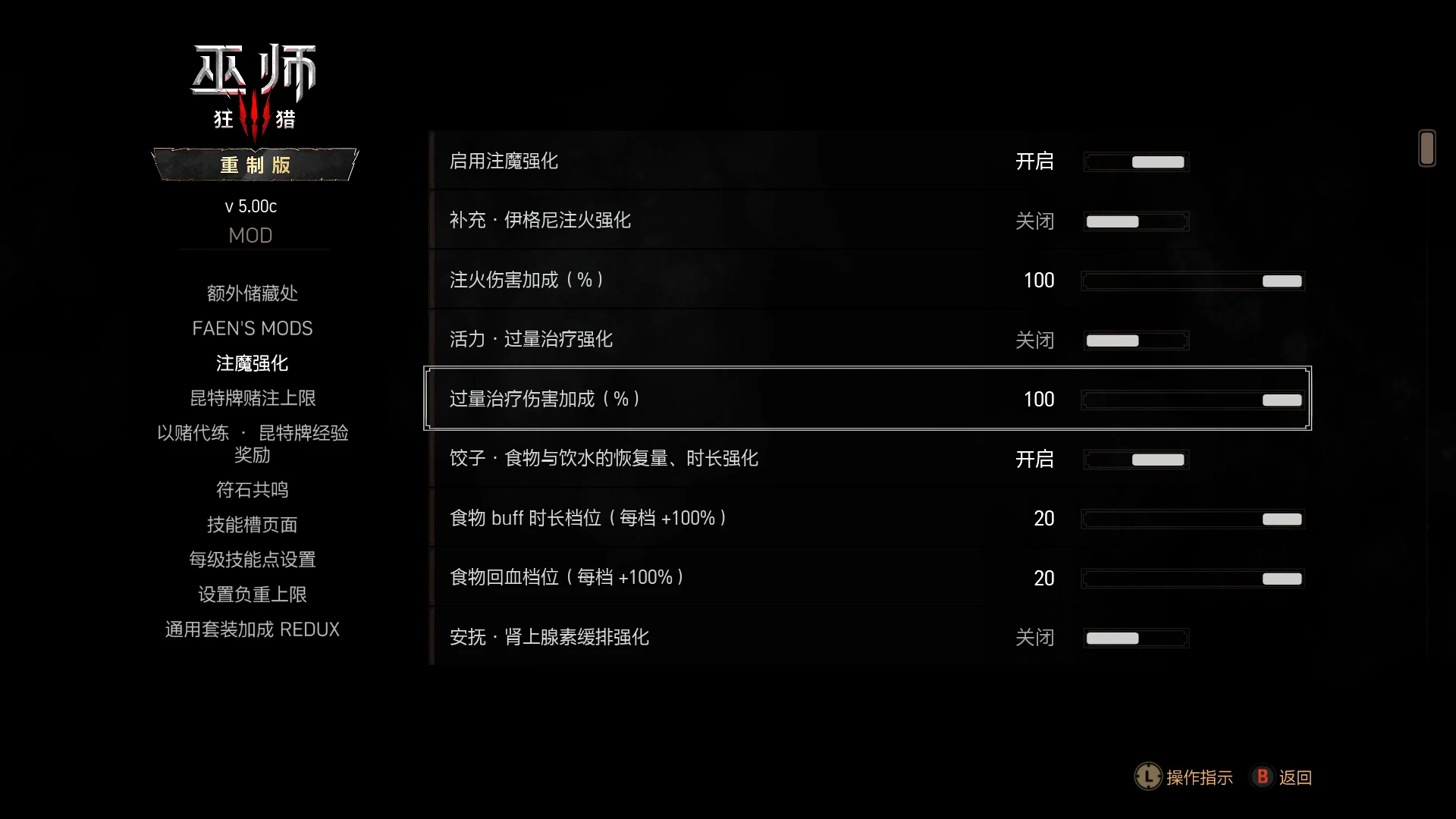
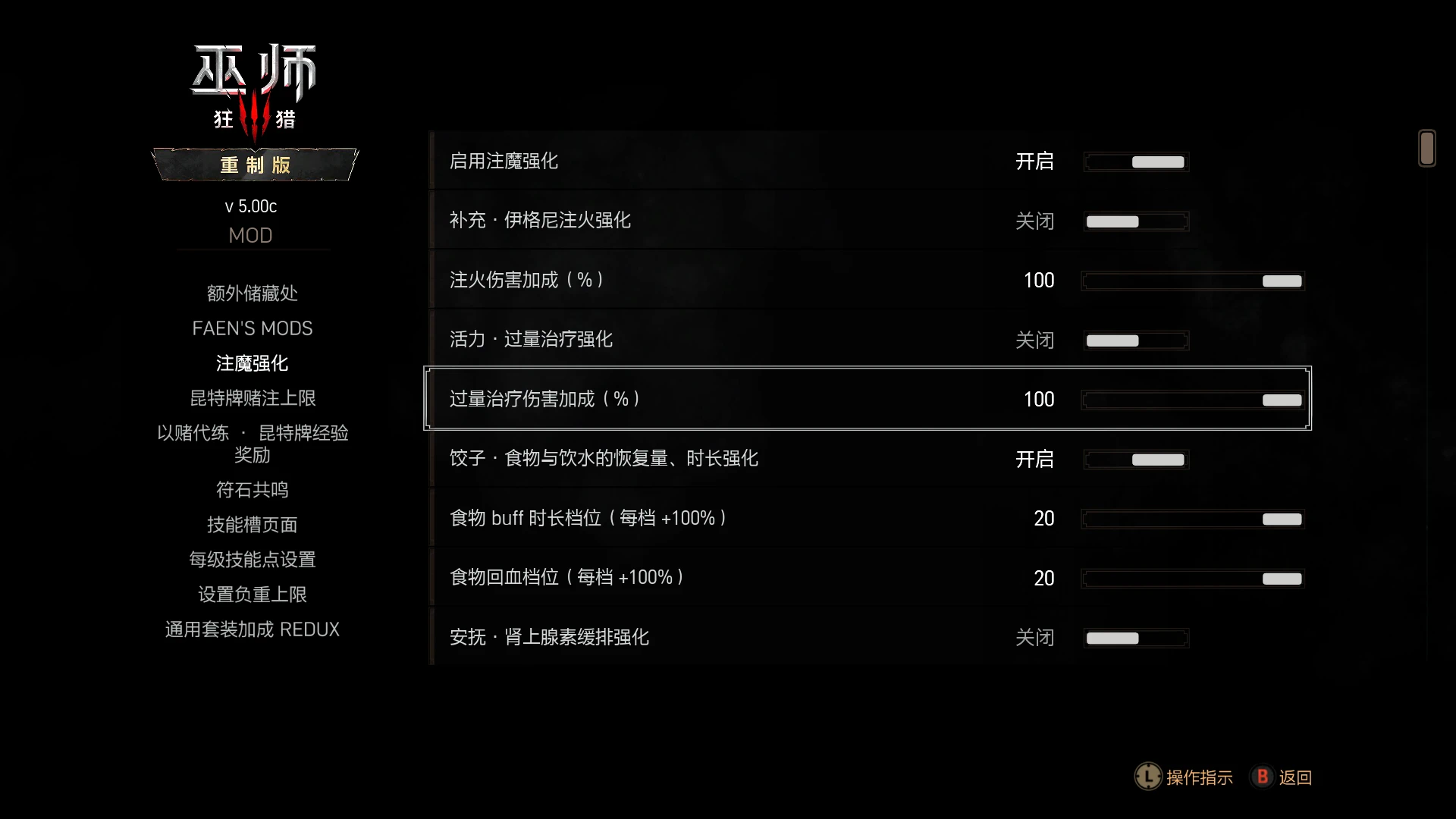
给《巫师3》重制版的「符文」(Runeword,武器) 与「符词」(Glyphword,护甲) 注魔 做一套集中强化,并提供一个游戏内设置面板,让你用 41 个滑块自由调整力度。 共 18 项效果,全部默认关闭,想用哪个开哪个。
【核心特色】
· 零覆盖:所有改动都通过「包装原函数 / 新增脚本 / 新增文本」实现,不改动任何 本体文件,可与其它 mod 共存。 · 面板可调:所有效果都在游戏内「选项 → 注魔强化」面板里逐项开关、逐项调档。 · 双滑块互不牵制:6 项效果带两个滑块,拉到 0 只代表「该维度用默认值」,另一个 滑块照常生效。 · 完全可逆:删掉 mod 文件夹即彻底卸载,不留残留。
【18 项效果一览】
· 武器 · 符文(Runeword) RW1 补充 —— 伊格尼注火伤害加成 RW4 活力 —— 过量治疗转化为伤害 RW6 饺子 —— 食物/饮水的「时长」与「回血量」分别强化 RW8 安抚 —— 降低战斗中肾上腺素的消耗 RW10 生机 —— 暴击恢复活力,额外多触发 N 次 RW11 延长 —— 魔药持续时间按倍数放大 RW12 雀跃 —— 暴击获得肾上腺素,额外多触发 N 次 断裂 (Severance) —— 回旋剑舞 / 怒气爆发的攻击距离分档放大
· 护甲 · 符词(Glyphword) GW5 报应 —— 挨打时按几率反弹伤害(连昆恩盾挡下伤害的情况也能反) GW6 耗力 —— 阿尔德额外削减敌人活力 GW7 火舞 —— 伊格尼追加火伤 GW10 强夺 —— 敌人死亡时魅惑效果转移给更多人 GW12 助燃 —— 命中燃烧中的敌人时,把火势向周围传播一圈 GW14 诱骗 —— 攻击被魅惑的敌人时延长魅惑时间 GW15 纠缠 —— 强化亚登陷阱减速圈的时长与范围 GW17 保护 —— 强化进战斗送的昆恩盾(盾值与时长,纯加强不削弱) GW18 附身 —— 强夺 + 诱骗合体(转移 + 加时) GW20 爆发 —— 被伊格尼击杀的敌人尸体爆炸,点燃并灼伤周围敌人
完整的效果说明、每个滑块的取值范围与「0 档语义」,见压缩包内附的表格:
注魔强化_效果与滑块说明_v1.0.0.xlsx
EnchantPack_Effects_and_Sliders_Reference_v1.0.0.xlsx
【安装方法】
解压压缩包,得到 bin\ 与 mods\ 两个文件夹。
把这两个文件夹直接解压到「游戏根目录」—— 也就是同时含有 bin\ 和 mods\ 的 那一层;提示文件重复时选「是」。
启动游戏 → 选项 → 找到「注魔强化」面板 → 勾选「启用注魔强化」总开关,再打开 你想用的效果。
生效前提:装备上要镶好对应的注魔(武器镶符文、护甲镶符词),效果才会触发。
默认路径 / Default paths Steam C:\Program Files (x86)\Steam\steamapps\common\The Witcher 3
GOG C:\Program Files (x86)\GOG Galaxy\Games\The Witcher 3\装完后应存在 mods\modEnchantPack
bin\config\r4game\user_config_matrix\pc\modEnchantPack.xml卸载:删掉上面这两个(mod 文件夹 + 菜单 xml)即可,不留残留。
================================================================================ English Description / Installation
[What this mod is]
A central upgrade pack for The Witcher 3 (Remastered) Runewords (weapons) and Glyphwords (armor), with an in-game settings panel that gives you 41 sliders to tune the strength of every effect. 18 effects in total - all OFF by default, enable only the ones you want.
[Key features]
- Zero overwrite: every change is done by wrapping vanilla functions / adding new scripts and new text; no vanilla file is modified, so it coexists with other mods.
- In-game panel: every effect has its own toggle and value slider under Options > Enchantment Pack.
- Independent dual sliders: 6 effects come with two sliders each; setting one to 0 only means "use the default for that dimension" - the other slider still works.
- Fully reversible: delete the mod folder for a complete uninstall, no leftovers.
[The 18 effects]
Weapons - Runewords RW1 Replenishment - Igni infusion fire damage bonus RW4 Invigoration - overheal converted into damage RW6 Dumplings - food/drink duration and healing boosted separately RW8 Placation - slower adrenaline drain in combat RW10 Rejuvenation - critical hits restore stamina, with extra triggers RW11 Prolongation - potion duration multiplied RW12 Elation - critical hits grant adrenaline, with extra triggers Severance - tiered attack-range boost for Whirl / Rend
Armor - Glyphwords GW5 Retribution - chance to reflect damage when hit (works even when Quen absorbs the whole hit) GW6 Depletion - Aard drains extra stamina GW7 Fire Dance - Igni bonus fire damage GW10 Usurpation - death transfer of charm effect to more targets GW12 Ignition - spread the burn to nearby enemies when you hit a burning one GW14 Beguilement - extend charm duration on attack GW15 Entanglement - boost Yrden trap slow-ring duration and range GW17 Protection - stronger Quen granted at combat start (value + duration) GW18 Possession - Usurpation + Beguilement combined (transfer + extension) GW20 Eruption - Igni-killed enemies explode, igniting and damaging nearby foes
Full effect descriptions and the exact range / "meaning of 0" for every slider are in the included spreadsheets: 注魔强化_效果与滑块说明_v1.0.0.xlsx EnchantPack_Effects_and_Sliders_Reference_v1.0.0.xlsx
[Installation]
Extract the archive to get the bin\ and mods\ folders.
Drop both folders straight into your GAME ROOT (the folder that contains BOTH bin\ and mods). Choose "Yes" when asked to overwrite.
Start the game > Options > the "Enchantment Pack" panel > tick "Enable Enchantment Pack", then turn on the effects you want.
To trigger an effect, the matching enchantment must be socketed on your gear (Runewords on weapons, Glyphwords on armor).
Default paths Steam C:\Program Files (x86)\Steam\steamapps\common\The Witcher 3
GOG C:\Program Files (x86)\GOG Galaxy\Games\The Witcher 3\Should exist afterwards mods\modEnchantPack
bin\config\r4game\user_config_matrix\pc\modEnchantPack.xmlUninstall: delete those two items (the mod folder + the menu xml). Complete removal, no leftovers.
正在加载版本记录…
正在加载评论…
评论在新手盒子客户端中发表,这里同步展示。