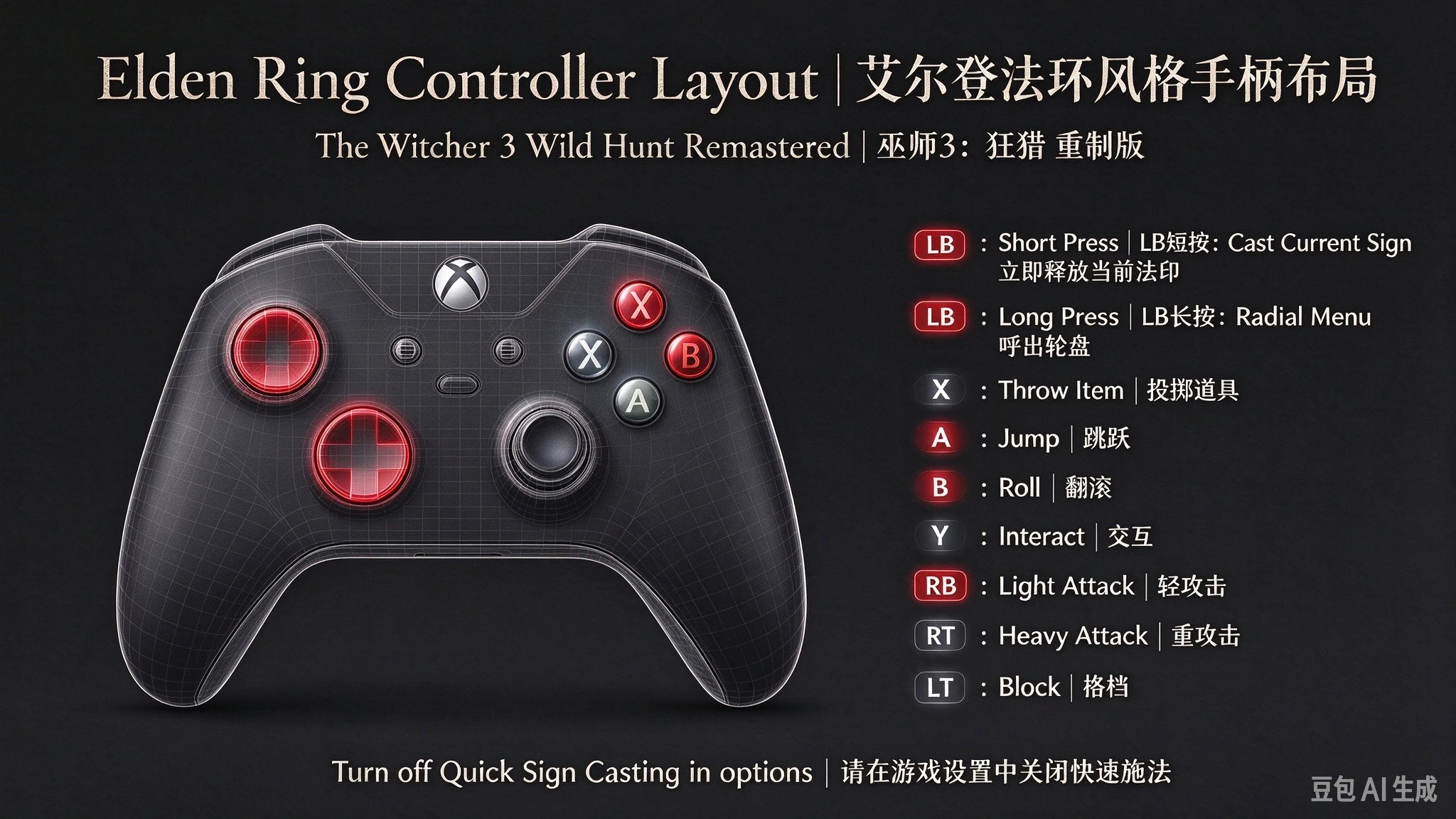
巫师3狂猎重制版控制器布局 - 艾尔登法环布局
【改动说明】/ [Overview] 本 MOD 将手柄操作调整为类似《艾尔登法环》的按键布局,并加入智能施法功能。 所有未列出的按键均与原版游戏相同。 This mod adjusts the controller layout to a style similar to Elden Ring, and adds smart (quick) casting. Any key NOT listed below is identical to the vanilla g
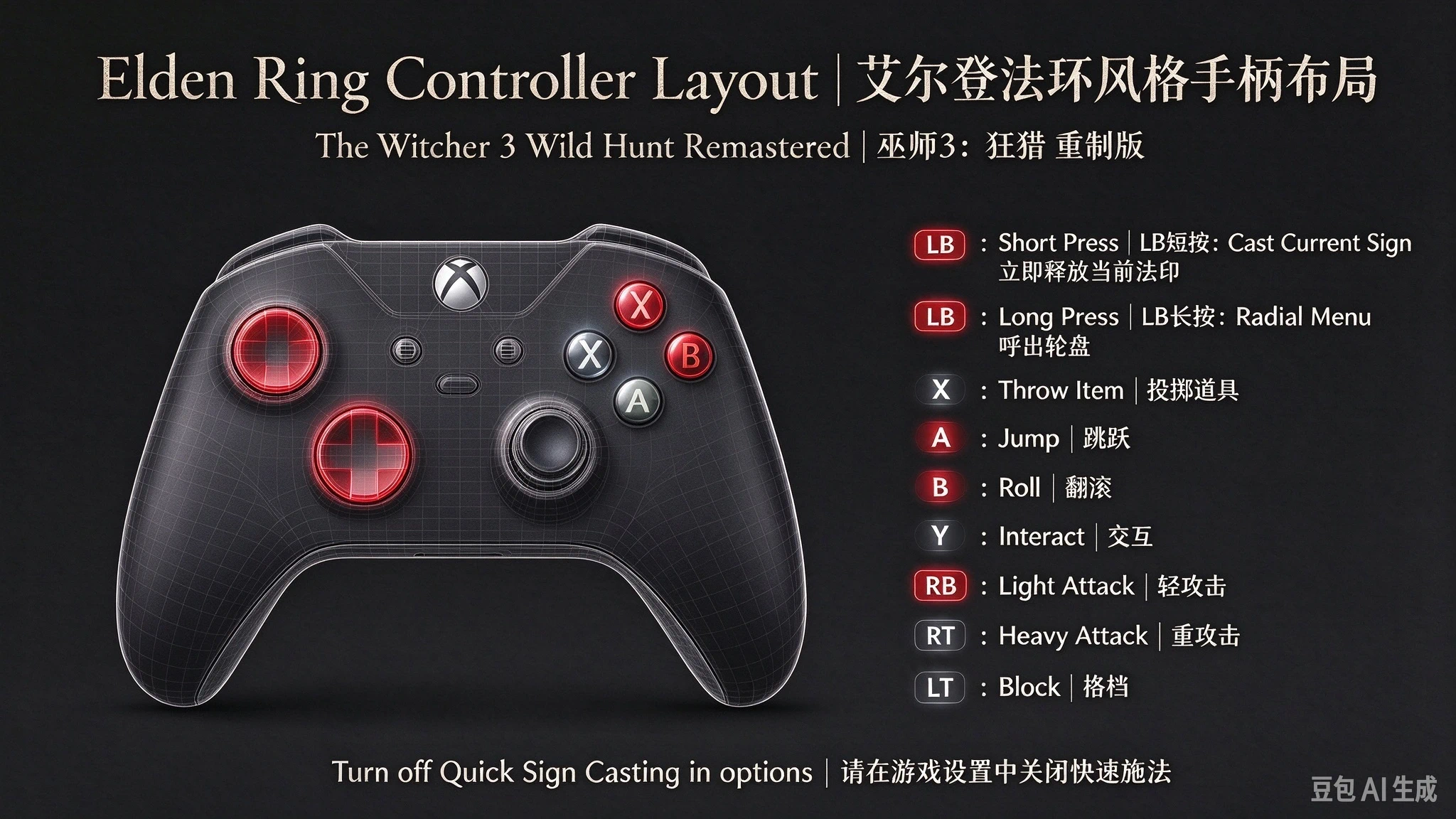 查看大图
============================================================
巫师3 重制版 · 手柄按键介绍(中英双语)
The Witcher 3 Remastered — Gamepad Bindings (Bilingual)
来源:input.settings(版本 60,次世代版)
Source: input.settings (version 60, Next-Gen)
============================================================
【A 键 · 叉键 A / Cross】
战斗翻滚 Combat Roll
下船 Boat Dismount
游泳互动 Swim Interaction
【B 键 · 圈键 B / Circle】
疾跑 Sprint
闪避 Dodge
昆恩变体(Alt 昆恩)Alt Quen Casting
【X 键 · 方块键 X / Square】
投掷物 Throw Item
投掷瞄准(长按)Throw Item (Hold)
船减速 Boat Decelerate
下潜 Dive Down
【Y 键 · 三角键 Y / Triangle】
主互动键(大量动作共用):对话、拾取、开门、
上马、阅读、取物、搜索等
Main Interact (Talk / Pick Up / Open / Mount /
Read / Loot...)
【LB 键 · 左肩键 LB / Left Shoulder】
释放法印 Cast Sign
法印蓄力(长按) Cast Sign (Hold)
—— 施法键(昆恩持续举盾用长按)
— Cast key (hold to keep Quen shield up)
【RB 键 · 右肩键 RB / Right Shoulder】
速攻(轻攻击) Light Attack
剑舞(长按) Whirl (Hold)
终结技 Finisher
【LT 键 · 左扳机 LT / Left Trigger】
猎魔人感官 Witcher Senses
锁定格挡 / 反击 Lock & Guard
替换修饰 Alternate
【RT 键 · 右扳机 RT / Right Trigger】
强攻(重攻击) Heavy Attack
拜年重击(长按)Rend (Hold)
上浮 Dive Up
【LS 键 · 左摇杆按下 LS / Left Thumb】
快捷轮盘 Radial Menu
拍照第一步 Photo Mode Step 1
【RS 键 · 右摇杆按下 RS / Right Thumb】
追踪任务 Track Quest
高亮目标 Highlight Objective
锁定镜头 Camera Lock
拍照第二步 Photo Mode Step 2
【十字键 D-pad】
上↑ 喝上方药水 Drink Potion 1(长按切换)
下↓ 喝下方药水 Drink Potion 2(长按切换)
左← 拔钢剑 Steel Sword(长按涂油/收剑)
右→ 拔银剑 Silver Sword(长按涂油/收剑)
【Back/Select 键 · 返回/选择键】
暂停菜单 In-Game Menu
辞典(长按) Glossary (Hold)
【Start 键 · 开始键】
快速菜单 Fast Menu
地图(长按) Map (Hold)
打开通知面板 Open Notifications
------------------------------------------------------------
骑马额外映射 Mounted (Horse) Extras:
双击召唤马 Spawn Horse (Double-tap) ... RS 键 (Right Thumb)
马上互动 Mounted Interact ......... LS 键 (Left Thumb)
------------------------------------------------------------
============================================================
安装方法 INSTALLATION
============================================================
【第一步 · 安装按键配置 Step 1 — Key Config】
将压缩包内的 input.settings 复制到:
Copy the included input.settings to:
「我的文档 / Documents」\The Witcher 3\
(通常为 C:\Users\你的用户名\Documents\The Witcher 3\)
(usually C:\Users\YourName\Documents\The Witcher 3\)
覆盖同名文件(如无同名则直接放入)。
Overwrite if the file already exists; otherwise just place it.
注意:如果你的「文档」文件夹被移动到了其它盘符,
Note: If your Documents folder has been relocated to another drive,
请放到实际位置的 The Witcher 3 文件夹里。
place the file inside The Witcher 3 at the actual location.
【第二步 · 安装脚本 MOD Step 2 — Script MOD】
将压缩包内的 modERQuickCast 文件夹整体复制到:
Copy the whole modERQuickCast folder to:
游戏安装目录\Mods\
Game Install Dir\Mods\
(例如 H:\SteamLibrary\steamapps\common\The Witcher 3\Mods\)
(e.g. ...\steamapps\common\The Witcher 3\Mods\)
若 Mods 文件夹不存在,请新建一个。
Create the Mods folder if it does not exist.
此 MOD 仅用于:骑马时长按 B 不再下马,
This MOD only changes: holding B while mounted no longer
下马改为长按 A。
dismounts; dismount is now by holding A.
【第三步 · 重启游戏 Step 3 — Restart】
启动游戏,首次启动会重新编译脚本(比平时稍慢,属正常)。
Launch the game. The first launch recompiles scripts
(a little slower than usual — this is normal).
============================================================
卸载方法 UNINSTALLATION
============================================================
【按键配置 Key Config】
删除(或替换回原版)下列文件即可还原原版按键:
To restore default bindings, delete or overwrite:
「我的文档 / Documents」\The Witcher 3\input.settings
(覆盖回原版文件或直接删除,游戏会重新生成默认配置)
(restore your backup or delete it — the game regenerates defaults)
【脚本 MOD Script MOD】
直接删除 Mods\modERQuickCast 文件夹即可完全移除脚本效果。
Simply delete the Mods\modERQuickCast folder to fully remove the mod.
(无需改动游戏源文件,MOD 为独立覆盖,删除即还原)
(No game source files are modified — the mod is a separate overlay;
deleting it restores the original behavior)
============================================================
游戏内设置要求 REQUIRED GAME SETTINGS
============================================================
启动游戏后,请务必在游戏菜单中关闭以下两项设置:
After launching the game, you MUST turn OFF these two options
in the in-game menu:
1. 快速施法(智能施法 / 交替施法)
Alternate Sign Casting / Quick Casting
(路径:选项 → 控制 → 快速施法,设为「关闭」)
(Path: Options → Controls → Alternate Sign Casting → OFF)
2. 左摇杆开启冲刺(左摇杆按下冲刺)
Sprint with Left Stick / Left Stick Sprint
(路径:选项 → 控制 → 左摇杆冲刺,设为「关闭」)
(Path: Options → Controls → Left Stick Sprint → OFF)
若这两项处于开启状态,会干扰自定义按键的正常工作。
If either is ON, it will interfere with the custom bindings.
============================================================
备注 NOTES
============================================================
- input.settings 仅在游戏启动时读取,修改后需重启游戏生效。
- input.settings is only read at game startup; restart to apply changes.
- 骑马长按 B = 疾驰(不再下马);长按 A = 下马。
- On horseback: hold B = gallop (no dismount); hold A = dismount.
- 乘船下船为 A 键,长按 B = 加速。
- On boat: A = dismount; hold B = accelerate.
正在加载版本记录…
正在加载评论…
评论在新手盒子客户端中发表,这里同步展示。