Inventory Lighting Fix - Remaster
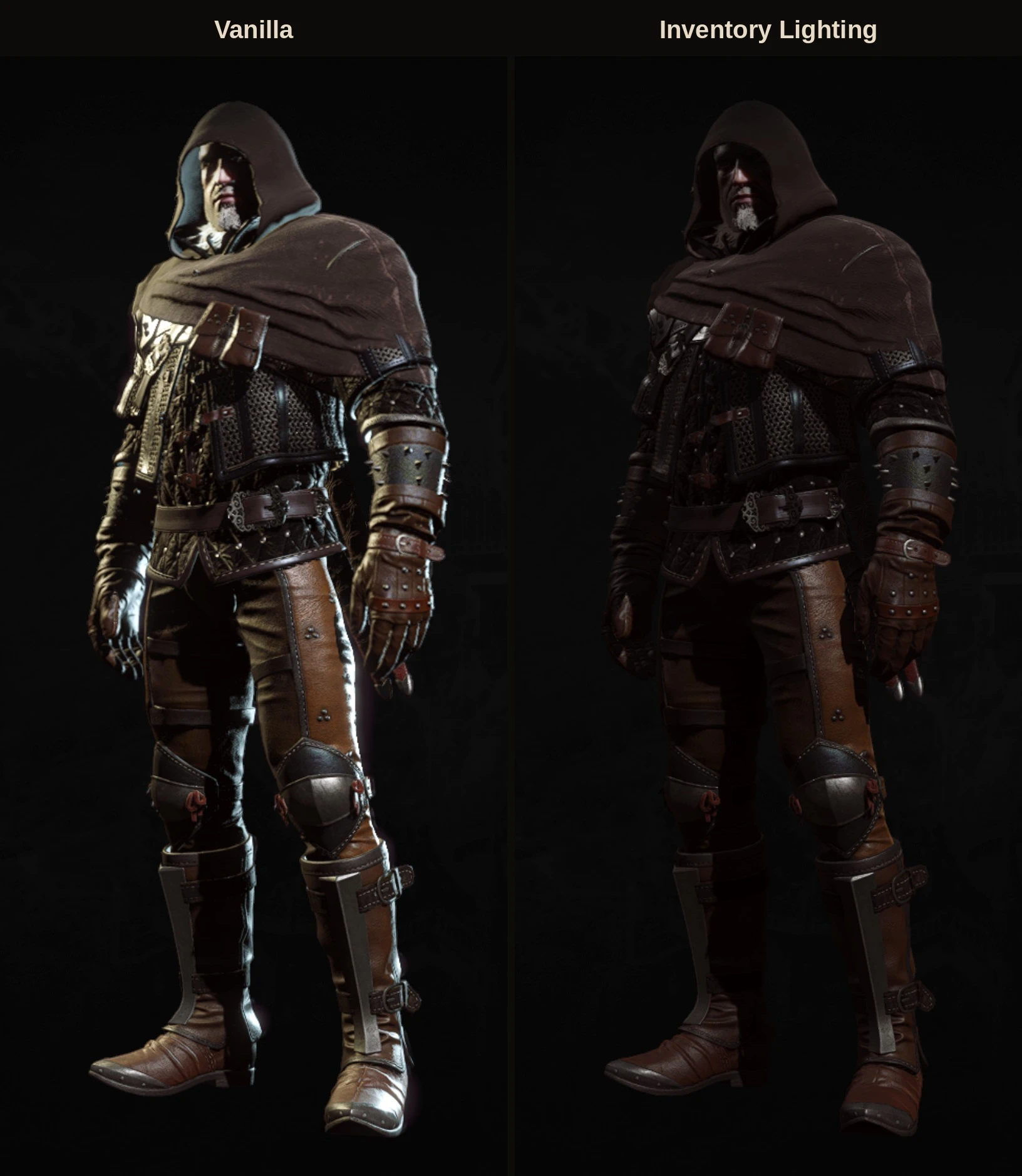
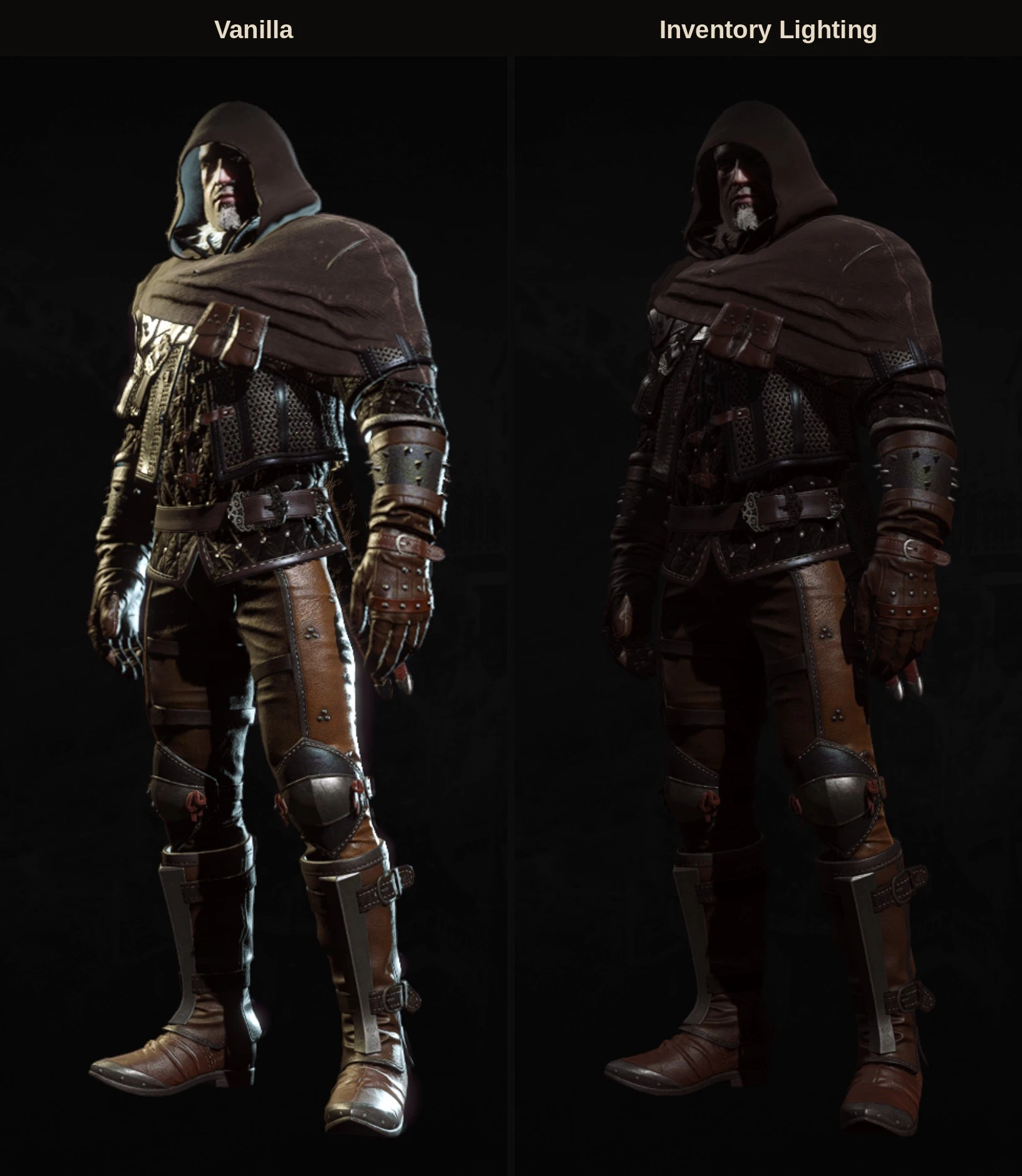
Fixes the inventory lighting situation i mean tones down the harsh, overly bright lighting on Geralt in the inventory character preview ;)
 查看大图
[size=5][b]Inventory Lighting[/b][/size]
On Next-Gen, the 3D Geralt in the inventory is lit very brightly. A strong white light washes out the armor and makes metal and leather look blown out. This mod lets you choose softer lighting for that preview, right from the options menu.
[size=4][b]How it works[/b][/size]
The inventory preview has its own small lighting setup: a sun and two lights attached to the camera, a warm main light and a cool, almost white fill light. The fill light is what gives the harsh white look. This mod ships edited copies of that lighting setup and loads the one you pick. Nothing is changed while the game runs. The mod only chooses which file the preview loads.
[size=4][b]Options[/b][/size]
In [b]Options > Mods > Inventory Lighting[/b]:
[b]Light preset[/b]
[list]
[][b]Vanilla[/b]: the original lighting[/]
[][b]Soft[/b]: a bit dimmer than vanilla, with the white fill light much weaker[/]
[][b]Balanced[/b]: in between[/]
[][b]Dim[/b]: darker and moodier[/]
[][b]Front[/b]: more of the main light from the front, so faces under hoods are lit better[/]
[][b]Dramatic[/b] (default): the sun does most of the lighting, the camera lights are low and the white fill light is off[/]
[/list]
[b]Light color[/b]
[list]
[][b]Original[/b]: vanilla light colors[/]
[][b]Neutral[/b] (default): close to white[/]
[][b]Warm[/b]: candle-like orange light[/]
[][b]Cool[/b]: bluish, moonlight-like[/]
[/list]Changes show the next time you open the inventory.
[size=4][b]Requirements[/b][/size]
The Witcher 3: Wild Hunt Remastered. Made and tested on patch [b]5.01[/b].
Uses a small script with an [i]@wrapMethod[/i] annotation, so it doesn't replace any vanilla script file and needs no merging.
[size=4][b]Installation[/b][/size]
[b]Vortex:[/b] install with the button above.
[b]Manual:[/b] extract the archive into your game folder (the one that contains [i]bin[/i] and [i]content[/i]), so you end up with:
[code]The Witcher 3\mods\modInventoryLighting\content\blob0.bundle
The Witcher 3\bin\config\r4game\user_config_matrix\pc\modInventoryLighting.xml[/code]If you already have a [i]Mods[/i] folder, put it there. On Windows the capitalization doesn't matter. On Linux, use your existing folder rather than creating a second one with different capitalization.
[b]Uninstall:[/b] delete the [i]modInventoryLighting[/i] folder and [i]modInventoryLighting.xml[/i].
[size=4][b]Compatibility[/b][/size]
Should work with mods that change the inventory UI or background, since only the lighting file of the 3D preview is affected.
It may conflict with mods that replace the inventory preview's lighting environment ([i]gui_character_environment.env[/i]) or that use [i]@replaceMethod[/i] on [i]CR4GuiSceneController.SetEnvironmentAndSunRotation[/i].
[size=4][b]Linux / Steam Deck[/b][/size]
Made and tested under Proton on Linux. No DLL overrides or launch options needed.
[size=4][b]Credits[/b][/size]
The lighting files are edited copies of CD PROJEKT RED's original environment definition, distributed under their modding policy.
正在加载版本记录…
正在加载评论…
评论在新手盒子客户端中发表,这里同步展示。