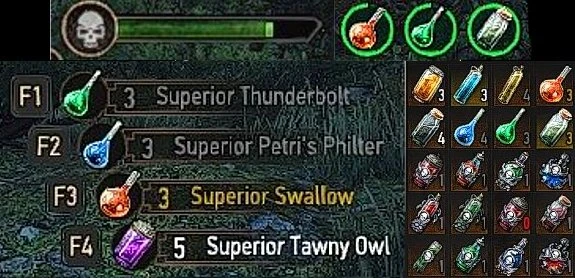
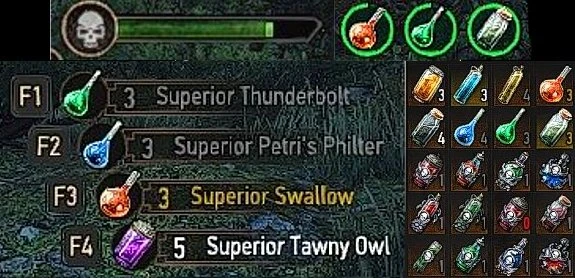
Actual consumable items for use (Classic and Next Gen)
Tired of wondering if you can drink a particular potion at the moment, or checking your buffs to see if a particular potion has been consumed? Then this mod is for you!
 查看大图
[color=#e06666][size=4][b]All my mods were made in OG ([/b][/size][/color][color=#ff7700][size=4][b][u]1.31/1.32[/u][/b][/size][/color][color=#e06666][size=4][b] game version), and then the changes were transferred to NG ([/b][/size][/color][color=#ff7700][size=4][b][u]4.04+[/u][/b][/size][/color][color=#e06666][size=4][b] game version) scripts. I always post [/b][/size][/color][color=#ff7700][size=4][b][u]two separate[/u][/b][/size][/color][color=#e06666][size=4][b] versions in [/b][/size][/color][color=#ff7700][size=4][b][u]one archive[/u][/b][/size][/color][color=#e06666][size=4][b] if necessary. If there is only one version in the archive, it is universal. If the mod is only for OG, I will especially note this.
If you use a mod manager, you should repack the archive with the mod, leaving in it only what is suitable for your version of the game. Why don't I post separate archives? It's more convenient for me.[/b][/size][/color]
[u]Description in English:[/u]
Assigns specific colors to the portion counter in the inventory (and the name, if it is in the quick use slot) for consumable items.
- Grey: a potion that is too toxic to drink at the moment.
- Yellow: you have a buff given by this potion, food, or beverages. If you have a mod that makes oils non-infinite, their counter will also get this color if this oil is smeared on an equipped sword.
- Blue: you have a buff given by this potion, food, or beverages, but its level is lower than what this item can give (for example, your buff by normal Thunderbolt, while you have Enhanced Thunderbolt in inventory).
To make this work properly for food, I have enabled the inventory quantity counter for it even when there is only one item left. For food that can be used indefinitely (like a ‘Horn of Plenty’), an infinity symbol is displayed instead of a number.
[color=#ff7700]If you want to change the colors that I have chosen, you can do it in [/color][color=#c27ba0][u]modActualConsumableItemsForUse.ws[/u][/color][color=#ff7700]. I added the comments next to the appropriate lines. To find out what color code you need, you can use [url=https://www.w3schools.com/colors/colors_picker.asp]this site[/url].[/color]
[u]Installation[/u]:
Place the modActualConsumableItemsForUse folder in the Mods folder. Optionally use 'Witcher Script Merger' to resolve conflicts.
_____________________
[u]Описание на русском[/u]:
Присваивает определённые цвета счётчику порций в инвентаре (и названию, если оно находится в слоте быстрого использования) у расходных предметов.
- Серый: зелье, которое слишком токсично, чтобы выпить его в данный момент.
- Желтый: у вас есть бафф, даваемый этим зельем, едой или напитком. Если у вас есть мод, делающий масла не бесконечными, их счётчик также приобретёт данный цвет, если это масло намазано на экипированный меч.
- Синий: у вас есть бафф, даваемый этим зельем, едой или напитком, но его уровень ниже, чем тот, который может дать этот предмет (например, ваш бафф от обычного Грома, тогда как у вас в инвентаре – улучшенный Гром).
Чтобы это правильно работало для еды, я включил для неё счётчик количества в инвентаре даже тогда, когда данный предмет остался только один. Для еды, которую можно использовать бесконечно (как рог изобилия), вместо числа отображается символ бесконечности.
[color=#ff7700]Если вы хотите поменять цвета, которые я выбрал – вы можете сделать это в [/color][color=#c27ba0][u]modActualConsumableItemsForUse.ws[/u][/color][color=#ff7700]. Я оставил комментарии рядом с нужными строками. Чтобы узнать, какой код у нужного вам цвета, можете воспользоваться [url=https://www.w3schools.com/colors/colors_picker.asp]этим сайтом[/url].[/color]
[u]Установка[/u]:
Поместить папку modActualConsumableItemsForUse в папку Mods. При необходимости использовать "Witcher Script Merger" для разрешения конфликтов.
正在加载版本记录…
正在加载评论…
评论在新手盒子客户端中发表,这里同步展示。