Palworld Expedition Configurator - Custom Expeditions
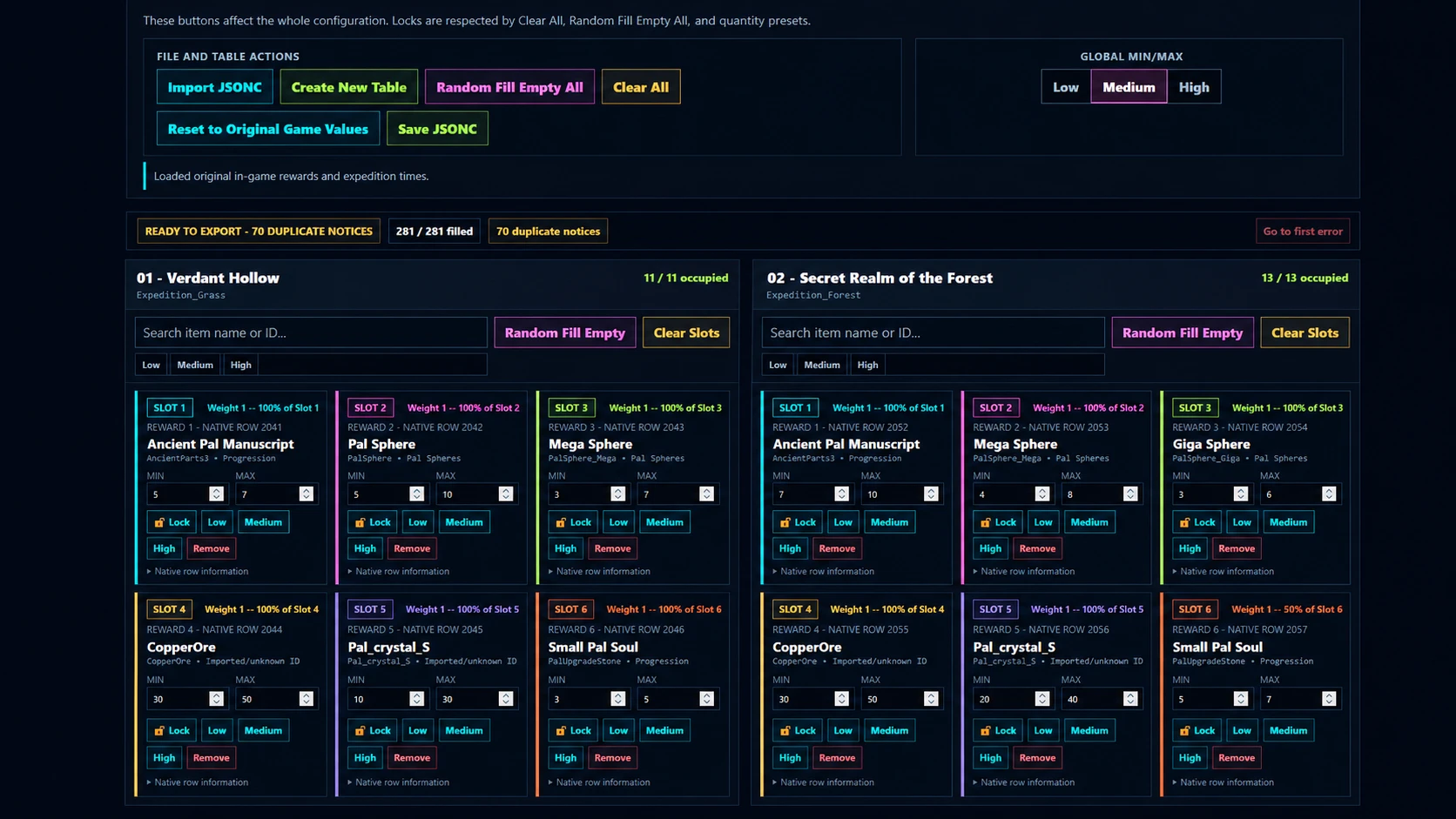
Customize all 18 Palworld expeditions with one simple offline tool. Edit rewards, quantities and completion times, randomize loot, preserve native slot behavior, and export a ready-to-use PalSchema JSONC for solo play or dedicated servers.
 查看大图
查看大图[heading]Description[/heading]
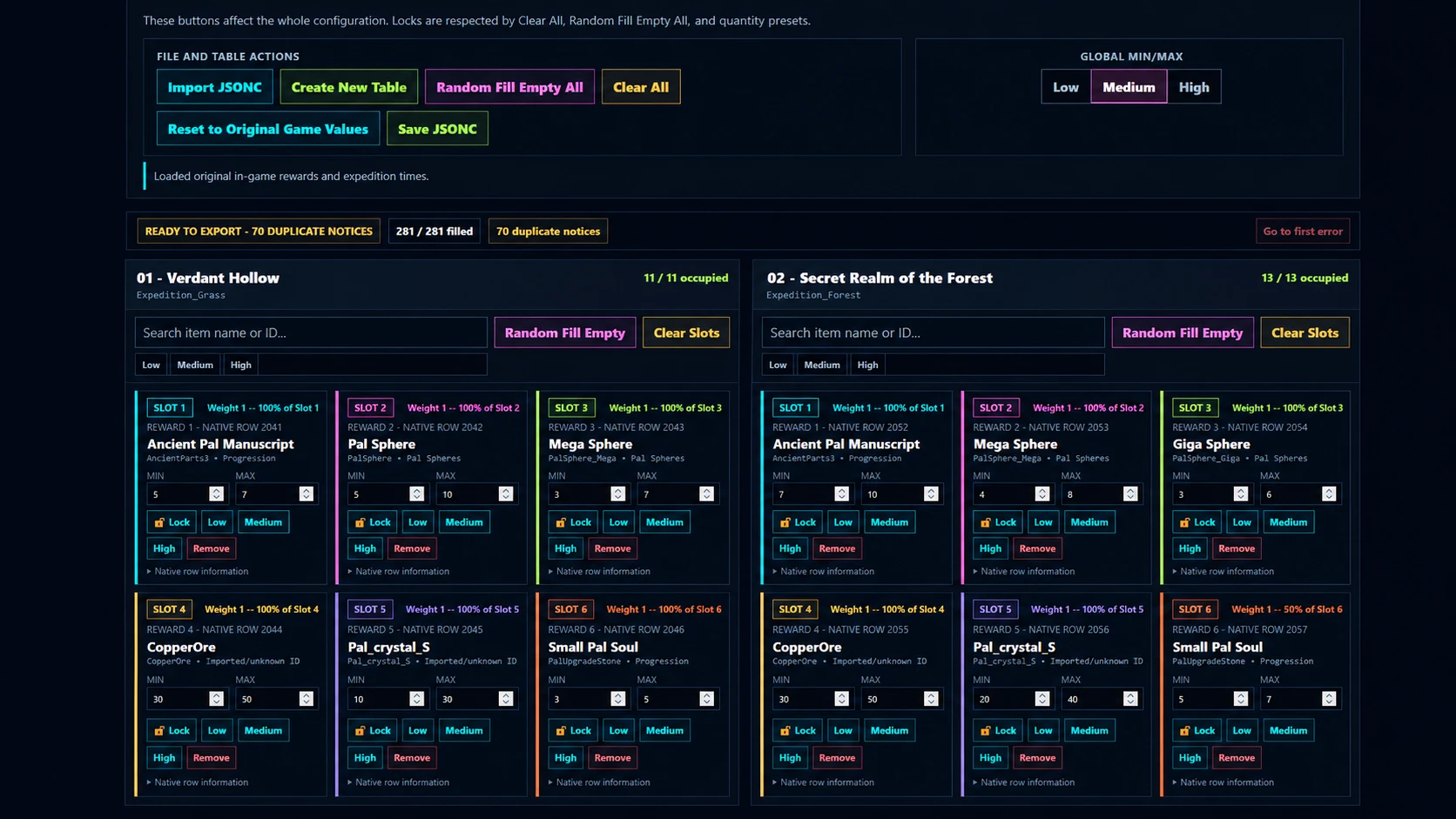
[b]Palworld Expedition Configurator[/b] is a standalone browser-based tool for customising expedition rewards and completion times across all 18 Palworld expeditions.
It opens with the original in-game reward tables and expedition times already loaded, so you can start editing immediately without extracting or importing any game files.
The configurator preserves all [b]281 native expedition reward rows[/b] and their underlying slot structure while allowing you to change the items, quantities and expedition duration.
Rewards can be searched from the built-in item catalogue, moved between reward rows or expeditions, randomised, locked in place, and adjusted using individual, expedition-wide or global quantity presets.
Rewards sharing the same native [b]Slot[/b] are colour-coded so it is easy to see which items compete for the same reward position and how their native [b]Weight[/b] affects their relative chance.
The configurator runs entirely in your browser. [b]Your files and configuration never leave your computer.[/b]
When finished, it generates a single JSONC containing both the expedition reward table and expedition completion-time table, ready for use with PalSchema.
[heading]Installation instructions[/heading]
[b]1. Install PalSchema[/b]
This configurator generates a PalSchema JSONC mod, so PalSchema must already be installed and working with your copy of Palworld.
[b]2. Open the configurator[/b]
Open:
[code]Palworld_Expedition_Configurator.html[/code]in a modern web browser.
No web server or additional installation is required. The original Palworld expedition rewards and completion times are already built into the configurator.
[b]3. Configure your expeditions[/b]
You can edit:
[list]
[]Expedition rewards[/]
[]Minimum and maximum reward quantities[/]
[]Reward placement[/]
[]Expedition completion times[/]
[/list]You can also import a previously generated compatible JSONC to continue editing an existing configuration.
[b]4. Save the JSONC[/b]
Click [b]Save JSONC[/b] when finished.
The configurator generates a single file containing both required PalSchema tables.
[b]5. Install the generated file[/b]
Place the generated JSONC inside:
[code]PalSchema/Mods/CustomExpeditions/raw/[/code]The filename itself is not important.
[b]Single-player[/b]
Install the generated file on the PC running Palworld.
[b]Multiplayer / dedicated servers[/b]
The generated file [b]must be installed on the server[/b] for the customised expedition behaviour to take effect.
Installing the same file on the client is recommended because some customised reward information may not display correctly in the expedition interface without the client-side data.
A small number of items, particularly some [b]Passive Skill Disposable Chips[/b], may also require the client-side mod data to function correctly at the Pal Surgery Table.
For Steam multiplayer, installing the same generated file on both the server and clients gives the best experience.
Console players connecting to a modded server can still receive the normal customised expedition functionality, but items that depend specifically on client-side mod data may not be fully usable.
[heading]Main features[/heading]
[list]
[]Supports [b]all 18 expeditions[/b][/]
[]Preserves all [b]281 native expedition reward rows[/b][/]
[]Searchable built-in reward item catalogue[/]
[]Manual reward Min / Max quantities[/]
[]Individual Low / Medium / High quantity presets[/]
[]Expedition-wide Low / Medium / High presets[/]
[]Global quantity presets[/]
[]Drag and drop rewards between rows[/]
[]Drag rewards between different expeditions[/]
[]Colour-coded native reward Slots[/]
[]Displays native Weight and estimated relative chance within each slot[/]
[]Read-only native structural values[/]
[]Lock individual rewards[/]
[]Random Fill Empty per expedition or globally[/]
[]Random filling avoids introducing new duplicate rewards[/]
[]Duplicate rewards are allowed and highlighted as an attention notice[/]
[]Custom expedition completion times[/]
[]Set all expedition times at once[/]
[]Reset times independently[/]
[]Reset to Original Game Values[/]
[]Built-in validation[/]
[]Export incomplete configurations as clearly marked progress saves[/]
[]Import existing compatible JSONC files[/]
[]Generates one JSONC containing both reward and expedition-time modifications[/]
[]Runs entirely locally in your browser[/]
[]Searchable reference table of valid reward items[/]
[/list][heading]Requirements[/heading]
[list]
[][b]Palworld[/b][/]
[][b]UE4SS[/b][/]
[][b]PalSchema[/b][/]
[][b]A modern web browser[/b][/]
[/list]UE4SS and PalSchema must be installed and working before using the generated JSONC. The configurator itself does not require Python, Node.js, a web server, an account or an internet connection.
The configurator itself does not require Python, Node.js, a web server, an account or an internet connection.
For multiplayer, the generated JSONC must be installed on the server. A matching client installation is recommended for the most accurate expedition UI and for the small number of rewards that depend on client-side mod data.
[heading]Shout outs[/heading]
Thanks to [url=https://www.nexusmods.com/profile/xicobrother93?gameId=6063][b]xicobrother93[/b][/url] and [url=https://www.nexusmods.com/profile/KaitieBear?gameId=6063][b]KaitieBear[/b][/url].
Their Palworld expedition mods helped inspire this project and the idea of making expedition reward and timing customisation easier and more accessible.
Also thanks to the developers and contributors behind [b]PalSchema[/b], without which this kind of data-table customisation would be considerably more difficult.
正在加载版本记录…
正在加载评论…
评论在新手盒子客户端中发表,这里同步展示。