赛博义体-EX 快捷键
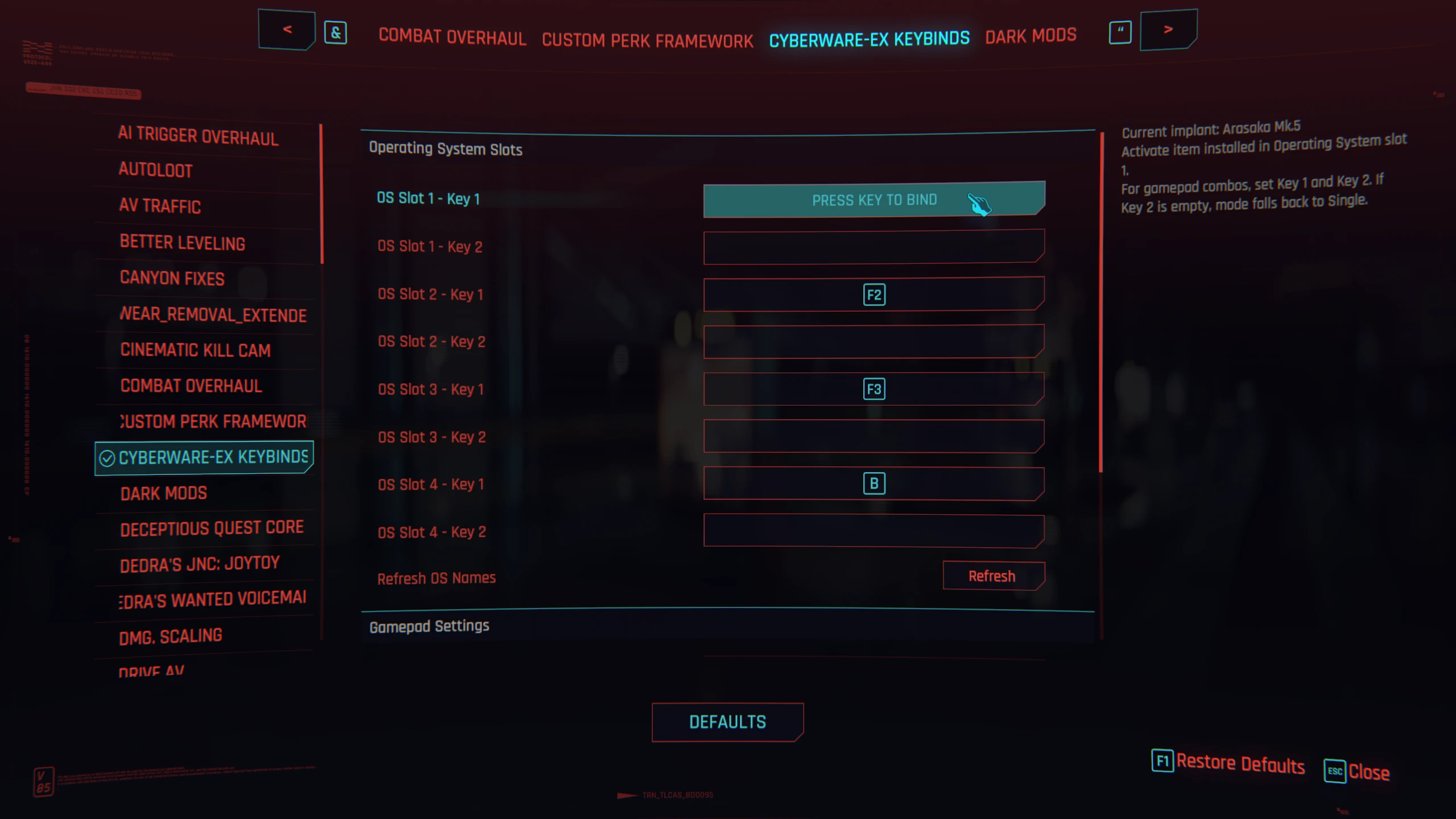
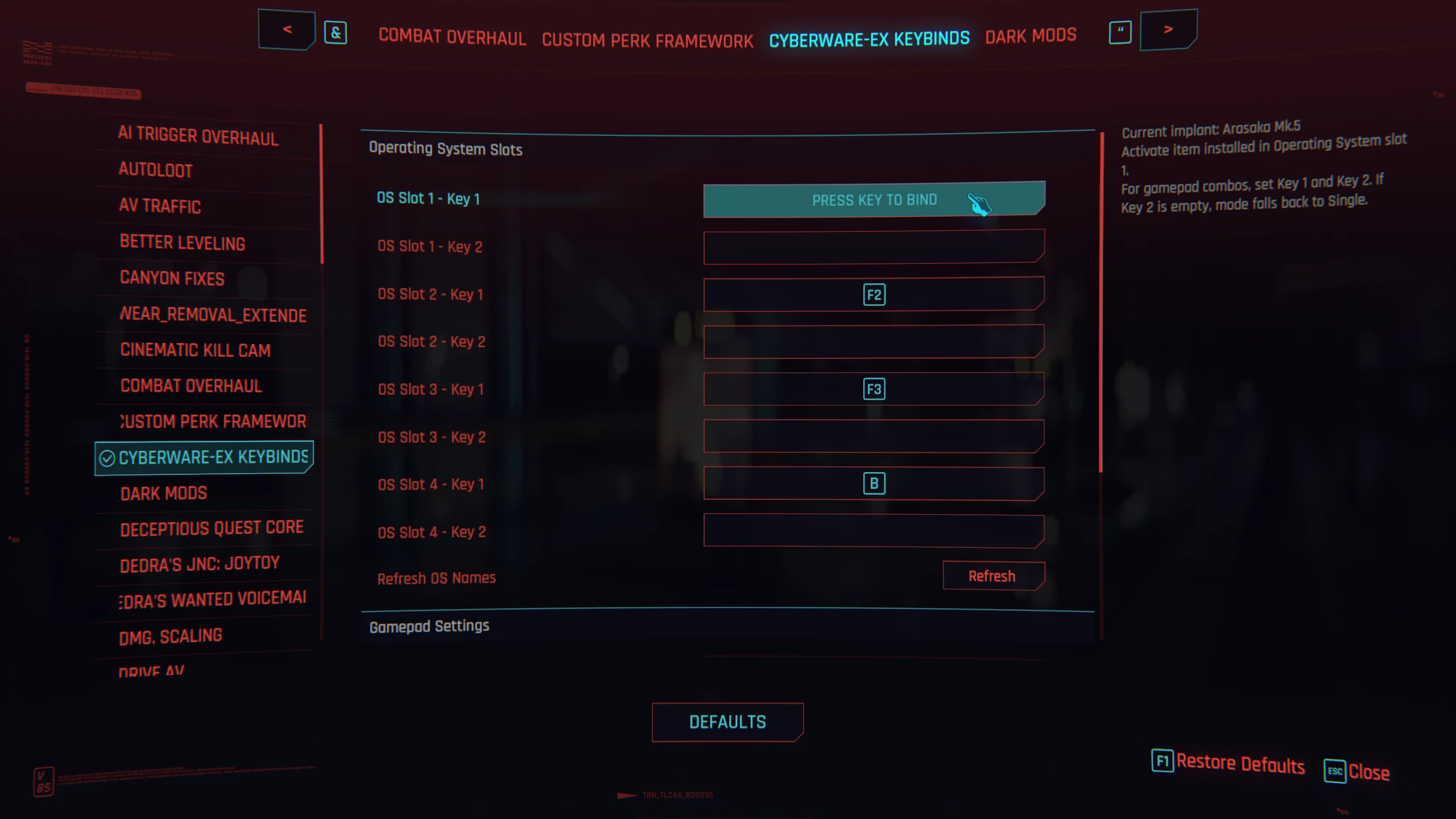
Cyberware-EX Keybinds为Cyberware-EX的额外操作系统槽位添加了可配置的热键和组合键
 查看大图
Cyberware-EX-Keybinds 为 [b]Cyberware-EX[/b] 提供的额外操作系统槽位添加了简单的快捷键。
在原版游戏中,如果你只有一个主动能力,按下能力键即可正常激活它。
当通过 [b]Cyberware-EX[/b] 装备多个主动能力时,游戏会使用不同的条件来触发每一个:
- 超频:在专注模式/扫描器中按下能力键
- 狂暴:在用拳头或近战武器格挡时按下能力键
- 斯安威斯坦:不在专注模式且未格挡时按下能力键
本模组可让你将每一个已装备的 OS 植入体 绑定到各自的按键上并直接触发。
默认按键为 F1、F2、F3 和 F4,可在游戏内通过 Native Settings UI 更改。
也支持组合输入:设置 按键 1 和 按键 2,然后在 手柄设置 中选择 顺序 或 同时。手柄和键盘均可使用。
由于游戏无法原生将两个按键绑定到同一动作,因此每个 OS 槽位都有两个独立的按键字段。
功能
- 为每个 Cyberware-EX 操作系统槽位提供一个快捷键或组合键
- 不同的激活模式(简单或组合:顺序/同时)
- 默认按键:F1、F2、F3、F4
- 游戏内完全可配置
- 尽可能支持模组植入体
- 轻量级独立附加组件
- 支持手柄
兼容性
- Cyberpunk 2077 2.5 及更新依赖(预期可用,但未在 2.5 上测试)
- Cyberpunk 2077 2.31
前置需求
- Cyberware-EX
- Native Settings UI
- Cyber Engine Tweaks
- redscript 0.5.31+
- Codeware 1.18.0+
- RED4ext 1.29.0+
- TweakXL 1.11.0+
- ArchiveXL 可选,用于本地化
安装
- 安装上面列出的前置需求。
- 下载最新版本。
- 将压缩包解压到你的 Cyberpunk 2077 安装文件夹。
你应该会得到:
<Cyberpunk 2077>\r6\scripts\CyberwareExKeybinds <Cyberpunk 2077>\bin\x64\plugins\cyber_engine_tweaks\mods\cyberware-ex-keybinds <Cyberpunk 2077>\archive\pc\mod\cyberware_ex_keybinds
游戏内设置
Esc -> Mods -> Settings -> Cyberware EX Keybinds
翻译
- 英语
- 法语
说明
本模组不会替换 Cyberware-EX。它仅为额外的操作系统槽位添加可配置的快捷键。
卸载
从你的 <Cyberpunk 2077> 文件夹中删除由压缩包 .zip 添加的文件。
或者
在 <Cyberpunk 2077> 文件夹中使用以下命令:
Powershell
if (!(Test-Path -LiteralPath '.\bin\x64\Cyberpunk2077.exe') -or !(Test-Path -LiteralPath '.\r6\scripts') -or !(Test-Path -LiteralPath '.\archive\pc\mod')) { Write-Error 'Abort: run this from the Cyberpunk 2077 root folder.'; exit 1 }; $files=@('archive\pc\mod\cyberware-ex-keybinds-localization.archive.xl','archive\pc\mod\cyberware_ex_keybinds\localization\en-us.json','archive\pc\mod\cyberware_ex_keybinds\localization\fr-fr.json','bin\x64\plugins\cyber_engine_tweaks\mods\cyberware-ex-keybinds\init.lua','bin\x64\plugins\cyber_engine_tweaks\mods\cyberware-ex-keybinds\README.md','bin\x64\plugins\cyber_engine_tweaks\mods\cyberware-ex-keybinds\config.json','plugins\cyber_engine_tweaks\mods\cyberware-ex-keybinds\config.json','mods\cyberware-ex-keybinds\config.json','cyberware-ex-keybinds-config.json','r6\scripts\CyberwareExKeybinds\CyberwareExKeybinds.reds'); $dirs=@('bin\x64\plugins\cyber_engine_tweaks\mods\cyberware-ex-keybinds','r6\scripts\CyberwareExKeybinds','archive\pc\mod\cyberware_ex_keybinds\localization','archive\pc\mod\cyberware_ex_keybinds'); $existing=$files|Where-Object{Test-Path -LiteralPath $}; Write-Host 'Planned file deletions:'; if($existing.Count -gt 0){$existing|ForEach-Object{Write-Host " - $"}}else{Write-Host ' - (none found)'}; $confirm=Read-Host 'Type DELETE to continue'; if($confirm -ne 'DELETE'){Write-Host 'Cancelled.'; exit 0}; foreach($f in $existing){Remove-Item -LiteralPath $f -Force; Write-Host "Deleted file: $f"}; foreach($d in $dirs){if(Test-Path -LiteralPath $d -PathType Container){$hasContent=(Get-ChildItem -LiteralPath $d -Force | Select-Object -First 1) -ne $null; if(-not $hasContent){Remove-Item -LiteralPath $d -Force; Write-Host "Deleted empty dir: $d"}}}; Write-Host 'Done.'
Linux/macOS
[ -f "./bin/x64/Cyberpunk2077.exe" ] && [ -d "./r6/scripts" ] && [ -d "./archive/pc/mod" ] || { echo "Abort: run this from the Cyberpunk 2077 root folder." >&2; exit 1; }; files=("archive/pc/mod/cyberware-ex-keybinds-localization.archive.xl" "archive/pc/mod/cyberware_ex_keybinds/localization/en-us.json" "archive/pc/mod/cyberware_ex_keybinds/localization/fr-fr.json" "bin/x64/plugins/cyber_engine_tweaks/mods/cyberware-ex-keybinds/init.lua" "bin/x64/plugins/cyber_engine_tweaks/mods/cyberware-ex-keybinds/README.md" "bin/x64/plugins/cyber_engine_tweaks/mods/cyberware-ex-keybinds/config.json" "plugins/cyber_engine_tweaks/mods/cyberware-ex-keybinds/config.json" "mods/cyberware-ex-keybinds/config.json" "cyberware-ex-keybinds-config.json" "r6/scripts/CyberwareExKeybinds/CyberwareExKeybinds.reds"); dirs=("bin/x64/plugins/cyber_engine_tweaks/mods/cyberware-ex-keybinds" "r6/scripts/CyberwareExKeybinds" "archive/pc/mod/cyberware_ex_keybinds/localization" "archive/pc/mod/cyberware_ex_keybinds"); echo "Planned file deletions:"; found=0; for f in "${files[@]}"; do [ -e "$f" ] && echo " - $f" && found=1; done; [ "$found" -eq 1 ] || echo " - (none found)"; read -r -p "Type DELETE to continue: " c; [ "$c" = "DELETE" ] || { echo "Cancelled."; exit 0; }; for f in "${files[@]}"; do [ -e "$f" ] && rm -f "$f" && echo "Deleted file: $f"; done; for d in "${dirs[@]}"; do [ -d "$d" ] && [ -z "$(ls -A "$d" 2>/dev/null)" ] && rmdir "$d" && echo "Deleted empty dir: $d"; done; echo "Done."

然后输入 "DELETE" 以删除已回显的文件(以及之后的文件夹)。
祝你玩得开心,chooms
正在加载版本记录…
正在加载评论…
评论在新手盒子客户端中发表,这里同步展示。