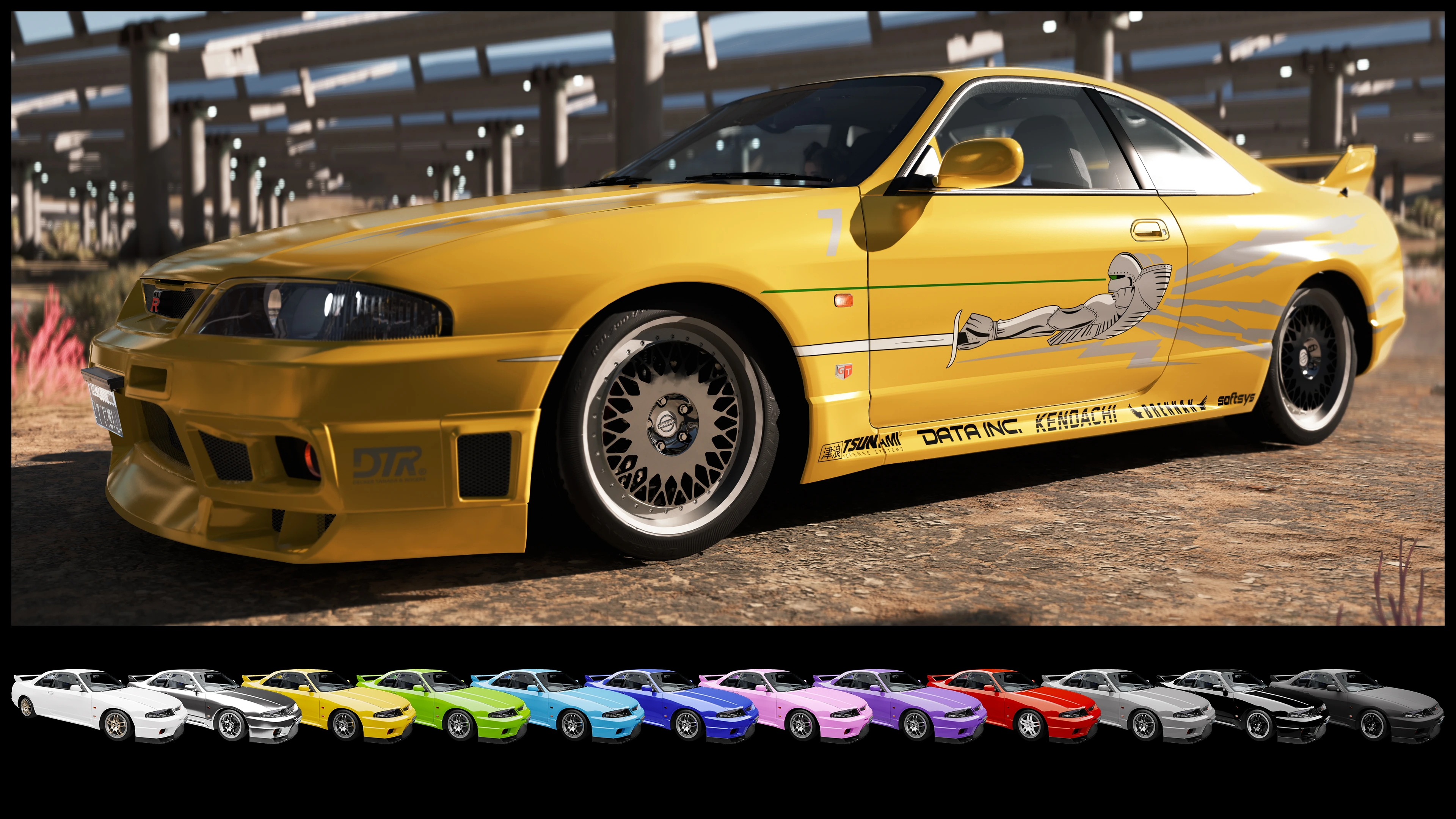
日产Skyline R33 GT-R V-Spec (1997) - ArchiveXL
支持CrystalCoat™,并有16种外观,其中四种是涂装!包含大量调校部件,可通过Vortex的fomod安装程序安装!
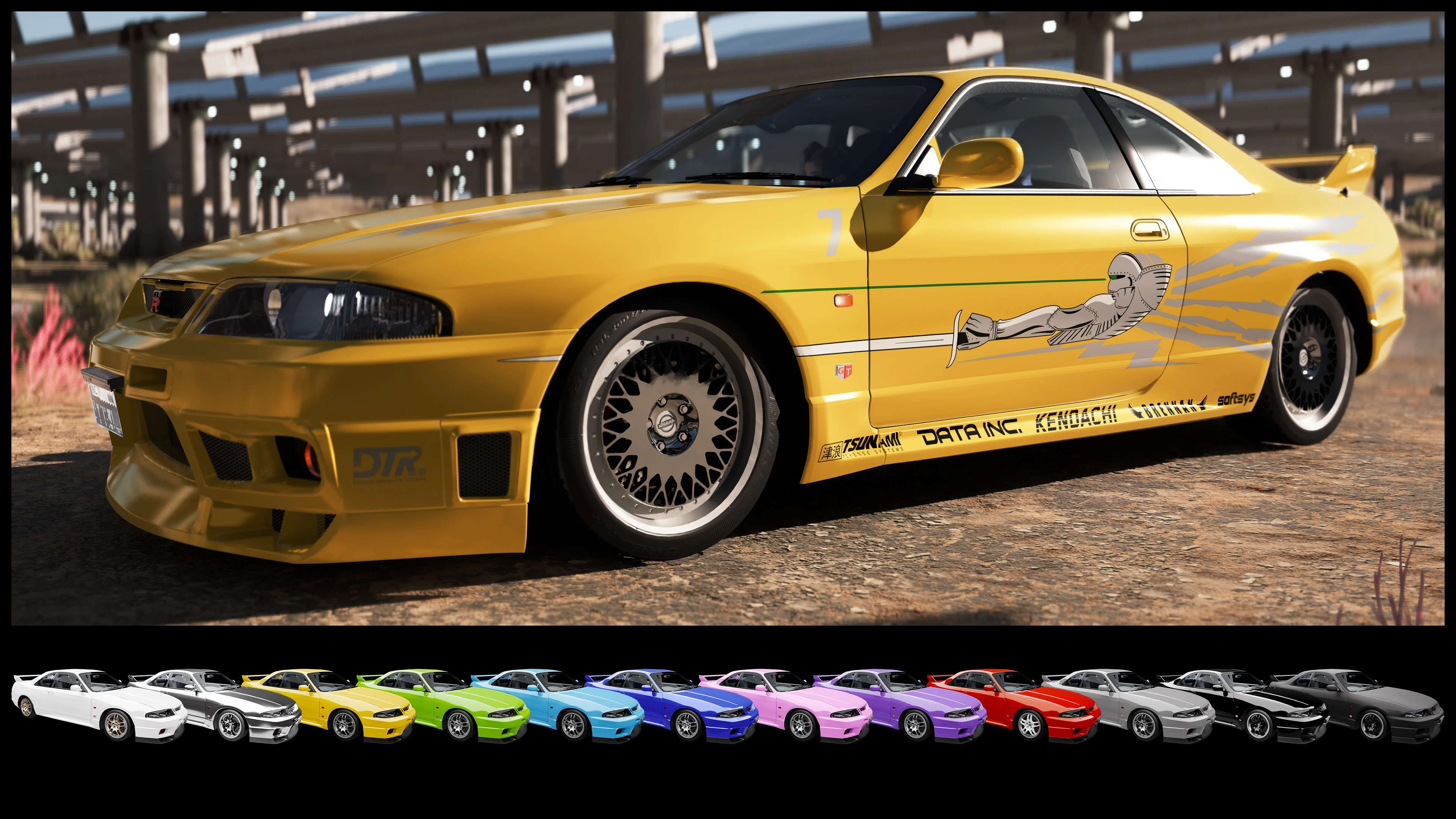 查看大图
调校部件与附加组件
[list]
[]六个前保险杠[/]
[]三个后保险杠[/]
[]四个侧裙[/]
[]三个扰流板[/]
[]六个排气管[/]
[]一个引擎盖[/]
[]十一个轮毂(其中一套带有动画)[/]
[]姿态附加组件(增加车轮倾角并降低车身)[/]
[]防滚架[/]
[]霓虹底盘灯[/]
[]侧面和引擎盖上的赛车条纹,会添加到所有基础颜色变体上[/]
[]东京漂移和速度与激情1涂装(两者均替换自定义涂装)[/]
[]一个安装在后备箱盖两个尾灯之间的灯条[/]
[]一套2077风格元素(车顶的激光雷达扫描仪和条形码、侧面的x9徽章、带屏幕和旋钮的内饰中控台等)[/]
[][url=https://www.nexusmods.com/cyberpunk2077/mods/22810]Whip Wizard[/url]插件 - 灯光组件在该模组的菜单中有正确标注[/]
[][url=https://www.nexusmods.com/cyberpunk2077/mods/14025]Nova Traffic[/url]插件 - NPC会在夜之城的常规交通中驾驶这辆车[/]
[][url=https://www.nexusmods.com/cyberpunk2077/mods/4454]Virtual Car Dealer[/url]预览图片 - 可选,因为[font=Courier New].archive[/font]有20mb。主文件中已包含基本的VCD支持[/]
[/list]除上述部件外,该车还附带一个附加组件,可[color=#ffff00]将其从右舵改为左舵[/color]。默认情况下,方向盘位于车辆右侧,这与其现实中的对应车型一致,但会导致一些故障:
[list]
[]进入车辆时的动画明显更长。从右侧进入时,V会先坐在右侧座位上,挪到左侧,然后再回到右侧座位[/]
[]当Johnny坐在左侧座位时,下车的动画会被完全跳过,V会直接传送出车外。[/]
[/list]特性:
[list]
[]CrystalCoat™支持:主颜色影响车身和刹车卡钳,次要颜色影响车轮。在涂装变体上,车身颜色不受影响。[/]
[]十二种颜色和四种涂装,均可同时使用[/]
[]发动机冷却器上的旋转风扇[/]
[]精细的发动机和内饰,带有自定义仪表盘、可用的时钟,以及与真车一致的材料[/]
[]自定义底盘,带有精细的刹车盘和卡钳,颜色与车辆外观匹配[/]
[]可用的雾灯(按键盘上的V键激活)[/]
[]自定义操控和最高速度,与现实中对应车型一致[/]
[]烧毁外观,带有弯曲的引擎盖,并移除玻璃和座椅等可破坏元素[/]
[]非RTX阴影网格[/]
[]正确定位的特效,例如发动机冒烟,以及所有六种排气管型号独有的回火[/]
[]自定义扫描器数据[/]
[/list]已知问题:
[list]
[]Stash的交互提示位于车头,因为它是基于Porsche的。[/]
[/list]制作你自己的涂装:
我包含了一个额外的车辆外观,具有纯白色涂装。你可以用自己制作的图片替换该涂装的图片文件。所以从Optional文件中获取[url=https://github.com/WolvenKit/WolvenKit/releases]WolvenKit[/url]项目模板,然后发挥创意吧!下载内容还包含一个Photoshop文件和一个带有说明及附加信息的[font=Courier New].pdf[/font]文件。
非常感谢[url=https://next.nexusmods.com/profile/Barfunkle999]Barfunkle999[/url]撰写了关于如何实现CrystalCoat™的[url=https://wiki.redmodding.org/cyberpunk-2077-modding/modding-guides/vehicles/new-crystalcoat-tm-guide]简易教程[/url],以及[url=https://next.nexusmods.com/profile/Boe6/mods?gameId=3333]boe6[/url]提供的[url=https://wiki.redmodding.org/cyberpunk-2077-modding/modding-guides/vehicles/boe6s-guide-new-car-from-a-to-z]wiki文章[/url]和关于车辆模组的[url=https://docs.google.com/document/d/1a5Xvviw_GQxcvbxEwc3GoboaNk0igxlhiyS7ux34sIs/edit?tab=t.0]pdf[/url]。
推荐模组:
[url=https://www.nexusmods.com/cyberpunk2077/mods/11134]No More Milky Glass[/url] 作者 [url=https://www.nexusmods.com/cyberpunk2077/users/32290030]Mark666DooM[/url] - 修复在间接/漫反射RTX光照下奇怪的朦胧外观。
[url=https://www.nexusmods.com/cyberpunk2077/mods/20419]Need More Smoke FX[/url] 作者 [url=https://www.nexusmods.com/cyberpunk2077/users/104835583]ShinyaON[/url] - 让漂移看起来酷毙了
[url=https://www.nexusmods.com/cyberpunk2077/mods/20675?tab=description]Nitrous[/url] 作者 [url=https://www.nexusmods.com/cyberpunk2077/users/185259609]MisterChedda[/url] - [i]强烈[/i]推荐
[url=https://www.nexusmods.com/cyberpunk2077/mods/20476]TPP Cam Toolkit[/url] 作者 [url=https://www.nexusmods.com/cyberpunk2077/users/20417594]Si13n7[/url] - 更改第三人称视角的相机位置
[url=https://www.nexusmods.com/cyberpunk2077/mods/22581]settings for Nissan Skyline R33[/url] 作者 [url=https://www.nexusmods.com/cyberpunk2077/users/104594823]Toniq187[/url] - 更改操控、最高速度、车轮位置(包含所有车轮的不同预设!)和发动机声音
[url=https://www.nexusmods.com/cyberpunk2077/mods/25873]Factions Evolved[/url] 作者 [url=https://www.nexusmods.com/cyberpunk2077/users/3251739]ApoKrytia[/url] - 允许夜之城的特定帮派驾驶这辆车
[url=https://www.nexusmods.com/cyberpunk2077/mods/31105]Loreful Modded Traffic[/url] 作者 [url=https://www.nexusmods.com/cyberpunk2077/users/138255678]soulmindberlin[/url] - 将这辆车添加到夜之城特定区域的交通中
以下链接列出了赛博朋克2077中大多数(如果不是全部)Skyline模组
[spoiler][url=https://www.nexusmods.com/cyberpunk2077/mods/21186]Nissan Skyline 2000GT-R[/url]
[url=https://www.nexusmods.com/cyberpunk2077/mods/23136]Nissan Skyline R32[/url]
[url=https://www.nexusmods.com/cyberpunk2077/mods/21275]Nissan Skyline R33[/url]
[url=https://www.nexusmods.com/cyberpunk2077/mods/23198]1995 Nissan Skyline GT-R LM Nismo[/url]
[url=https://www.nexusmods.com/cyberpunk2077/mods/7606]02' Nissan Skyline GT-R R34[/url])
[url=https://www.nexusmods.com/cyberpunk2077/mods/7767]C-West Kit - Nissan Skyline GT-R R34[/url]
[url=https://www.nexusmods.com/cyberpunk2077/mods/16570]Nissan Skyline GTR R34 HYCADE Bodykit[/url]
[url=https://www.nexusmods.com/cyberpunk2077/mods/25326]Nissan GT-R 2012[/url]
[url=https://www.nexusmods.com/cyberpunk2077/mods/11659]2017 Nissan GTR R35[/url]
[url=https://www.nexusmods.com/cyberpunk2077/mods/20237]NISSAN GT-R 'Lone Wanderer'[/url][/spoiler]
以下是其他极品飞车和速度与激情相关模组的列表:
[spoiler][url=https://www.nexusmods.com/cyberpunk2077/mods/9871]'01 BMW M3 GTR 'Most Wanted'[/url]
[url=https://www.nexusmods.com/cyberpunk2077/mods/7606]02' Nissan Skyline GT-R R34[/url]
[url=https://www.nexusmods.com/cyberpunk2077/mods/17670]2F2F Livery for Nissan Skyline GTR R34 HYCADE[/url]
[url=https://www.nexusmods.com/cyberpunk2077/mods/7767]C-West Kit - Nissan Skyline GT-R R34[/url]
[url=https://www.nexusmods.com/cyberpunk2077/mods/13569]Dodge Charger RT[/url]
[url=https://www.nexusmods.com/cyberpunk2077/mods/20249]Honda S2000[/url]
[url=https://www.nexusmods.com/cyberpunk2077/mods/20778]Mitsubishi Eclipse GSX[/url]
[url=https://www.nexusmods.com/cyberpunk2077/mods/24076]Mitsubishi Lancer Evolution IX MR[/url]
[url=https://www.nexusmods.com/cyberpunk2077/mods/17809]NFSU Eddie's Livery for Nissan Skyline GTR R34 HYCADE[/url]
[url=https://www.nexusmods.com/cyberpunk2077/mods/18759]Nissan 350Z[/url]
[url=https://www.nexusmods.com/cyberpunk2077/mods/16570]Nissan Skyline GTR R34 HYCADE Bodykit[/url]
[url=https://www.nexusmods.com/cyberpunk2077/mods/21275]Nissan Skyline R33[/url]
[url=https://www.nexusmods.com/cyberpunk2077/mods/22467]Toyota Supra Mk4[/url]
[url=https://www.nexusmods.com/cyberpunk2077/mods/25478]Mazda RX7 Fortune[/url]
[url=https://www.nexusmods.com/cyberpunk2077/mods/25670]FF7 Dodge Challenger SRT Shaker[/url][/spoiler]
[color=#666666][s] [/s][/color]
安装:
如果你通过Vortex安装此模组,[url=https://nexus-mods.github.io/NexusMods.App/developers/misc/AboutFomod/]fomod[/url]安装程序将引导你完成安装。它允许你选择调校部件(带预览图片)以及上述附加组件。安装程序有一个选项可以跳过调校部件的安装,并以原厂车身套件安装车辆。
如果你想手动安装车辆,请使用专为fomod安装程序准备的[font=Courier New].zip[/font]。下载并解压[font=Courier New].zip[/font]后,你会看到一个名为[font=Courier New]fomod[/font]的文件夹。双击打开它。里面的文件夹包含车辆和所有调校部件。它们的组织方式与你手动安装[font=Courier New].zip[/font]时所预期的一样,并且还包含预览图片和[font=Courier New].txt[/font]文件,其中包含否则只能在fomod安装程序中看到的附加信息。预览文件以每个调校部件命名。[font=Courier New].xml[/font]和[font=Courier New].jpg[/font]文件可以忽略,它们仅用于fomod安装程序。
我强烈建议使用模组管理器,因为这会让调校部件和附加组件的安装变得轻而易举。
[img]https://staticdelivery.nexusmods.com/mods/3333/images/18919/18919-1769274562-827574888.jpg[/img]
[color=#666666][s] [/s][/color]
[font=Courier New]
CET代码:[/font]
[font=Courier New][color=#b6b6b6]Game.GetVehicleSystem():EnablePlayerVehicle('Vehicle.yv_r33_black_glossy', true, false)
Game.GetVehicleSystem():EnablePlayerVehicle('Vehicle.yv_r33_black_matte', true, false)
Game.GetVehicleSystem():EnablePlayerVehicle('Vehicle.yv_r33_blue', true, false)
Game.GetVehicleSystem():EnablePlayerVehicle('Vehicle.yv_r33_green', true, false)
Game.GetVehicleSystem():EnablePlayerVehicle('Vehicle.yv_r33_grey', true, false)
Game.GetVehicleSystem():EnablePlayerVehicle('Vehicle.yv_r33_pink', true, false)
Game.GetVehicleSystem():EnablePlayerVehicle('Vehicle.yv_r33_purple', true, false)
Game.GetVehicleSystem():EnablePlayerVehicle('Vehicle.yv_r33_red', true, false)
Game.GetVehicleSystem():EnablePlayerVehicle('Vehicle.yv_r33_silver', true, false)
Game.GetVehicleSystem():EnablePlayerVehicle('Vehicle.yv_r33_sky', true, false)
Game.GetVehicleSystem():EnablePlayerVehicle('Vehicle.yv_r33_white', true, false)
Game.GetVehicleSystem():EnablePlayerVehicle('Vehicle.yv_r33_yellow', true, false)
Game.GetVehicleSystem():EnablePlayerVehicle('Vehicle.yv_r33_livery_birds', true, false)
Game.GetVehicleSystem():EnablePlayerVehicle('Vehicle.yv_r33_livery_custom', true, false) # ← 东京漂移涂装
Game.GetVehicleSystem():EnablePlayerVehicle('Vehicle.yv_r33_livery_paint', true, false)
Game.GetVehicleSystem():EnablePlayerVehicle('Vehicle.yv_r33_livery_purple-black', true, false)
Game.GetVehicleSystem():EnablePlayerVehicle('Vehicle.yv_r33_livery_skyline', true, false)[/color][/font]

正在加载版本记录…
正在加载评论…
评论在新手盒子客户端中发表,这里同步展示。