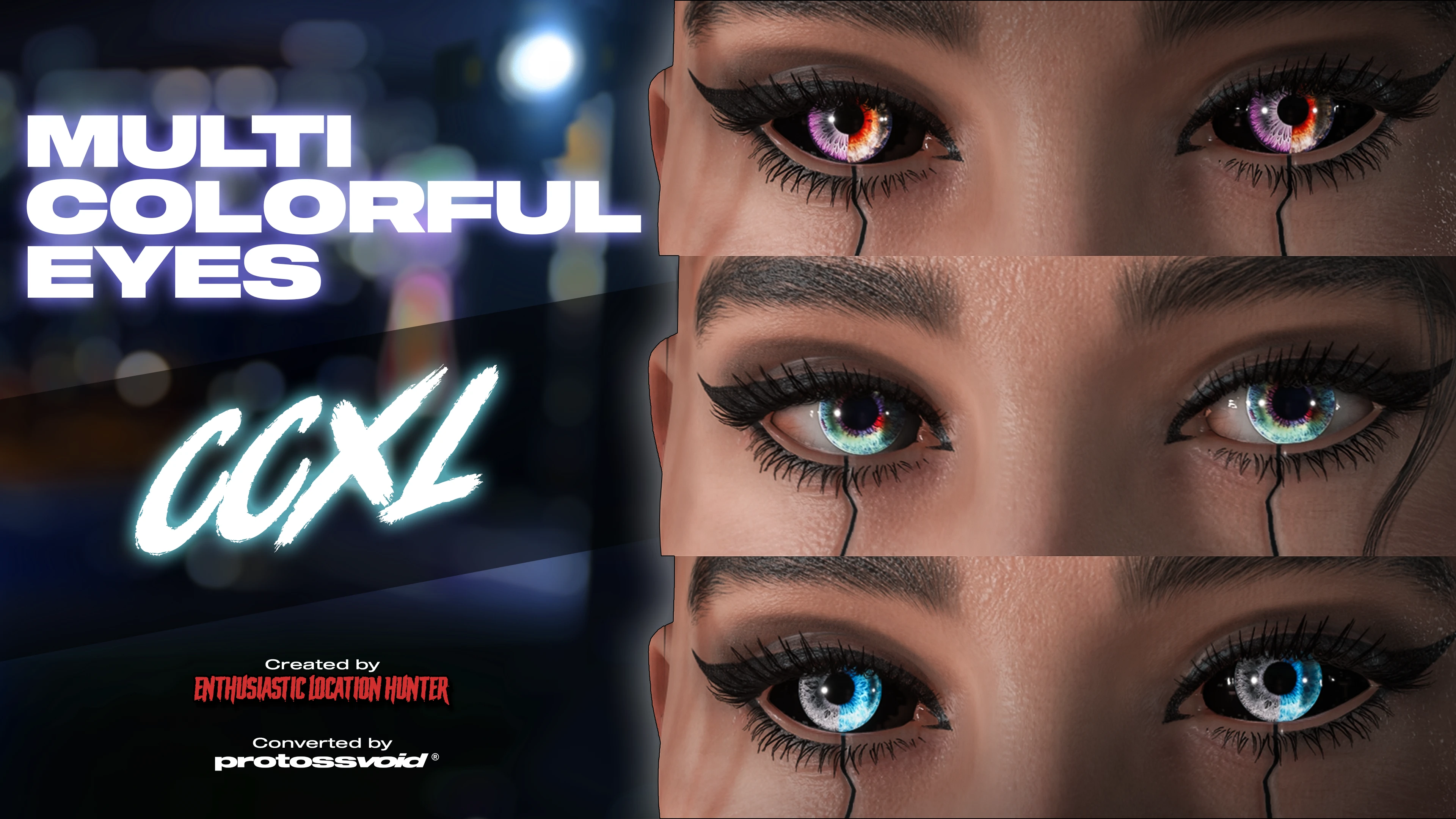
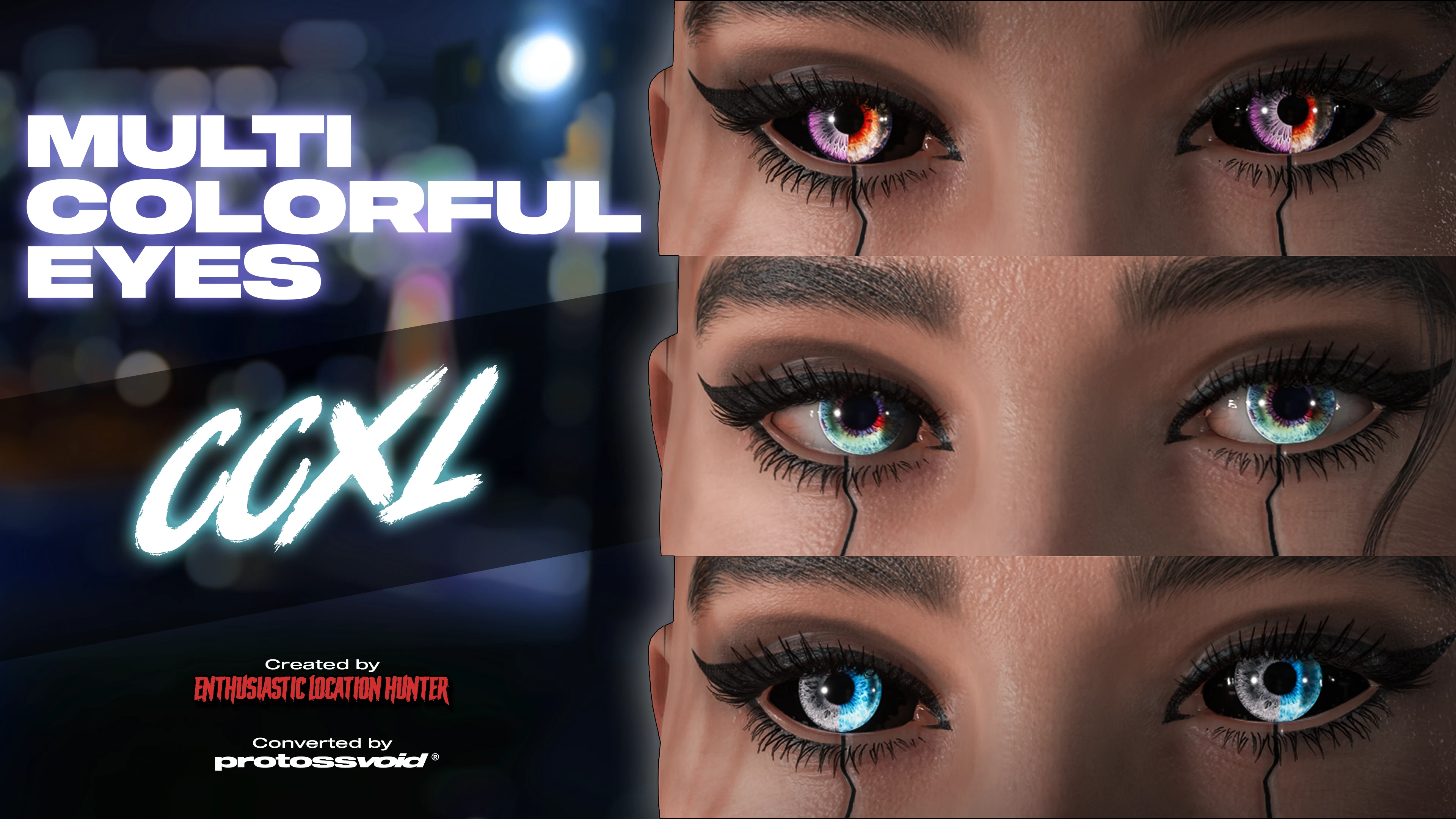
Multicolorful Eyes CCXL
CCXL conversion of EnthusiasticLocationHunter's Multicolorful Eyes. Two sets of 39 eyes each, for a total of 78 new eyes. White or Black sclera versions.
 查看大图
查看大图[center][img]https://i.imgur.com/O6PcbvW.png[/img][/center]
[center][size=5]This is a [b][color=#b4a7d6]CCXL[/color][/b] conversion of [url=https://www.nexusmods.com/cyberpunk2077/mods/13116?tab=description]EnthusiasticLocationHunter's mod[/url] Multicolorful Eyes.[/size][/center]
[center][size=5]Two sets of 39 eyes. [b][color=#b4a7d6]White Sclera[/color][/b] version and [b][color=#b4a7d6]Black Sclera[/color][/b] version.[/size][/center]
[center][/center]
[center][/center]
[center][size=5][b][color=#b4a7d6]CCXL[/color][/b] means that these eyes [b][color=#b4a7d6]do not replace[/color][/b] any existing items from the game.[/size][/center]
[center]
[/center]
[center][size=5]The eyes will be [b][color=#b4a7d6]added up into your Character Creation menu[/color][/b], and you can simply choose the new eye colors from the list.[/size][/center]
[center][/center]
[center][/center]
[center][size=4]Many thank yous to the absolute GOAT [url=https://www.nexusmods.com/profile/EnthusiasticLocationHunter]EnthusiasticLocationHunter[/url] for allowing me to do this conversion, it is extremely generous of them. Please check out their nexus page![/size][/center]
[center][/center]
[center][img]https://i.imgur.com/KtGIv3I.png[/img][/center]
[center][/center]
[center][u][b][size=5]IT REQUIRES[/size][/b][/u][/center]
[center][size=4][url=https://www.nexusmods.com/cyberpunk2077/mods/4198]ArchiveXL[/url][/size][/center]
[center][size=4][url=https://www.nexusmods.com/cyberpunk2077/mods/4197]TweakXL[/url][/size][/center]
[center][/center]
[center][/center]
[b][color=#b4a7d6][size=4]Installation:[/size][/color][/b]
I recommend simply using [url=https://www.nexusmods.com/vortex]Vortex[/url] to make your life easier. But, if you install manually:
1. Unzip the contents from MultiColorful_WhiteSclera_CCXL.zip and MultiColorful_BlackScleraCCXL.zip into your Cyberpunk 2077 root directory, normally in: “C:\Program Files(x86)\Steam\steamapps\common\Cyberpunk 2077".
[b][color=#b4a7d6][size=4]Uninstallation:[/size][/color][/b]
1. Go to your [b][color=#b4a7d6]Cyberpunk 2077 root directory[/color][/b].
2. Navigate to: [b][color=#b4a7d6][i]archive\pc\mod[/i][/color][/b]
3. Look for the files named "[b][color=#b4a7d6][i]elh_MultiColorfulWhiteScleraCCXL.xl[/i][/color][/b]", "[b][color=#b4a7d6][i]MultiColorful_WhiteSclera_CCXL.archive[/i][/color][/b]", "[b][color=#b4a7d6][i]elh_MultiColorfulBlackScleraCCXL.xl[/i][/color][/b]" and "[b][color=#b4a7d6][i]MultiColorful_BlackSclera_CCXL.archive[/i][/color][/b]" and manually delete them from the folder.
4. Navigate to: [b][i][color=#b4a7d6]r6\tweaks\elh[/color][/i][/b]
5. Look for the files named "[b][i][color=#b4a7d6]elh_MultiColorfulWhiteScleraCCXL.yaml[/color][/i][/b]" and "[b][i][color=#b4a7d6]elh_MultiColorfulBlackScleraCCXL.yaml[/color][/i][/b]"", and manually delete them.
[center][/center]
[center][/center]
[center][u][b][size=5]Big ol' thanks to:[/size][/b][/u]
[/center]
[center][b][color=#f9cb9c]El Coyote[/color][/b][/center]
[center][b][color=#a4c2f4]-KS-Modding Community[/color][/b][/center]
[center][b][color=#d5a6bd]Cyptid Syndicate[/color][/b][/center]
[center][color=#ea9999][b]Cyberpunk 2077 Garden[/b][/color][/center]
[center]for taking beautiful previews <3[/center]
[center][/center]
[center][/center]
[center][url=https://www.nexusmods.com/profile/EnthusiasticLocationHunter/mods][img]https://i.imgur.com/wH842mT.png[/img][/url][/center]
[center]Big thanks to [url=https://www.nexusmods.com/profile/AnruiMurasaki?gameId=3333]AnruiMusaraki[/url] and [url=https://www.nexusmods.com/profile/rockergirlfriend]Zwei[/url] for the help with CCXL and Wolvenkit.[/center]
[center][/center]
[center][/center]
[center]Do you like my work? You can [url=https://ko-fi.com/protossvoid]buy me a coffee![/url] ☕[/center]
[center]
[url=https://ko-fi.com/protossvoid][img]https://i.imgur.com/LcGNRr2.png[/img][/url]
Any contribution will be appreciated <3[/center]
[center][i][color=#d9d2e9][size=1]ravenous and unrelenting, pathogenic and parasitic[/size][/color][/i][/center]
![https://i.imgur.com/O6PcbvW.png[/img][/center]](https://i.imgur.com/O6PcbvW.png%5B/img%5D%5B/center%5D)
![https://i.imgur.com/KtGIv3I.png[/img][/center]](https://i.imgur.com/KtGIv3I.png%5B/img%5D%5B/center%5D)
![https://www.nexusmods.com/profile/EnthusiasticLocationHunter/mods][img]https://i.imgur.com/wH842mT.png[/img][/url]](https://www.nexusmods.com/profile/EnthusiasticLocationHunter/mods%5D%5Bimg%5Dhttps://i.imgur.com/wH842mT.png%5B/img%5D%5B/url%5D)
![https://ko-fi.com/protossvoid][img]https://i.imgur.com/LcGNRr2.png[/img][/url]](https://ko-fi.com/protossvoid%5D%5Bimg%5Dhttps://i.imgur.com/LcGNRr2.png%5B/img%5D%5B/url%5D)
正在加载版本记录…
正在加载评论…
评论在新手盒子客户端中发表,这里同步展示。