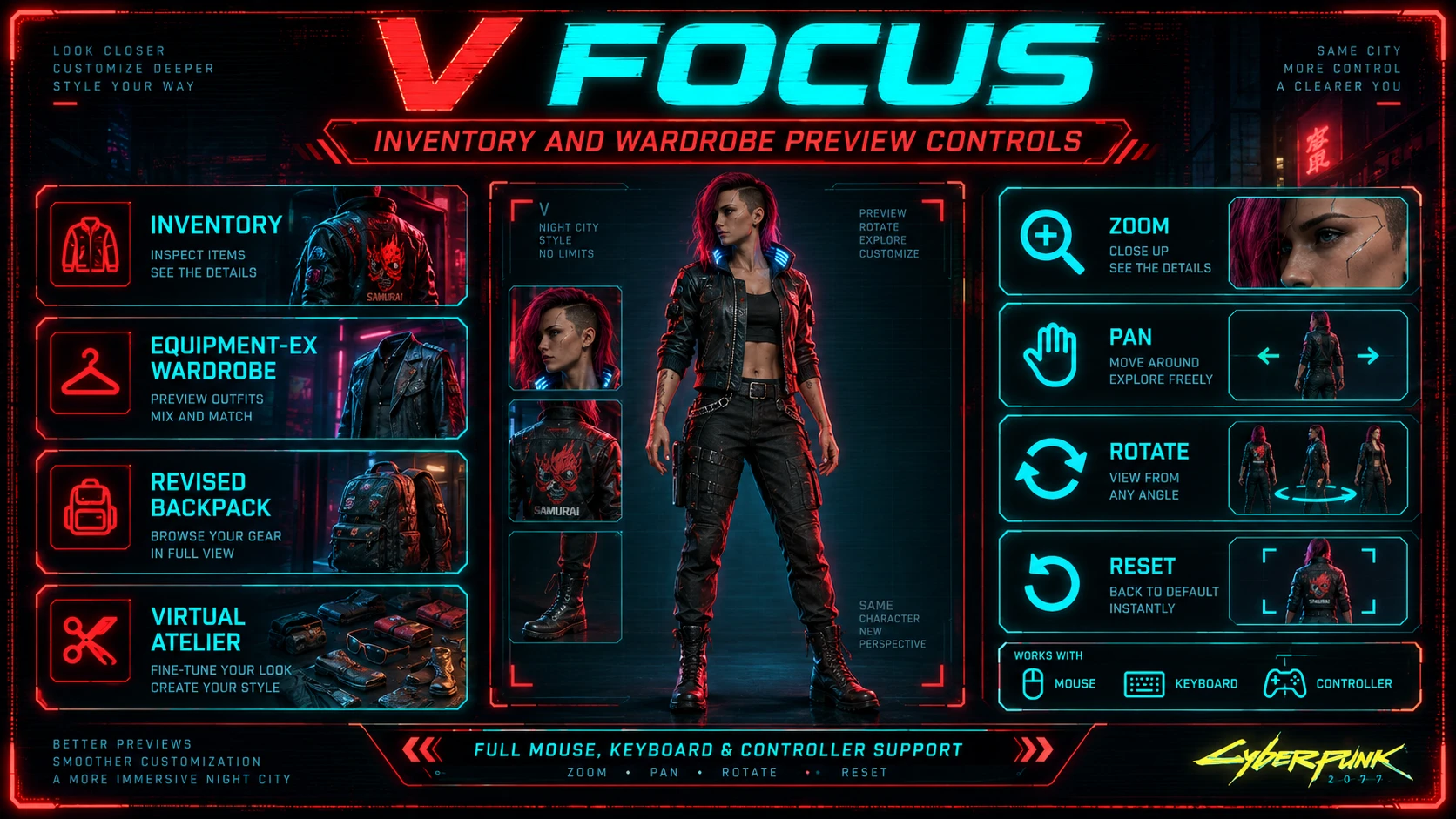
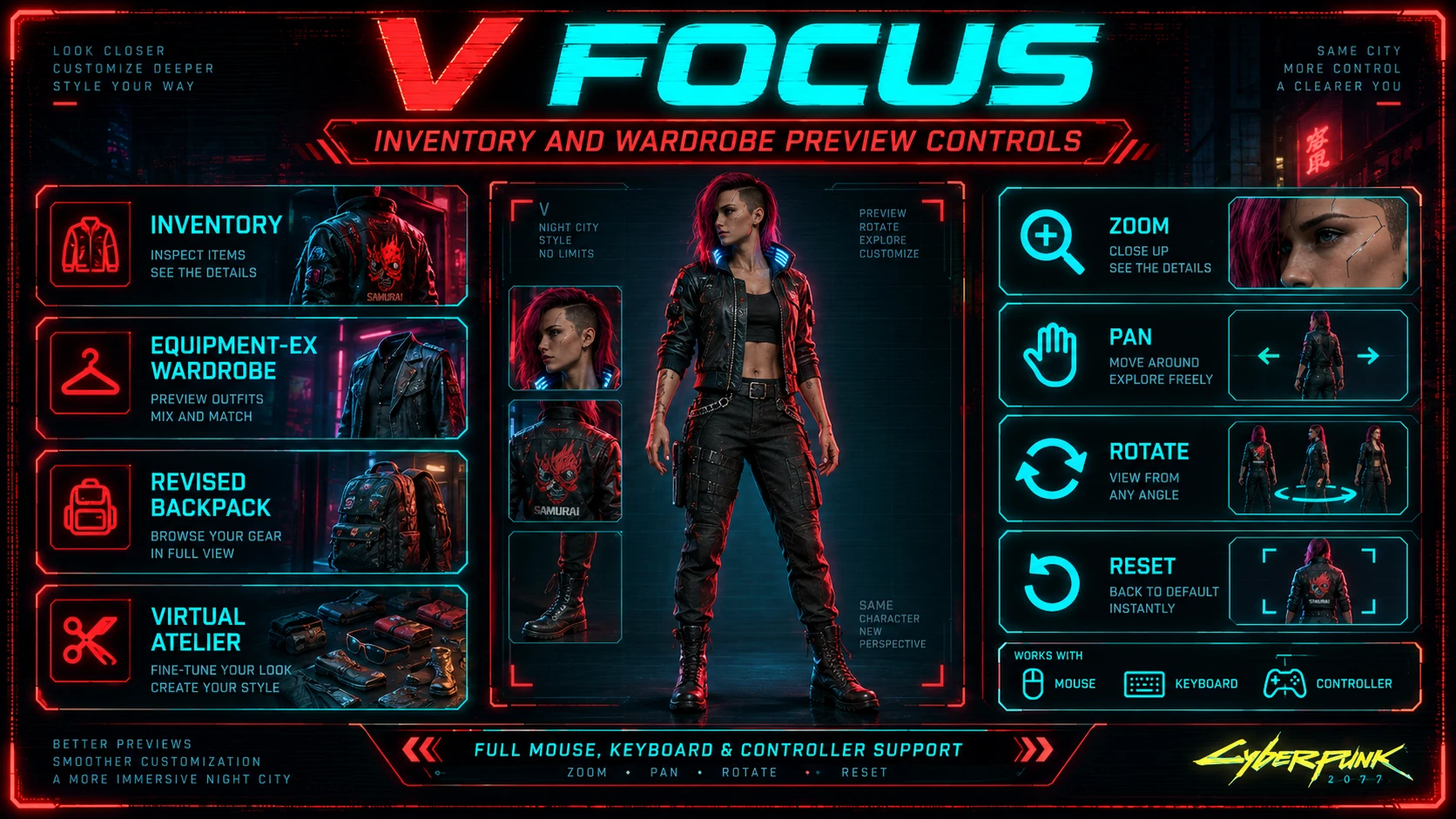
V Focus - Inventory and Wardrobe Preview Controls - Zoom Pan Rotate
Take full control of character previews with zoom, pan, rotation and reset controls for Inventory, Equipment-EX Wardrobe, Revised Backpack and Virtual Atelier - with full mouse, keyboard and controller support.
 查看大图
查看大图[color=#9fc5e8][size=4][b]DESCRIPTION[/b][/size][/color]
[b][i]Take full control of V's character previews.[/i][/b]
[b][color=#9fc5e8]V Focus [/color][/b]expands the character preview controls across Cyberpunk 2077's Inventory and several popular UI mods, adding proper zoom, pan, rotation and view reset controls for mouse, keyboard and controller.
[quote][center][color=#ffff00][b][size=4]I'm aware the current release is too impactful regarding performances: it does 32x on vanilla resolution. You'd need something like a RTX4090 to use it.[/size][/b][/color][/center]
[center][color=#ffff00][b][size=4]I'm working on more balanced versions : 1x, 4, 8x, 16x[/size][/b][/color][/center]
[/quote]
[color=#9fc5e8][size=4][b]FEATURES[/b][/size][/color]
- High-resolution character previews (even at maximum zoom)
* V Focus keeps V's preview sharp and detailed at very close zoom levels, making it possible to properly inspect clothing, accessories, tattoos, cyberware and other character details.
* This is especially noticeable in Equipment-EX Wardrobe and Virtual Atelier, whose native previews can become noticeably low-resolution when viewed up close.
* Performance note: the highest zoom levels use a much higher-resolution preview surface than the native UI. This can cause a noticeable performance hit while heavily zoomed in, especially on lower-end GPUs. Performance returns to normal once you zoom back out or reset the preview.
- Natively compatible with [url=https://www.nexusmods.com/cyberpunk2077/mods/33193]Ultrawide UI Overhaul[/url] mod (supports all aspect ratio displays)
- Extended zoom controls for character and item previews
- Free preview panning / repositioning
- Mouse rotation support
- Full controller support
- Smooth keyboard panning
- One-button / combo view reset
- Context-sensitive button hints
- Controls are restricted to the preview area where necessary, so item interactions remain untouched
- Keyboard panning automatically follows your actual movement bindings:
* AZERTY: ZQSD
* QWERTY: WASD
* Custom movement bindings are supported too
[color=#9fc5e8][size=4][b]SUPPORTED MENUS[/b][/size][/color]
[center][b][color=#9fc5e8]INVENTORY[/color][/b][/center]
[center][img width=316]https://staticdelivery.nexusmods.com/mods/3333/images/33527/33527-1788622501-541627660.gif[/img][/center]
V Focus also prevents the vanilla [i]Enable / Disable Comparison[/i] L3 action from triggering globally from the main Inventory screen. It remains available where it actually belongs: inside Inventory item-selection screens.
[center][b][color=#9fc5e8]EQUIPMENT-EX WARDROBE[/color][/b][/center]
[center][img width=321]https://staticdelivery.nexusmods.com/mods/3333/images/33527/33527-1788622562-439273558.gif[/img][/center]
Because V Focus uses R3 for zoom, Equipment-EX's native [i]Unequip All Items[/i] controller action is moved to Triangle / Y while hovering the preview.
Preview controls remain hover-only so normal Wardrobe item actions are not affected.
[center][b][color=#9fc5e8]REVISED BACKPACK[/color][/b][/center]
[center][img width=327]https://staticdelivery.nexusmods.com/mods/3333/images/33527/33527-1788622524-90116069.gif[/img][/center]
Supports both Revised Backpack preview types:
- Garment Preview
- Item Preview
Preview controls remain hover-only so normal Revised Backpack item actions are not affected.
[center][color=#9fc5e8][size=3][b]VIRTUAL ATELIER[/b][/size][/color][/center]
[center][img width=328]https://staticdelivery.nexusmods.com/mods/3333/images/33527/33527-1788622572-1260565260.gif[/img][/center]
Preview controls remain hover-only so normal Virtual Atelier item actions are not affected.
[color=#9fc5e8][size=4][b]CONTROLS[/b][/size][/color]
[b][color=#9fc5e8]Mouse & Keyboard[/color][/b]
- Zoom in / out: Mouse Wheel
- Rotate: Left Mouse Button + Mouse Movement
- Pan the preview:
* Middle Mouse Button + Mouse Movement (The mouse pan key can be changed in Mod Settings.)
* Movement Keys (WASD, ZQSD, other layout depending user config)
- Reset the view by default: V (The reset key can also be changed through Mod Settings.)
[b][color=#9fc5e8]Controller[/color][/b]
- Rotate left: L2 / LT
- Rotate right: R2 / RT
- Pan the preview: Right Stick
- Zoom in: R3 / Right Stick Click (Hold to continue zooming in.)
- Zoom in: L3 / Left Stick Click (Hold to continue zooming out.)
- Reset view: L3 + R3
Controller preview actions are kept context-sensitive where necessary so they do not interfere with unrelated item controls.
[color=#9fc5e8][size=4][b]REQUIREMENTS[/b][/size][/color]
Required:
- [url=https://www.nexusmods.com/cyberpunk2077/mods/1511]redscript[/url]
- [url=https://www.nexusmods.com/cyberpunk2077/mods/4885]Mod Settings[/url]
Optional integrations:
- [url=https://www.nexusmods.com/cyberpunk2077/mods/6945]Equipment-EX[/url] - enables V Focus controls in its Wardrobe
- [url=https://www.nexusmods.com/cyberpunk2077/mods/17642]Revised Backpack[/url] - enables its garment and item preview support
- [url=https://www.nexusmods.com/cyberpunk2077/mods/2987]Virtual Atelier[/url] - enables Virtual Atelier preview support
- [url=https://www.nexusmods.com/cyberpunk2077/mods/31920]RedLogger[/url] - only required if you enable V Focus debug logging
You do not need RedLogger for normal use.
[color=#9fc5e8][size=4][b]INSTALLATION[/b][/size][/color]
Extract the archive into your Cyberpunk 2077 installation directory.
Or install with your favorite mod manager.
[color=#9fc5e8][size=4][b]UNINSTALLATION[/b][/size][/color]
Remove:
- archive/pc/mod/VFocus.archive
- r6/scripts/VFocus/
[color=#9fc5e8][size=4][b]COMPATIBILITY[/b][/size][/color]
V Focus only modifies preview-related behavior and activates its compatibility code when the corresponding preview or supported mod is present.
Virtual Atelier and Equipment-EX integrations are conditional, so they do not become hard requirements for players who do not use those mods.
Revised Backpack support activates only on its preview screens.
[color=#9fc5e8][size=4][b]DEBUGGING[/b][/size][/color]
V Focus contains optional runtime diagnostics for troubleshooting.
Debug logs are:
- Disabled by default
- Controlled through Mod Settings
- Written through RedLogger when RedLogger is installed
Normal users do not need to enable them.
![https://staticdelivery.nexusmods.com/mods/3333/images/33527/33527-1788622501-541627660.gif[/img][/center]](https://staticdelivery.nexusmods.com/mods/3333/images/33527/33527-1788622501-541627660.gif%5B/img%5D%5B/center%5D)
![https://staticdelivery.nexusmods.com/mods/3333/images/33527/33527-1788622562-439273558.gif[/img][/center]](https://staticdelivery.nexusmods.com/mods/3333/images/33527/33527-1788622562-439273558.gif%5B/img%5D%5B/center%5D)
![https://staticdelivery.nexusmods.com/mods/3333/images/33527/33527-1788622524-90116069.gif[/img][/center]](https://staticdelivery.nexusmods.com/mods/3333/images/33527/33527-1788622524-90116069.gif%5B/img%5D%5B/center%5D)
![https://staticdelivery.nexusmods.com/mods/3333/images/33527/33527-1788622572-1260565260.gif[/img][/center]](https://staticdelivery.nexusmods.com/mods/3333/images/33527/33527-1788622572-1260565260.gif%5B/img%5D%5B/center%5D)
正在加载版本记录…
正在加载评论…
评论在新手盒子客户端中发表,这里同步展示。