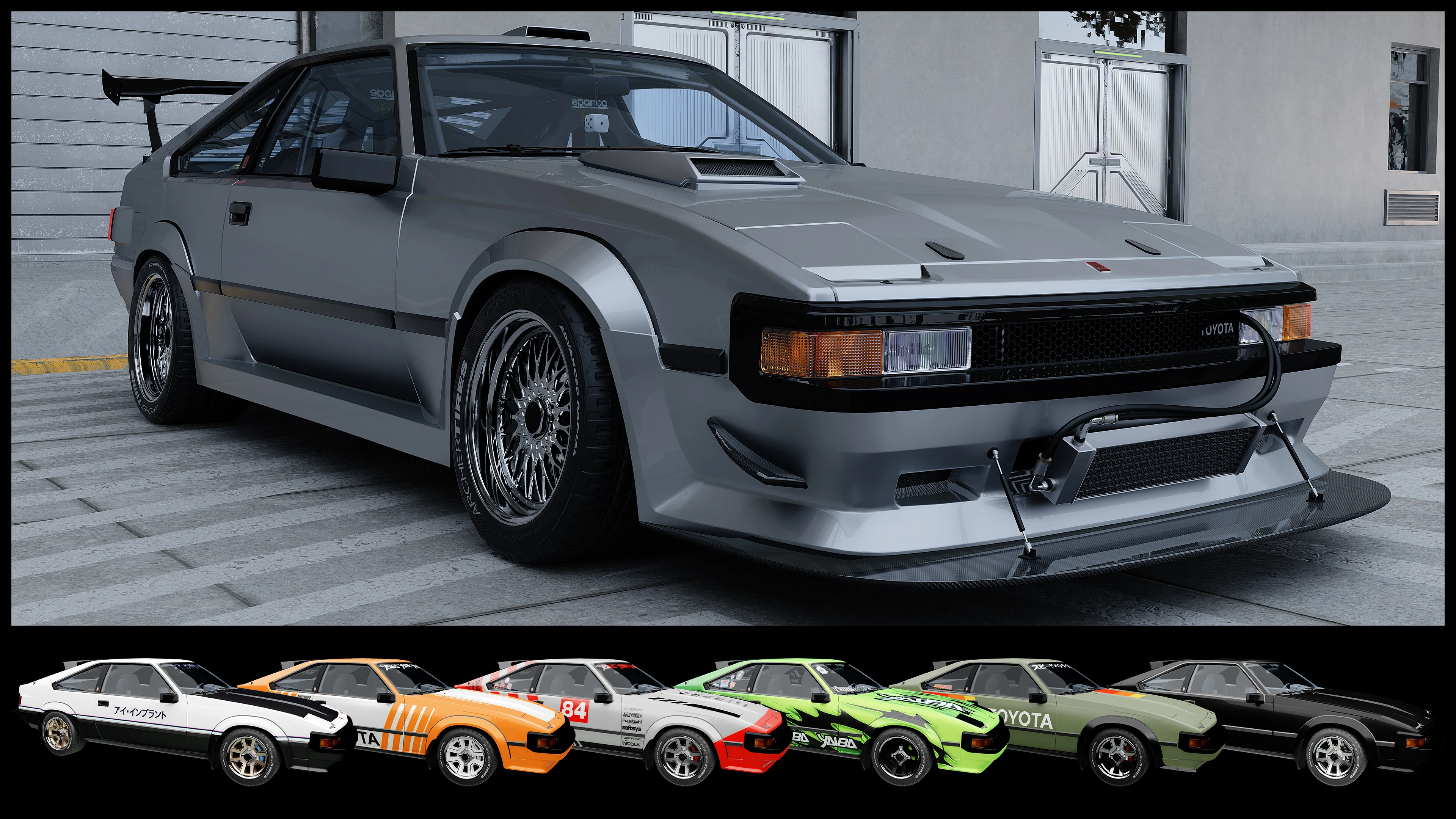
Toyota Celica Supra A60 - ArchiveXL
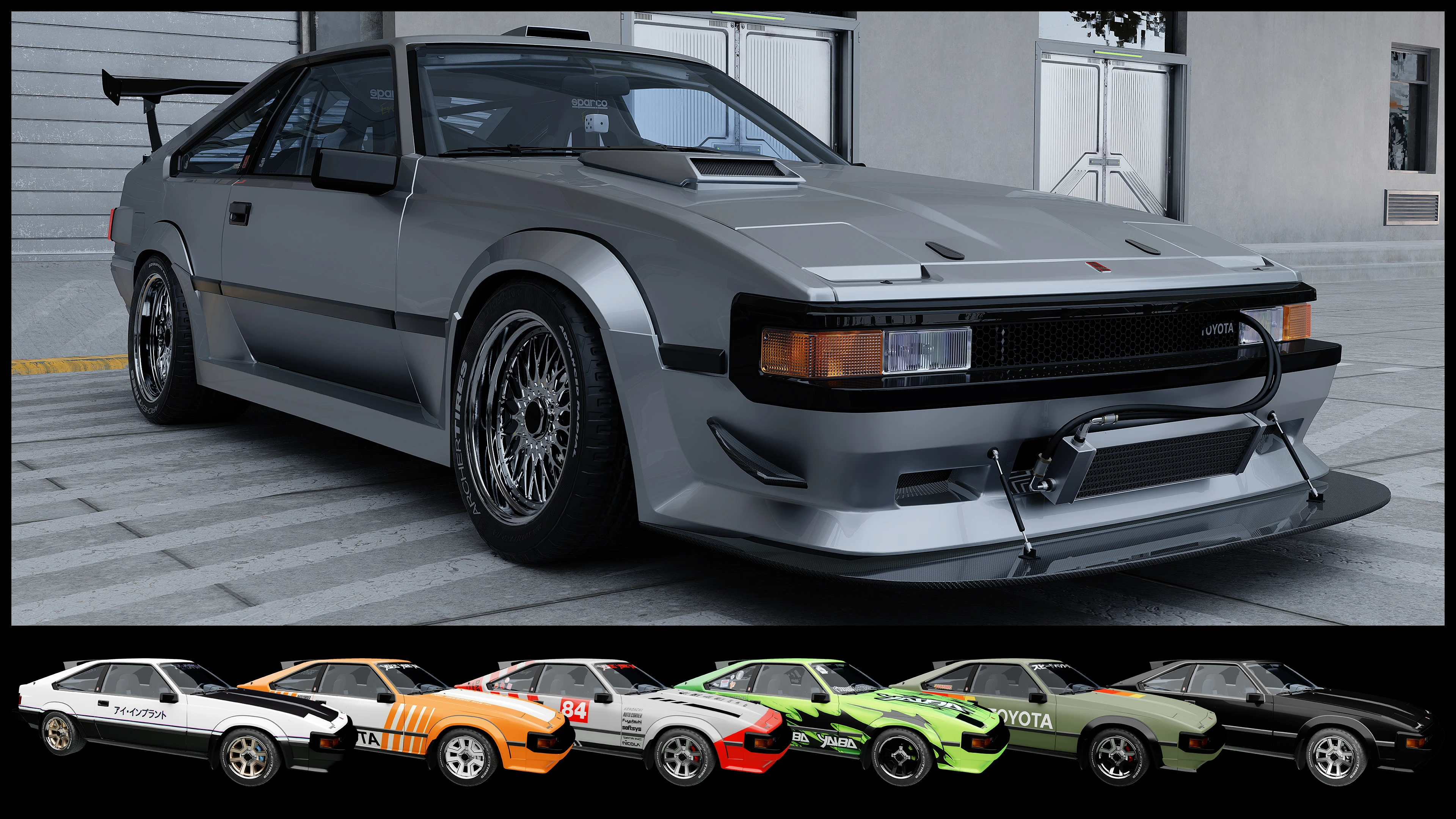
features extensive colour customisation, supports CrystalCoat™, has an animated antenna and pop up headlights, and a few tuning parts that can be chosen with the fomod installer for Vortex!!
 查看大图
查看大图colour customisation:
you can easily change the colours of the body, brake calipers, hood, spoiler, wheels, window tint, and Supra decal on the trunk. additionally, body parts can be assigned to either the primary or secondary CrystalCoat™ colour to allow even further customisation. this works by editing an [font=Courier New].xl[/font] file which can be opened in any text editor like Notepad. the tuning part [font=Courier New].zip[/font] file of the mod includes a PDF tutorial on how to change colours, preview pictures of each body part in each of the colours, and preset colour schemes. the colour customisation doesn't affect the livery variations, only the appearance named "Customisable" is affected.
tuning parts, exterior:
[list]
[]alternative front bumper[/]
[]alternative rear bumper[/]
[]cooler on front bumper[/]
[]4 exhausts[/]
[]alternative hood[/]
[]louvers[/]
[]neon underglow[/]
[]disable roof spoiler[/]
[]alternative skirts[/]
[]splitter[/]
[]9 spoilers[/]
[]stance suspension[/]
[]4 sunroofs[/]
[]10 wheels[/]
[/list]tuning parts, interior:
[list]
[]bobblehead[/]
[]alternative dashboard[/]
[]dice on the rear view mirror that dangles[/]
[]phone mounted on dashboard [color=#b6b6b6](shows time, currently selected radio station, animated equaliser)[/color][/]
[]rollcage[/]
[]alternative seats[/]
[]alternative steering wheel[/]
[]alternative stereo[/]
[]5 trunk accessories[/]
[/list]features:
[list]
[]animated pop up headlights [color=#b6b6b6](the redscript that triggers the animation was originally written by [url=https://www.nexusmods.com/profile/MisterChedda]MisterChedda[/url])[/color] [/]
[][color=#ffffff]animated radio antenna, press R on your keyboard to start the radio and the antenna will extend [/color][color=#b6b6b6]([/color][url=https://www.nexusmods.com/profile/hgyi56]hgyi56[/url][color=#b6b6b6] originally wrote the code that toggles the animation for the [/color][url=https://www.nexusmods.com/cyberpunk2077/mods/22107]Bugatti Tourbillon[/url][color=#b6b6b6] by [/color][url=https://www.nexusmods.com/profile/MAXSA5]MAXSA5[/url][color=#b6b6b6])[/color][/]
[]CrystalCoat™: by default, the primary colour affects the car body, secondary colour affects the wheels and brake calipers. this can be changed using the colour customisation described above.[/]
[]detailed interior with high res recreation of badges from real life photos and materials accurate to the real life car[/]
[]custom dashboard elements: functional clock, foglight indicator[/]
[]functional fog lights [color=#b6b6b6](tap the V key on your keyboard to activate them)[/color][/]
[]custom chassis with animated suspension & detailed brakes[/]
[]custom handling and top speed accurate to its real life counterpart [color=#b6b6b6](131mph, [font=Courier New].yaml[/font] includes instructions to make it faster)[/color][/]
[]burnt appearance that removes breakable elements like glass and the seats[/]
[]non-RTX shadow meshes[/]
[]correctly positioned FX, such as smoke from the engine and backfire[/]
[]custom scanner data[/]
[/list]gameplay add-ons:
[list]
[][url=https://www.nexusmods.com/cyberpunk2077/mods/22810][/url][url=https://www.nexusmods.com/cyberpunk2077/mods/24887]Dedka Car Dealership[/url] plugin - car can be bought in the showroom[/]
[][url=https://www.nexusmods.com/cyberpunk2077/mods/14025]Nova Traffic[/url] plugin - NPCs drive the car through Night City in regular traffic[/]
[][url=https://www.nexusmods.com/cyberpunk2077/mods/4454]Virtual Car Dealer[/url] preview pictures - optional because the [font=Courier New].archive[/font] is 9mb. basic VCD support is included in the main file[/]
[][url=https://www.nexusmods.com/cyberpunk2077/mods/22810]Whip Wizard[/url] plugin - light components are properly labeled in the menu of the mod[/]
[/list]make your own liveries:
i've included one additonal appearance of the car which features a plain white livery. you can replace the image file of that livery with one you can make yourself. so grab the [font=Courier New].psd[/font] from the Miscellaneous files and get creative! the download also contains a [font=Courier New].pdf[/font] file with instructions and additional info.
known issues:
[list]
[]the engine is low poly and lacks detail[/]
[]after loading a savegame in which V is inside the car, the headlights will be down even if the lights are on. hold V on your keyboard to toggle the lights off and then hold the key again to toggle them on again. after that, the headlights will be up.[/]
[]after loading a savegame in which V is inside the car, the antenna will be down even if the radio is on. press R twice to turn the radio off and back on and the antenna will extend.[/]
[/list]many thanks to [url=https://next.nexusmods.com/profile/Barfunkle999]Barfunkle999[/url] for writing an [url=https://wiki.redmodding.org/cyberpunk-2077-modding/modding-guides/vehicles/new-crystalcoat-tm-guide]easy tutorial[/url] on how to implement CrystalCoat™ and [url=https://next.nexusmods.com/profile/Boe6/mods?gameId=3333]boe6[/url] for the [url=https://wiki.redmodding.org/cyberpunk-2077-modding/modding-guides/vehicles/boe6s-guide-new-car-from-a-to-z]wiki article[/url] and [url=https://docs.google.com/document/d/1a5Xvviw_GQxcvbxEwc3GoboaNk0igxlhiyS7ux34sIs/edit?tab=t.0]pdf[/url] on car modding.
recommended mods:
[url=https://www.nexusmods.com/cyberpunk2077/mods/26318]Hot-Sampled Photomode Renders[/url] by [url=https://www.nexusmods.com/cyberpunk2077/users/3462879]dragonzkiller[/url] - incredibly useful mod for incredibly high-res screenshots
[url=https://www.nexusmods.com/cyberpunk2077/mods/20419]Need More Smoke FX[/url] by [url=https://www.nexusmods.com/cyberpunk2077/users/104835583]ShinyaON[/url] - makes drifting look cool af
[url=https://www.nexusmods.com/cyberpunk2077/mods/20675?tab=description]Nitrous[/url] by [url=https://www.nexusmods.com/cyberpunk2077/users/185259609]MisterChedda[/url] - [i]highly[/i] recommended
[url=https://www.nexusmods.com/cyberpunk2077/mods/11134]No More Milky Glass[/url] by [url=https://www.nexusmods.com/cyberpunk2077/users/32290030]Mark666DooM[/url] - fixes the weird hazy look under indirect/diffused RTX light
[url=https://www.nexusmods.com/cyberpunk2077/users/7484287][/url][url=https://www.nexusmods.com/cyberpunk2077/mods/16099]Toyota Trueno GT[/url] by [url=https://www.nexusmods.com/cyberpunk2077/users/7484287]SDH0[/url]
[url=https://www.nexusmods.com/cyberpunk2077/mods/19749]Toyota MR2 Supercharged[/url] by [url=https://www.nexusmods.com/cyberpunk2077/users/177255294]Cornmilf[/url]
[url=https://www.nexusmods.com/cyberpunk2077/mods/11312]Mitsubishi Starion ESI-R[/url] by [url=https://www.nexusmods.com/cyberpunk2077/users/177255294]Cornmilf[/url]
[url=https://www.nexusmods.com/cyberpunk2077/mods/27152]Honda CRX Mugen[/url]
[color=#666666][s] [/s][/color]
[img]https://staticdelivery.nexusmods.com/mods/3333/images/18919/18919-1788528539-1299719271.gif[/img]
[center][font=Courier New][color=#d8d8d8]colour presets ⤴[/color][/font][/center]
[img]https://i.imgur.com/zVAwNAD.gif[/img]
[center][font=Courier New][color=#d8d8d8]animated pop-up headlights⤴[/color][/font][/center]
[img]https://i.imgur.com/j5htXvY.gif[/img]
[center][font=Courier New][color=#d8d8d8]animated antenna ⤴[/color][/font][/center]
[color=#666666][s] [/s][/color]
installation:
the mod is split into two separate [font=Courier New].zip[/font] files: the base car with its factory body kit and black car paint and a second [font=Courier New].zip[/font] file that includes all tuning parts, colour customisation options, and the related tutorial. this allows easy one click installation without any tuning parts for those of you who just want the car, but still provides a fomod installer for easy customisation of the body parts and interior. the fomod installer features interactive selection of each tuning part in its respective category with preview pictures and additional information. that additional information is also available in [font=Courier New].txt[/font] files when manually installing the tuning parts. among useful instructions, there's also a list with each tuning part that belongs to each livery.
if you choose to install the tuning parts, you must also install the base car.
regardless of installation method, all files need to be copied into the following directories in your [url=https://wiki.redmodding.org/cyberpunk-2077-modding/for-mod-users/users-modding-cyberpunk-2077/the-cyberpunk-2077-game-directory]Cyberpunk game folder[/url].
[color=#b6b6b6][font=Courier New].archive → archive\pc\mod[/font][/color]
[color=#b6b6b6][font=Courier New].xl → archive\pc\mod[/font][/color]
[color=#b6b6b6][font=Courier New].yaml → r6\tweaks\yellingintothevoid[/font][/color]
gameplay add-ons:
[font=Courier New].json[/font] for Dedka Auto Shop:
[color=#b6b6b6][font=Courier New]bin\x64\plugins\cyber_engine_tweaks\mods\Dedka Auto Shop\cars[/font][/color]
[font=Courier New].json[/font] for Nova Traffic:
[color=#b6b6b6][font=Courier New]bin\x64\plugins\cyber_engine_tweaks\mods\NovaTraffic\custom[/font][/color]
[font=Courier New].json[/font] for Whip Wizard:
[color=#b6b6b6][font=Courier New]bin\x64\plugins\cyber_engine_tweaks\mods\whip_wizard\vehicles\lights[/font][/color]
more info can be found inside the tuning part [font=Courier New].zip[/font] in the [font=Courier New]readme_manual_installation.txt[/font].
[color=#666666][s] [/s][/color]
[font=Courier New]CET codes:
[color=#b6b6b6]Game.GetVehicleSystem():EnablePlayerVehicle('Vehicle.yv_a60_customisable', true, false)
Game.GetVehicleSystem():EnablePlayerVehicle('Vehicle.yv_a60_livery_custom', true, false)
Game.GetVehicleSystem():EnablePlayerVehicle('Vehicle.yv_a60_livery_green', true, false)
Game.GetVehicleSystem():EnablePlayerVehicle('Vehicle.yv_a60_livery_kiroshi', true, false)
Game.GetVehicleSystem():EnablePlayerVehicle('Vehicle.yv_a60_livery_orange_white', true, false)
Game.GetVehicleSystem():EnablePlayerVehicle('Vehicle.yv_a60_livery_red_grey', true, false)
Game.GetVehicleSystem():EnablePlayerVehicle('Vehicle.yv_a60_livery_trd', true, false)[/color][/font]
![https://staticdelivery.nexusmods.com/mods/3333/images/18919/18919-1788528539-1299719271.gif[/img]](https://staticdelivery.nexusmods.com/mods/3333/images/18919/18919-1788528539-1299719271.gif%5B/img%5D)
![https://i.imgur.com/zVAwNAD.gif[/img]](https://i.imgur.com/zVAwNAD.gif%5B/img%5D)
![https://i.imgur.com/j5htXvY.gif[/img]](https://i.imgur.com/j5htXvY.gif%5B/img%5D)
正在加载版本记录…
正在加载评论…
评论在新手盒子客户端中发表,这里同步展示。