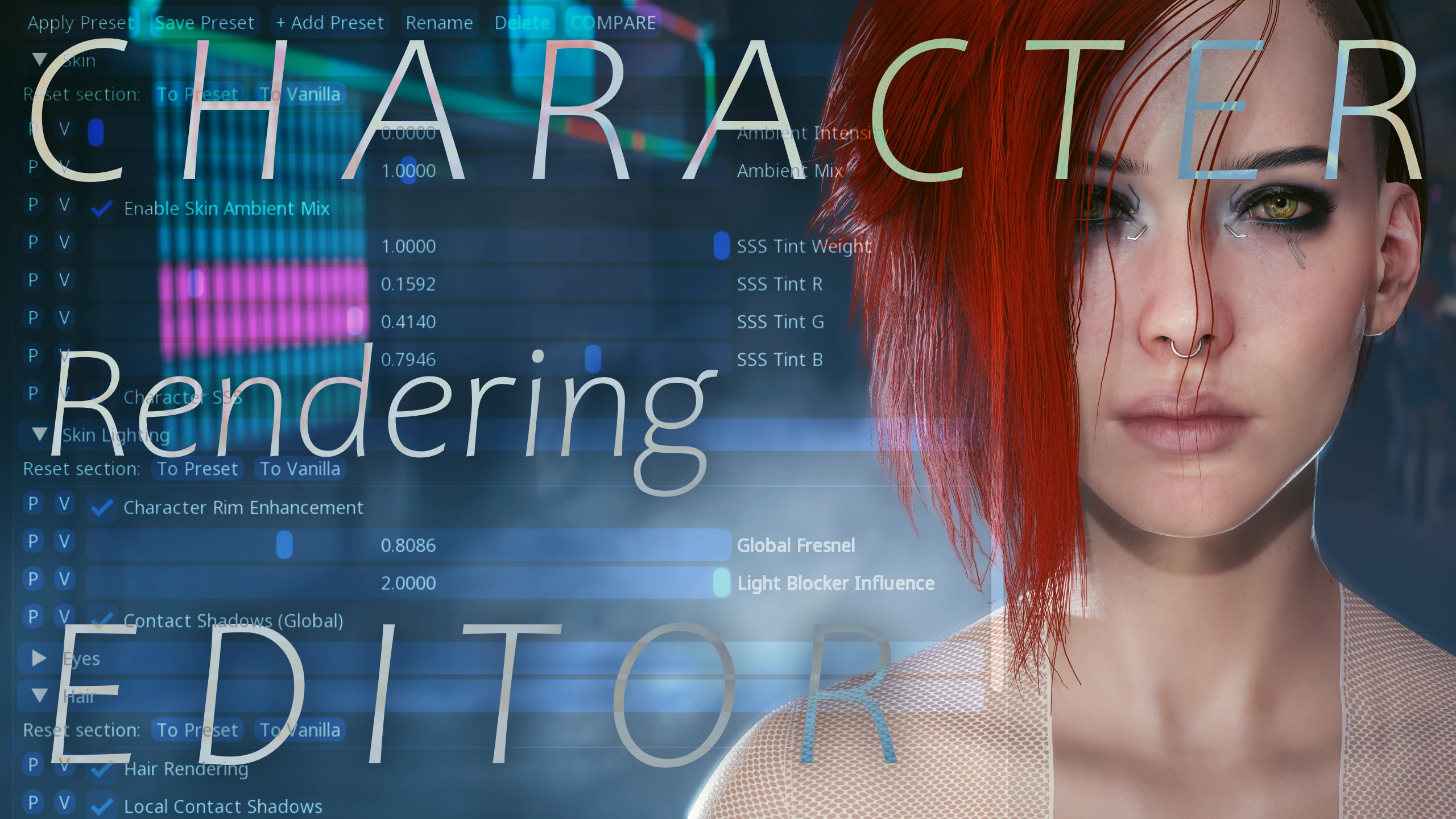
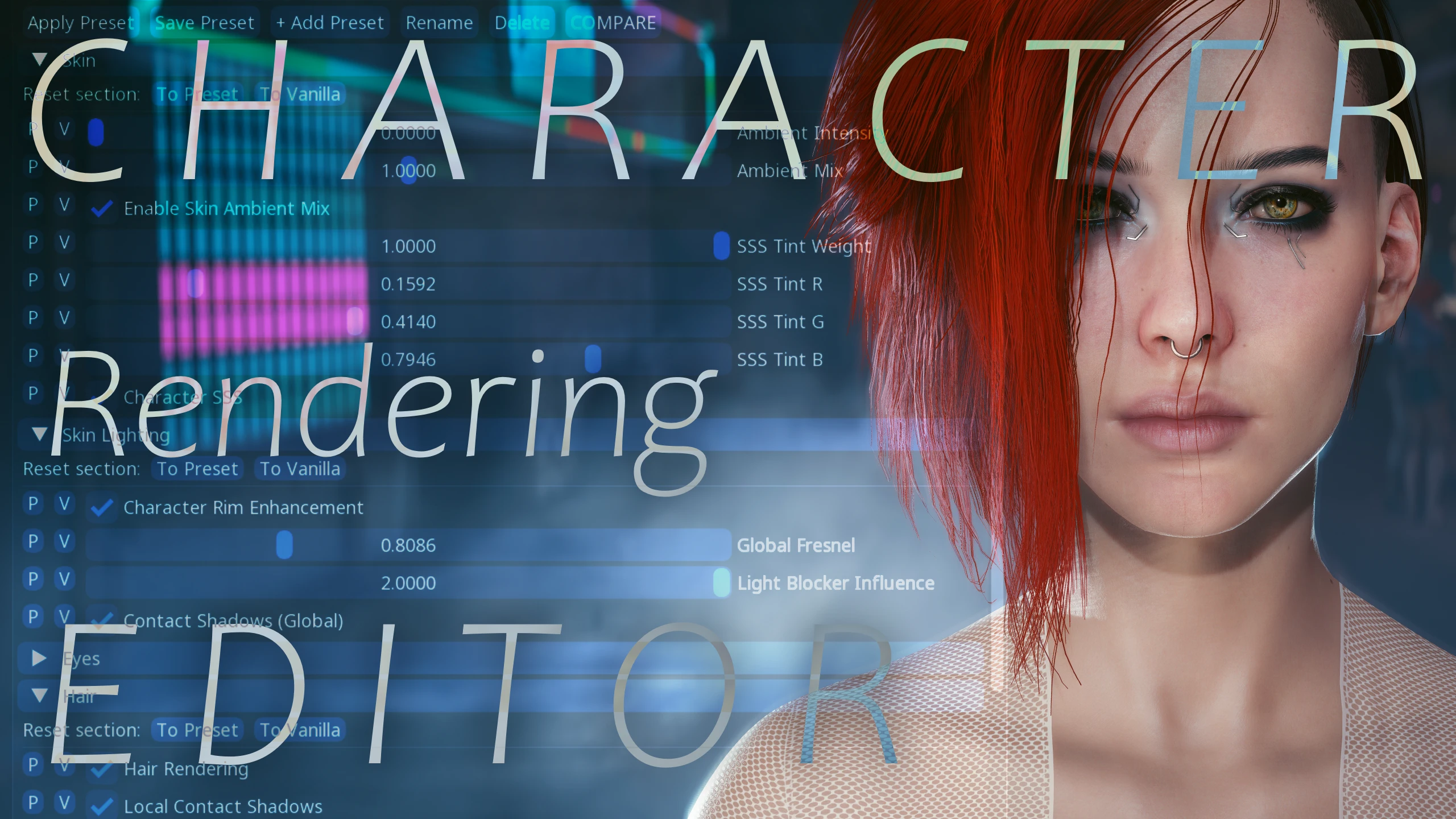
Character Rendering Editor - Real-time Control on Skin Hair Eyes Shaders - for Cyber Engine Tweaks
A CET-based real-time editor tool for character GameOption's rendering parameters, with customizable controls for skin, hair, eyes, lighting, plus custom preset support.
 查看大图
查看大图[center][heading][b][img]https://i.imgur.com/rPL3EGZ.png[/img][/b][/heading]
[left]Here is a [url=https://www.nexusmods.com/cyberpunk2077/mods/107?utm_source=chatgpt.com]Cyber Engine Tweaks[/url] tool I designed to make [b]game characters look as good as possible[/b], in the simplest way! [/left]
[left]I’ve always felt that character skin in newest game version look a little bland, waxy and yellowish, while hair also appear overly shiny or just slightly “off”, which can be enough to hurt my immersion.[/left]
[left]While working on my upcoming skin texture set, I wanted to experiment with some of the [url=https://rootpunk.com/gameoptions]GameOptions[/url] to see how far we can push the engine. The problem was that tweaking them manually, out of the box, since character rendering can look completely different depending on lighting, location, time of day, and other conditions, quickly became impractical.[/left]
[left]So I decided to build a simple CET real-time editor exposing the character-related GameOptions I was able to find and make usable. With AI’s help to write the .lua code and learn more about the engine.[/left]
[left]After quite a few versions, experiments, broken things, fixes and improvements, it finally reached a point where it works properly and feels like an actual tool that should be easy for everyone to understand and use.[/left]
[left][/left]
[left][/left]
[line]
[heading][b][size=6][i]What does it do?[/i][/size][/b][/heading]
[left][b]Character Rendering Editor[/b] gives you real-time control over character-rendering parameters affecting [b]V and NPCs[/b].[/left]
[left]Everything is changed through sliders and toggles, with [b]immediate visual feedback[/b].[/left]
[left][/left]
[left]You can tweak:[/left]
[left][/left]
[left][list]
[][b]Skin[/b] : Ambient Occlusion, Subsurface Scattering, tint intensity & RGB.[/]
[][b]Skin Lighting[/b] : Rim Lighting, Fresnel & Contact Shadows.[/]
[][b]Eyes[/b] : Brightness & Ambient Occlusion.[/]
[][b]Hair[/b] : Brightness, Roughness, Specular, Scattering & other shading parameters. [/]
[/list][/left]
[left][/left]
[left]Once you've installed the mod, find the editor by opening the CET window with your usual [u]custom shortcut[/u]. The editor should appear there, as a new overlay.[/left]
[line]
[heading][b][size=6][i]Presets[/i][/size][/b][/heading]
[left][/left]
[left]Mod includes a [b]preset system[/b] allowing you to create, save, rename and switch between different configurations.[/left]
[left]Presets are stored in the editable "[size=2][font=Monaco, Menlo, Consolas, monospace]user_presets.lua" [/font][/size]file, wich can be shared with peoples.[/left]
[left][/left]
[left]I've included 2 base presets : [/left]
[left][/left]
[left][list]
[][b]"Vanilla"[/b] : Its the default basegame settings.[/]
[/list][/left]
[left][list]
[][b]“Arkhe Balanced”[/b] is focused on finding the best [b]overall balance for the entire game[/b], and gameplay purpose while addressing the rendering issues mentioned above. It has been [b]heavily tested across different lighting conditions and environments[/b], and I, personally, prefer it over the vanilla settings. [/]
[/list][/left]
[left][/left]
[left]Therefore, I don't think there is an universal “perfect” setting for everyone. [b]Your display, graphics settings, mods and personal taste all matter. [/b]That's why giving you the ability to tweak it yourself was a cool idea, I swear ^^ [/left]
[left][/left]
[line]
[heading][b][size=6][i]Lighting matters[/i][/size][/b][/heading]
[left]Not every parameter is equally visible under every lighting condition. Some effects may be barely noticeable in direct sunlight but much stronger under local/darker lighting, or vice versa. So you need to test different environments and lighting situation.[/left]
[left]If a slider seems to do nothing, it’s most likely because [b]RT/PT is taking control of that feature[/b], or you’re simply testing it under a lighting condition where the effect is less or simply not visible.[/left]
[left][/left]
[left]I [b]highly recommend testing the mod at night[/b], its where its the most effective, especially in the streets. You can also play with spawned lights, such as those provided by [url=https://www.nexusmods.com/cyberpunk2077/mods/8176]CharLi[/url], which I also highly recommend to use for better photo-studio shots!
All my screenshots were taken on [b]Ultra settings with Ray Tracing Psycho[/b], which, in my opinion, offers the best balance of detail and realistic character lighting.
[i]For me, Path Tracing doesnt look right when it comes to characters. + it override a lot of features exposed there, so keep that in mind when testing the mod.[/i][/left]
[line]
[heading][b][size=6][i]Photomode Tool[/i][/size][/b][/heading]
[left]You can also use the editor as a [b]real-time Photomode “hot-fix” tool, [/b]or even for[b] artistic purpose[/b].[/left]
[left]Temporarily tweak things for a specific shot, then re-apply your usual preset afterwards. [/left]
[left][/left]
[left]For example:[/left]
[left][list]
[]Fix strange [b]hair brigthness and lighting absorbtion[/b].[/]
[]Tune [b]hair highlights orientation[/b] for portraits. [/]
[]Adjust [b]skin scattering tint / lighting[/b] to match an environment.[/]
[]Enhance skin subsurface details lightings.[/]
[]Etc.[/]
[/list][/left]
[left]This can be particularly useful for [b]VPers[/b], check the last screenshots to get an instant idea of what i mean. [/left]
[left][line]
[/left]
[heading][b][size=6][i]What this mod does NOT control[/i][/size][/b][/heading]
[left]Many things but to be short, [url=https://rootpunk.com/gameoptions]GameOptions[/url] do [b]not[/b] directly control things like [b]roughness, metalness, normal maps, diffuse textures, or material instances/templates etc etc[/b]. It would be awesome but those belong to other parts of the character's rendering pipeline and are spread across sooo many different files and resources. Turning them into real-time sliders would be considerably more complex.[/left]
[left]So this editor focuses specifically on the [b]GameOption-based parameters that can realistically be exposed through CET[/b]. Not more not less.[/left]
[left][/left]
[left][i]Im actually trying to integrate the additionnal skin material possible tweaks, which provides much deeper control over SSS and roughness values and intensity. It’s definitely more complex, since it dosent depend on gameoption, and for now, idk if it can be changed in real-time, but I’d love to give it a try and hopefully integrate it directly into the Editor! ^^[/i][/left]
[left][/left]
[line]
[heading][b][img]https://i.imgur.com/eeEbzPe.png[/img][/b][/heading]
[left][color=#38761d]⚙️To install:[/color][/left]
[left]Extract the compressed file, then drag and drop the “bin” folder into your Cyberpunk2077 directory.[/left]
[left][color=#900000]⚙️To uninstall:[/color][/left]
[left]Delete this folder: [/left]
[code]Cyberpunk2077\bin\x64\plugin\cyber_engine_tweaks\mods\CharacterRenderingEditor [/code][left]It will revert back to the vanilla settings after uninstallation.[/left]
[left][/left]
[left]-[/left]
[left][/left]
[left] ⚙️Requirements:[/left]
[left][list]
[]Game - latest version[/]
[][url=https://www.nexusmods.com/cyberpunk2077/mods/107]Cyber Engine Tweaks[/url] - latest version[/]
[/list][/left]
[left][/left]
[img]https://i.imgur.com/FVDic7D.png[/img]
[left]The only mods i know that directly use some of the GameOptions exposed here are :[/left]
[left][/left]
[/center]
[left][list]
[][url=https://www.nexusmods.com/cyberpunk2077/mods/12184?tab=files]Alternative Hair Material[/url] (textures will work !) [/]
[][url=https://www.nexusmods.com/cyberpunk2077/mods/7341?tab=description]Alternative Skin Material[/url] (you can still install it since it also tweak other files !)[/]
[][url=https://www.nexusmods.com/cyberpunk2077/mods/4740?tab=files]Shiny Glamour Hair Material[/url][/]
[][url=https://www.nexusmods.com/cyberpunk2077/mods/2577?tab=files]Better Hair Material[/url][/]
[/list][/left]
[center][left]My mod seems to overwrite their tweaks, so having both installed [b]shouldn’t cause any crashes or conflicts[/b]. However, it will make their custom tweaks inactive. The good news is that you can [b]r[/b]ecreate their settings using the user preset system. Just enter the same values and roll on ! [/left]
[left][/left]
[left]All the rest down here on Nexus might be compatible. [/left]
[left][/left]
[left]If you really want to know what are each parameters does, more information here (from GPT, but pretty accurate i believe) :
[spoiler]
[size=6][b]Skin[/b][/size]
[table][tr][th][size=3]Parameter[/size][/th]
[th][size=3]What it controls[/size][/th]
[th][size=3]In-game effect[/size][/th]
[/tr]
[tr][td][size=3][b]Ambient Intensity[/b][/size][/td]
[td][size=3]Intensity of ambient lighting applied to the skin.[/size][/td]
[td][size=3]Higher values make the skin brighter in poorly lit areas.[/size][/td]
[/tr]
[tr][td][size=3][b]Ambient Mix[/b][/size][/td]
[td][size=3]How much ambient lighting is mixed into the skin shading.[/size][/td]
[td][size=3]Higher values make ambient lighting have more influence on the skin.[/size][/td]
[/tr]
[tr][td][size=3][b]Enable Skin Ambient Mix[/b][/size][/td]
[td][size=3]Enables/disables the skin ambient mixing system.[/size][/td]
[td]OFF = Ambient Mix no longer affects the skin.[/td]
[/tr]
[tr][td][size=3][b]SSS Tint Weight[/b][/size][/td]
[td][size=3]Strength of the color tint applied to Subsurface Scattering.[/size][/td]
[td][size=3]Higher values make the SSS color influence the skin more strongly.[/size][/td]
[/tr]
[tr][td][size=3][b]SSS Tint R[/b][/size][/td]
[td][size=3]Red component of the SSS tint.[/size][/td]
[td][size=3]Higher = warmer/redder subsurface light.[/size][/td]
[/tr]
[tr][td][size=3][b]SSS Tint G[/b][/size][/td]
[td][size=3]Green component of the SSS tint.[/size][/td]
[td][size=3]Higher = more green/yellow influence.[/size][/td]
[/tr]
[tr][td][size=3][b]SSS Tint B[/b][/size][/td]
[td][size=3]Blue component of the SSS tint.[/size][/td]
[td][size=3]Higher = cooler/bluer influence.[/size][/td]
[/tr]
[tr][td][size=3][b]Character SSS[/b][/size][/td]
[td][size=3]Enables Subsurface Scattering on characters.[/size][/td]
[td]OFF = skin looks more opaque/solid (not recommanded)
ON = skin can look softer and more organic.[/td]
[/tr]
[/table][size=6][b]Skin Lighting [/b][/size]
[table][tr][th][size=3]Parameter[/size][/th]
[th][size=3]What it controls[/size][/th]
[th][size=3]In-game effect[/size][/th]
[/tr]
[tr][td][size=3][b]Character Rim Enhancement[/b][/size][/td]
[td][size=3]Enables the character rim-light enhancement system.[/size][/td]
[td]ON = stronger lighting around the character's silhouette.[/td]
[/tr]
[tr][td][size=3][b]Global Fresnel[/b][/size][/td]
[td][size=3]Strength of the Fresnel effect used for rim lighting.[/size][/td]
[td][size=3]Higher = stronger edge/silhouette lighting.[/size][/td]
[/tr]
[tr][td][size=3][b]Light Blocker Influence[/b][/size][/td]
[td][size=3]How much light blockers affect the rim lighting.[/size][/td]
[td][size=3]Changes how strongly the rim light is reduced by objects blocking the light.[/size][/td]
[/tr]
[tr][td][size=3][b]Contact Shadows (Global)[/b][/size][/td]
[td][size=3]Enables global contact shadows.[/size][/td]
[td]ON = stronger small-scale shadows where objects/parts are very close together.[/td]
[/tr]
[/table][b][size=6]Eyes [/size][/b]
[table][tr][th][size=3]Parameter[/size][/th]
[th][size=3]What it controls[/size][/th]
[th][size=3]In-game effect[/size][/th]
[/tr]
[tr][td][size=3][b]Eye Diffuse Boost[/b][/size][/td]
[td][size=3]Boosts the diffuse component of the eyes.[/size][/td]
[td][size=3]Higher = brighter/more diffuse-looking eyes.[/size][/td]
[/tr]
[tr][td][size=3][b]Eye Ambient Occlusion[/b][/size][/td]
[td][size=3]Applies ambient occlusion to the eyes.[/size][/td]
[td][size=3]Can add more depth and shadow around the eyes and eye sockets.[/size][/td]
[/tr]
[/table][b][size=6]Hair — General [/size][/b]
[table][tr][th][size=3]Parameter[/size][/th]
[th][size=3]What it controls[/size][/th]
[th][size=3]In-game effect[/size][/th]
[/tr]
[tr][td][size=3][b]Hair Rendering[/b][/size][/td]
[td][size=3]Enables/disables the hair rendering system.[/size][/td]
[td]OFF = can disable the hair rendering feature.[/td]
[/tr]
[tr][td][size=3][b]Local Contact Shadows[/b][/size][/td]
[td][size=3]Local contact shadows on the hair.[/size][/td]
[td][size=3]Adds more small-scale shadowing between strands and around the scalp.[/size][/td]
[/tr]
[tr][td][size=3][b]Albedo Multiplier[/b][/size][/td]
[td][size=3]Multiplier applied to the hair's base color/albedo.[/size][/td]
[td][size=3]Higher = brighter hair; lower = darker hair.[/size][/td]
[/tr]
[tr][td][size=3][b]Roughness[/b][/size][/td]
[td][size=3]Overall roughness of the hair material.[/size][/td]
[td][size=3]Higher = softer/wider highlights; lower = sharper/glossier highlights.[/size][/td]
[/tr]
[tr][td][size=3][b]Additional Area Roughness[/b][/size][/td]
[td][size=3]Adds extra roughness for area-light reflections.[/size][/td]
[td][size=3]Higher = softer/less defined highlights from large light sources.[/size][/td]
[/tr]
[tr][td][size=3][b]Contact Shadow Clamp[/b][/size][/td]
[td][size=3]Limits the strength of hair contact shadows.[/size][/td]
[td][size=3]Higher can allow stronger contact shadows.[/size][/td]
[/tr]
[tr][td][size=3][b]Specular Random Min[/b][/size][/td]
[td][size=3]Lower limit of random specular variation between strands.[/size][/td]
[td][size=3]Changes how much individual strands differ in brightness/reflection.[/size][/td]
[/tr]
[tr][td][size=3][b]Specular Random Max[/b][/size][/td]
[td][size=3]Upper limit of random specular variation between strands.[/size][/td]
[td][size=3]A larger Min/Max range creates more variation between strands.[/size][/td]
[/tr]
[/table][b][size=6]Hair — Alpha Shifts [/size][/b]
[table][tr][th][size=3]Parameter[/size][/th]
[th][size=3]What it controls[/size][/th]
[th][size=3]In-game effect[/size][/th]
[/tr]
[tr][td][size=3][b]Alpha TRT[/b][/size][/td]
[td][size=3]Offset applied to the TRT-related alpha calculation.[/size][/td]
[td][size=3]Can change how certain hair transparency/alpha layers are distributed.[/size][/td]
[/tr]
[tr][td][size=3][b]Alpha R[/b][/size][/td]
[td][size=3]Offset applied to the R-related alpha calculation.[/size][/td]
[td][size=3]Can alter the distribution/transparency behavior of certain hair components.[/size][/td]
[/tr]
[/table][b][size=6]Hair — TRT Parameters [/size][/b]
[table][tr][th][size=3]Parameter[/size][/th]
[th][size=3]What it controls[/size][/th]
[th][size=3]In-game effect[/size][/th]
[/tr]
[tr][td][size=3][b]TRT Exponent Bias[/b][/size][/td]
[td][size=3]Bias/offset applied to the TRT exponent calculation.[/size][/td]
[td][size=3]Changes the distribution and intensity of the TRT lighting response.[/size][/td]
[/tr]
[tr][td][size=3][b]TRT Exponent Scale[/b][/size][/td]
[td][size=3]Scale applied to the TRT exponent.[/size][/td]
[td][size=3]Controls how strongly the TRT response is compressed or expanded.[/size][/td]
[/tr]
[/table][b][size=6]Hair — Multi Scatter [/size][/b]
[table][tr][th][size=3]Parameter[/size][/th]
[th][size=3]What it controls[/size][/th]
[th][size=3]In-game effect[/size][/th]
[/tr]
[tr][td][size=3][b]Diffuse Scatter[/b][/size][/td]
[td][size=3]Additional diffuse scattering between hair fibers.[/size][/td]
[td][size=3]Higher = more light can spread between strands, potentially making hair look fuller/brighter.[/size][/td]
[/tr]
[tr][td][size=3][b]Multi Scatter Mask[/b][/size][/td]
[td][size=3]Strength of the mask controlling Multi Scatter.[/size][/td]
[td][size=3]Changes the overall influence of the Multi Scatter mask.[/size][/td]
[/tr]
[tr][td][size=3][b]Scatter Wrap[/b][/size][/td]
[td][size=3]How far the scattering extends around the incoming light direction.[/size][/td]
[td][size=3]Higher = light can wrap further around the hair instead of only affecting directly lit areas.[/size][/td]
[/tr]
[/table][b][size=6]Hair — Specular [/size][/b]
[table][tr][th][size=3]Parameter[/size][/th]
[th][size=3]What it controls[/size][/th]
[th][size=3]In-game effect[/size][/th]
[/tr]
[tr][td][size=3][b]Specular Mask[/b][/size][/td]
[td][size=3]Strength of the specular mask.[/size][/td]
[td][size=3]Higher = stronger specular contribution where the mask allows it.[/size][/td]
[/tr]
[tr][td][size=3][b]Specular Wrap[/b][/size][/td]
[td][size=3]How far the specular response wraps around the light direction.[/size][/td]
[td][size=3]Changes the spread/shape of the highlights around the hair strands.[/size][/td]
[/tr]
[/table][b][size=6]Hair — Environment Probe[/size][/b]
[table][tr][th][size=3]Parameter[/size][/th]
[th][size=3]What it controls[/size][/th]
[th][size=3]In-game effect[/size][/th]
[/tr]
[tr][td][size=3][b]Environment Multi Scatter[/b][/size][/td]
[td][size=3]Multi Scatter contribution from environment lighting.[/size][/td]
[td][size=3]Controls how much environmental light is scattered between hair fibers.[/size][/td]
[/tr]
[tr][td][size=3][b]Environment TRT[/b][/size][/td]
[td][size=3]TRT contribution from environment lighting.[/size][/td]
[td][size=3]Changes how the hair responds to environmental lighting through the TRT component.[/size][/td]
[/tr]
[tr][td][size=3][b]Environment R[/b][/size][/td]
[td][size=3]R contribution from environment lighting.[/size][/td]
[td][size=3]Changes another component of the hair's environmental lighting response.[/size][/td]
[/tr]
[/table][b][size=6]Hair — Global Light [/size][/b]
[table][tr][th][size=3]Parameter[/size][/th]
[th][size=3]What it controls[/size][/th]
[th][size=3]In-game effect[/size][/th]
[/tr]
[tr][td][size=3][b]Global Multi Scatter[/b][/size][/td]
[td][size=3]Multi Scatter contribution from global lighting.[/size][/td]
[td][size=3]Controls how much global light is scattered between hair fibers.[/size][/td]
[/tr]
[tr][td][size=3][b]Global TRT[/b][/size][/td]
[td][size=3]TRT contribution under global lighting.[/size][/td]
[td][size=3]Changes the hair's response to global illumination.[/size][/td]
[/tr]
[tr][td][size=3][b]Global R[/b][/size][/td]
[td][size=3]R contribution under global lighting.[/size][/td]
[td][size=3]Changes the corresponding secondary component of the hair shading response.[/size][/td]
[/tr]
[/table]
[size=6][b]Hair — Local Light [/b][/size]
[table][tr][th][size=3]Parameter[/size][/th]
[th][size=3]What it controls[/size][/th]
[th][size=3]In-game effect[/size][/th]
[/tr]
[tr][td][size=3][b]Local Multi Scatter[/b][/size][/td]
[td][size=3]Multi Scatter contribution from local lights.[/size][/td]
[td][size=3]Controls how light spreads between hair strands under local lighting.[/size][/td]
[/tr]
[tr][td][size=3][b]Local TRT[/b][/size][/td]
[td][size=3]TRT contribution under local lighting.[/size][/td]
[td][size=3]Changes how hair reacts to nearby/local light sources.[/size][/td]
[/tr]
[tr][td][size=3][b]Local R[/b][/size][/td]
[td][size=3]R contribution under local lighting.[/size][/td]
[td][size=3]Changes another component of the hair's local-light response.[/size][/td]
[/tr]
[/table][/spoiler]
[center][b][size=5]Hope you ll enjoy this one ! [/size][/b][/center]
[/left]
[heading][url=https://www.nexusmods.com/profile/Arkhe0][img]https://i.imgur.com/bY0Jm9H.png[/img][/url]
[url=https://ko-fi.com/arkhe0#][img]https://i.imgur.com/39DyCe9.png[/img][/url][/heading]
[/center]
[center][img]https://i.imgur.com/3xhDWQe.jpeg[/img][/center]
![https://i.imgur.com/rPL3EGZ.png[/img][/b][/heading]](https://i.imgur.com/rPL3EGZ.png%5B/img%5D%5B/b%5D%5B/heading%5D)
![https://i.imgur.com/eeEbzPe.png[/img][/b][/heading]](https://i.imgur.com/eeEbzPe.png%5B/img%5D%5B/b%5D%5B/heading%5D)
![https://i.imgur.com/FVDic7D.png[/img]](https://i.imgur.com/FVDic7D.png%5B/img%5D)
![https://www.nexusmods.com/profile/Arkhe0][img]https://i.imgur.com/bY0Jm9H.png[/img][/url]](https://www.nexusmods.com/profile/Arkhe0%5D%5Bimg%5Dhttps://i.imgur.com/bY0Jm9H.png%5B/img%5D%5B/url%5D)
![https://ko-fi.com/arkhe0#][img]https://i.imgur.com/39DyCe9.png[/img][/url][/heading]](https://ko-fi.com/arkhe0#%5D%5Bimg%5Dhttps://i.imgur.com/39DyCe9.png%5B/img%5D%5B/url%5D%5B/heading%5D)
![https://i.imgur.com/3xhDWQe.jpeg[/img][/center]](https://i.imgur.com/3xhDWQe.jpeg%5B/img%5D%5B/center%5D)
正在加载版本记录…
正在加载评论…
评论在新手盒子客户端中发表,这里同步展示。