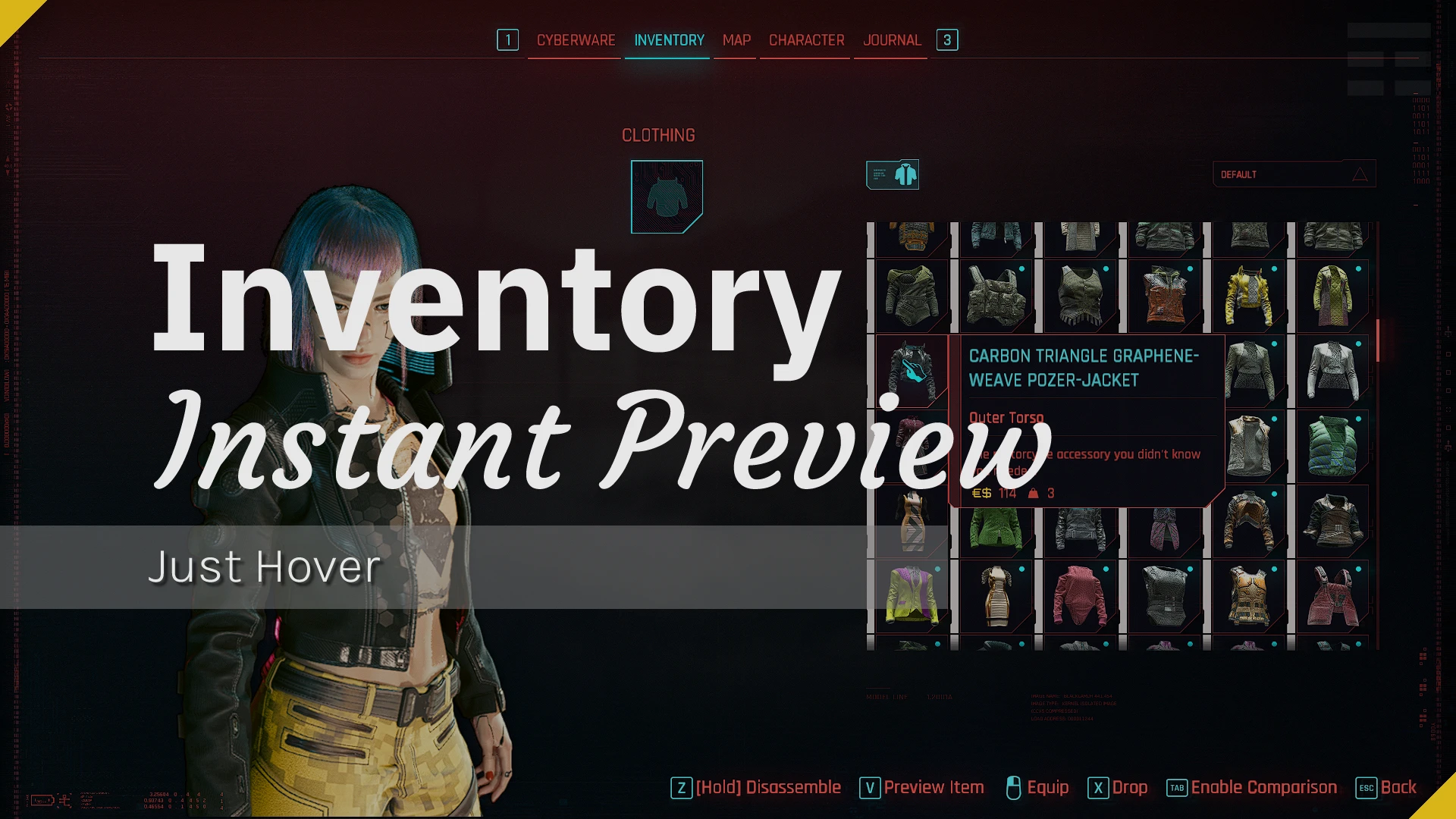
Inventory Instant Preview (Supports Equipment-EX and Virtual Atelier)
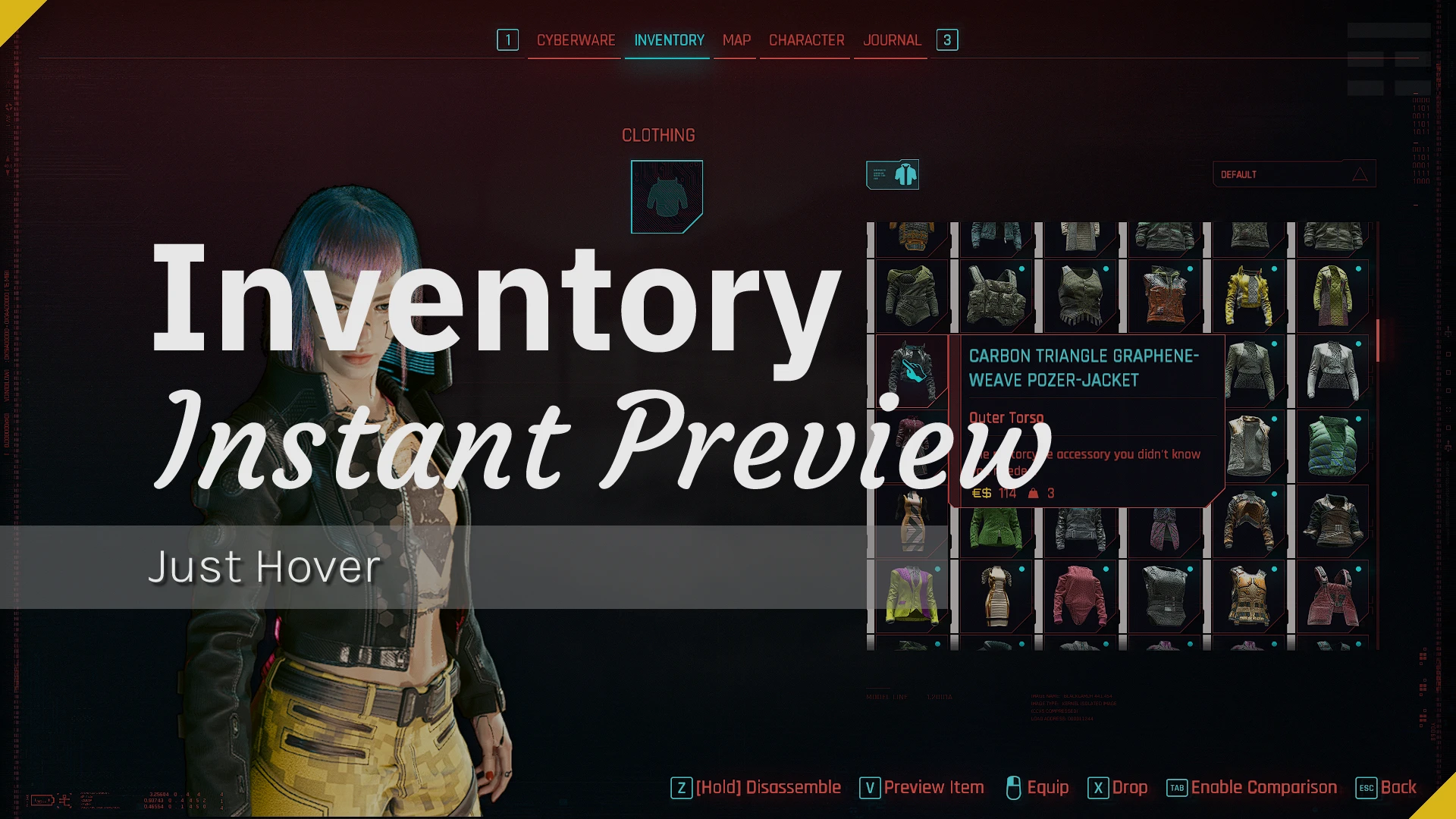
Preview items instantly by hovering over them in your inventory, without opening any pop-up windows.
 查看大图
查看大图[b][size=5][color=#BC71D1]Features[/color][/size][/b]
[color=#D2A556][b]⌬ Instant Preview Mode:[/b][/color]
[color=#454A54]⸺⸺⸺⸺⸺⸺⸺⸺⸺⸺⸺[/color]
Simply hover over an item to see it instantly equipped on your character.
[color=#98C379][b]• Main Inventory Menu:[/b][/color] Supports item previewing directly within the primary inventory menu.
[color=#98C379][b]• Locked Items Preview:[/b][/color] Allows previewing of locked items (useful when wearing specific outfits).
[color=#98C379][b]• Dual Mode:[/b][/color] Allows you to use both Instant and Pop-up preview modes simultaneously where supported.
[color=#98C379][b]• Customizable Delay:[/b][/color] Allows you to add a delay before the preview triggers.
[color=#98C379][b]• Closing Behavior:[/b][/color]
[color=#56B6C2][b]• Hover Out:[/b][/color] The preview closes automatically when the cursor leaves the item.
[color=#56B6C2][b]• Hotkey:[/b][/color] The preview stays open until you manually press the standard preview keybind.
[color=#98C379][b]• Tip:[/b][/color] For the smoothest experience, it is best used without gender-mismatched clothing mods; alternatively, use [color=#D2A556][b]Toggle Preview[/b][/color] to manually preview items under your direct control. Check [url=https://www.nexusmods.com/cyberpunk2077/articles/2321]this article[/url] for more details.
[color=#D2A556][b]⌬ Toggle Preview Mode:[/b][/color]
[color=#454A54]⸺⸺⸺⸺⸺⸺⸺⸺⸺⸺⸺[/color]
Allows you to preview wearable items on your character without a pop-up window by pressing the standard preview keybind, and close the preview by pressing it again.
[color=#D2A556][b]⌬ Pop-up Preview Mode:[/b][/color]
[color=#454A54]⸺⸺⸺⸺⸺⸺⸺⸺⸺⸺⸺[/color]
Traditional pop-up preview where supported.
[color=#D2A556][b]⌬ Preserved Character Rotation:[/b][/color]
[color=#454A54]⸺⸺⸺⸺⸺⸺⸺⸺⸺⸺⸺[/color]
Prevents the character's rotation from resetting to the default view during previews.
Your custom rotation angle is fully preserved.
[color=#D2A556][b]⌬ Smart Dependency Logic:[/b][/color]
[color=#454A54]⸺⸺⸺⸺⸺⸺⸺⸺⸺⸺⸺[/color]
[b][color=#B479D1]Inventory Instant Preview[/color][/b] supports [b][color=#D2A556][url=https://www.nexusmods.com/cyberpunk2077/mods/6945]Equipment-EX[/url][/color][/b] and [color=#D2A556][b][url=https://www.nexusmods.com/cyberpunk2077/mods/2987]Virtual Atelier[/url][/b][/color] but does not require them.
[color=#56B6C2][b]•[/b][/color] If these mods are detected, their specific settings will automatically appear.
[color=#56B6C2][b]•[/b][/color] If they are not installed, the related features and settings will remain disabled.
[color=#D2A556][b]⌬ Highly Customizable:[/b][/color]
[color=#454A54]⸺⸺⸺⸺⸺⸺⸺⸺⸺⸺⸺[/color]
Most features and behaviors can be customized via the [b][color=#D2A556][url=https://www.nexusmods.com/cyberpunk2077/mods/3518]Native Settings[/url][/color][/b] menu.
[b][size=5][color=#BC71D1]Compatibility[/color][/size][/b]
[color=#D2A556][b]⌬ Base Game Inventory:[/b][/color]
[color=#454A54]⸺⸺⸺⸺⸺⸺⸺⸺⸺⸺⸺[/color]
[color=#98C379][b]• Instant Preview:[/b][/color] ✓ Supported
[color=#98C379][b]• Toggle Preview:[/b][/color] ✓ Supported
[color=#98C379][b]• Pop-up Preview:[/b][/color] ✓ Supported
[color=#98C379][b]• Dual Preview Mode:[/b][/color] ✓ Supported
[color=#D2A556][b]⌬ Equipment-EX:[/b][/color]
[color=#454A54]⸺⸺⸺⸺⸺⸺⸺⸺⸺⸺⸺[/color]
[color=#98C379][b]• Instant Preview:[/b][/color] ✓ Supported
[color=#98C379][b]• Toggle Preview:[/b][/color] ✓ Supported
[color=#98C379][b]• Pop-up Preview:[/b][/color] ✓ Supported
[color=#98C379][b]• Dual Preview Mode:[/b][/color] ✓ Supported
[color=#98C379][b]• Seamless Mouse Interaction:[/b][/color] Ensures character rotation and zoom controls remain fully responsive and active throughout the Wardrobe menu.
[color=#D2A556][b]⌬ Virtual Atelier:[/b][/color]
[color=#454A54]⸺⸺⸺⸺⸺⸺⸺⸺⸺⸺⸺[/color]
[color=#98C379][b]• Instant Preview:[/b][/color] ✓ Supported
[color=#98C379][b]• Toggle Preview:[/b][/color] ✓ Supported
[color=#98C379][b]• Clean Vendor Previews:[/b][/color] Provides a clean preview experience by ensuring clothes do not stack or clip on top of each other.
[color=#98C379][b]• Auto-Clean on Exit:[/b][/color] Closing the Virtual Atelier web page automatically clears any active previews and correctly restores V's original equipped clothing.
[b][size=5][color=#BC71D1]Mod Preview[/color][/size][/b]
[youtube]KgRJQ2URj0w[/youtube]
[b][size=5][color=#BC71D1]More of My Mods[/color][/size][/b]
[center][url=https://www.nexusmods.com/cyberpunk2077/mods/13014][img]https://i.imgur.com/7VbvYcn.png[/img][/url] [url=https://www.nexusmods.com/cyberpunk2077/mods/12700][img]https://i.imgur.com/moWBtQM.png[/img][/url] [url=https://www.nexusmods.com/cyberpunk2077/mods/22805][img]https://i.imgur.com/1cufcdu.png[/img][/url]
[/center]
[center][url=https://www.nexusmods.com/cyberpunk2077/mods/22872][img]https://i.imgur.com/m5HiDQU.png[/img][/url] [url=https://www.nexusmods.com/cyberpunk2077/mods/21149][img]https://i.imgur.com/JV7iAPJ.png[/img][/url] [url=https://www.nexusmods.com/profile/EmreHQ/mods?gameId=3333&sortBy=downloads][img]https://i.imgur.com/mzlLWMT.png[/img][/url][/center]
[b][size=5][color=#BC71D1]Thanks & Credits[/color][/size][/b]
[url=https://next.nexusmods.com/profile/yamashi?gameId=3333][img]https://img.shields.io/badge/💗_%E2%81%A3-yamashi-F7BB16[/img][/url] [img]https://img.shields.io/badge/for-B44999[/img] [url=https://www.nexusmods.com/cyberpunk2077/mods/107][img]https://img.shields.io/badge/Cyber%20Engine%20Tweaks-5EF6FF[/img]
[/url][url=https://next.nexusmods.com/profile/jac3km4?gameId=3333][img]https://img.shields.io/badge/💗_%E2%81%A3-jac3km4-F7BB16[/img][/url] [img]https://img.shields.io/badge/for-B44999[/img] [url=https://www.nexusmods.com/cyberpunk2077/mods/1511][img]https://img.shields.io/badge/redscript-5EF6FF[/img][/url] [url=https://github.com/jac3km4/redscript-ide][img]https://img.shields.io/badge/redscript--ide-5EF6FF[/img][/url][url=https://github.com/psiberx/cp2077-red-hot-tools]
[/url][url=https://next.nexusmods.com/profile/NexusGuy999?gameId=3333][img]https://img.shields.io/badge/💗_%E2%81%A3-NexusGuy999-F7BB16[/img][/url] [img]https://img.shields.io/badge/for-B44999[/img] [url=https://www.nexusmods.com/cyberpunk2077/mods/3518][img]https://img.shields.io/badge/Native%20Settings%20UI-5EF6FF[/img][/url][url=https://www.nexusmods.com/cyberpunk2077/mods/2380]
[/url][img]https://img.shields.io/badge/💗_%E2%81%A3-Red%20Modding%20Community-F7BB16[/img] [img]https://img.shields.io/badge/for-B44999[/img] [url=https://github.com/WolvenKit/WolvenKit][img]https://img.shields.io/badge/WolvenKit-5EF6FF[/img][/url]
[url=https://www.nexusmods.com/profile/psiberx][img]https://img.shields.io/badge/💗_%E2%81%A3-psiberx-F7BB16[/img][/url] [img]https://img.shields.io/badge/for-B44999[/img] [url=https://github.com/psiberx/cp2077-cet-kit][img]https://img.shields.io/badge/cp2077--cet--kit-5EF6FF[/img]
[/url]
[b][size=5][color=#BC71D1]Ways to Support[/color][/size][/b]
If you enjoy [size=3]💚[/size] my mods, consider supporting my work by:
[url=https://ko-fi.com/emrehq][img]https://img.shields.io/badge/-Ko--Fi-F4EFE7?logo=kofi&logoColor=white[/img][/url]
[url=https://www.buymeacoffee.com/emrehq][img]https://img.shields.io/badge/%E2%81%A3-Buy_me_a_coffee-FFDD00?logo=buymeacoffee&logoColor=white[/img][/url]
[url=https://www.nexusmods.com/cyberpunk2077/mods/31316][img]https://img.shields.io/badge/%F0%9F%92%97_%E2%81%A3_%E2%81%A3-Leaving_an_Endorsement-B44999[/img][/url]
![https://www.nexusmods.com/cyberpunk2077/mods/13014][img]https://i.imgur.com/7VbvYcn.png[/img][/url]](https://www.nexusmods.com/cyberpunk2077/mods/13014%5D%5Bimg%5Dhttps://i.imgur.com/7VbvYcn.png%5B/img%5D%5B/url%5D)
![https://www.nexusmods.com/cyberpunk2077/mods/12700][img]https://i.imgur.com/moWBtQM.png[/img][/url]](https://www.nexusmods.com/cyberpunk2077/mods/12700%5D%5Bimg%5Dhttps://i.imgur.com/moWBtQM.png%5B/img%5D%5B/url%5D)
![https://www.nexusmods.com/cyberpunk2077/mods/22805][img]https://i.imgur.com/1cufcdu.png[/img][/url]](https://www.nexusmods.com/cyberpunk2077/mods/22805%5D%5Bimg%5Dhttps://i.imgur.com/1cufcdu.png%5B/img%5D%5B/url%5D)
![https://www.nexusmods.com/cyberpunk2077/mods/22872][img]https://i.imgur.com/m5HiDQU.png[/img][/url]](https://www.nexusmods.com/cyberpunk2077/mods/22872%5D%5Bimg%5Dhttps://i.imgur.com/m5HiDQU.png%5B/img%5D%5B/url%5D)
![https://www.nexusmods.com/cyberpunk2077/mods/21149][img]https://i.imgur.com/JV7iAPJ.png[/img][/url]](https://www.nexusmods.com/cyberpunk2077/mods/21149%5D%5Bimg%5Dhttps://i.imgur.com/JV7iAPJ.png%5B/img%5D%5B/url%5D)
![https://www.nexusmods.com/profile/EmreHQ/mods?gameId=3333&sortBy=downloads][img]https://i.imgur.com/mzlLWMT.png[/img][/url][/center]](https://www.nexusmods.com/profile/EmreHQ/mods?gameId=3333&sortBy=downloads%5D%5Bimg%5Dhttps://i.imgur.com/mzlLWMT.png%5B/img%5D%5B/url%5D%5B/center%5D)
正在加载版本记录…
正在加载评论…
评论在新手盒子客户端中发表,这里同步展示。