Drone Companion - Summon Combat Drones
Summon combat drones that follow you and fight at your side. 34 units across 9 chassis, native companion AI, squad HUD, minimap icons, presets, upgrade tree plus firmware shards, quickhack commands, tactical orders, drone camera, vehicle escort, optional Rigger mode with a Gatekeeper chip, save persistence. EN/PT-BR.
 查看大图
查看大图[size=4][b]Drone Companion - Summon Combat Drones[/b][/size]
Summon a [b]combat drone that follows you[/b] around Night City and [b]fights at your side[/b]. Pick a model, call it with a hotkey and let it join your firefights.
Reports and suggestions in the comments help a lot.
[b]✨ Features[/b]
[list]
[][b]34 units[/b] - nine chassis (Octant, Wyvern, Griffin, Bombus, Minotaur, Android, Cerberus, Flathead, Chimera) in their factions' own colours: Militech, Arasaka, Kang Tao, NCPD, Maelstrom, Wraiths, Aldecaldos, Scavengers, Sixth Street, Trauma Team and more. Pick chassis, then faction; each one deploys up to three times[/]
[][b]Androids[/b] - the bipedal combat robots the factions field, NCPD's cruiser droid included[/]
[][b]Native companion AI[/b] - drones use the game's own follower system: they fly along, teleport to catch up when you leave them behind and rejoin you after every fight[/]
[][b]They fight for you[/b] - drones share your side, engage whoever attacks you, and enemies actually shoot back at them[/]
[][b]Squad HUD[/b] - a compact panel by your health bar shows every deployed drone: chassis icon, name, health bar, stance and ability cooldown. Toggle it in the Commands tab[/]
[][b]Scales to your screen[/b] - menu and HUD scale sliders in the Commands tab, so the panels stay readable on 1440p, ultrawide and 4K. Your choice is saved[/]
[][b]Name your drones[/b] - rename any deployed unit; the name shows on the HUD, the in-game screen and the squad list[/]
[][b]Kill counter[/b] - every drone tracks its takedowns, saved with your playthrough[/]
[][b]Minimap icons[/b] - every deployed drone shows its own chassis icon on the minimap and the map, replacing the game's generic squares[/]
[][b]Follow your lead[/b] - optional switches: summon drones behind you instead of ahead, and idle ground drones turn to face wherever you face[/]
[][b]Squad presets[/b] - save up to three squad compositions (models, stances, android weapon) and summon the whole crew back in one click[/]
[][b]Damage numbers[/b] - drone hits pop the game's own damage floaters, following your HUD settings[/]
[][b]Road trips[/b] - hop in a car and the squad comes along: the android grabs a free seat and shoots from the window, flying drones escort the vehicle and teleport to keep pace, and heavy ground units wait for you and return the moment you step out[/]
[][b]Tuned firepower[/b] - damage balanced per model, and the Arasaka Octant fires smart-tracking rounds that curve into its target[/]
[][b]Chassis passives[/b] - every chassis brings something of its own without you pressing anything: the Octant patches itself up right after taking a hit, the Wyvern blinds whoever it is shooting, the Griffin stacks reactive plating as it soaks damage, the Bombus keeps nearby drones repaired, the Minotaur pulls enemies onto itself when hit and the Android sharpens its aim the longer a fight drags on[/]
[][b]Explosive rounds[/b] - optional switch that swaps the Octant, Griffin, Wyvern and Minotaur to explosive ammunition, with splash on impact[/]
[][b]Signature abilities[/b] - each model fires its own ability in combat: Octants blind their target, the Wyvern scans and marks enemies, the Griffin bursts an EMP pulse, the Bombus jams enemy comms (no reinforcement calls - it is a support drone and carries no gun) and Minotaurs taunt enemies into focusing them[/]
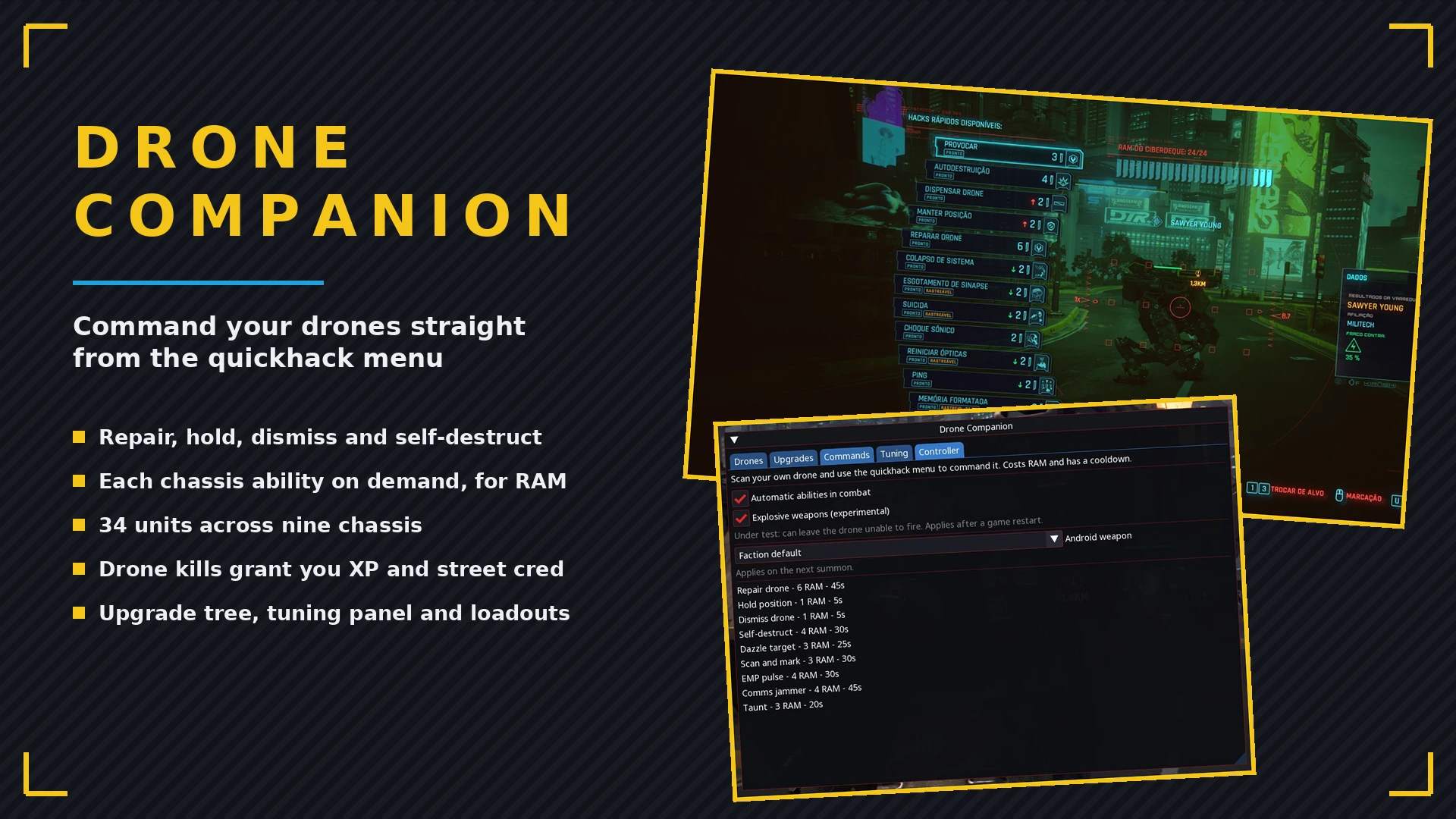
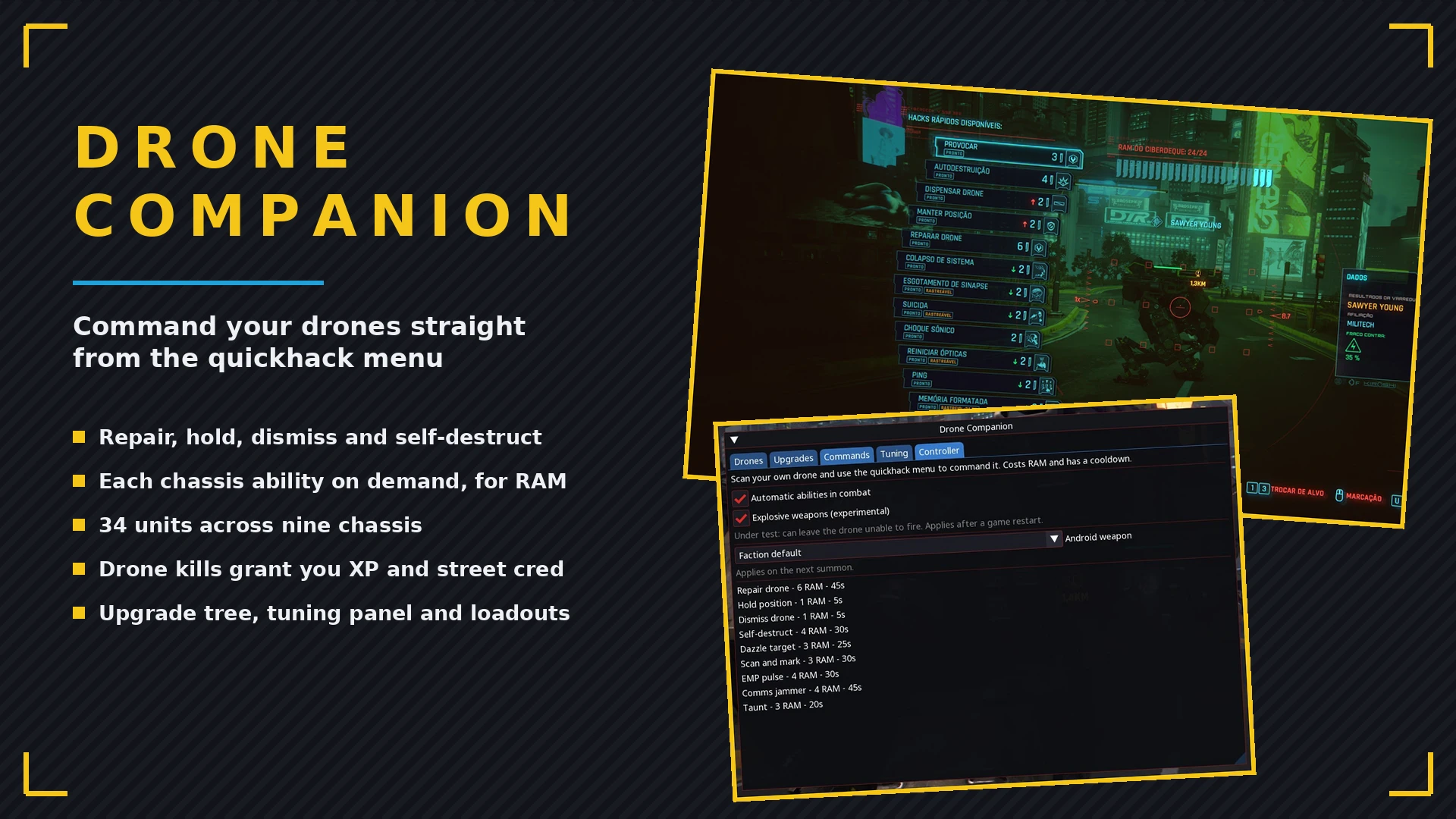
[][b]Command them by quickhack[/b] - scan your own drone and its abilities show up in the quickhack menu, like hacking any other target: repair it to full, order it to hold position, send it home, trigger a self-destruct run, overclock its damage, fortify its armor, plus the chassis ability on demand. Each one costs RAM and recharges per drone - while a drone is recharging that entry greys out on its own wheel, so the rest of your squad stays ready[/]
[][b]Abilities on autopilot (or not)[/b] - leave the automatic mode on and drones use their ability by themselves in combat, or switch it off and keep every trigger in your hands[/]
[][b]Your kills[/b] - enemies taken down by a drone credit you: experience and street cred land as if you pulled the trigger[/]
[][b]Android loadout[/b] - pick what the combat androids carry: rifle, shotgun, sniper, melee or handgun, or leave them with their faction's own gear[/]
[][b]Netrunner androids[/b] - switch on Android quickhacks and your androids upload hacks on their target in combat: overheat, weapon jam, blind and cripple, with any weapon in hand. The cooldown is a slider in the Tuning tab[/]
[][b]Quickhack through the drone camera[/b] - open the drone camera, aim at an enemy, a turret or a camera and the target's own quickhack list shows up; arrow keys pick, one key fires. The drone does the hacking, so you can reach targets from cover[/]
[][b]Arena stance[/b] - a fourth stance next to Combat, Defensive and Passive: your drone duels a rival drone for real, with matched health, a difficulty slider in Tuning and toasts for the start and the winner[/]
[][b]Tuning panel[/b] - sliders for damage, health, catch-up distance, ability range and cooldown, static leash and how many units each model deploys. Upgrades still stack on top[/]
[][b]Upgrade tree[/b] - spend one point every 4 character levels across three branches: Combat (armor, damage, ability cooldown), Support (repair rate, post-combat delay, stuck-drone rescue) and Utility (ability range, indoor catch-up). Respec is free, and progress is saved per playthrough[/]
[][b]Drone stats panel[/b] - the manager shows what each chassis is before you summon it: flying or ground, weapon, shard price and summon cost (with Immersive acquisition on), relative toughness and damage, and its ability with the exact range and cooldown - already including your upgrades[/]
[][b]Trophy units[/b] - the Flathead and the Chimera can be summoned as static display pieces. They do not follow or fight (their AI only exists inside their own quests), but they teleport back to you if you wander off. Marked i[/i] in the list[/]
[][b]Tactical orders[/b] - one bind (F10, or LB+B on a controller) commands the squad by where you aim: aim at an enemy and every drone focuses it, aim at a spot and they move there and hold position, aim at the sky and everyone returns to your side. Ground units run over; flyers relocate instantly[/]
[][b]Stances[/b] - set each drone to Combat, Defensive or Passive in the Squad tab. Defensive drones only join fights you are already in and never start one; Passive drones stop fighting entirely and enemies ignore them - great for roleplay or screenshots. Stances survive saves and fast travel[/]
[][b]Orders from the menu[/b] - no need to aim: the Squad tab has Hold position per drone and a Regroup button that frees the whole squad, both in the in-game screen and the CET window[/]
[][b]Drone camera[/b] - see through any drone's eyes from the Squad tab. Flying drones fly freely (jump climbs, crouch descends) and mobile ground units - Android, Minotaur, Cerberus - walk wherever you steer them. Park one anywhere and leave the camera - it holds position for screenshots until a tactical order at the sky calls the squad back[/]
[][b]Spotlight[/b] - turn a drone into a walking flashlight. The Minotaur and the Wyvern carry real searchlights; pair it with passive mode and you have an escort that lights your way instead of shooting[/]
[][b]Skip the shopping[/b] - buttons in the menu hand you the control shard, the Rigger chip or a firmware shard whenever you would rather not hunt for a gunsmith[/]
[][b]In-world acquisition (optional)[/b] - flip on Immersive acquisition and every chassis has to be bought as a control shard from any gunsmith in Night City, from 10,000 eddies for the Bombus up to 150,000 for the Chimera - each shard with its own icon in the shop. Off by default: everything stays unlocked and free[/]
[][b]Summon points (Immersive)[/b] - with Immersive acquisition on, fielding drones spends summon points by size: 1 for a Bombus, up to 5 for a Chimera, from a pool that starts at 3. Drone Capacity Modules sold at the same gunsmiths raise the pool by one each - both UIs show the pool and each drone's cost. With Immersive off there is no limit[/]
[][b]Rigger mode (optional)[/b] - summoning requires the Drone Gatekeeper chip, sold at every gunsmith. Combine it with Immersive acquisition for a full progression path; the interface shows whether you own the chip[/]
[][b]Firmware shards[/b] - Combat, Support and Utility firmware sold at gunsmiths: each shard grants one free rank in every upgrade of its branch, stacking with your spent points. Up to 3 of each count[/]
[][b]Smart shop stock[/b] - control shards you already own leave the shelves, firmware shows up once you own any control shard (always there with Immersive off), and the Gatekeeper disappears once bought[/]
[][b]No friendly fire[/b] - your bullets pass through your drones and they never hurt you or each other; the NCPD never turns them against you[/]
[][b]Self-repair[/b] - damaged drones regenerate out of combat; the manager window shows each drone's HP[/]
[][b]Mute button[/b] - silence any drone's hover, beeps and engine sounds individually[/]
[][b]Always with you[/b] - drones survive saves, fast travel, vehicles and cutscenes: they ride along or wait for you, and come back on their own[/]
[][b]In-game menu[/b] - a full screen in the game's own UI style, made for controller play: browse and summon every model, manage the squad, buy upgrades, switch commands and drag the tuning sliders without touching the CET overlay. D-pad moves, LB/RB switch tabs, A confirms, B closes - mouse works too[/]
[][b]Squad tab[/b] - every active drone with distance, HP, kills and current state, plus stance, spotlight, mute and dismiss per drone, and the squad presets, all in one place[/]
[][b]Keys that just work[/b] - F6 summons/dismisses, F7 cycles the model, F8 opens the in-game menu, right after install. Swap them for other keys in the game settings, Mods tab; the CET Bindings tab works too[/]
[][b]Controller support[/b] - LB+A summons or dismisses, RB+A cycles the model, LB+X opens the in-game menu, and every combo can be remapped in the game settings, Mods tab: pick the modifier (LB, RB or none) and the face button per action. Press each combo as a quick chord: it lands even if you hit both buttons at once or let go of LB a beat early. Keep it snappy - holding LB belongs to the scanner[/]
[][b]Overlay manager[/b] - the classic CET window is still there with everything in it, if you prefer the overlay[/]
[][b]English and Portuguese[/b] - interface follows the game language[/]
[/list]
[b]📖 How to use[/b]
[list]
[]Press [b]F6[/b] in game - the drone appears ahead of you and comes along. [b]F7[/b] cycles the model, [b]F8[/b] opens the in-game menu[/]
[]Press [b]F10[/b] (or LB+B) while aiming: at an enemy, the squad focuses it; at a spot, the drones move there and hold; at the sky, they return to you[/]
[]Open the Squad tab and hit [b]Drone camera[/b] to see through a drone; on flying and mobile ground drones you take the controls - press the tactical order bind to leave the camera[/]
[]Want other binds? Game settings, [b]Mods[/b] tab: keyboard key, controller modifier and button for each action (needs Mod Settings). The CET Bindings tab still works too[/]
[]Open the in-game menu with its hotkey (or LB+X on a controller) to summon models, manage the squad, buy upgrades and tune everything[/]
[]On a controller, tap LB and A together to summon or dismiss, RB and A together to cycle models[/]
[]The [b]Drone Companion[/b] window in the CET overlay does everything too, if you prefer the overlay[/]
[/list]
[b]🚧 Notes[/b]
[list]
[]The Flathead and the Chimera are static: they spawn, look the part and keep up by teleporting, but they never walk or fight. Their movement lives inside their quest scripts and cannot be driven outside them[/]
[]The Minotaur cannot be silenced. Its steps and gunfire come from the entity itself, out of reach of the mute button[/]
[]The Cerberus is an escort only: it follows and soaks hits but never attacks. Its combat routines live inside its boss fight and cannot be driven outside it[/]
[]Only the Minotaur and the Wyvern have searchlights strong enough to light the ground. The Bombus glows underneath itself, the Android lights its own face, and the Octant and Griffin report no spotlight at all[/]
[]Big squads are heavy: a large group of drones in a full 5-star police fight can hang the game. If that happens, lower [i]Drones per model[/i] in the Tuning tab[/]
[]The android needs a free seat to ride: on bikes or full cars it waits with the heavy units and returns when you leave the vehicle[/]
[]Flying drones escorting a fast vehicle keep up by teleporting - the blink is visible at high speed, by design[/]
[]Flying drones can visually clip through thin interior walls - engine collision, purely cosmetic[/]
[]A piloted ground drone may snap into place on its first steps - it settles right after[/]
[]The repair quickhack restores hull integrity only. A mounted gun that enemies shot off stays broken until you resummon the drone - weapon state lives inside the entity, out of the mod's reach[/]
[]MaxTac can take a while to show up at 5 stars if you fight from a hidden or hard-to-reach spot - their AV needs an open, reachable point near you to land. That is the game's own spawn logic, not the mod[/]
[]Drone walking speed cannot be raised. Locomotion lives inside the entity template, out of reach of the mod - lower the catch-up distance in the Tuning tab to keep them glued to you[/]
[][i]Drones match your facing[/i] works on ground drones only: the flying follow AI does not survive external rotation, so flyers keep following as usual[/]
[]Shop items added by the mod appear after the vendor restocks - skip 24-48 hours in game and check again[/]
[/list]
[b]📦 Installation[/b]
Extract the archive into the game's root folder (the one that contains [i]bin[/i], [i]archive[/i], [i]r6[/i]...), or install with Vortex / Mod Organizer 2. The files land in:
[code]bin/x64/plugins/cyber_engine_tweaks/mods/DroneCompanion/
r6/scripts/DroneCompanion/
r6/tweaks/DroneCompanion.yaml
archive/pc/mod/DroneCompanion.archive[/code]
[b]🚧 In development[/b]
Quickhacking through the drone camera is new and not finished. Hacks installed in your cyberdeck run exactly like the vanilla ones. Hacks you do not own are fired by the drone itself, and some of them (Detonate Grenade, System Collapse, Cyberpsychosis) only trigger their cooldown without the effect. The upload icon over the target only shows for hacks you own. Reports in the comments help.
[b]📋 Requirements[/b]
[list]
[][url=https://www.nexusmods.com/cyberpunk2077/mods/107]Cyber Engine Tweaks[/url][/]
[][url=https://www.nexusmods.com/cyberpunk2077/mods/2380]RED4ext[/url][/]
[][url=https://www.nexusmods.com/cyberpunk2077/mods/1511]redscript[/url][/]
[][url=https://www.nexusmods.com/cyberpunk2077/mods/7780]Codeware[/url][/]
[][url=https://www.nexusmods.com/cyberpunk2077/mods/4197]TweakXL[/url][/]
[][url=https://www.nexusmods.com/cyberpunk2077/mods/4885]Mod Settings[/url] - optional, to remap the keys and controller combos in the game settings[/]
[/list]
[b]✅ Compatibility[/b]
Game version 2.x. The mod only spawns extra entities - no file patching, no replaced assets - so it is compatible with virtually everything. Works on Windows and Linux/Proton. Dismiss your drones before removing the mod and nothing is left behind.
[b]🗑️ Uninstall[/b]
Dismiss active drones, then delete
[code]bin/x64/plugins/cyber_engine_tweaks/mods/DroneCompanion[/code],
[code]r6/scripts/DroneCompanion[/code],
[code]r6/tweaks/DroneCompanion.yaml[/code]and
[code]archive/pc/mod/DroneCompanion.archive[/code].
[b]🌍 Translations[/b]
Translations are welcome. Every string in the mod lives in a single file:
[code]r6/scripts/DroneCompanion/DroneCompanionLang.reds[/code]. Copy the PT class, translate the values and add one case for your language code - instructions are at the top of the file. No tools needed, redscript compiles on game start. Post in the comments if you need help.
Have an idea for the mod? Suggestions are welcome - leave a comment.
[b]🧩 My other mods[/b]
[list]
[][url=https://www.nexusmods.com/cyberpunk2077/mods/31460]Give Me Everything[/url] - in-game panel to add/remove money, components, perk/attribute/Relic points, XP, cyberware shards, unlock romances and all vehicles[/]
[][url=https://www.nexusmods.com/cyberpunk2077/mods/31610]FindMyRide[/url] - search, category tabs and sorting inside the native vehicle call menu[/]
[][url=https://www.nexusmods.com/cyberpunk2077/mods/31702]BestInSlot[/url] - gold TOP tag on the best item of every category, one-key best loadout and bulk-sell of non-TOP weapons[/]
[][url=https://www.nexusmods.com/cyberpunk2077/mods/31701]UnequipMods[/url] - unequip weapon and clothing mods back to your inventory instead of losing them[/]
[][url=https://www.nexusmods.com/cyberpunk2077/mods/31784]QuestGuide[/url] - native-UI quest overview on U: real main story, ending-affecting side jobs and cosmetic content, with search and click to track[/]
[/list][url=https://next.nexusmods.com/profile/opaaaaaaaaaaaa/mods]All my mods[/url]
[url=https://github.com/nventatech/game-mods]Source code on GitHub[/url]
[center][b]❤️ Support development[/b]
[url=https://www.paypal.com/donate/?business=SR28XBBCYSPHE&no_recurring=0&item_name=Help+me+buy+a+coffee.&currency_code=USD][img]https://raw.githubusercontent.com/nventatech/cctop/main/contents/images/donate-qr.png[/img][/url]
[url=https://www.paypal.com/donate/?business=SR28XBBCYSPHE&no_recurring=0&item_name=Help+me+buy+a+coffee.&currency_code=USD]Donate via PayPal[/url][/center]
[center][url=https://www.paypal.com/donate/?business=SR28XBBCYSPHE&no_recurring=0&item_name=Help+me+buy+a+coffee.&currency_code=USD][/url][/center]
![https://www.paypal.com/donate/?business=SR28XBBCYSPHE&no_recurring=0&item_name=Help+me+buy+a+coffee.&currency_code=USD][img]https://raw.githubusercontent.com/nventatech/cctop/main/contents/images/donate-qr.png[/img][/url]](https://www.paypal.com/donate/?business=SR28XBBCYSPHE&no_recurring=0&item_name=Help+me+buy+a+coffee.&currency_code=USD%5D%5Bimg%5Dhttps://raw.githubusercontent.com/nventatech/cctop/main/contents/images/donate-qr.png%5B/img%5D%5B/url%5D)
正在加载版本记录…
正在加载评论…
评论在新手盒子客户端中发表,这里同步展示。