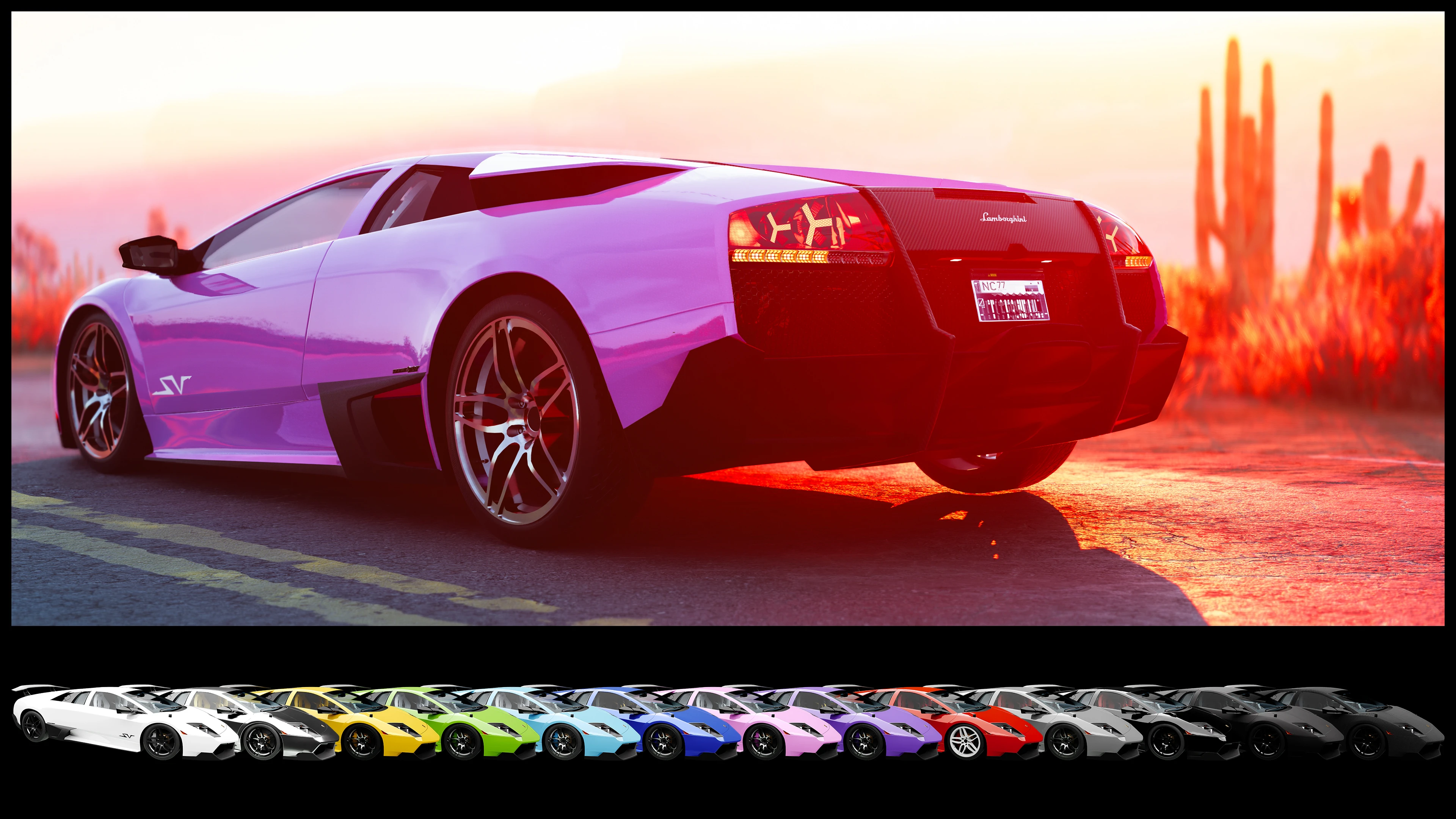
兰博基尼Murcielago SV (LP670-4) - ArchiveXL
支持水晶涂层™,提供13种外观及一些调校部件!
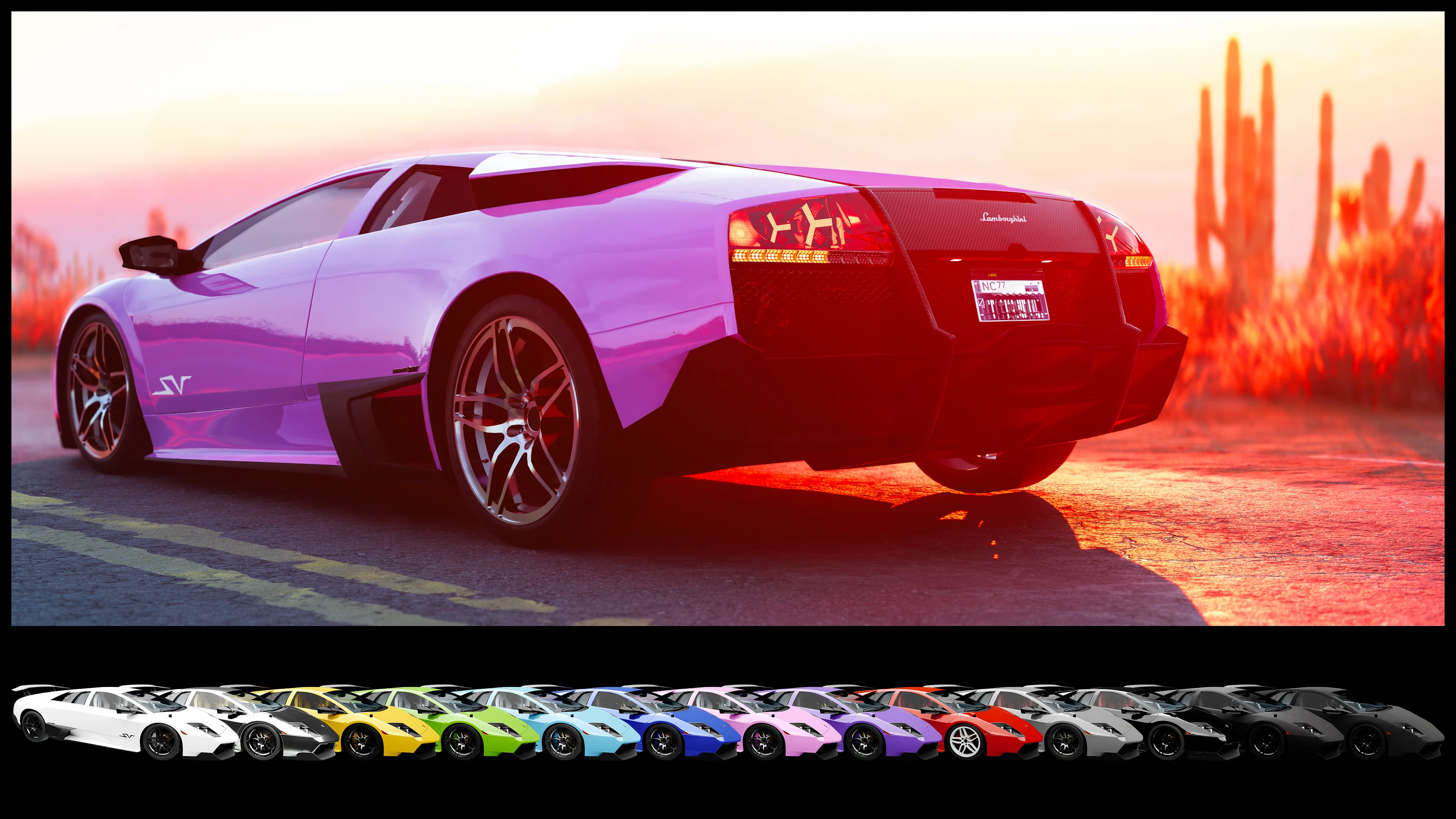 查看大图
查看大图[img]https://i.imgur.com/qIrdruY.gif[/img]
![https://i.imgur.com/qIrdruY.gif[/img]](https://i.imgur.com/qIrdruY.gif%5B/img%5D)
改装部件:
- 宽体套件
- 前唇
- 防滚架
- 三种尾翼
- 一组大灯
- 摇头公仔
特性:
- 支持 CrystalCoat™:主色影响车身和刹车卡钳,副色影响轮毂
- 剪刀门
- 车门后方的进气口在达到一定速度后会向上倾斜
- 挡风玻璃雨刮器、两侧进气口和尾翼在受到损伤时会脱落,与普通车身部件一样
- 精细的内饰和引擎
- 车辆的 13 种外观中有 5 种不同的内饰颜色
- 自定义仪表盘元素:功能性时钟、档位指示器、大灯和顶灯指示灯
- 中控台屏幕显示当前速度和电台,并以原始 GPS 作为背景图像,夜间所有显示会变暗
- 两个后通风口内的旋转风扇
- 根据实车照片高清复刻的徽章和标签
- 定制底盘,配备精细的刹车盘和与车身颜色匹配的卡钳
- 定制操控性和最高速度,与其真实对应车型一致
- 烧毁外观,移除玻璃和座椅等易碎部件
- 非 RTX 阴影网格
- 正确定位的特效,如引擎烟雾和回火
- 定制扫描仪数据
- Whip Wizard 插件 - 灯光组件在该模组的菜单中正确标注
- Nova Traffic 插件 - NPC 会在夜之城的常规交通中驾驶这辆车
- Virtual Car Dealer 预览图片 - 可选,因为
.archive文件大小为 20mb。主文件中包含基础的 VCD 支持
已知问题:
- 车窗的碰撞体积不准确。
⚠ 该车在呼叫菜单中命名为 “Lamborghini Murciélago SV”。要完整显示名称,需要 Barfunkle999 的 Extended Vehicle Call Menu。
非常感谢 Barfunkle999 编写了关于如何实现 CrystalCoat™ 的简易教程,以及 boe6 提供的维基文章和关于车辆改装的 pdf。
推荐模组:
- No More Milky Glass 作者 Mark666DooM - 修复了间接/漫射 RTX 光照下的模糊外观。
- TPP Cam Toolkit 作者 Si13n7 - 改变第三人称视角下的摄像机位置
- My settings for Lamborghini Murcielago SV 作者 Toniq187 - 改变速度和操控性
- Factions Evolved 作者 ApoKrytia - 允许特定的夜之城帮派驾驶这辆车
- Loreful Modded Traffic 作者 soulmindberlin - 在特定区域将这辆车添加到夜之城交通中
Lamborghini Diablo VT 6.0 Custom Widebody 和 Lamborghini Countach Custom WideBody 作者 SDH0 Lamborghini Aventador LP 700-4 和 Lamborghini Aventador LP 750-4 SV 作者 Morpheus9436
[center][font=Courier New][color=#d8d8d8] [img]https://i.imgur.com/ETwxcp9.gif[/img]剪刀门 ⤴[/color][/font] [font=Courier New][color=#d8d8d8] [img]https://i.imgur.com/oAPg1Ge.gif[/img]进气口 ⤴
![https://i.imgur.com/ETwxcp9.gif[/img]剪刀门](https://i.imgur.com/ETwxcp9.gif%5B/img%5D%E5%89%AA%E5%88%80%E9%97%A8)
![https://i.imgur.com/oAPg1Ge.gif[/img]进气口](https://i.imgur.com/oAPg1Ge.gif%5B/img%5D%E8%BF%9B%E6%B0%94%E5%8F%A3)
[img]https://i.imgur.com/t2C9ohs.gif[/img]内饰颜色 ⤴[/color][/font][/center]
![https://i.imgur.com/t2C9ohs.gif[/img]内饰颜色](https://i.imgur.com/t2C9ohs.gif%5B/img%5D%E5%86%85%E9%A5%B0%E9%A2%9C%E8%89%B2)
安装: 如果你通过 Vortex 安装此模组,一个 fomod 安装程序将指导你完成安装。它允许你选择改装部件(带预览图片)以及上述附加组件。安装程序还提供了一个选项,可以跳过改装部件的安装,直接以原厂车身套件安装车辆。
如果你想手动安装车辆,请使用为 fomod 安装程序准备的 .zip 文件。下载并解压 .zip 文件后,你会看到一个名为 fomod 的文件夹。双击打开它。里面的文件夹包含车辆和所有改装部件。它们的组织方式与手动安装的 .zip 文件相同,并且还包含预览图片和 .txt 文件,其中包含仅在 fomod 安装程序中提供的附加信息。预览文件以每个改装部件的名称命名。名为 readme_manual_installation.txt 的文件包含有关如何安装车辆和改装部件的进一步信息。.xml 和 .jpg 文件可以忽略,它们仅供 fomod 安装程序使用。
我强烈建议使用模组管理器,因为这会让改装部件和附加组件的安装变得非常轻松。
[img]https://staticdelivery.nexusmods.com/mods/3333/images/18919/18919-1769274562-827574888.jpg[/img]
![https://staticdelivery.nexusmods.com/mods/3333/images/18919/18919-1769274562-827574888.jpg[/img]](https://staticdelivery.nexusmods.com/mods/3333/images/18919/18919-1769274562-827574888.jpg%5B/img%5D)
[font=Courier New] CET 代码:[/font] [font=Courier New][color=#b6b6b6]Game.GetVehicleSystem():EnablePlayerVehicle('Vehicle.yv_lamborghini_murcielago_black_glossy', true, false) Game.GetVehicleSystem():EnablePlayerVehicle('Vehicle.yv_lamborghini_murcielago_black_matte', true, false) Game.GetVehicleSystem():EnablePlayerVehicle('Vehicle.yv_lamborghini_murcielago_blue', true, false) Game.GetVehicleSystem():EnablePlayerVehicle('Vehicle.yv_lamborghini_murcielago_carbon', true, false) Game.GetVehicleSystem():EnablePlayerVehicle('Vehicle.yv_lamborghini_murcielago_green', true, false) Game.GetVehicleSystem():EnablePlayerVehicle('Vehicle.yv_lamborghini_murcielago_grey', true, false) Game.GetVehicleSystem():EnablePlayerVehicle('Vehicle.yv_lamborghini_murcielago_pink', true, false) Game.GetVehicleSystem():EnablePlayerVehicle('Vehicle.yv_lamborghini_murcielago_purple', true, false) Game.GetVehicleSystem():EnablePlayerVehicle('Vehicle.yv_lamborghini_murcielago_red', true, false) Game.GetVehicleSystem():EnablePlayerVehicle('Vehicle.yv_lamborghini_murcielago_silver', true, false) Game.GetVehicleSystem():EnablePlayerVehicle('Vehicle.yv_lamborghini_murcielago_sky', true, false) Game.GetVehicleSystem():EnablePlayerVehicle('Vehicle.yv_lamborghini_murcielago_white', true, false) Game.GetVehicleSystem():EnablePlayerVehicle('Vehicle.yv_lamborghini_murcielago_yellow', true, false)[/color][/font]
正在加载版本记录…
正在加载评论…
评论在新手盒子客户端中发表,这里同步展示。