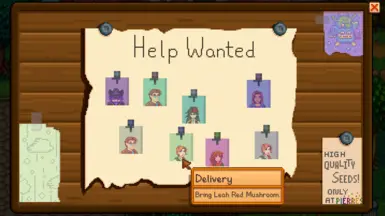
招聘启事
将“求助板”更改以显示多个任务,让您可以增加完成任务的天数,可选地要求委托者确实喜欢甚至热爱他们所要求的物品,以及更多功能!
 查看大图
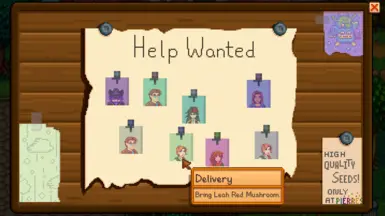
查看大图这个模组增强了种子店门前的“招聘启事”板。
其主要功能是将单一的“当日任务”替换为一系列贴在公告板上的任务便签。
其他功能包括:
[list] []要求村民真正喜欢(甚至热爱)他们请求的物品(可选) []忽略游戏对请求物品的限制(仅设置上述条件之一) []设置物品请求的最高价格(默认[b]-1[/b]表示禁用) []允许切换是否接受工匠制品的请求(默认[b]true[/b]) []允许切换是否避免发布来自好感度已满的村民的任务(默认[b]true[/b])——仅在单人模式中生效 []设置完成招聘启事任务的天数(默认[b]2[/b]天) []设置每日最大任务数量(默认[b]10[/b]) []调整接收各种任务类型的相对概率 []自定义默认的任务便签外观 []通过 SMAPI API 添加任务 [/list]
任务类型的相对概率是相互影响的。消灭怪物任务需要玩家解锁矿井并游玩至少6天后方可出现。
每日任务的最大数量受到公告板上可放置的便签数量的限制,该数量可在配置的重叠参数范围内调整。
[b][size=5]自定义任务便签[/size][/b]
要替换默认的记事本图标和/或图钉(由 Lumisteria 绘制),请使用 Content Patcher 定位以下路径:
[b]aedenthorn.HelpWanted/pad[/b] [b]aedenthorn.HelpWanted/pin[/b]
一个实现此功能的模组示例是 url=https://www.nexusmods.com/stardewvalley/mods/14953 Help Wanted Pad and Pin Retexture[/url]。
[b][size=4]特定任务便签[/size][/b]
您也可以通过定位以下子路径,为特定的NPC、任务类型,甚至为特定NPC的特定任务类型创建图标:
[b]aedenthorn.HelpWanted/pad/NPCNAME[/b] [b]aedenthorn.HelpWanted/pad/QUESTTYPE[/b] [b]aedenthorn.HelpWanted/pad/NPCNAME/QUESTTYPE[/b]
[b]aedenthorn.HelpWanted/pin/NPCNAME[/b] [b]aedenthorn.HelpWanted/pin/QUESTTYPE[/b] [b]aedenthorn.HelpWanted/pin/NPCNAME/QUESTTYPE[/b]
将 NPCNAME 替换为 NPC 的内部名称,例如:
[b]aedenthorn.HelpWanted/pad/Emily[/b]
将 QUESTTYPE 替换为任务类型,例如:
[b]aedenthorn.HelpWanted/pad/ItemDelivery[/b]
有效的任务类型为:
[list] [][b]ItemDelivery[/b] (物品送达) [][b]ResourceCollection[/b] (资源收集) [][b]Fishing[/b] (钓鱼) [][b]SlayMonster[/b] (消灭怪物) [/list]
[b][size=4]随机任务便签[/size][/b]
上述任何路径都可以通过添加后缀[b]/NUMBER[/b]来提供多个纹理,以便随机选择,例如:
[b]aedenthorn.HelpWanted/pad/1[/b] [b]aedenthorn.HelpWanted/pad/2[/b] ...
[b]aedenthorn.HelpWanted/pin/Emily/ItemDelivery/1[/b] [b]aedenthorn.HelpWanted/pin/Emily/ItemDelivery/2[/b] ...
以此类推。数字必须从1开始连续编号。
[b][size=5]添加任务[/size][/b]
可以使用 Content Patcher 或 C# 来添加任务。
[size=4][b]Content Patcher[/b][/size]
要使用 Content Patcher 添加任务,您可以按如下方式输入任务详情:
[code] { "Action": "EditData", "Target": "aedenthorn.HelpWanted/dictionary", "Entries": { "aedenthorn.TestQuest": { "percentChance": 100, "quest": { "questType": "ItemDelivery", "target": "Krobus", "item": "Gold Bar", "number": 1, "questDescription": "Gib Gold Bar, Krobus", "targetMessage": "Tanks bigly.", "currentObjective": "Give Gold Bar to Krobus." } } } }, [/code]
如果省略了[b]percentChance[/b](或设为100),该任务将每天出现。您可以使用 Content Patcher 的 [b]When[/b] 条件来进一步选择何时将任务添加到字典中。
[b]questType[/b] 可以是以下任意一种:
[list] [][b]ItemDelivery[/b] [][b]ResourceCollection[/b] [][b]Fishing[/b] [][b]SlayMonster[/b] [/list]
您可以添加 [b]questTitle[/b] 来为任务设置自定义标题。
您可以使用完整的字段集来自定义任务板的视觉外观,具体字段可在 GitHub 上查看。
[size=4][b]SMAPI C#[/b][/size]
要使用 C# 添加任务,请使用 SMAPI 的模组 API 系统。您需要创建一个实现以下接口的类:
[code] public interface IQuestData { public Texture2D padTexture { get; set; } public Rectangle padTextureSource { get; set; } public Color padColor { get; set; } public Texture2D pinTexture { get; set; } public Rectangle pinTextureSource { get; set; } public Color pinColor { get; set; } public Texture2D icon { get; set; } public Rectangle iconSource { get; set; } public Color iconColor { get; set; } public float iconScale { get; set; } public Point iconOffset { get; set; } public Quest quest { get; set; } } [/code]
然后,您通过另一个接口将此类的实例传递给 API:
[code] public interface IHelpWantedAPI { public void AddQuestToday(IQuestData data); } [/code]
这应该在 Helper.Events.GameLoop.DayStarted 事件中完成。
以下是一个示例:
[code] public override void Entry(IModHelper helper) { Helper.Events.GameLoop.DayStarted += GameLoop_DayStarted; } private void GameLoop_DayStarted(object sender, StardewModdingAPI.Events.DayStartedEventArgs e) { var api = Helper.ModRegistry.GetApi("aedenthorn.HelpWanted"); if (api != null) { var d = new MyQuestData() { pinTextureSource = new Rectangle(0, 0, 64, 64), padTextureSource = new Rectangle(0, 0, 64, 64), pinTexture = pinTexture, padTexture = padTexture, pinColor = Color.Black, padColor = Color.Gray, icon = Game1.getCharacterFromName("Krobus").Portrait, iconSource = new Rectangle(0, 0, 64, 64), iconColor = new Color(150, 150, 150, 150), iconScale = 1, iconOffset = new Point(32, 64), quest = new ItemDeliveryQuest() }; (d.quest as ItemDeliveryQuest).target.Value = "Krobus"; (d.quest as ItemDeliveryQuest).item.Value = 305; (d.quest as ItemDeliveryQuest).targetMessage = "I can haz void egg? Tanks lots."; d.quest.currentObjective = "Gib Krobus void egg."; d.quest.questDescription = "Pls gib."; api.AddQuestToday(d); } } [/code]
[size=5][b]致谢[/b][/size]
感谢 [url=https://www.nexusmods.com/stardewvalley/users/5575844]Lumisteria[/url] 无私地制作了记事本/图钉图标。
[size=5][b]配置[/b][/size]
您可以通过编辑配置文件或使用 [url=https://www.nexusmods.com/stardewvalley/mods/5098]Generic Mod Config Menu[/url] 来自定义本模组。
[size=5][b]技术信息[/b][/size]
需要安装 [url=https://www.nexusmods.com/stardewvalley/mods/2400/]SMAPI[/url]。
实现了 [url=https://www.nexusmods.com/stardewvalley/mods/5098]Generic Mod Config Menu[/url] 的接口,以便在游戏内更改配置设置。
兼容 [url=https://www.nexusmods.com/stardewvalley/mods/6338]Mod Updater[/url] 以实现自动更新。
如果您想投诉、寻求帮助或协助我测试模组,可以访问 [url=https://discord.gg/bs6zHuj]我的 Discord 服务器[/url]。
我所有星露谷物语模组的列表可在 [url=https://www.nexusmods.com/stardewvalley/articles/895]https://www.nexusmods.com/stardewvalley/articles/895[/url] 找到。
正在加载版本记录…
正在加载评论…
评论在新手盒子客户端中发表,这里同步展示。