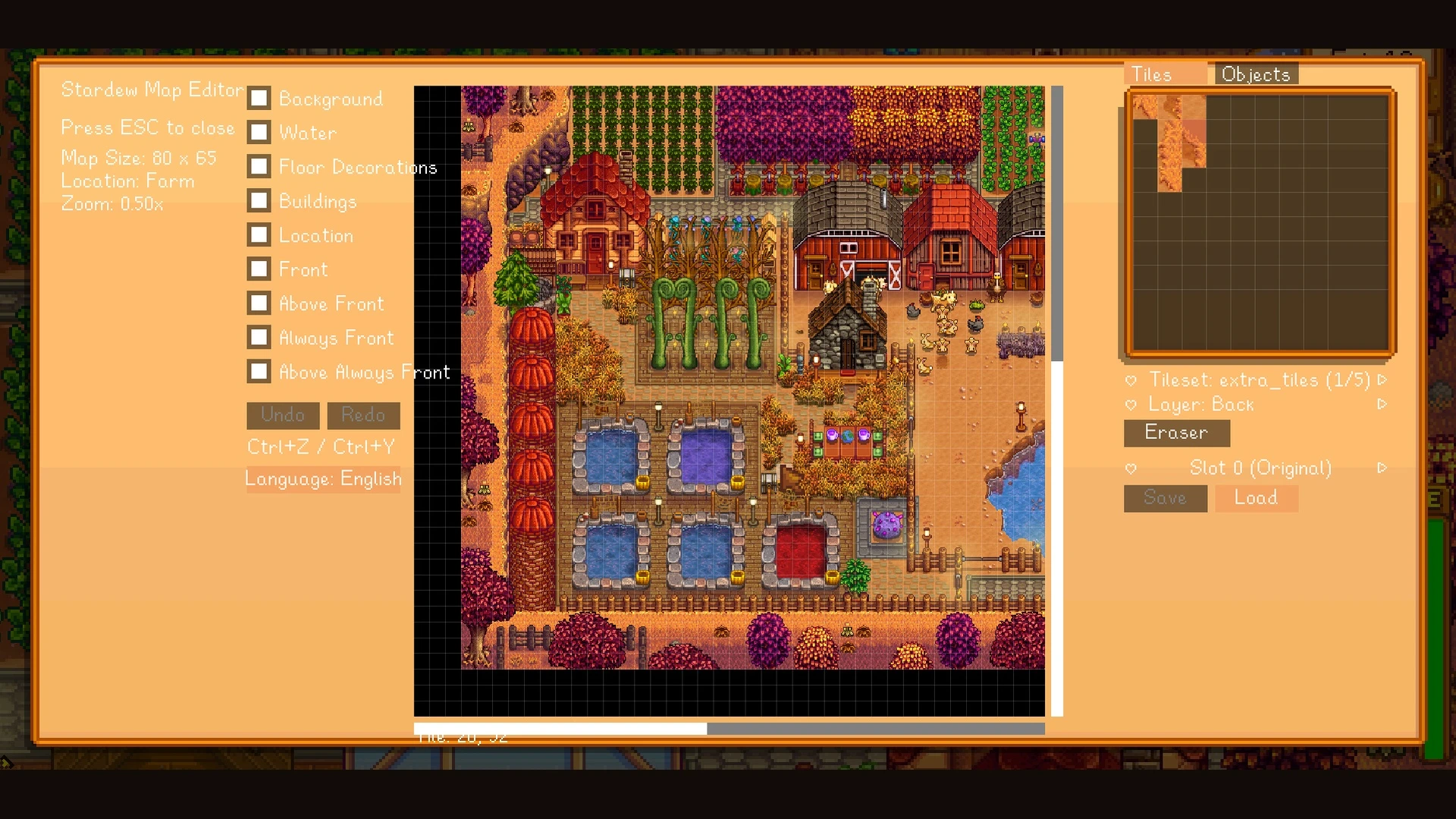
星露谷物语游戏内地图编辑器
一款《星露谷物语》的游戏内蓝图风格地图编辑器。它是一个可视化地图编辑器,可让你编辑《星露谷物语》的地图。通过可视化界面直接编辑地图图块、图层和可放置物体,扩展地图边界,并使更改在存档和地图重新加载之间持久保留,从而装饰你的地图。包含中英文界面支持。
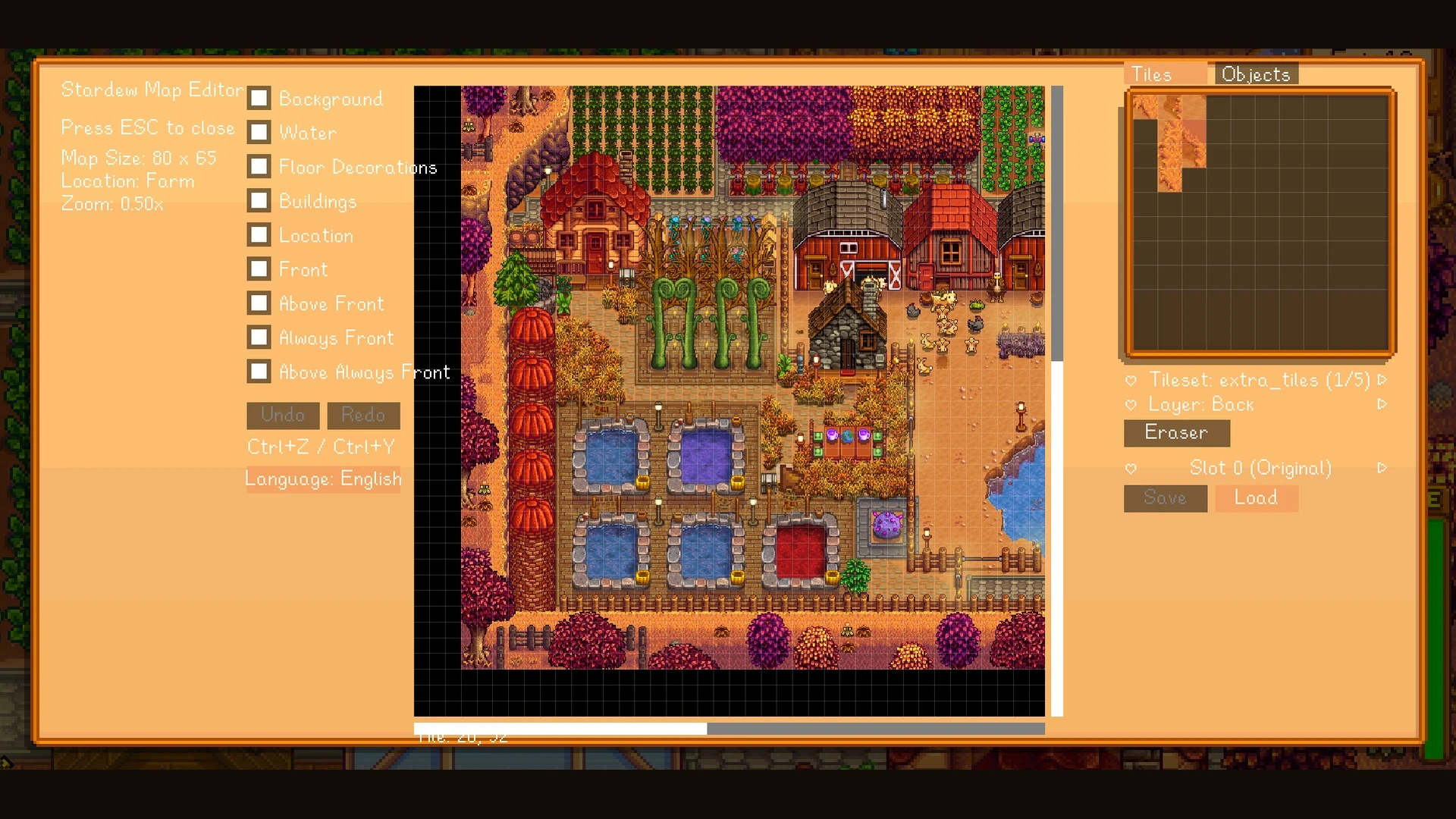 查看大图
Stardew In-Game Map Editor
[line]
English
[heading]Description[/heading]
[b]Stardew In-Game Map Editor[/b] is a visual in-game map editor for Stardew Valley.
It allows you to directly edit the actual map tiles and layers of an existing game location without leaving the game. You can place, replace, or erase map tiles such as floors, walls, building structures, and decorative elements, as well as expand the size of the current map.
When placing tiles, you can choose which map layer they belong to. For example, decorative tiles can be placed on a background layer, while walls or structural tiles can be placed on building-related layers that affect collision and interaction behavior.
By editing or removing tiles from the appropriate layers, you can also change parts of the original map structure, including areas that would normally behave as walls or blocked spaces.
The editor also supports placing and removing placeable in-game objects. Object placement still follows Stardew Valley's normal placement rules. If an object cannot normally be placed at a specific position, the editor will not force it into that location.
The current map is rendered directly inside the editor in real time. Large maps can be explored using zooming and panning, and individual map layers can be shown or hidden to make editing complex areas easier.
Available map tiles and placeable objects are displayed in separate palette panels, allowing you to browse and select the content you want to place.
The editor also includes placement and erase previews, limited-step undo and redo, and a separate map-state save system for each edited location.
Map-State Slots
Each map has [b]10 map-state slots[/b]:
[list]
[][b]Slot 0[/b] — Automatically created the first time the editor is opened on that map. It stores the original map state from before editing began and cannot be overwritten or modified.[/]
[][b]Slots 1–9[/b] — Can be freely saved and loaded, allowing you to keep multiple versions of the same map.[/]
[/list]Creating Custom Spaces Using Existing Locations
The mod currently edits existing Stardew Valley locations and does [b]not[/b] create entirely new standalone locations or custom warp destinations by itself.
However, existing interior locations such as [b]Sheds[/b] can be used as a base for custom map spaces.
You can enter a Shed, open the editor, redesign its tiles and layers, expand its map boundaries, and turn the existing interior into a much larger custom-designed space.
This makes it possible to build your own custom interior maps while still using locations and entrances that already exist in the game.
[line]
[heading]Installation Instructions[/heading]
[list=1]
[]Install [b]SMAPI[/b].[/]
[]Download this mod.[/]
[]Extract the archive.[/]
[]Place the complete mod folder inside:
Stardew Valley/Mods[/]
[]Launch Stardew Valley through SMAPI.[/]
[]Load a save and press [b]F8[/b] to open the map editor. The hotkey can be changed in the mod configuration.[/]
[/list][quote][b]Recommended:[/b] Back up your save before making large or experimental map changes, especially while using early versions of the mod.[/quote][line]
[heading]Main Features[/heading]
Map Editing
[list]
[][b]In-game visual map editing[/b] Edit the current Stardew Valley map directly without using an external map editor.[/]
[][b]Tile placement, replacement, and removal[/b] Place, replace, or erase map tiles such as floors, walls, building structures, decorative tiles, and other tiles available from the current map's tilesheets.[/]
[][b]Layer editing[/b] Choose which map layer a tile is placed on. This lets you control how tiles are rendered and, depending on the map structure, how they affect collision and accessibility.[/]
[][b]Map expansion[/b] Expand the boundaries of existing maps and create additional editable space beyond their original dimensions.[/]
[][b]Preserved map content during expansion[/b] Existing map content is preserved and repositioned when expansion requires additional space on the top or left side.[/]
[/list]Custom Spaces
[list]
[][b]Custom interiors using existing locations[/b] Use an existing location such as a Shed as the starting point for a custom map.[/]
[][b]Large custom interior spaces[/b] Expand and redesign an existing interior while keeping the original game location and entrance.[/]
[/list]Objects
[list]
[][b]Object placement and removal[/b] Place and remove supported in-game placeable objects.[/]
[][b]Vanilla placement rules[/b] Object placement follows Stardew Valley's normal placement restrictions. Invalid placements are not forced.[/]
[/list]Editor Interface
[list]
[][b]Real-time map preview[/b] The editor renders the current map in real time while you work.[/]
[][b]Zoom and pan[/b] Navigate large maps by zooming and moving the editor camera.[/]
[][b]Layer visibility controls[/b] Show or hide individual map layers to inspect and edit complex map structures more easily.[/]
[][b]Tile and object palettes[/b] Browse available map tiles and placeable objects through dedicated palette panels.[/]
[][b]Placement and erase previews[/b] Preview the affected tile or area before applying an edit.[/]
[/list]Editing Safety and Versioning
[list]
[][b]Undo and redo[/b] Undo or redo a limited number of recent editing operations.[/]
[][b]Per-map save slots[/b] Every editable location has 10 independent map-state slots.[/]
[][b]Protected original-state slot[/b] Slot 0 automatically stores the original map state and cannot be overwritten.[/]
[][b]Reusable custom slots[/b] Slots 1–9 can be freely used to save and load different versions of the same map.[/]
[/list]Language Support
[list]
[][b]Simplified Chinese[/b][/]
[][b]English[/b][/]
[/list]The interface language can be changed through the mod configuration.
[line]
[heading]Requirements[/heading]
Required
[list]
[][b]Stardew Valley[/b][/]
[][b]SMAPI[/b][/]
[/list]There are no other required framework mods.
Optional
[list]
[][b]Generic Mod Config Menu[/b][/]
[/list]Generic Mod Config Menu is optional.
If installed, it provides a convenient interface for changing settings such as:
[list]
[]the editor hotkey;[/]
[]interface language.[/]
[/list]The mod can still be used without Generic Mod Config Menu.
[line]
[heading]Important Notes[/heading]
[list]
[]This mod directly saves changes made to map state.[/]
[]The editor includes an original-map backup slot and additional map-state save slots, but backing up important save files before large-scale editing is still recommended.[/]
[]The current version edits [b]existing game locations[/b].[/]
[]It does [b]not[/b] currently provide a standalone custom-location registration system.[/]
[]It does [b]not[/b] currently provide its own custom warp or teleport system.[/]
[/list][line]
[heading]Shout Outs[/heading]
Thanks to [b]ConcernedApe[/b] for creating Stardew Valley.
Thanks to [b]Pathoschild[/b] and the SMAPI community for providing the modding framework, documentation, and tools that make Stardew Valley modding possible.
Thanks to everyone who tests the mod, reports bugs, and provides feedback.
[line]
中文
[heading]模组介绍[/heading]
[b]Stardew In-Game Map Editor[/b] 是一个可以直接在 Stardew Valley 游戏内使用的可视化地图编辑器。
本模组允许你直接编辑游戏中已有地点的实际地图图块(Tile)和地图图层,而不需要退出游戏或使用外部地图编辑器。
你可以放置、替换或擦除地图原有的图块,包括地面、墙壁、房屋与建筑结构、装饰性图块,以及当前地图 Tilesheet 中能够使用的其他图块,同时也可以扩展当前地图原有的尺寸。
在放置图块时,可以自行选择图块所在的地图图层。例如,可以将纯装饰性图块放置在背景层,也可以将墙壁、建筑结构等内容放置在建筑相关图层。根据图层及原地图结构的不同,这些修改也可以影响部分区域的碰撞与通行效果。
因此,你不仅可以给地图增加装饰,还可以通过修改或擦除相应图层中的 Tile,对原地图中的部分墙壁、建筑结构和不可通行区域进行重新设计。
编辑器同时支持放置和擦除游戏中的可放置物体。物体仍然遵守 Stardew Valley 原版的放置规则。如果某个位置按照游戏规则无法正常放置该物体,编辑器也不会强制将其放置在那里。
编辑界面会实时绘制当前地图。对于面积较大的地图,可以通过缩放和平移来查看不同区域,也可以分别显示或隐藏不同地图图层,使复杂地图的编辑更加方便。
地图可用的 Tile 与可放置物体会分别显示在素材面板中,可以直接浏览并选择准备放置的内容。
模组还提供放置与擦除预览、一定步数范围内的撤销与重做,以及每张地图独立的地图状态保存功能。
地图状态槽位
每张地图拥有 [b]10 个地图状态槽位[/b]:
[list]
[][b]Slot 0[/b] — 第一次在该地图中打开编辑器时自动创建,保存开始编辑之前的原始地图状态。该槽位之后不能被覆盖或修改。[/]
[][b]Slot 1–9[/b] — 可以自由保存与读取,用于保存同一张地图的不同版本。[/]
[/list]利用已有地点创建自定义地图空间
当前版本主要用于编辑 Stardew Valley 中[b]已经存在的地点[/b]。
模组目前本身不会创建完全独立的新 Location,也没有单独实现新的自定义 Warp / 传送系统。
但是,你可以利用游戏本身已经存在的独立室内地点,例如 [b]小屋(Shed)[/b],作为自定义地图的基础空间。
进入小屋以后,可以直接打开编辑器,重新绘制内部地图、修改墙壁与地面、调整不同地图图层、扩展地图边界,并放置新的装饰与物体。
因此,可以将原本的小屋内部逐渐改造成一个面积更大、布局完全由自己设计的自定义地图空间,同时继续使用游戏原本已经存在的小屋入口和地点结构。
[line]
[heading]安装方法[/heading]
[list=1]
[]安装 [b]SMAPI[/b]。[/]
[]下载本模组。[/]
[]解压下载的压缩包。[/]
[]将完整的模组文件夹放入:
Stardew Valley/Mods[/]
[]通过 SMAPI 启动 Stardew Valley。[/]
[]进入存档后按 [b]F8[/b] 打开地图编辑器。 快捷键可以在模组配置中修改。[/]
[/list][quote][b]建议:[/b] 在进行大规模或实验性的地图修改之前,先备份自己的存档,尤其是在使用模组早期版本时。[/quote][line]
[heading]主要功能[/heading]
地图编辑
[list]
[][b]游戏内可视化地图编辑[/b] 无需使用外部地图编辑器,可以直接在 Stardew Valley 游戏内编辑当前地图。[/]
[][b]Tile 放置、替换与擦除[/b] 可以放置、替换或擦除地板、墙壁、建筑结构、装饰图块,以及当前地图 Tilesheet 中的其他可用素材。[/]
[][b]多图层编辑[/b] 可以自行选择准备放置的 Tile 所在的地图图层,从而控制图块的显示层级,并根据地图结构影响部分碰撞与通行效果。[/]
[][b]地图尺寸扩展[/b] 可以向已有地图边界之外继续扩展地图,获得额外的可编辑空间。[/]
[][b]扩图时保留原地图内容[/b] 当地图向上方或左侧扩展时,原有地图内容会相应调整位置并保持原有结构。[/]
[/list]自定义空间
[list]
[][b]使用已有地点制作自定义地图[/b] 可以使用小屋等现有独立室内地点作为基础地图。[/]
[][b]扩展为大型自定义空间[/b] 在保留原有地点与入口的前提下,对内部地图进行重新绘制和扩展,制作更大的自定义室内空间。[/]
[/list]物体编辑
[list]
[][b]物体放置与擦除[/b] 可以放置和移除支持的游戏内可放置物体。[/]
[][b]遵循原版放置规则[/b] 如果某个位置按照 Stardew Valley 原本的规则无法放置该物体,编辑器不会强制放置。[/]
[/list]编辑器界面
[list]
[][b]实时地图预览[/b] 编辑过程中实时显示当前地图的实际状态。[/]
[][b]缩放与平移[/b] 可以自由缩放地图视图,并移动编辑器镜头查看大型地图的不同区域。[/]
[][b]图层显示控制[/b] 可以单独显示或隐藏不同地图图层,更方便地检查和编辑复杂地图结构。[/]
[][b]Tile 与物体素材面板[/b] 地图 Tile 与可放置物体会显示在独立素材面板中,可以直接浏览和选择。[/]
[][b]放置与擦除预览[/b] 在真正应用修改之前,可以预览即将受到影响的位置或区域。[/]
[/list]撤销与地图版本管理
[list]
[][b]Undo / Redo[/b] 支持一定步数范围内的撤销与重做。[/]
[][b]每张地图独立的存档槽位[/b] 每个可编辑地点拥有 10 个独立地图状态槽位。[/]
[][b]不可覆盖的原始地图 Slot 0[/b] Slot 0 会自动保存第一次打开编辑器时的原始地图状态,并且不能被覆盖。[/]
[][b]可自由使用的 Slot 1–9[/b] 可以自由保存和读取同一张地图的不同版本。[/]
[/list]语言支持
[list]
[][b]简体中文[/b][/]
[][b]English[/b][/]
[/list]可以通过模组配置修改界面语言。
[line]
[heading]前置要求[/heading]
必需
[list]
[][b]Stardew Valley[/b][/]
[][b]SMAPI[/b][/]
[/list]除此之外没有其他必需的框架类前置 Mod。
可选
[list]
[][b]Generic Mod Config Menu[/b][/]
[/list]Generic Mod Config Menu 并非必需。
安装以后,可以更方便地修改:
[list]
[]地图编辑器快捷键;[/]
[]编辑器界面语言。[/]
[/list]即使没有安装 Generic Mod Config Menu,本模组仍然可以正常使用。
[line]
[heading]重要说明[/heading]
[list]
[]本模组会直接保存对地图状态进行的修改。[/]
[]虽然编辑器提供原始地图 Slot 0 以及额外的地图状态存档槽位,但在进行大规模地图编辑之前,仍然建议备份重要存档。[/]
[]当前版本主要编辑[b]游戏中已经存在的地点[/b]。[/]
[]目前尚未提供独立的新地图 Location 注册系统。[/]
[]目前尚未实现独立的自定义 Warp / 传送系统。[/]
[/list][line]
[heading]致谢[/heading]
感谢 [b]ConcernedApe[/b] 创作 Stardew Valley。
感谢 [b]Pathoschild[/b] 与 SMAPI 社区提供 Stardew Valley Mod 开发所需的框架、文档与开发工具。
感谢所有参与测试、报告问题并提供反馈的玩家。
正在加载版本记录…
正在加载评论…
评论在新手盒子客户端中发表,这里同步展示。