保存笔记
Show editable custom notes on each save slot in Stardew Valley's load menu . 在星露谷的加载存档界面为每个存档显示可编辑的自定义备注
 查看大图
查看大图Save Notes 存档备注
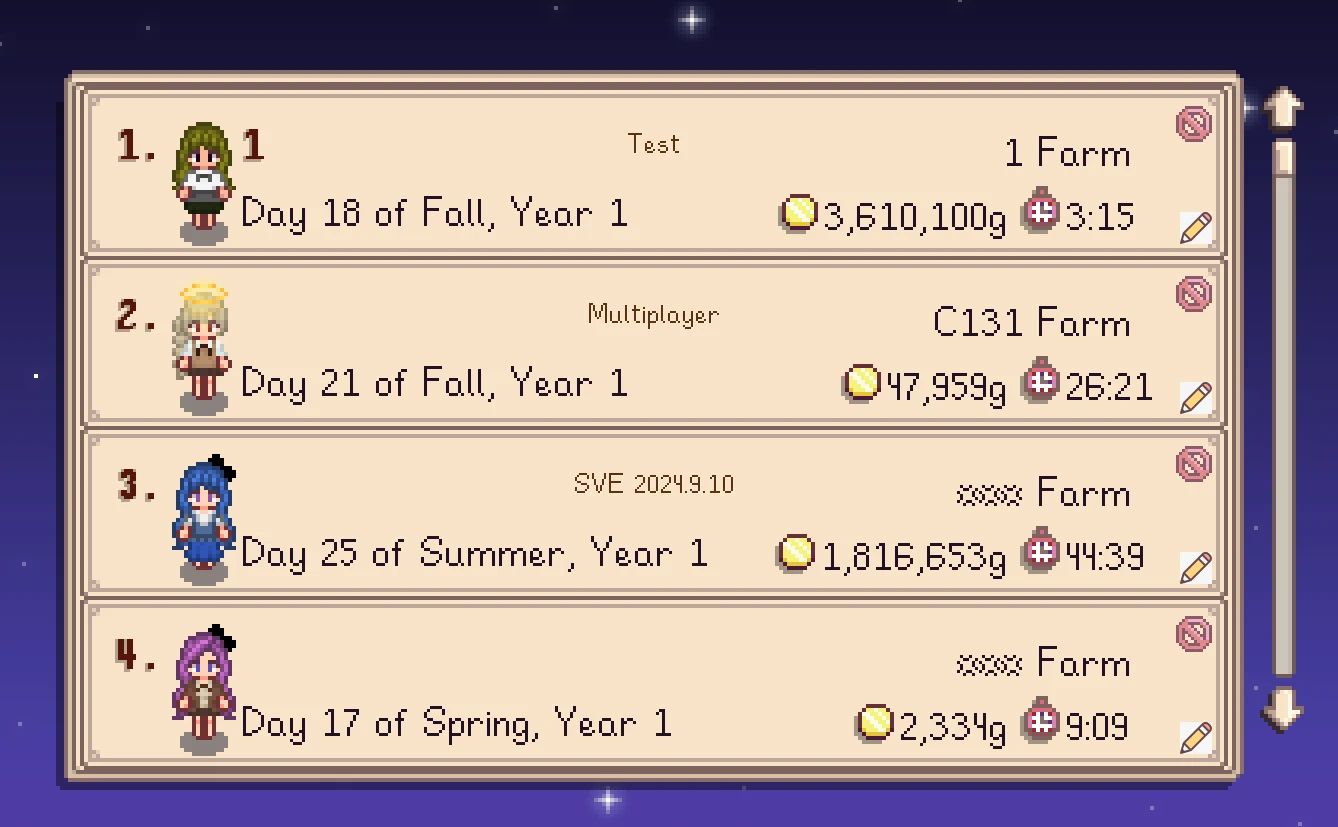
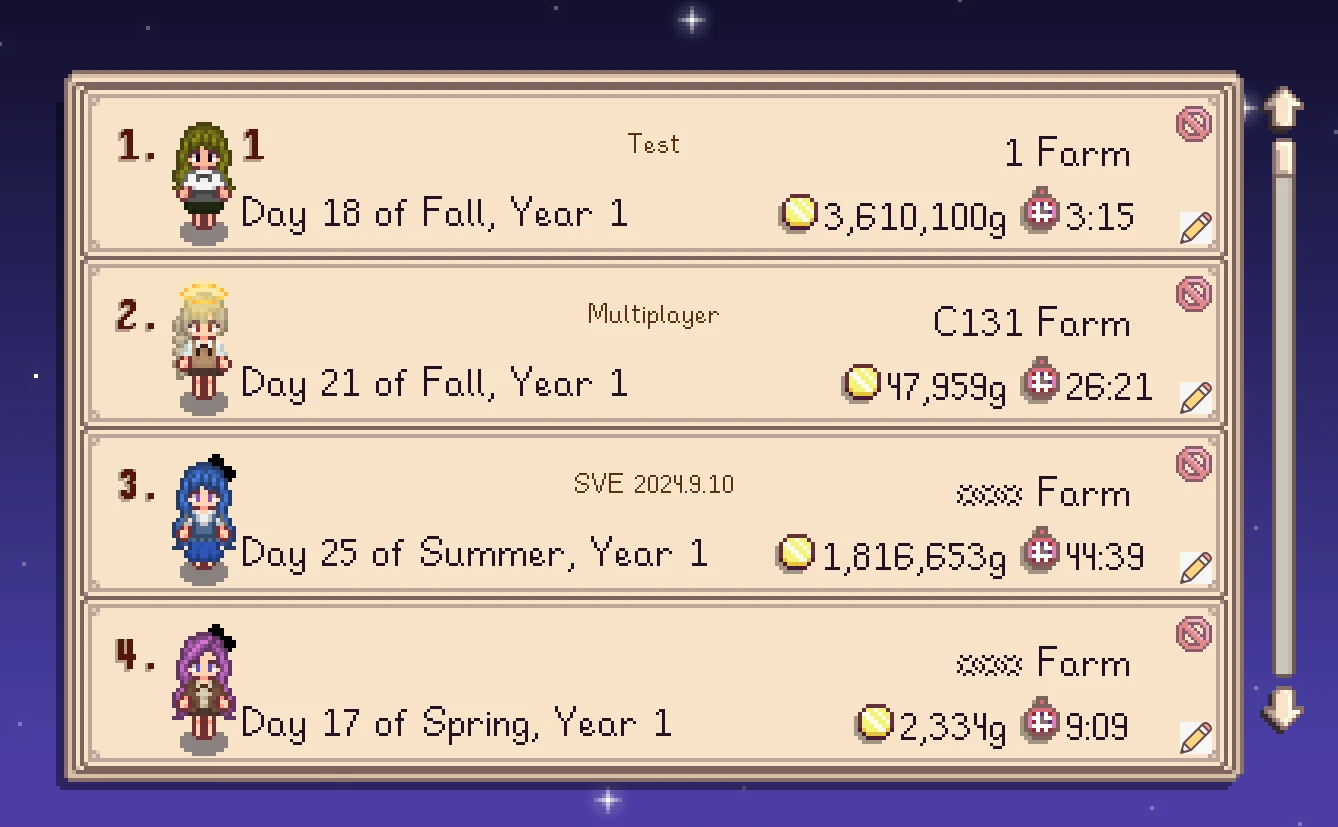
在存档选择界面为每个存档显示一段自定义备注,方便区分不同存档。
Show a custom note next to each save in the load menu, so you can tell your saves apart at a glance.
功能 · Features
存档备注 · Save Notes 在"加载游戏"界面的每个存档槽右上角显示一条自定义备注(深棕色文字)。备注会跟随存档保存,重进游戏后依然存在。
Displays a custom note (dark brown text) on each save slot in the Load Game menu. Notes are saved with the mod and persist across game sessions.
铅笔编辑按钮 · Pencil Edit Button 每个存档槽右下角有一个带铅笔图标的按钮,点击后可输入备注。
A pencil-icon button appears at the bottom-right of each save slot. Click it to edit the note.
- 支持中文、英文、数字、符号(走游戏原生输入系统,IME 中文输入正常)
- Supports Chinese, English, numbers, and symbols via the game's native input system (IME input works normally)
- 回车 保存 / ESC 取消 / 点击 OK 或 取消 按钮
- Enter to save / ESC to cancel / click OK or Cancel button
- 悬停与点击有原版风格的音效和按压动画
- Vanilla-style hover and click sounds with a press animation
备注文件 · Note File
备注保存在 Mods/SaveNotes/notes.json,你可以:
- 用农场名作为 key(如
MniShark):同名农场共用备注 - 用存档文件夹名作为 key(如
MniShark_447999796):精确匹配某个存档
The note file is stored at Mods/SaveNotes/notes.json. You can use either the farm name (e.g. MniShark) to share a note across same-named farms, or the save folder name (e.g. MniShark_447999796) to target a specific save.
{
  "MniShark": "主存档 - 秋季第二年",
  "MniShark_447999796": "挑战存档 - 只种远古水果"
}
使用 · Usage
- 打开游戏的"加载游戏"菜单 / Open the "Load" menu in-game
- 每个存档槽会显示备注(如果有)和铅笔按钮 / Each slot shows its note (if any) and a pencil button
- 点击铅笔按钮编辑备注 / Click the pencil button to edit the note
- 输入文字后按回车或点击 OK / Type your note, then press Enter or click OK
兼容性 · Compatibility
- 适用于 Stardew Valley 1.6+ 和 SMAPI 4.0+
- Works with Stardew Valley 1.6+ and SMAPI 4.0+
- 自绘 UI,不依赖任何游戏贴图,与 UI 美化模组(如 Overgrown Flowery Interface)兼容
- Self-drawn UI that doesn't rely on any game textures, compatible with UI retexture mods (e.g. Overgrown Flowery Interface)
- 与其他修改加载菜单的模组可能冲突(因为使用了 Harmony 补丁)
- May conflict with other mods that patch the Load Game menu (uses a Harmony patch)
安装 · Installation
安装 SMAPI
解压到
Stardew Valley/Mods/文件夹通过 SMAPI 启动游戏
Install SMAPI
Unzip into your
Stardew Valley/Mods/folderRun the game through SMAPI
权限与致谢 · Permissions and Credits
作者:MniShark
你可以自由修改、分发、翻译此 Mod
未经许可请勿上传到其他平台
Author: MniShark
You're free to modify, redistribute, and translate this mod
Please don't upload to other platforms without permission
还没有人评论,去客户端里说两句吧。
评论在新手盒子客户端中发表,这里同步展示。