SoManyToolbars
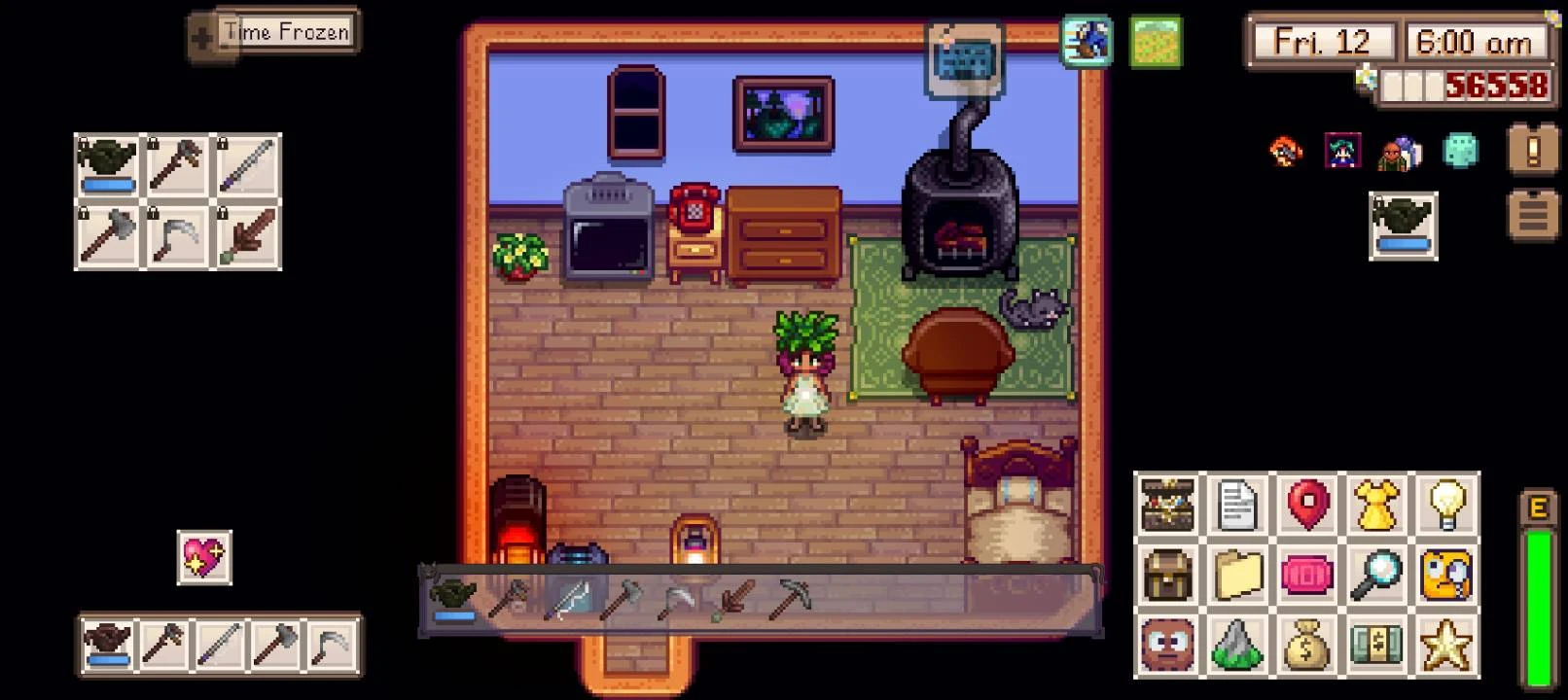
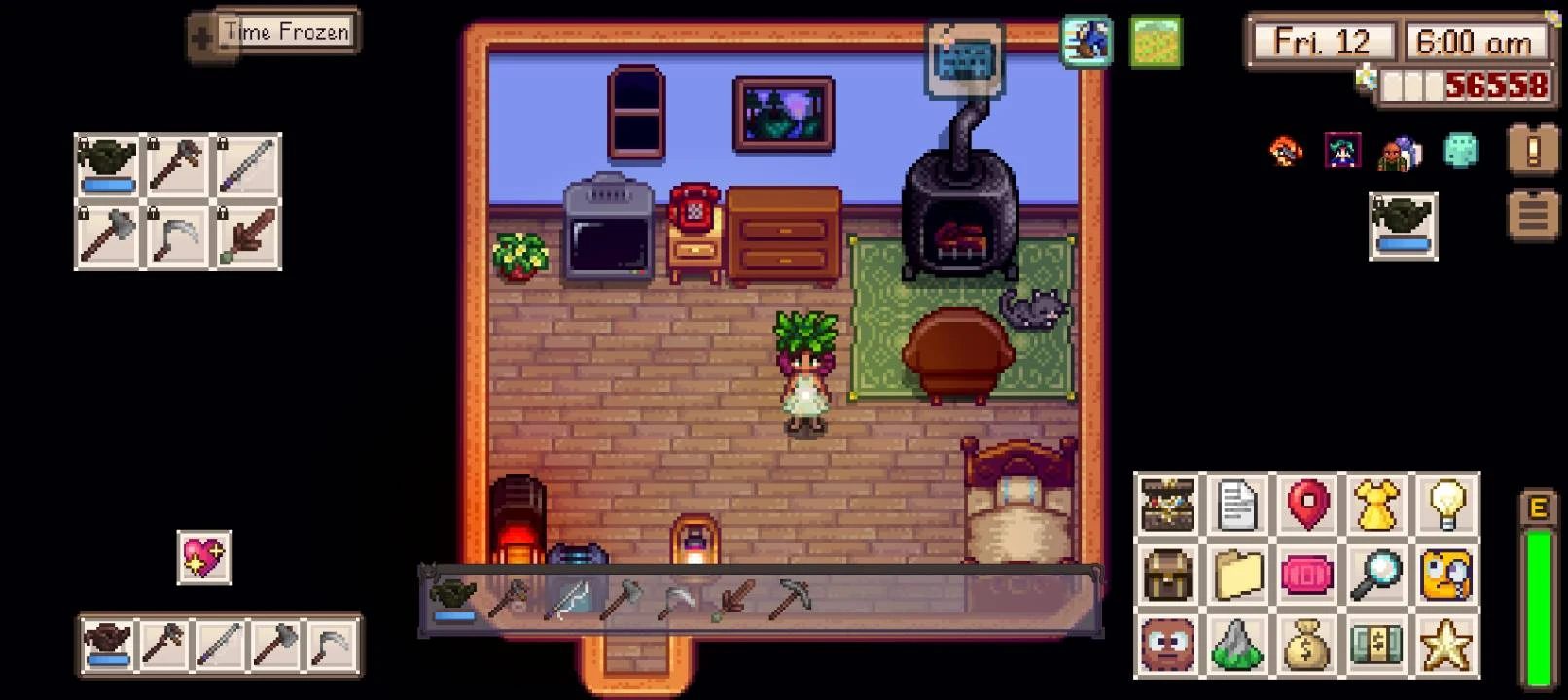
Adds fully customizable toolbars. Designed for mobile first with PC in mind.
 查看大图
查看大图[center][color=#e6c552][size=5][b]So Many Toolbars[/b][/size][/color][/center]
[size=3]
Create fully customizable toolbars! This mod is intended to feel like a native replacement to Stardew Valley’s UI while offering far more flexibility than the vanilla toolbar. It is designed mobile first while still being fully compatible with PC.[/size]
[i]If you use [b][color=#b6d7a8]Cinderbox[/color][/b], this is a part of the [b]Cinderbox Pack[/b] file that can be downloaded during setup and on the Home screen.[/i]
[color=#4fa8ff][size=4][b]How to [/b][/size][/color](Check the images in the gallery for visual help!)
[b]Open the Toolbar Settings Menu[/b]
- Open inventory
- Click on Options tab
- Click on Toolbar Settings
[b]Make Your Own Border[/b]
- Template is in the assets folder. Shaded yellow/orange = tiled. Shaded blue/red = static
- Animated borders are accepted as a single row of 96x96 tiles with zero gaps in between. This means a tilesheet for an animated border is 96 by some multiple of 96
[b]Add Your Own Icons[/b]
- Use a multiple of 16, 32 or 64 tilesheet. It can be any number of rows or columns as long as its a multiple of those listed. Make sure there are no gaps in between tiles
- Add the suffix 16, 32 or _64 to the filename so it's parsed correctly. Example: "icon_32.png" gets parsed as a 32x32 icons
[color=#4fa8ff][size=4][b]Features[/b][/size][/color]
[b]Current[/b]
- Add as many toolbars as you want
- Show, hide, move, or reorganize them freely
- Change scale or transparency
- Add or remove any number of rows and columns
- Set custom borders to individual toolbars
- Set custom icons to individual QuickAction Toolbars or slot covers
- Supports slot counts that adapt to your inventory size (in case you have mods that expand your bag)
- Hide pages that have all empty slots
- Collapse toolbars into a 1x1 slot that opens on hold
- Optional custom borders/icons
- Save/Load preset toolbar templates
- Automatically load/save toolbar configurations when entering a map or tile
- Works on both mobile and PC
- Touch-aware: tap, drag, swipe
- Designed to avoid conflicts with the virtual joystick and Tap-to-Move
- Tooltips on mobile and PC
- i18n support
- [url=https://stardewvalleywiki.com/Modding:Console_commands#Console_commands]Console[/url] commands
- [url=https://stardewvalleywiki.com/Modding:Console_commands#Debug_commands]Debug[/url] commands
- Built in terminal window that is shown in game and other debugging goodies (like mouse coordinates) [b]fully working on mobile[/b]! Use the command line prompt "smt_logmonitor -h" for more details on terminal window and the default "help" for all available prompts
- Radial/pie collapsible toolbars
[b]Planned[/b]
- Set specific keybinds to individual toolbars for paging (PC/Controller)
- Full controller support so you can change slots between toolbars
[b]What This Won't Do
[/b]- Give you unlimited slots in your inventory. You will need a separate mod for that
[color=#4fa8ff][size=4][b]Currently Implemented Toolbar Types[/b][/size][/color]
[b]Inventory Toolbars[/b]
- Option to Auto-sync with your main inventory
- Add custom number of pages per toolbar if not being synced with main inventory
- Assign items to a specific slot
- Lock items to a specific slot so it stays in place while paging
- Filter items that are assigned to other toolbars
- Filter empty pages
[b]QuickAction Toolbar[/b]
- Assign custom command line prompts to a specific slot
- Assign specific in-game menus or shops (still expanding)
[b]Key Toolbars[/b]
- Assign keybinds to a specific slot (like Virtual Keyboard!) from within the Toolbar Settings Menu. No need to edit the config!
- Assign combo keybinds to a specific slot
[color=#4fa8ff][size=4][b]Requirements[/b][/size][/color]
- SMAPI 4.1.10+
[color=#4fa8ff][size=4][b]Known Bugs/Issues[/b][/size][/color] (Bug reports and feature requests are welcomed!)
- Pressing tab on PC skips pages due to how vanilla shifts rows in inventory. This will be fixed soon, use swipe gestures to page for now
- Almost no controller support.
- "Always Show In Menus" QAToolbars are hidden under cutscenes
- On mobile, the stamina bar for the watering can might be drawn too low. This can be fixed by changing the "toolbar size" in the [b][u]vanilla game options[/u][/b]. Decreasing it will bring it closer to center of the slot, increasing it will push it further south. This is standard vanilla behavior and not a bug with the mod
[color=#4fa8ff][size=4]
[b]Credits
[/b][/size][/color][b]Thank you to the people below who have encouraged me to continue working on this project! I truly appreciate all the work you guys have done.[/b]
[b]- ♡ l i a (@__lia) [/b] [Stardew SMAPI Thailand Discord]: Images used in the gallery, bug testing, and support
[b]- aki (@ashryyyver) [/b] [Stardew SMAPI Thailand Discord]: bug testing and support
[b]- kazutopi1 (@dopeflamingo11) [/b] [Stardew SMAPI Thailand Discord]: bug testing and developing future menus for QAToolbars
[b]- Wrath (@itsmewrath05) [/b] [Stardew SMAPI Thailand Discord]: bug testing
[b]- justcallmeR (@savior7r) [/b] [Stardew SMAPI Thailand Discord]: bug testing
[b]- The people on Stardew SMAPI Thailand Discord who have: [/b]reported bugs and give feature recommendations to improve the mod[b]
- The people here on Nexus who have: [/b]reported bugs and give feature recommendations to improve the mod[b]
[color=#4fa8ff][size=4]Want to help?[/size][/color]
[/b]I'm always willing to accept help. This means adding custom borders, icons, features, quality of life improvements, fixes for bugs. Basically, anything that will make the mod a better experience for all players across all platforms. If you want to reach out directly, you can @me in the Stardew SMAPI Thailand discord [url=https://discord.gg/kbfUGv66Yv][u]here[/u][/url] or the Official Stardew Valley discord server [url=https://discord.gg/kbfUGv66Yv][u]here[/u][/url] under the username [b]Eky(@ekyso)[/b].
[b]If you want to help develop:[/b] Once 1.0.0 drops I am officially opening the source code on Github for pull requests.
[b]If you want to create your own toolbars for your own mod[/b]: I will be releasing an API after the 1.0.0 drop so you can customize how you want your toolbars to look along with dedicated actions.
正在加载版本记录…
正在加载评论…
评论在新手盒子客户端中发表,这里同步展示。