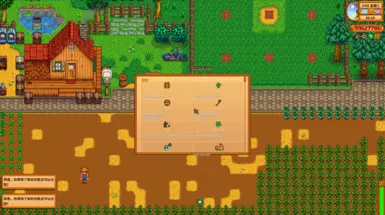
技能概览
显示所有技能中所有已解锁职业的描述和图标。
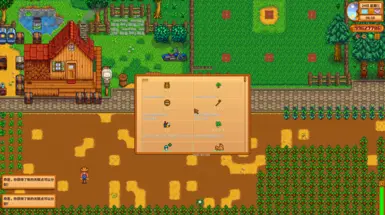 查看大图
查看大图Skill Overview / 技能效果总览
—— English ——
If you have All Professions installed with many skills, but struggle to keep track of all your unlocked profession effects — this mod is for you!
Description Skill Overview displays all your unlocked profession effects and icons in a clean, scrollable 2-column grid. No more alt-tabbing to wikis or skill trees — just press K in-game and see exactly what each of your professions does at a glance.
Fully compatible with vanilla professions, SpaceCore custom skills, and Vanilla Plus Professions (VPP) extended professions. Each source is color-coded (Gold = Vanilla, Blue = SpaceCore, Green = VPP) for easy identification.
Installation Instructions
- Install SMAPI (version 4.0.0 or later).
- Download the mod and extract the contents into your Mods folder.
- Launch the game via SMAPI.
- (Optional) Install Generic Mod Config Menu for in-game configuration.
- (Optional) Install SpaceCore and/or Vanilla Plus Professions for extended skill support.
Main Features
- One-key access — Press K to open the skill overview panel (configurable key).
- Complete profession display — Shows profession icon, name, and full effect description for every unlocked profession.
- Grouped by skill — Professions are organized under their parent skill (Farming, Fishing, Foraging, Mining, Combat).
- Multi-mod support — Works with vanilla, SpaceCore custom skills, and VPP extended professions.
- Color-coded sources — Gold for vanilla, Blue for SpaceCore, Green for VPP.
- Smart deduplication — Automatically prevents duplicate entries when VPP and SpaceCore are both installed.
- Scrollable UI — Scrollbar appears when professions exceed the visible area; supports mouse wheel and drag scrolling.
- GMCM integration — Customize the hotkey and scroll speed (5–100 px per tick) via Generic Mod Config Menu.
Requirements
- SMAPI ≥ 4.0.0 — Required
- Generic Mod Config Menu — Optional, in-game config UI
- SpaceCore — Optional, custom skill support
- Vanilla Plus Professions — Optional, extended profession support
All optional dependencies are auto-detected. The mod works perfectly without them.
Support If you enjoy my mods, consider supporting me on ifdian.net. Your support means a lot!
Shout Outs
- SMAPI — The modding framework that makes all of this possible.
- SpaceCore by spacechase0 — For the custom skill framework.
- Vanilla Plus Professions by KediDili — For the extended profession system.
- Generic Mod Config Menu by spacechase0 — For the in-game configuration support.
—— 中文 ——
如果你安装了 All Professions 有许多技能,但是却苦于看不到所有已拥有的技能效果,这个模组可以帮助你!
简介 技能效果总览 以简洁的双列网格展示你已解锁的所有职业技能效果与图标。无需再切屏查攻略或技能树——游戏中按 K 键,即可一目了然地查看每个职业的具体效果。
完整支持原版职业、SpaceCore 自定义技能以及 Vanilla Plus Professions (VPP) 扩展职业。每种来源以不同颜色标识(金色 = 原版,蓝色 = SpaceCore,绿色 = VPP),方便快速识别。
安装步骤
- 安装 SMAPI(版本 4.0.0 或更高)。
- 下载模组并将内容解压到游戏的 Mods 文件夹中。
- 通过 SMAPI 启动游戏。
- (可选)安装 Generic Mod Config Menu 以使用游戏内配置界面。
- (可选)安装 SpaceCore 和/或 Vanilla Plus Professions 以支持扩展技能。
主要功能
- 一键打开 — 按 K 键打开技能总览界面(按键可自定义)。
- 完整职业展示 — 显示每个已解锁职业的技能图标、名称和完整效果描述。
- 按技能分组 — 职业按所属技能(耕种、钓鱼、采集、采矿、战斗)分组展示。
- 多模组兼容 — 支持原版、SpaceCore 自定义技能和 VPP 扩展职业。
- 颜色区分来源 — 原版金色,SpaceCore 蓝色,VPP 绿色。
- 智能去重 — 当 VPP 和 SpaceCore 同时安装时,自动避免职业重复显示。
- 滚动浏览 — 职业过多时自动出现滚动条,支持鼠标滚轮和拖拽滚动。
- GMCM 配置支持 — 可通过 Generic Mod Config Menu 自定义快捷键和滚轮速度(5~100 像素/格)。
依赖
- SMAPI ≥ 4.0.0 — 必需
- Generic Mod Config Menu — 可选,游戏内配置界面
- SpaceCore — 可选,自定义技能支持
- Vanilla Plus Professions — 可选,扩展职业支持
所有可选依赖均为自动检测,不安装也不影响基础功能。
赞助支持 如果你喜欢我的模组,欢迎到 爱发电 请我喝杯咖啡,你的支持是我持续更新的动力!
致谢
- SMAPI — 让这一切成为可能的模组框架。
- SpaceCore by spacechase0 — 自定义技能框架支持。
- Vanilla Plus Professions by KediDili — 扩展职业系统支持。
- Generic Mod Config Menu by spacechase0 — 游戏内配置界面支持。
正在加载版本记录…
正在加载评论…
评论在新手盒子客户端中发表,这里同步展示。