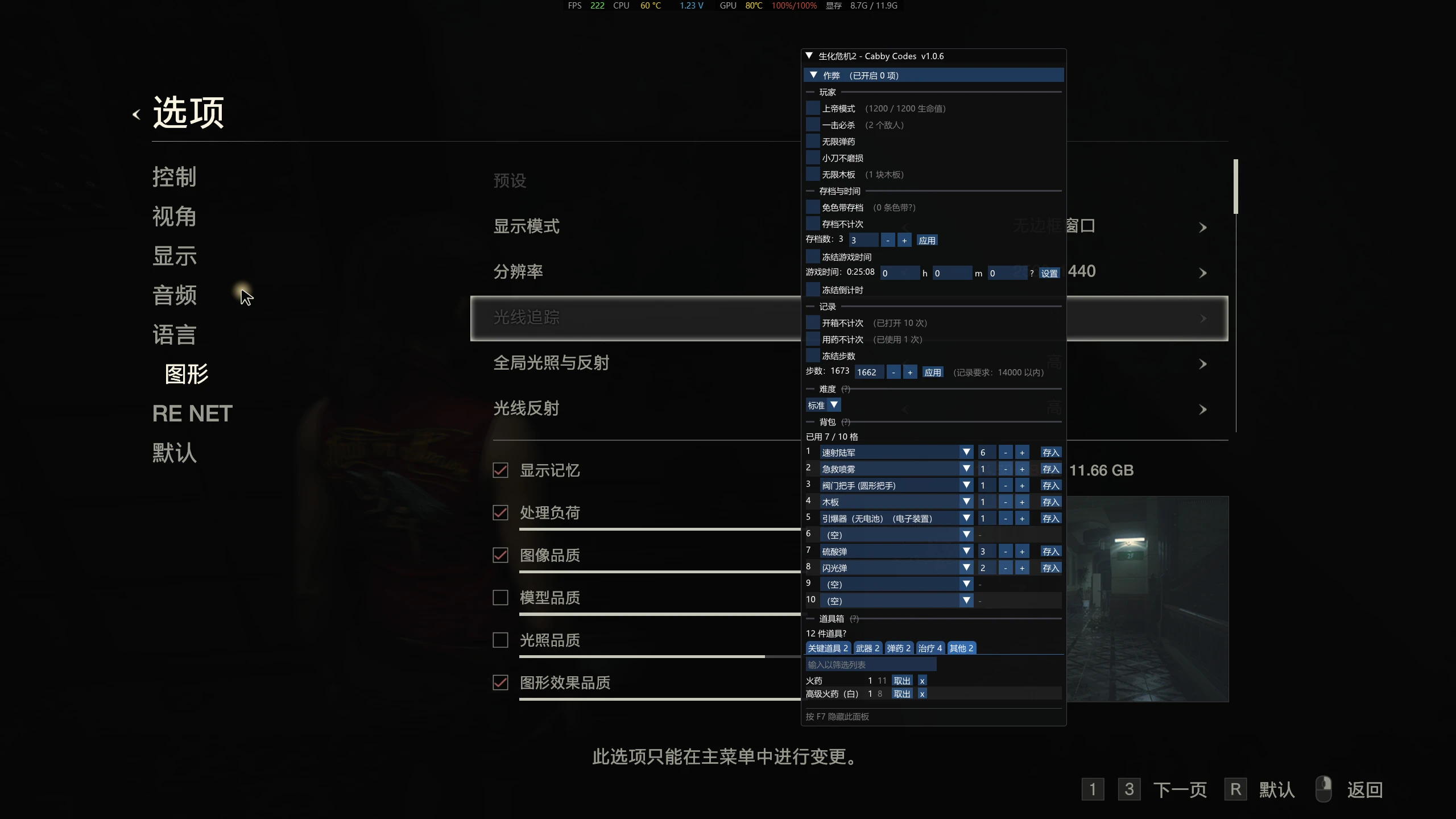
CabbyCodes 1.0.6 简体中文本地化
CabbyCodes 1.0.6 的简体中文汉化 / Simplified Chinese localization
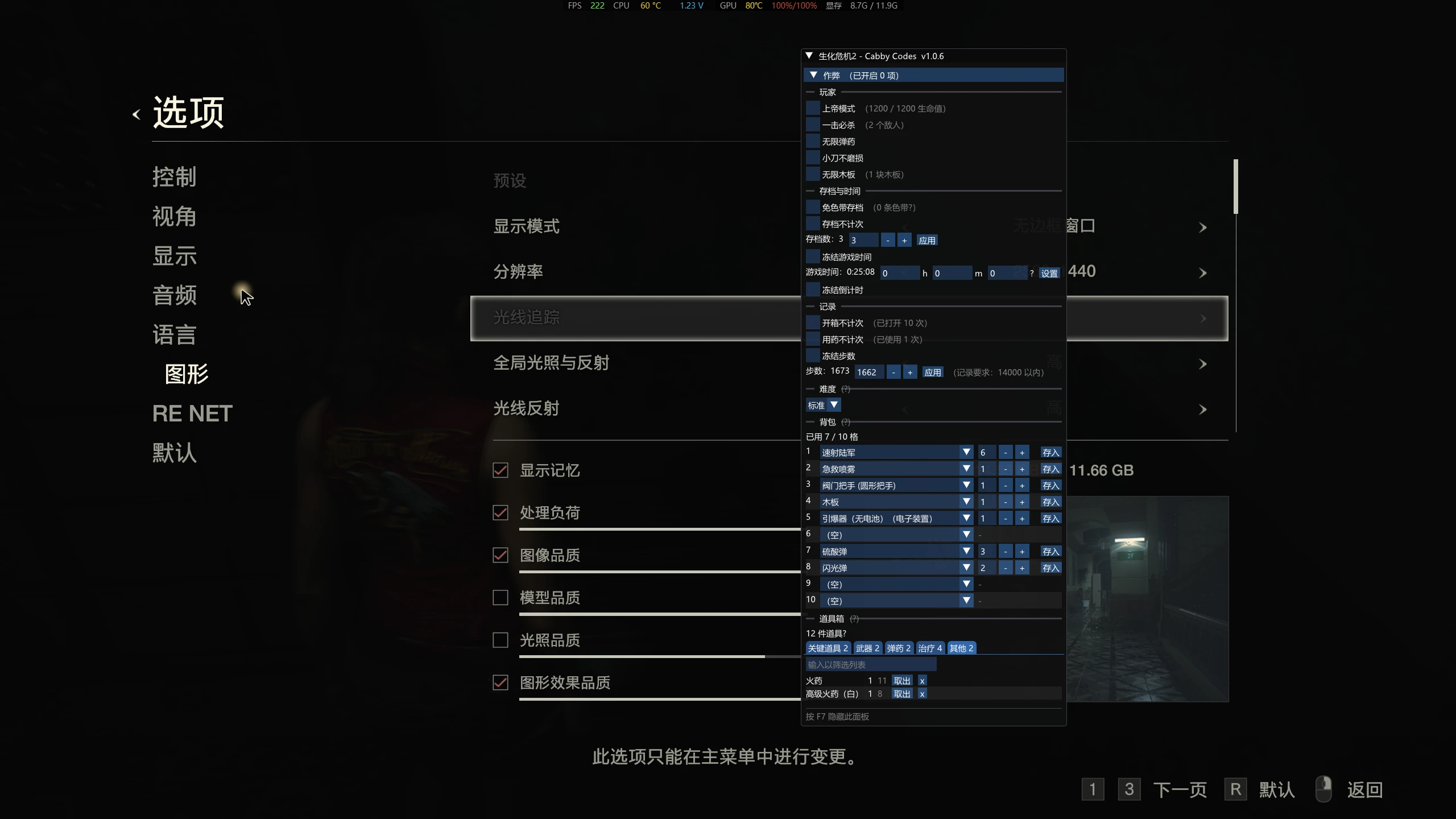 查看大图
RE2CabbyCodes-zh-CN
RE2CabbyCodes 1.0.6 的简体中文汉化补丁 —— 把《生化危机 2 重制版》这个作弊面板 MOD 的英文界面换成中文,并为它注入一个系统中文字体(原版 DLL 里没有汉字字形,不注入的话中文会显示成问号)。
Simplified Chinese localization for the RE2CabbyCodes 1.0.6 cheat panel mod for Resident Evil 2 (2019). It replaces the panel's English UI strings with Chinese and injects a system CJK font, since the original DLL ships no Chinese glyphs.
本仓库只包含工具和译文,不包含任何 DLL。想直接用的请到 Releases 下载现成的
steam_api64.dll。 This repository contains only the patcher and the translation tables — no binaries. Grab a ready-to-usesteam_api64.dllfrom Releases.
English
What it is
RE2CabbyCodes is a pause-menu cheat panel for Resident Evil 2 (2019), shipped as a proxy steam_api64.dll (it needs REFramework at runtime). The original mod is published on Nexus Mods and GitHub. This project localizes it to Simplified Chinese by binary patching that DLL:
- 907 UI strings translated (cheat names, tooltips, item/weapon names, records & rewards, panel captions).
- A system CJK font is injected into ImGui's font atlas at runtime (
msyh.ttc/simhei.ttf/ Noto CJK, first one that exists). - No source code of the original mod is modified, and no compiler is needed.
Requirements
| The game | Resident Evil 2 (2019), Steam app 883710 |
| The mod | RE2CabbyCodes 1.0.6 — install it first, we patch its steam_api64.dll |
| Node.js | 18 or newer (only needed if you build it yourself) |
How to use (build it yourself)
- Install RE2CabbyCodes 1.0.6 following its own instructions, so that its
steam_api64.dllis in your game folder (usually...\RESIDENT EVIL 2 BIOHAZARD RE2\). - Copy that
steam_api64.dllinto this repository's folder (next topatch.js). - Run one of these:
- Windows: double-click
build.bat - Linux / macOS / WSL / Git Bash:
./build.sh - Or directly:
node patch.js
- Windows: double-click
- The localized DLL is written to
out/steam_api64.dll. - Back up the game's current
steam_api64.dll, then rename the built file tosteam_api64.dlland overwrite it. - Fully quit the game and restart it. Load a save, press F7 to open the panel.
Or just download
steam_api64.dllfrom Releases and skip steps 2–4.
How it works
patch.js parses the PE, finds every user-facing string by RVA, and rewrites it:
- Strings that still fit in their original slot are overwritten in place (
\0padded). - Longer ones are appended into a new PE section
.re2zh, and everylea/data-pointer that referenced the original is rewritten to point at the new copy. - A trampoline replaces the
call AddFontDefaultinsideImFontAtlasBuildMain, so the first time ImGui builds its atlas we load a real CJK font (with an auto-generated glyph-range table covering ASCII, punctuation, kana, and every Chinese character used by the translations) instead of the built-in ProggyClean. - Everything is RIP-relative; the new section contains no absolute addresses, so ASLR is fine.
The script self-checks its own output (section layout, every rewritten reference, trampoline call targets, absence of absolute addresses) and refuses to write anything if a check fails.
Troubleshooting
| Symptom | Cause / fix |
|---|---|
Chinese shows as ? boxes |
No CJK font was found. Make sure C:\Windows\Fonts\msyh.ttc exists, or pass your own: node patch.js --fonts "D:/fonts/your.ttf" |
| Panel still English | You overwrote the wrong file, or didn't restart the game. The log line should read [汉化 ...]. |
| Game crashes on F7 | Please open an issue and attach RE2CabbyCodes.log from the game folder. |
| Want to revert | Restore your backed-up original steam_api64.dll. |
Credits & license
- Original mod: RE2CabbyCodes by its respective author(s) — all credit for the panel itself goes to them.
- The localization itself (the translation tables and the patching tool) was produced with
deepseek-v4-flash. - This localization is a derivative work of a GPL-3.0 project, therefore it is licensed under the GNU General Public License v3.0 or later (see
LICENSE). - Resident Evil 2 is a trademark of CAPCOM. This project is unofficial and not affiliated with or endorsed by CAPCOM or Valve.
简体中文
这是什么
RE2CabbyCodes 是《生化危机 2 重制版》的一个暂停菜单作弊面板,以代理 steam_api64.dll 的形式发布(运行时依赖 REFramework)。原 MOD 发布在 Nexus Mods 与 GitHub。本项目通过二进制补丁把它汉化:
- 翻译了 907 条界面文本(作弊项名称、说明文字、道具/武器名、记录与奖励、面板标题等)。
- 运行时注入系统中文字体(依次尝试
msyh.ttc/simhei.ttf/ Noto CJK,取第一个存在的),因为原版 DLL 里没有汉字字形。 - 不修改原 MOD 的源码,也不需要编译器。
前置条件
| 游戏 | 《生化危机 2 重制版》,Steam app 883710 |
| 原 MOD | RE2CabbyCodes 1.0.6 —— 请先按它自己的说明装好,我们打补丁的对象就是它的 steam_api64.dll |
| Node.js | 18 或更高(只有自己生成时才需要) |
使用方法(自己生成)
- 先按原 MOD 的说明装好 RE2CabbyCodes 1.0.6,让它的
steam_api64.dll出现在游戏目录 (一般是...\RESIDENT EVIL 2 BIOHAZARD RE2\)。 - 把那个
steam_api64.dll复制到本仓库目录里(和patch.js放在一起)。 - 任选一种方式运行:
- Windows:双击
build.bat - Linux / macOS / WSL / Git Bash:
./build.sh - 或者直接:
node patch.js
- Windows:双击
- 汉化版 DLL 会生成到
out/steam_api64.dll。 - 先备份游戏目录里原来的
steam_api64.dll,然后把生成的文件改名成steam_api64.dll覆盖进去。 - 完全退出游戏再重新启动,读档后按 F7 呼出面板。
也可以直接到 Releases 下载现成的
steam_api64.dll,跳过第 2~4 步。
工作原理
patch.js 解析 PE,按 RVA 定位所有面向用户的字符串并改写:
- 原文槽位放得下的,原地覆盖(用
\0补齐)。 - 放不下的,追加到新增的 PE 节区
.re2zh,同时把所有引用它的lea/数据指针改指向新位置。 - 用一段 trampoline 替换
ImFontAtlasBuildMain里的call AddFontDefault:ImGui 第一次构建字体图集时,我们不加载内置的 ProggyClean,而是加载真正的系统中文字体,并给出一张自动生成的字形范围表(覆盖 ASCII、标点、假名,以及全部译文用到的汉字)。 - 全部使用 RIP 相对寻址,新节区里不含任何绝对地址,因此在 ASLR 下也不会失效。
脚本会对自己的产物做自检(节区布局、每条被改写的引用、trampoline 的调用目标、新节区里是否混入绝对地址),任何一项不通过就直接拒绝输出。
常见问题
| 现象 | 原因 / 解决 |
|---|---|
中文显示成 ? 方块 |
没找到中文字体。确认 C:\Windows\Fonts\msyh.ttc 存在,或自己指定:node patch.js --fonts "D:/fonts/你的字体.ttf" |
| 面板还是英文 | 覆盖错了文件,或者没有重启游戏。日志第一行应该带 [汉化 ...] 标记。 |
| 按 F7 游戏崩溃 | 请开一个 Issue,并把游戏目录里的 RE2CabbyCodes.log 附上。 |
| 想还原 | 用你备份的原始 steam_api64.dll 覆盖回去即可。 |
致谢与许可
- 原 MOD:RE2CabbyCodes,面板本身的一切功劳归原作者。
- 本汉化本身(译文表与补丁工具)由
deepseek-v4-flash完成。 - 本汉化是 GPL-3.0 项目的衍生作品,因此同样以 GNU General Public License v3.0 或更高版本发布(见
LICENSE)。 - 《生化危机 2》是 CAPCOM 的商标。本项目为非官方作品,与 CAPCOM、Valve 均无关联,也未获其认可。
正在加载版本记录…
正在加载评论…
评论在新手盒子客户端中发表,这里同步展示。