招架条
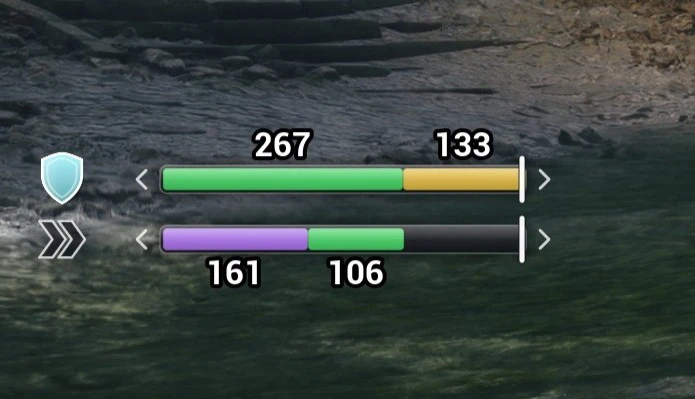
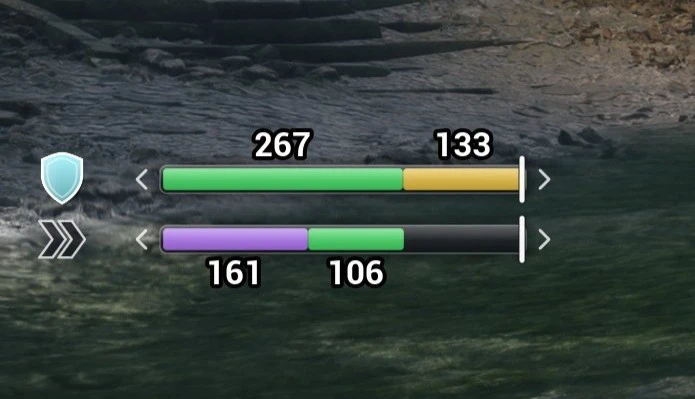
ParryBar 在屏幕上实时显示你的招架窗口和无敌帧。完美招架、普通格挡、无敌帧和完美闪避判定各自拥有独立的颜色,并显示以毫秒为单位的时长以及敌人攻击落点的标记。非常适合练习招架时机。只读 UE4SS Lua 模组:不修改任何游戏数值,对存档安全。
 查看大图
ParryBar 1.0.0
影之刃零 格挡 / 闪避窗口条 · Parry / dodge window bar for Phantom Blade Zero
中文
在画面上实时画出你的格挡窗口和无敌帧,用来练精防时机、看招式有多少帧无敌。 只读取游戏状态,不修改任何数值,不影响存档。
需要:影之刃零(Steam 版)+ UE4SS(例如 Nexus 上的 UE4SS For Phantom Blade Zero)。
安装:把 ParryBar 文件夹放进 <游戏目录>\platform\steam\ue4ss\Mods\,进游戏读档即可。
卸载:删除这个文件夹。
按键:F4 显示 / 隐藏。
颜色
| 颜色 | 含义 |
|---|---|
| 绿(上面的格挡条) | 完美格挡窗口 |
| 黄 | 普通格挡 |
| 蓝 | 完美格挡后的 Great 窗口 |
| 绿(下面的闪避条) | 无敌帧 |
| 紫 | 完美闪避判定 |
| 发光 | 能接反击的那一段 |
| 白色虚线 | 敌人攻击命中的时刻 |
数字是窗口长度(毫秒),灰色数字是窗口前的空档。
设置:在 Scripts\config.lua 里改位置、大小、颜色、按键等,改完重启游戏。
说明
- mod 没认出的招式,如果实际产生了格挡帧或无敌,会自动记进
learned.txt,以后正常显示。记错了删掉对应那行即可。 - 游戏更新后条不出现:在 config 里设
Debug = true,然后查看ue4ss\UE4SS.log里以[ParryBar]开头的行。
English
Draws your parry windows and invincibility frames on screen in real time, for practising parry timing and checking how many i-frames a move has. Read-only: it never changes game values and is safe for saves.
Requires: Phantom Blade Zero (Steam) + UE4SS (e.g. UE4SS For Phantom Blade Zero on Nexus).
Install: put the ParryBar folder into <game>\platform\steam\ue4ss\Mods\, then load a save.
Uninstall: delete the folder.
Key: F4 shows / hides the bars.
Colours
| Colour | Meaning |
|---|---|
| Green (top, parry bar) | Perfect parry window |
| Yellow | Normal block |
| Blue | Great window after a perfect parry |
| Green (bottom, dodge bar) | Invincibility frames |
| Purple | Perfect-dodge check |
| Glow | The part that triggers a counter |
| White dashed line | An enemy attack landing |
Numbers show window length in ms. Grey numbers show the gap before a window.
Settings: edit position, size, colours, keys etc. in Scripts\config.lua, then restart the game.
Notes
- If a move the mod doesn't recognise produces parry frames or i-frames, it is saved to
learned.txtand shown properly from then on. To undo a wrong entry, delete that line. - If the bars stop appearing after a game update, set
Debug = truein the config. Then check the lines starting with[ParryBar]inue4ss\UE4SS.log.
更新记录 / Changelog
- 1.0.0:首个版本。/ First release.
正在加载版本记录…
正在加载评论…
评论在新手盒子客户端中发表,这里同步展示。