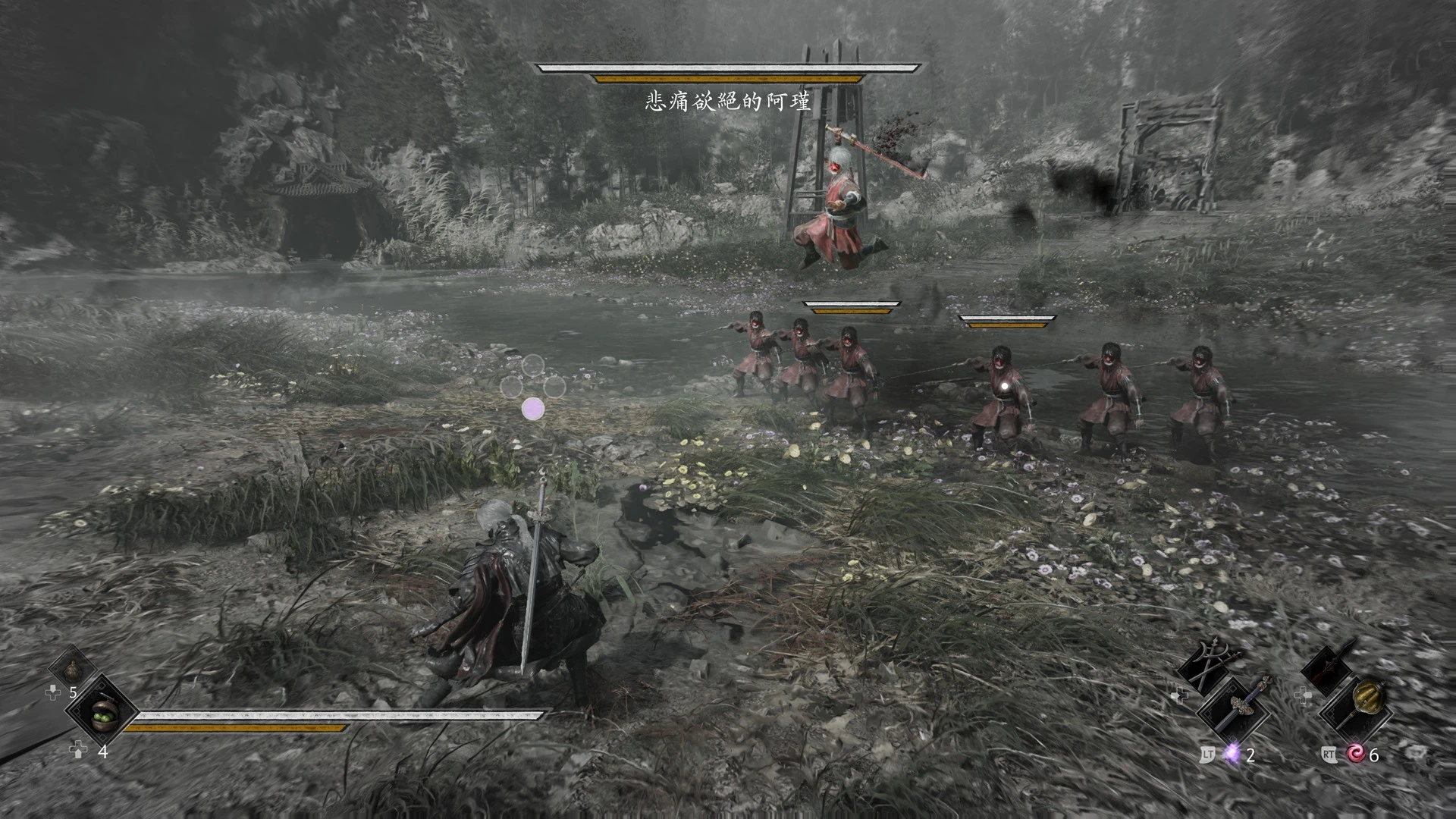
PBZ闪光提示与慢动作警报
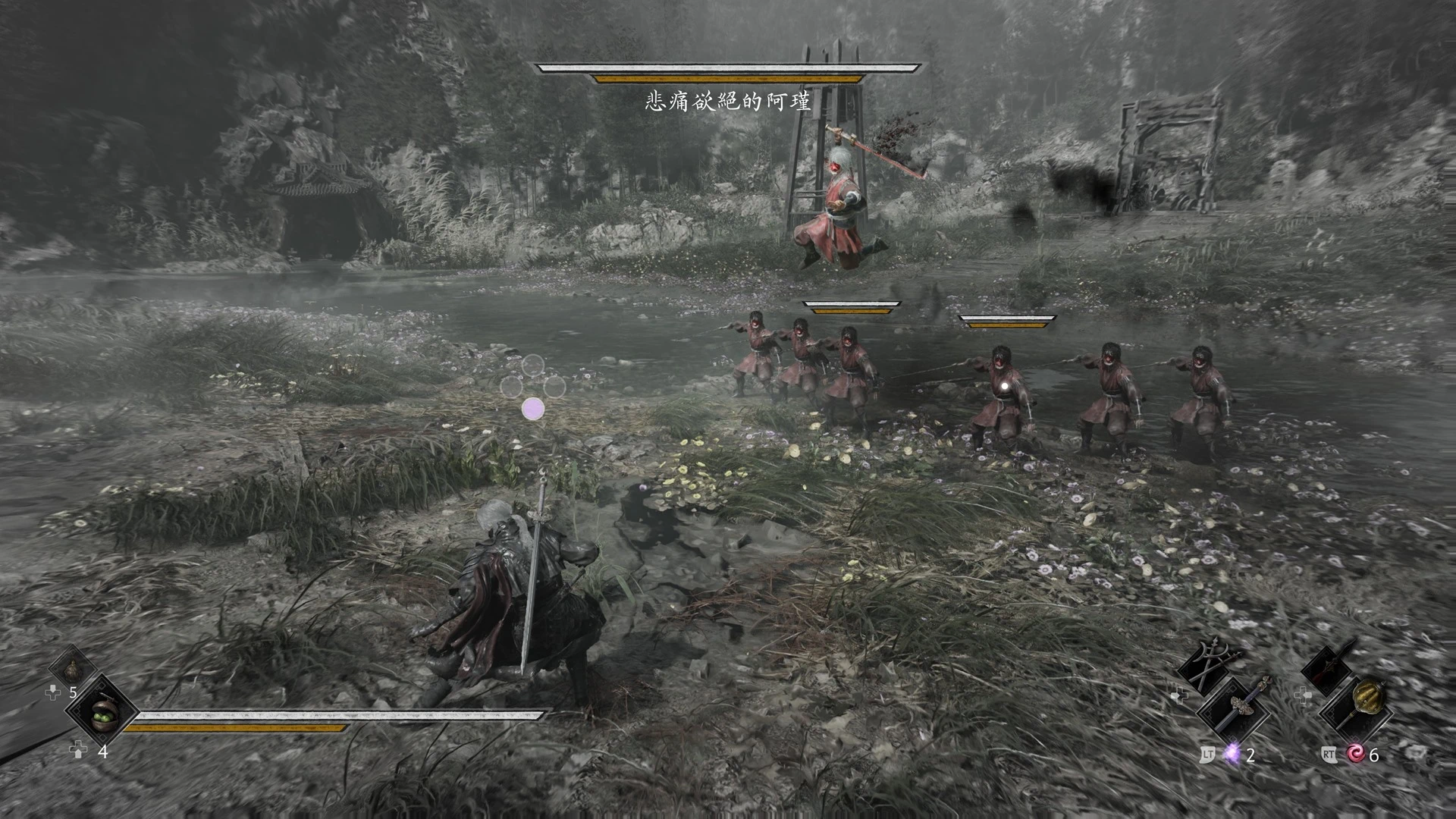
Switch-style button prompts when enemies make red, blue or black flash attacks, plus brief slow motion to react, and Switch-style QTE icons. 红/蓝/黑光攻击时显示switch式按键提示并短暂慢放,QTE 也换成switch式图标。
 查看大图
[center][size=5][b]PBZFlashPrompt & SlowMotionAlert[/b][/size]
红 / 蓝 / 黑光 按键提示与慢放 · Button prompts & slow motion for red / blue / black flash attacks
[size=2][color=#999999]“中登快乐mod”:手速不比当年,就让提示早一点、时间慢一点。 · a.k.a. the "Dad Reflexes" mod[/color][/size][/center]
[line]
[size=4][b]中文[/b][/size]
[b]mod功能[/b]
[list=1]
[][b]按键提示[/b]:敌人的红光、蓝光、黑光攻击时,在主角头顶显示switch式按键提示(十字四键只点亮对应方向那颗,肩键 / 扳机点亮对应一侧)。[/]
[][b]慢放[/b]:光效提示出现的同时把整个游戏短暂放慢(默认 0.6 倍速),给瞬发的红蓝光留出反应时间。按下这种光的应对键就立刻恢复原速;没按的话,最多 600 毫秒(真实时间)后也会恢复。判定本身不变。[/]
[][b]QTE[/b]:要求按面键的QTE,把xbox字母 / PS符号换成switch式十字四键图标,只点亮对应的物理位置。[/]
[/list]
[b]前置要求[/b]
[list]
[]影之刃零 Steam 版(测试版本:Steam build 26367565)[/]
[][url=https://www.nexusmods.com/phantombladezero/mods/113]PBZModLoader[/url][/]
[]手柄(提示图标和“按键结束慢放”都按手柄按键设计)[/]
[/list]
[b]安装[/b]
把压缩包里的 [b]PBZFlashPrompt[/b] 文件夹放到
[code]<游戏根目录>\ProjectPBZ\PBZModLoader\mods\[/code]放好后应该是
[code]...\PBZModLoader\mods\PBZFlashPrompt\main.js[/code]。启动游戏即可,游戏运行中按 Alt+F5 可以热重载。
[b][color=#ff6060]装好后先改键位![/color][/b]
第一次运行会生成设置文件
[code]<游戏根目录>\ProjectPBZ\Content\Paks\~mods\PBZFlashPrompt.txt[/code],改完保存,约 3 秒内生效,不用重启。
默认值是作者自己的手柄设置,请先按你自己的键位改这几项:
[list]
[][b]BlueKey=LB[/b]:蓝光的应对键[/]
[][b]RedKey=Down[/b]:红光的应对键(Down = 面键最下面那颗的物理位置)[/]
[][b]PurpleKey=Red[/b]:黑光的应对键,Red = 和 RedKey 同一个键[/]
[][b]SwapAB=On[/b]:作者的手柄把A、B互换了。[b]没换过的玩家请改成 Off[/b],否则 QTE 图标的方向会显示错[/]
[/list]键的写法:Up / Down / Left / Right(面键的物理位置,推荐)、A / B / X / Y、LB / RB / LT / RT;Off = 不提示。
其他常用设置:
[list]
[]RedSlowMo / BlueSlowMo = 0.6:慢放倍率,Off = 不慢放,可设 0.2 ~ 0.9[/]
[]SlowMaxMs = 600:一次慢放最长多少毫秒[/]
[]RedAdvanceMs / BlueAdvanceMs = 150 / 200:提示比游戏的光提前多少毫秒提示[/]
[]Anchor = Player:Player = 主角头顶,Enemy = 亮光敌人头顶[/]
[]Scale = 1.0 / QteScale = 1.6:提示键面盘大小[/]
[]Qte = On:Off = QTE 保持游戏原样[/]
[/list]设置文件里每一项都有说明。
[b]卸载[/b]
删掉
[code]PBZModLoader\mods\PBZFlashPrompt[/code]文件夹;设置文件
[code]Content\Paks\~mods\PBZFlashPrompt.txt[/code]可以一起删。
[b]反馈问题[/b]
请附上日志
[code]%LOCALAPPDATA%\ProjectPBZ\Saved\PBZFlashPrompt-<启动时间>.log[/code],并说明是哪个敌人、哪一招。
[b]致谢[/b]
感谢 PBZModLoader 的作者。图标位置和提前量参考了 PBZAlertCue 的做法(没有使用它的代码)。
[b]AI 说明[/b]
本 mod 的代码在 AI(Claude)协助下编写,作者负责需求、设计和实机测试。
[line]
[size=4][b]English[/b][/size]
[b]Features[/b]
[list=1]
[][b]Button prompts[/b]: when an enemy makes a red, blue or black flash attack, a Switch-style button prompt appears above your character (a cross of four face buttons with only the matching position lit; for shoulder buttons / triggers, the matching side lights up).[/]
[][b]Slow motion[/b]: when the flash prompt appears, the whole game slows down briefly (0.6x by default), giving you time to react to instant red / blue flashes. Pressing the matching button restores normal speed immediately; otherwise it ends after at most 600 ms (real time). Hit timing itself is unchanged.[/]
[][b]QTE[/b]: face-button QTEs show a Switch-style four-button cross instead of Xbox letters / PlayStation symbols, with only the physical position lit.[/]
[/list]
[b]Requirements[/b]
[list]
[]Phantom Blade Zero, Steam version (tested on Steam build 26367565)[/]
[][url=https://www.nexusmods.com/phantombladezero/mods/113]PBZModLoader[/url][/]
[]A controller (prompts and "press to end slow motion" are designed for controller buttons)[/]
[/list]
[b]Install[/b]
Put the [b]PBZFlashPrompt[/b] folder from the archive into
[code]<game folder>\ProjectPBZ\PBZModLoader\mods\[/code]You should end up with
[code]...\PBZModLoader\mods\PBZFlashPrompt\main.js[/code]. Start the game; Alt+F5 hot-reloads mods while the game is running.
[b][color=#ff6060]Set your buttons first![/color][/b]
The first run creates
[code]<game folder>\ProjectPBZ\Content\Paks\~mods\PBZFlashPrompt.txt[/code]. Save the file and changes apply within about 3 seconds, no restart needed.
The defaults are the author's own controller setup. Change these to match your bindings first:
[list]
[][b]BlueKey=LB[/b]: button for blue attacks[/]
[][b]RedKey=Down[/b]: button for red attacks (Down = physical bottom face button)[/]
[][b]PurpleKey=Red[/b]: button for black attacks; Red = same as RedKey[/]
[][b]SwapAB=On[/b]: the author's controller has A and B swapped. [b]Players who haven't swapped them should set it to Off[/b], or QTE icons will point to the wrong position[/]
[/list]Button names: Up / Down / Left / Right (physical face-button position, recommended), A / B / X / Y, LB / RB / LT / RT; Off = no prompt.
Other useful options:
[list]
[]RedSlowMo / BlueSlowMo = 0.6: slow-motion rate, Off = disabled, 0.2 to 0.9[/]
[]SlowMaxMs = 600: longest slow motion, in ms[/]
[]RedAdvanceMs / BlueAdvanceMs = 150 / 200: show the prompt this many ms before the game's flash[/]
[]Anchor = Player: Player = above your character, Enemy = above the flashing enemy[/]
[]Scale = 1.0 / QteScale = 1.6: size of the button-pad prompt[/]
[]Qte = On: Off = leave QTE icons as they are[/]
[/list]Every option is explained inside the settings file (in Chinese); the main ones are explained in English in the included README.txt.
[b]Uninstall[/b]
Delete
[code]PBZModLoader\mods\PBZFlashPrompt[/code]. You can also delete
[code]Content\Paks\~mods\PBZFlashPrompt.txt[/code].
[b]Reporting problems[/b]
Please attach
[code]%LOCALAPPDATA%\ProjectPBZ\Saved\PBZFlashPrompt-<start time>.log[/code]and say which enemy and which attack.
[b]Credits[/b]
Thanks to the author of PBZModLoader. Icon placement and lead times follow the approach of PBZAlertCue (none of its code is used).
[b]AI disclosure[/b]
The code was written with AI (Claude) assistance; the author handled requirements, design and in-game testing.
正在加载版本记录…
正在加载评论…
评论在新手盒子客户端中发表,这里同步展示。