PBZ_Enemy_Weapons
让主角魂能使用敌人和 Boss 的部分武器 Let Soul use some of the enemy‘s weapons and boss’s weapons。
 查看大图
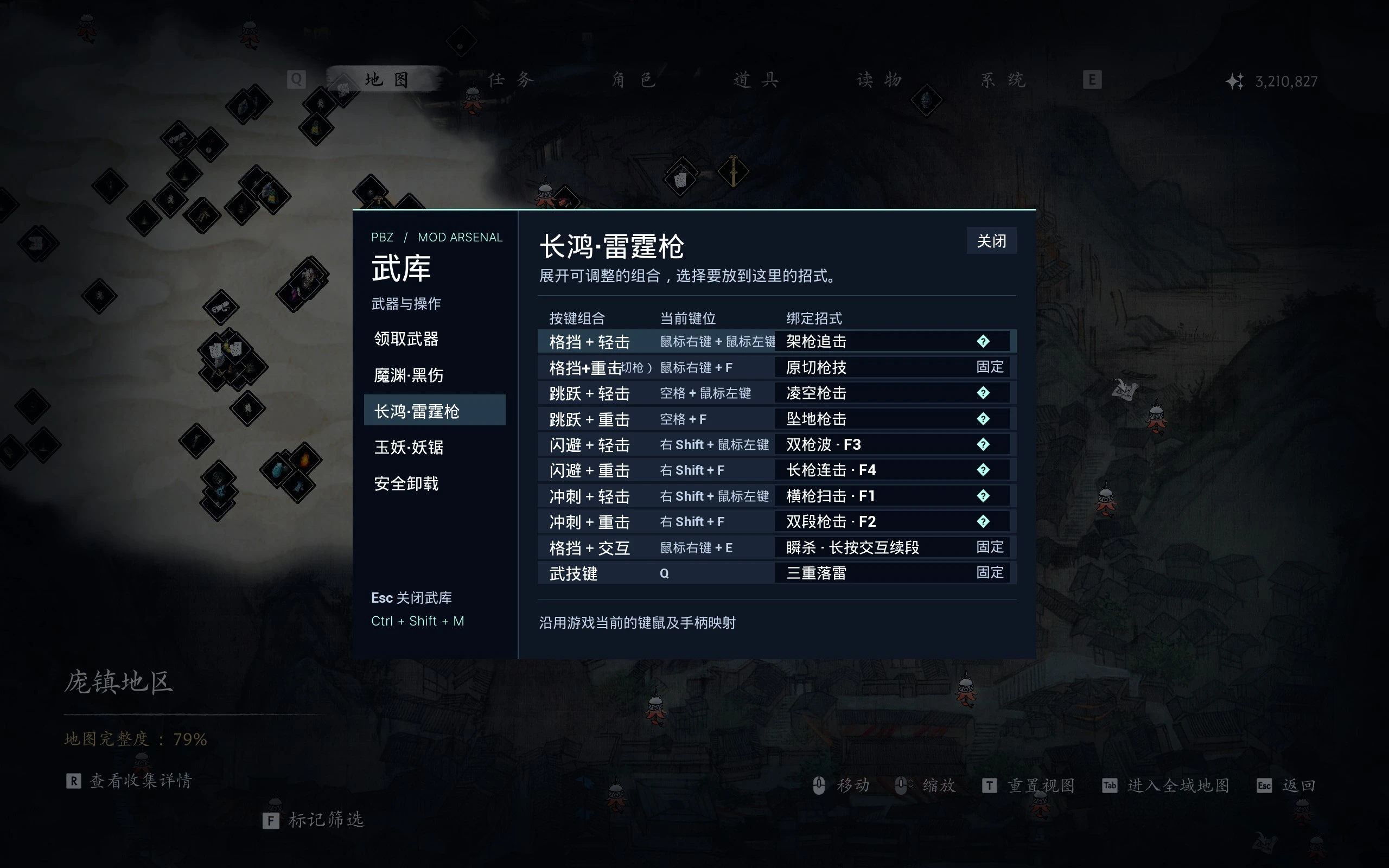
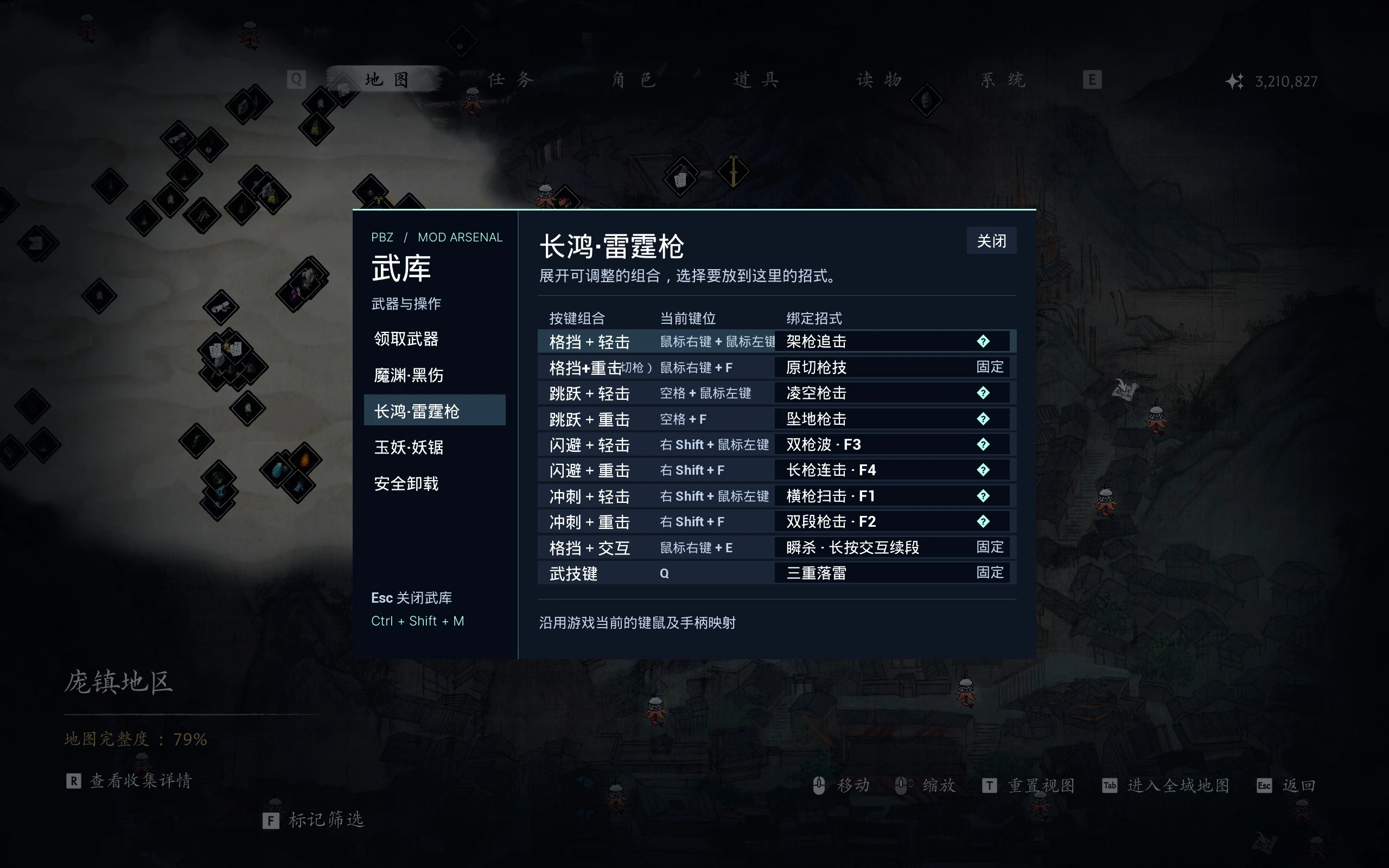
PBZ Enemy Weapons 让魂能使用《影之刃零》中敌人和 Boss 的武器。在游戏内武库领取后,即可从原版菜单装备和强化。
武器一览
[list]
[*]Boss 武器:魔渊·黑伤、长鸿·雷霆枪、玉妖·妖锯。[/*]
[*]影之武装:舞狮头·吼吼吼(boss战中临时装备可吐火球版本)。[/*]
[*]普通武器:巨熊双斧、狼牙棒、疯妇双镐。[/*]
[/list]
武库
读档后按 Ctrl+Shift+M 打开武库。可以单独领取武器,也可以为魔渊·黑伤、长鸿·雷霆枪和玉妖·妖锯的部分招式选择按键组合。武库、武器名称、简介、招式表和卸载工具均支持简体中文和英文。切换游戏语言后重新打开武库即可刷新。
安装与升级
[list=1]
[*]安装适配 PBZ 的 UE4SS。本包适用 Steam 构建 26367565 和 UE4SS v3.0.1(1ceefac8)。[/*]
[*]完全退出游戏。在 Steam 中打开属性 → 已安装文件 → 浏览。从旧版升级时,先按随包的 PBZEW_安装说明.md 移走旧文件。[/*]
[*]将压缩包里的 ProjectPBZ 和 platform 合并到 PBZ 游戏目录。新版使用一个 PBZEW_EnemyWeapons 脚本目录和一套 PBZEW_EnemyWeapons_P 资源文件(.pak、.ucas、.utoc)。已领取的武器、强化等级和保存的改键可继续使用。[/*]
[/list]
安全卸载
在武库选「安全卸载」并点击「打开卸载工具」。保留桌面窗口,退出游戏,等云存档同步完成后退出 Steam。核对各档退款预览,输入 UNINSTALL 确认。工具会备份并校验存档,将已装备的 Mod 武器替换为已有的原版装备,再返还强化材料和尘。确认清理后的存档能读入,再移除 Mod 文件。
[line]
English[b]PBZ Enemy Weapons[/b] lets Soul wield seven weapons from enemies and bosses in Phantom Blade Zero. Claim them in the in-game Arsenal, then equip and upgrade them through the game's menus.
[b]Weapons[/b]
[list]
[*][b]Boss weapons[/b] · Moyuan's Sanguine, Chang Hong's Thunder Spear, and Jade Dancer's Fiend Saws.[/*]
[*][b]Artifice[/b] · Lion Head: Hou Hou Hou.[/*]
[*][b]Regular weapons[/b] · Giant Bear Twin Axes, Spiked Club, and Madwoman's Twin Pickaxes.[/*]
[/list]
[b]Arsenal[/b]
Load a save and press [b]Ctrl + Shift + M[/b] to open the Arsenal. Claim weapons individually and assign selected moves to supported input combinations for Moyuan, Chang Hong, and Jade Dancer's weapons. The Arsenal, added weapon names and move descriptions, and uninstall tool support English and Simplified Chinese. Reopen the Arsenal after changing the game language.
[b]Installation and updates[/b]
[list=1]
[*]Install a PBZ-compatible build of UE4SS. This package targets Steam build [b]26367565[/b] and UE4SS [b]v3.0.1 (1ceefac8)[/b].[/*]
[*]Close the game and open Steam's [b]Properties → Installed Files → Browse[/b]. If upgrading, use the checklist in [b]PBZEW_Installation.md[/b] to move the old mod files out of the game folder.[/*]
[*]Merge the archive's [b]ProjectPBZ[/b] and [b]platform[/b] folders into the game directory. This release uses one [b]PBZEW_EnemyWeapons[/b] folder under UE4SS Mods and one [b]PBZEW_EnemyWeapons_P[/b] set (.pak, .ucas, .utoc). Claimed weapons, upgrade levels, and saved bindings carry over.[/*]
[/list]
[b]Safe uninstall[/b]
Open [b]Safe Uninstall → Open Tool[/b] in the Arsenal. Leave the tool window open, exit PBZ, wait for Steam Cloud to finish syncing, then exit Steam. Review the refund preview and type [b]UNINSTALL[/b] to confirm. The tool backs up and verifies the save, replaces equipped mod weapons with owned vanilla gear, and refunds upgrade materials and Dust. Check that your cleaned save loads before removing the mod files.
[line]
正在加载版本记录…
正在加载评论…
评论在新手盒子客户端中发表,这里同步展示。