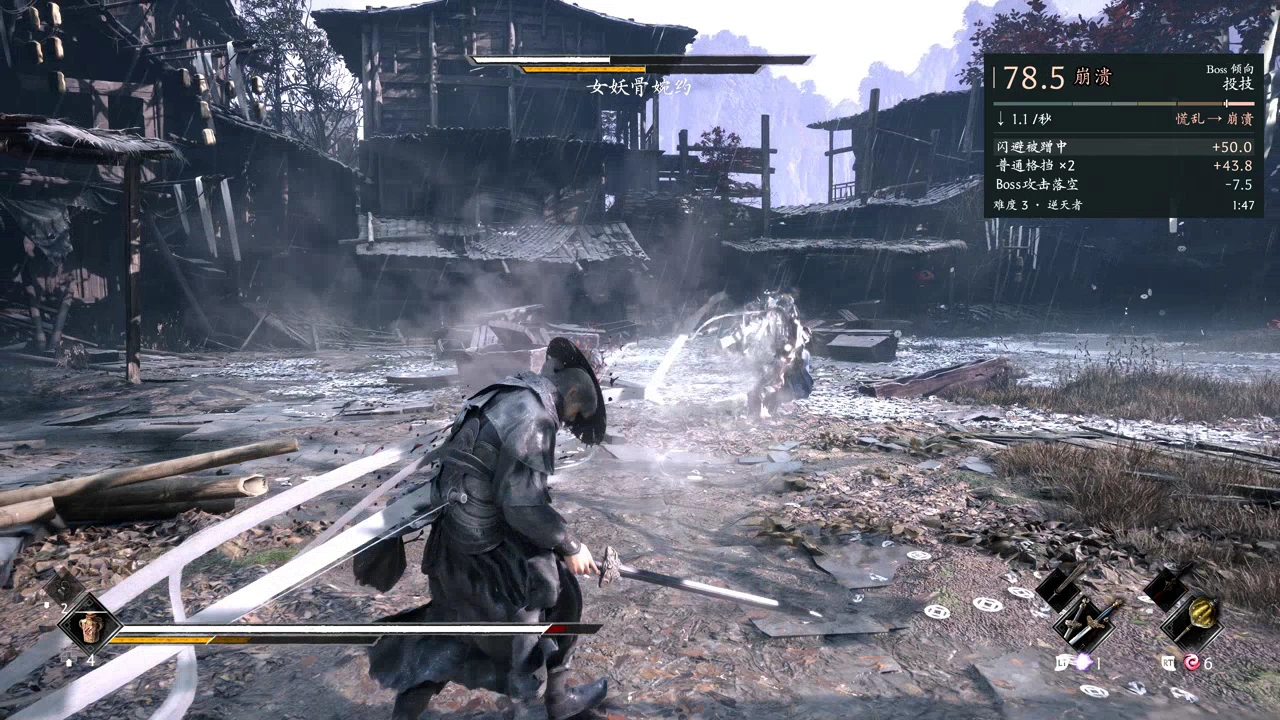
Boss紧张度计量表
Shows the game's hidden boss tension score in the top-right corner during boss fights, with the events that move it. Bosses pick moves by it from HELLWALKER up. 15 languages. Needs UE4SS. Boss 战时在右上角显示游戏隐藏的压力评分和计分事件,逆天者起 Boss 按它出招。
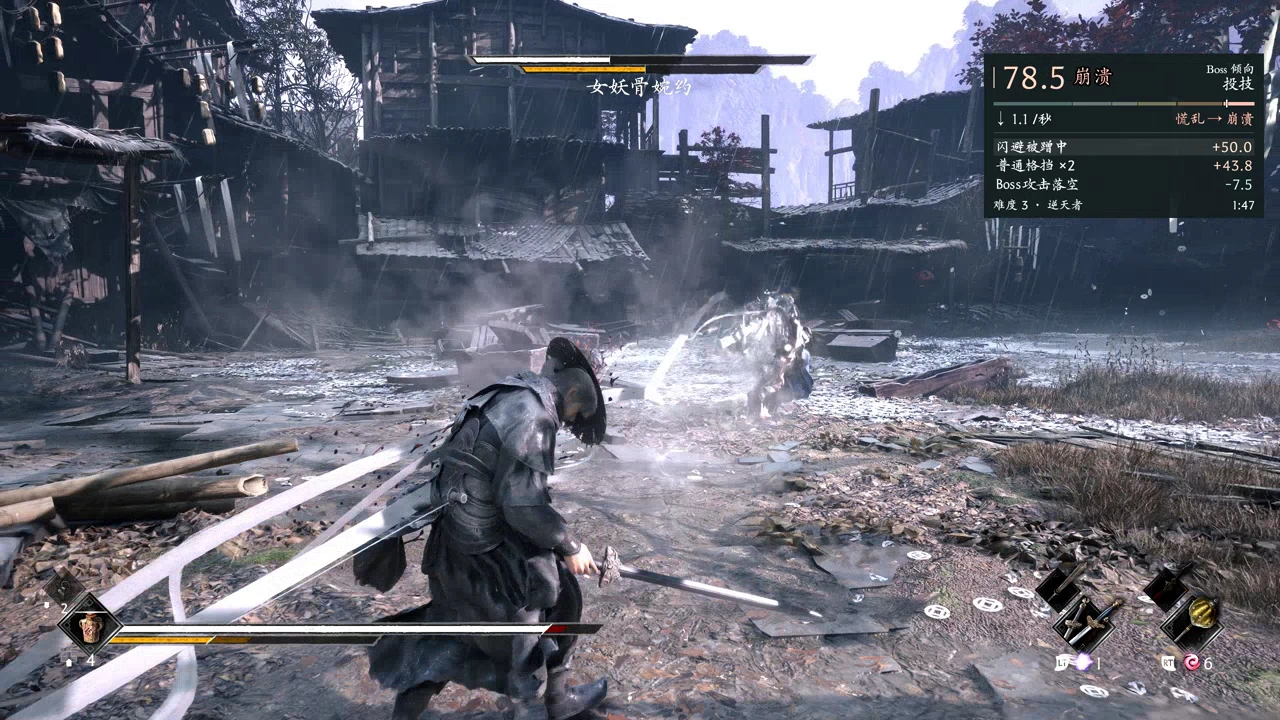 查看大图
BossTensionMeter(Boss 压力条)0.7.1(影之刃零)
BossTensionMeter 0.7.1 for Phantom Blade Zero
在 Boss 战时于画面右上角显示游戏自带、平时看不到的 Boss“压力评分”。
Shows the game's own hidden boss "tension" score in the top-right corner during boss fights.
游戏会给你当前承受的压力打分(从“从容”到“崩溃”),从逆天者难度起,Boss 会按它选择部分招式:你从容或平稳时 它更爱破防和突袭,你慌乱或崩溃时它更爱用投技。这个 mod 把这个分数显示出来。所有数值都来自游戏自己的接口, 不读游戏内存,不改游戏文件。
The game rates how much pressure you are under (from Calm to Overwhelmed) and, from the HELLWALKER difficulty up, bosses choose some moves by it: when you are Calm or Steady they go for guard breaks and rushes, when you are in Panic or Overwhelmed they go for grabs. This mod makes that score visible. All numbers come from the game's own functions; the mod reads no game memory and changes no game files.
内容 WHAT IT SHOWS
压力分和档位(从容、平稳、均势、承压、慌乱、崩溃),以及六段档位条。
该档位下 Boss 的出招倾向(逆天者起)和每秒变化。
最近的计分事件,如“完美弹反”“无反应被命中”及其分值。同一招的多段命中合成一行(×N)。
研究展开版(可选):10 秒峰谷、置信度、七个维度,以及每条事件的基础值 × 倍率。
随 Boss 血条出现,血条消失 5 秒后关闭。游戏通常在开战 10–20 秒后才开始计分,这期间显示“等待计分”和这句提示。
文字跟随游戏的文本语言(游戏的全部 15 种语言),使用游戏自己的字体。
The score and its tier (Calm, Steady, Neutral, Pressured, Panic, Overwhelmed) on a six-part bar.
What the boss tends to do at this tier (from HELLWALKER up), and the change per second.
The latest scoring events, such as "Perfect parry" or "Hit without reacting", with their values. Repeated hits of one attack share a line (×N).
Research view (optional): 10 s peak and low, confidence, the seven dimensions and each event's base value × multiplier.
It appears with the boss HP bar and closes 5 s after the bar goes. The game itself usually starts scoring 10–20 s into a fight; until then it shows "Waiting" with that note.
Text follows the game's text language (all 15 game languages), in the game's own fonts.
环境需要 NEEDS
- 影之刃零 UE4SS(Nexus mod 5,KintaroModding)。检查方法:启动游戏后,用记事本打开 PBZ\platform\steam\ue4ss\UE4SS.log,里面必须有 "Starting Lua mod"。
- 可选:Mods Menu 0.6.1 或更高版本及其 UE4SS Bridge(已用 Mods Menu 0.9.3、Bridge 0.3.1 测试),用来在游戏里改设置。没有它也能用(默认设置),或手改配置文件(见“设置”)。
- The Phantom Blade Zero UE4SS (Nexus mod 5, KintaroModding). Check that it starts: start the game, then open PBZ\platform\steam\ue4ss\UE4SS.log with Notepad. It must say "Starting Lua mod".
- Optional: Mods Menu and its UE4SS Bridge, to change the settings in the game. Without them the mod works with its defaults, or edit its config file (see SETTINGS).
安装 INSTALL
关闭游戏。
把这个压缩包解压到游戏文件夹 PBZ(包含 ProjectPBZ 的那个文件夹)‘PBZ\platform\steam\ue4ss\Mods\BossTensionMeter’。
启动游戏。UE4SS.log 里会出现 "[BossTensionMeter] loaded 0.7.0 (public edition, no logs)"。
打 Boss:右上角出现压力条。
Close the game.
Extract this zip into the game folder, PBZ, the folder that has ProjectPBZ in it. This adds PBZ\platform\steam\ue4ss\Mods\BossTensionMeter.
Start the game. UE4SS.log says "[BossTensionMeter] loaded 0.7.0 (public edition, no logs)".
Fight a boss: the overlay shows in the top-right corner.
使用 USE
F7:显示 / 隐藏压力条(在 Scripts\config.lua 里改键;F9 被 Mods Menu 占用,F10、F11 被游戏占用)。
Mods Menu → Boss 压力条:开关、研究展开版、事件行数、位置和宽度,以及“预览压力条(20 秒)”按钮——不打 Boss 也能显示,方便调位置。
F7 shows or hides the overlay (change the key in Scripts\config.lua; F9 is taken by Mods Menu, F10 and F11 by the game).
Mods Menu > BossTensionMeter: turn it on or off, research view, number of event lines, position and width, and a "Preview the overlay (20 s)" button that shows it with made-up numbers outside a fight, so you can place it.
设置(不用 Mods Menu 时)SETTINGS (WITHOUT MODS MENU)
打开编辑 PBZ\platform\steam\ue4ss\Mods\BossTensionMeter\BossTensionMeter.config.json(首次启动时自动生成)。游戏启动时读取,改完要重启游戏。有 Mods Menu 时在那里改,立即生效
Edit PBZ\platform\steam\ue4ss\Mods\BossTensionMeter\BossTensionMeter.config.json with Notepad (it is created on the first start). The game reads it at start, so restart the game after a change. With Mods Menu, change them there instead: those apply at once.
| 设置 | 默认 | 含义 |
|---|---|---|
| `ModEnabled` | `true` | `false` = 装着但关闭(不显示,也不读数) |
| `OverlayVisible` | `true` | `false` = 启动时隐藏(按 F7 显示) |
| `ResearchView` | `false` | `true` = 研究展开版(峰谷、置信度、七个维度、基础值 × 倍率) |
| `CombatEventLines` | `3` | 战斗版显示几行事件,1 到 8 |
| `HideAfterBarGoneSeconds` | `5` | Boss 血条消失后再停留几秒,0 到 30 |
| `PanelMarginRight` | `24` | 距屏幕右边,单位界面像素 |
| `MarginTop` | `160` | 距屏幕上边,单位界面像素 |
| `PanelWidth` | `420` | 宽度,300 到 1200 界面像素 |
| `SampleEveryFrames` | `1` | 每 N 帧读一次压力分,1 到 60(越大开销越低) |
| `HistoryIntervalSeconds` | `1` | 每隔几秒取一次事件明细,0 到 10(0 = 不显示事件行);如果游戏每秒卡一下,把它调大 |
| `EndGraceSeconds` | `3` | 游戏结束 Boss 的压力会话后,再保留这一场几秒,0.5 到 10 |


"ModEnabled": true              false = installed but off (no overlay, nothing read)  已安装但关闭(不显示,也不读数)
"OverlayVisible": true          false = hidden at start (F7 shows it)  启动时隐藏(按 F7 显示)
"ResearchView": false          true = research view (peaks, confidence, dimensions, base × multiplier) 研究展开版(峰谷、置信度、七个维度、基础值 × 倍率)
"CombatEventLines": 3          event lines in the combat view, 1 to 8  战斗版显示几行事件,1 到 8
"HideAfterBarGoneSeconds": 5    seconds it stays after the boss HP bar goes, 0 to 30  Boss 血条消失后再停留几秒,0 到 30
"PanelMarginRight": 24          distance from the right screen edge, in UI units  距屏幕右边,单位界面像素
"MarginTop": 160                distance from the top screen edge, in UI units  距屏幕上边,单位界面像素
"PanelWidth": 420              width, 300 to 1200 UI units  宽度,300 到 1200 界面像素
"SampleEveryFrames": 1          read the score every N frames, 1 to 60 (higher costs less)  每 N 帧读一次压力分,1 到 60(越大开销越低)
"HistoryIntervalSeconds": 1    seconds between event-detail fetches, 0 to 10 (0 = no event lines);
                                raise it if the game stutters once a second  每隔几秒取一次事件明细,0 到 10(0 = 不示事件行);如果游戏每秒卡一下,把它调大
"EndGraceSeconds": 3            seconds the fight is kept after the game ends the boss's tension
                                session, 0.5 to 10  游戏结束 Boss 的压力会话后,再保留这一场几秒,0.5 到 10
超出范围的值按最近的上下限处理;类型不对的值改用默认值。
A value outside its range is set to the nearest limit; a wrong type is replaced by the default.
更新 UPDATE
解压覆盖旧版本,选择替换。你的设置会保留:压缩包里不带配置文件。
Extract over the old version and choose Replace.
删除 UNINSTALL
关闭游戏,删除 PBZ\platform\steam\ue4ss\Mods\BossTensionMeter。
Close the game and delete PBZ\platform\steam\ue4ss\Mods\BossTensionMeter.
目前限制KNOWN LIMITS
- 事件行最多比命中晚约 1 秒出现(游戏每秒给一次事件明细)。
- 多个 Boss 同时战斗时只跟第一个有压力会话的 Boss。
- 游戏专有名词(难度名、杀气、绝技等)取自游戏文本;其余文字是我自己的翻译,欢迎指正。
- Event lines arrive up to about 1 s after the hit (the game hands out event details once a second).
- Only the first boss with a tension session is followed when several fight at once.
- The game's own terms (difficulty names, Sha-Chi, Power Surge and others) come from the game text; the other texts are my own translations. Corrections are welcome.
0.7.0 的改动 CHANGES IN 0.7.0
First public release.
Created by JiuLi9JM
正在加载版本记录…
正在加载评论…
评论在新手盒子客户端中发表,这里同步展示。