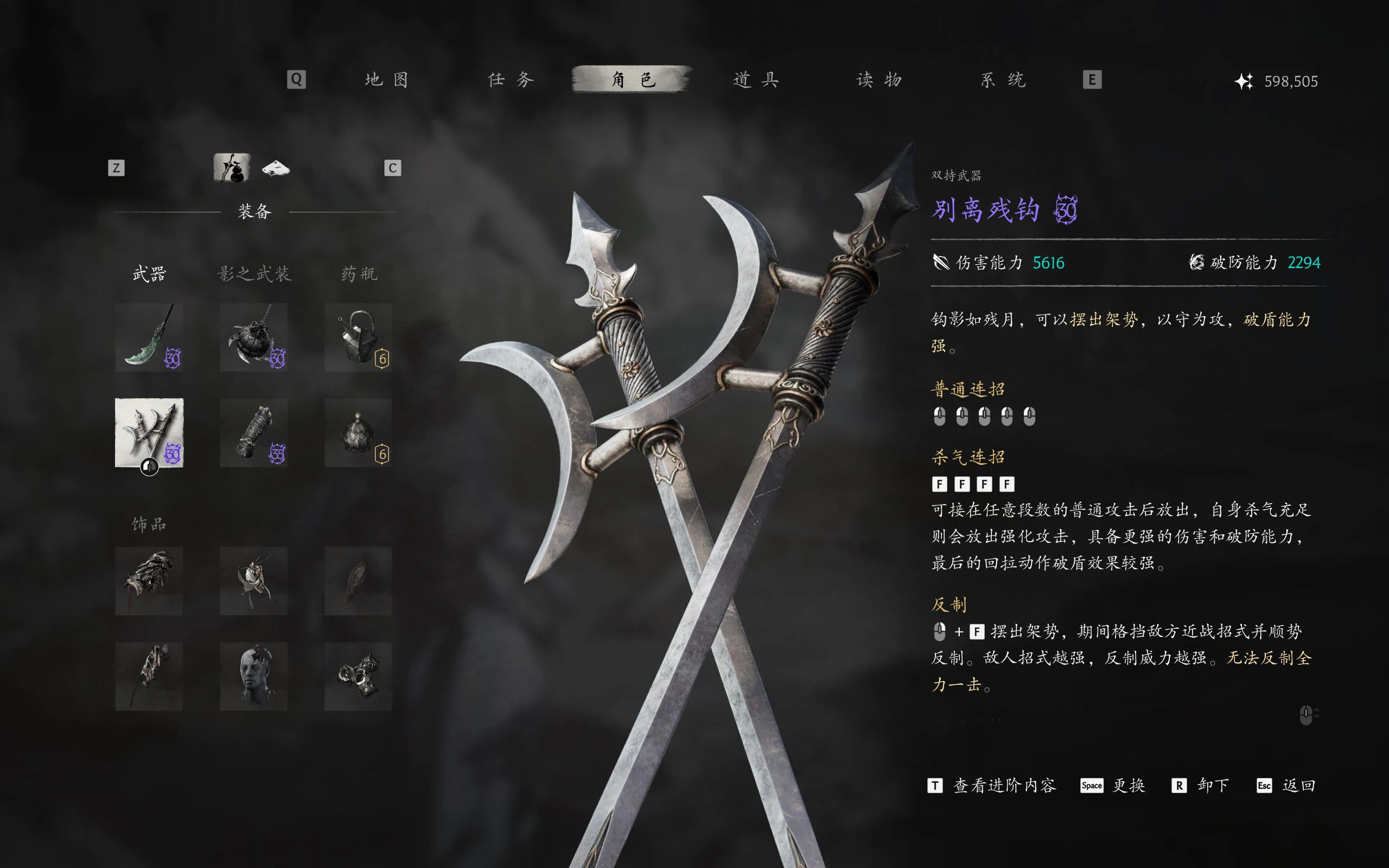
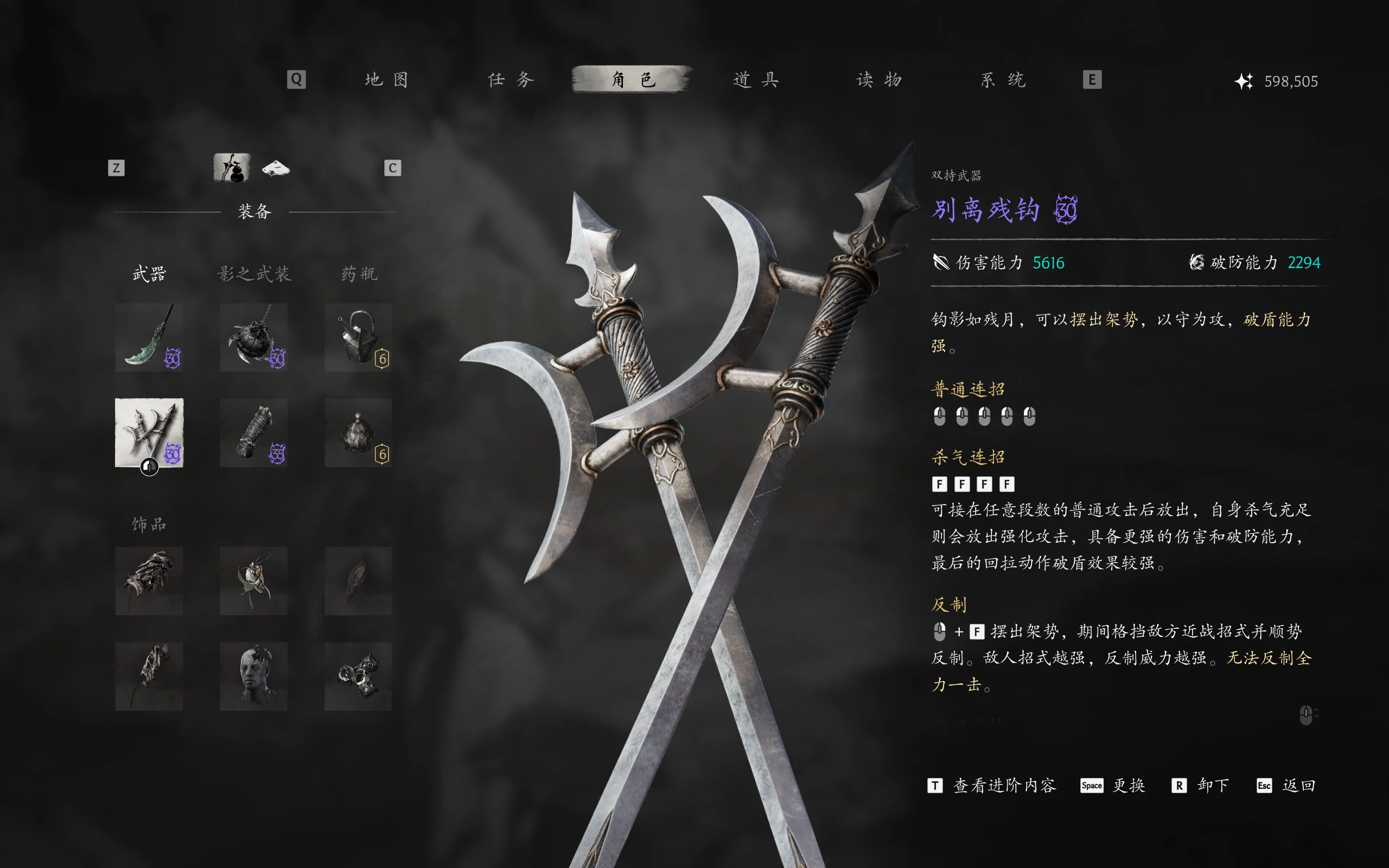
离别钩 - 自定义反击架势调整
自定义离别钩反击架势,包括资源消耗、资源恢复、架势消耗、起手速度和武器伤害。具备可调倍率、可选的模组菜单支持,以及用于启动时机更改的PAK构建器。
 查看大图
描述(模组介绍)
离残钩自定义强化 – v1.3.4 Beta
本模组针对《影之刃零》中的别离钩残钩反制架势提供可自定义的数值调整功能,玩家能够根据自己的操作习惯和战斗需求,调整反制。
支持自定义反制起手后杀气消耗、成功反制的杀气回复、架势持续消耗、武器伤害倍率,以及让反制架势的起手速度。
模组由 UE4SS 运行时数值模块与可配置的 PAK 封包生成工具组成,不修改游戏原始封包或存档。
安装说明(安装说明)
1.解压文件
下载后完整解压压缩包,不要直接在压缩包内运行工具。
2.安装UE4SS模组
将
PBZPartingHooksCustom文件夹复制到:
platform\steam\ue4ss\Mods保留文件夹中的
enabled.txt,用于启用模组。
3.
打开设置封包安装目录
封包目录.txt,将其中的路径修改为机游戏的对应:
ProjectPBZ\Content\Paks\~mods填写完整的实际路径。
4.应用反制架势起手设置
确保游戏已完全退出。
将
InstantStanceBuilder文件夹、
封包目录.txt和
应用架势设置.ps1保留在同一解压目录中。
在该目录中打开 Windows PowerShell 5.1 或 PowerShell 7,执行:
.\应用架势设置.ps1脚本会生成、校验并安装以下三个文件:
zzz_PBZPartingHooksInstant_P.pakzzz_PBZPartingHooksInstant_P.ucaszzz_PBZPartingHooksInstant_P.utoc
文件将直接安装到指定的
~mods目录。重复运行会覆盖同名文件,不会自动备份。
5.调整数值
可以通过以下两种方式修改:
- 游戏内菜单: 安装Mods Menu和PBZModsMenuBridge后,可在菜单中调整七项设置。
- 手动修改: 编辑模组文件夹中的
PBZPartingHooksCustom.config.json。
除架势起手速度外,其余六项数值保存后约1–5秒生效。
特别注意:
StanceStartProgress不能热更新。每次架势起手跳过量修改后,都需要退出游戏并重新运行
应用架势设置.ps1,然后再启动游戏。
卸载方法
退出游戏后,删除
PBZPartingHooksCustom文件夹模组,以及
~mods目录中本模组生成的三个
zzz_PBZPartingHooksInstant_P文件。
主要特点(主要功能)
1. 自定义反制起始手消耗
可以分别调整反制起始手消耗的三个组成部分:
ShachiCost:固定消耗,范围0–50。ShachiCostMul:杀气上限乘数,范围0–0.33。ShachiCostMin:最低消耗,范围0–70。
2. 自定义反制成功回复
通过
AngerRegenCostMul调整成功反制后的杀气回复量。
- 范围:1–5倍。
- 以计算出的起始手消耗为基础,按倍率设定回复量。
实际净回复可能受到饰品减耗、杀气上限等游戏机制影响。 3、通过
调整架势持续消耗
StanceDrainMultiplier调整反制架势维持持续杀气消耗期间。
- 范围:0–1。
- 设置为0时取消持续消耗。
- 设置为1时保持原版倍率。
4.自定义武器伤害倍率
通过
WeaponMultiplierScale调整别离残钩的武器伤害能力及破防能力。
- 范围:1–5倍。
- 1倍为原版。
- 1.5倍表示伤害能力及破防能力均乘以1.5。
5. 自定义反制架势起手速度
通过
StanceStartProgress调整反制架势的起手前摇跳过比例。
- 0%:原版入门。
- 100%:本模组支持的最大跳过量。
- 其他数值:按比例调整。
此功能需要重新生成PAK封包,无法实时修改。 具体起手速度、动画衔接与操作窗口仍需游戏内验证。
6.七项参数自定义
支持通过JSON配置文件全部七项数值,也支持通过任选的游戏内模组菜单进行调整。 当前版本不反修改制战术窗口、能够抵挡全部一击以及独立伤害系数。
要求(运行要求)
必需组件:
- 《影之刃零》及兼容的游戏资源版本。
- 已正常安装并运行UE4SS。
- Windows PowerShell 5.1 或 PowerShell 7,用于生成及安装入门设置封包。
可选组件:
- 模组菜单。
- PBZModsMenuBridge。
仅使用游戏内菜单修改设置时,才需要同时安装两个以上可选组件;否则可以直接编辑 JSON 配置文件。
兼容性注意事项:
- 不要同时启用其他修改别离残钩反制机制的模组。
- 不要保留其他来源的同名
zzz_PBZPartingHooksInstant_P封包。 - PAK生成工具仅支持开发时核对的游戏资源版本。
- JSON配置必须符合格式要求,并保持各参数在允许范围内。
描述
Parting Hooks – Custom Counter Stance Tweaks is a customizable gameplay mod for Phantom Blade Zero, designed to give players greater control over the Parting Hooks' counter stance mechanics. Adjust resource consumption, resource recovery, stance drain, weapon damage, and counter stance startup speed to suit your preferred playstyle. The mod combines a UE4SS-based runtime module with a configurable PAK builder. It does not modify the game's original PAK files or save data.
Version: 1.3.4 Beta
Installation instructions
1. Extract the archive
Fully extract the downloaded archive before proceeding.
2. Install the UE4SS module
Copy the
PBZPartingHooksCustomfolder to:
platform\steam\ue4ss\ModsKeep the included
enabled.txtfile to enable the mod.
3. Configure the PAK installation path
Open
封包目录.txtand replace the path with the full location of your game's:
ProjectPBZ\Content\Paks\~mods
4. Apply the counter stance startup settings
Make sure the game is closed.
Keep the
InstantStanceBuilderfolder,
封包目录.txt, and
应用架势设置.ps1together in the extracted directory.
Open Windows PowerShell 5.1 or PowerShell 7 in that directory and run:
.\应用架势设置.ps1The script generates, verifies, and installs three files directly into the configured
~modsdirectory:
zzz_PBZPartingHooksInstant_P.pakzzz_PBZPartingHooksInstant_P.ucaszzz_PBZPartingHooksInstant_P.utoc
Running the script again overwrites these files without creating backups.
5. Customize your settings
You can adjust the mod through either method:
- In-game menu: Requires Mods Menu and PBZModsMenuBridge.
- Manual configuration: Edit
PBZPartingHooksCustom.config.jsoninside the mod folder.
Six runtime settings are applied approximately 1–5 seconds after saving.
Important: Counter stance startup speed cannot be updated in real time. After changing
StanceStartProgress, close the game and run
应用架势设置.ps1again before restarting.
Uninstallation
Close the game, remove the
PBZPartingHooksCustomfolder, and delete the three generated
zzz_PBZPartingHooksInstant_Pfiles from
~mods.
Main features
1. Customizable counter stance activation cost
Fine-tune the resource cost of activating the counter stance:
ShachiCost: Fixed activation cost (0–50).ShachiCostMul: Resource-capacity scaling factor (0–0.33).ShachiCostMin: Minimum activation cost (0–70).
2. Adjustable resource recovery
Control how much resource is restored after a successful counter.
AngerRegenCostMul: 1.0×–5.0× the calculated activation cost.
Actual net recovery may be affected by other game mechanics.
3. Reduced or disabled stance drain
Adjust continuous resource consumption while maintaining the counter stance.
StanceDrainMultiplier: 0–1.- Set to 0 to disable continuous stance drain.
4. Customizable weapon damage
Adjust the Parting Hooks' damage and guard-breaking capability.
WeaponMultiplierScale: 1.0×–5.0×.- 1.0× preserves the original values.
- 1.5× multiplies both damage and guard-breaking capability by 1.5.
5. Adjustable counter stance startup speed
Reduce the startup portion of the counter stance animation.
StanceStartProgress: 0–100%.- 0% 保留原始启动状态。
- 100% 表示最大可用的启动跳过次数。
- 中间值允许进行更精细的调整。
此功能需要在每次更改后重建 PAK 文件。实际动画行为和时序尚未在游戏中验证。6
. 配置支持
所有七项设置均可通过 JSON 进行配置,并可选择集成到游戏内菜单中。 该模组不会修改反击检测窗口、格挡全功率攻击的能力或任何独立的伤害系数。
要求
必需的:
- 幻影之刃 Zero 需兼容游戏资源版本。
- UE4SS已安装并运行正常。
- 使用 Windows PowerShell 5.1 或 PowerShell 7 生成和安装启动 PAK 文件。
选修的:
- 模组菜单。
- PBZModsMenuBridge。
这两个可选组件均用于游戏内菜单调整。无需它们,也可以手动配置 JSON 文件。
兼容性说明:
- 请勿同时启用其他会修改离别钩反击姿态机制的模组。
- 使用相同的方法删除任何冲突的 PAK 文件。
zzz_PBZPartingHooksInstant_P文件名。 - PAK 构建器仅支持开发过程中验证过的游戏资源版本。
- 请确保JSON配置值在支持的范围内。
正在加载版本记录…
正在加载评论…
评论在新手盒子客户端中发表,这里同步展示。