地图标记
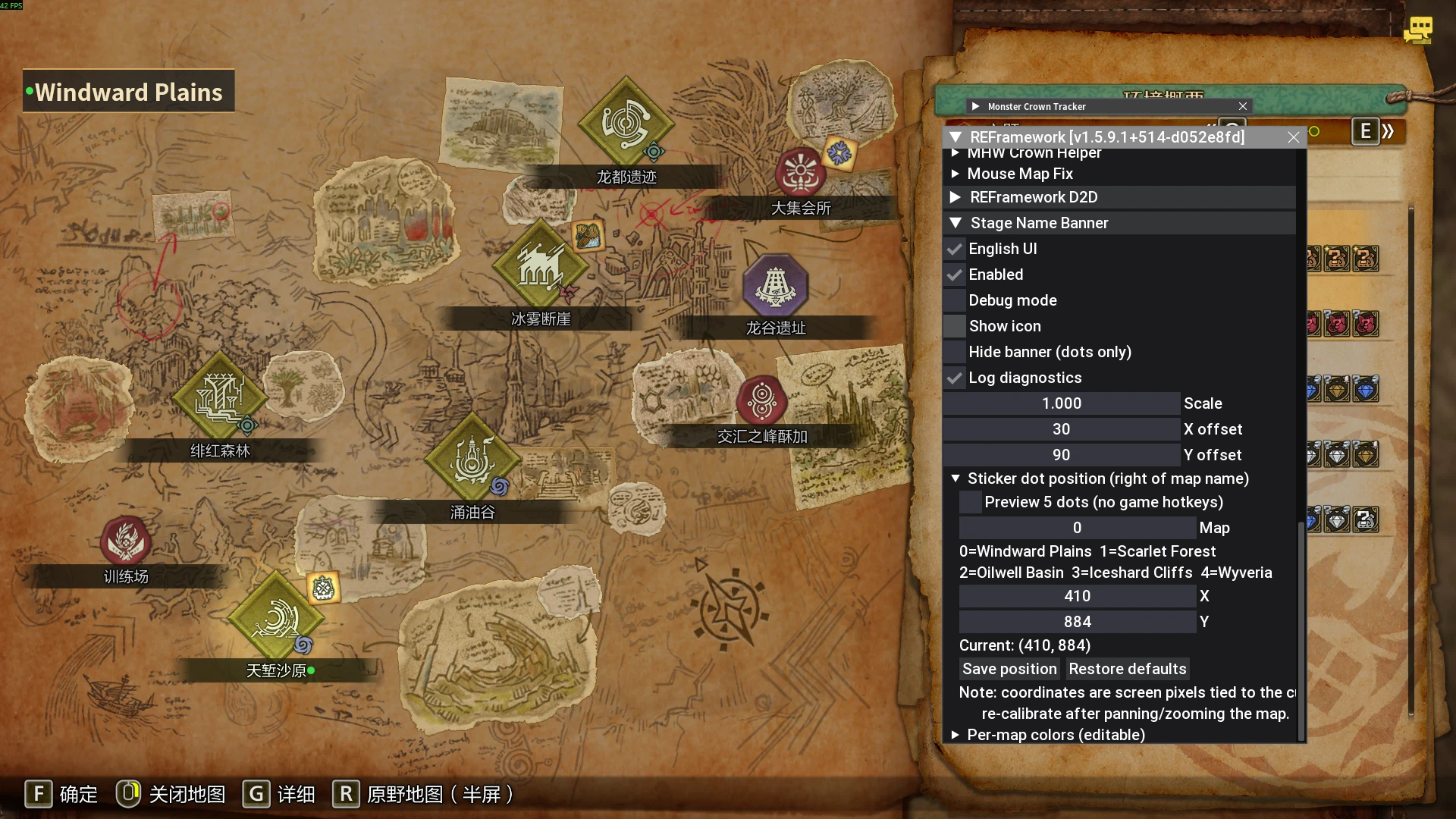
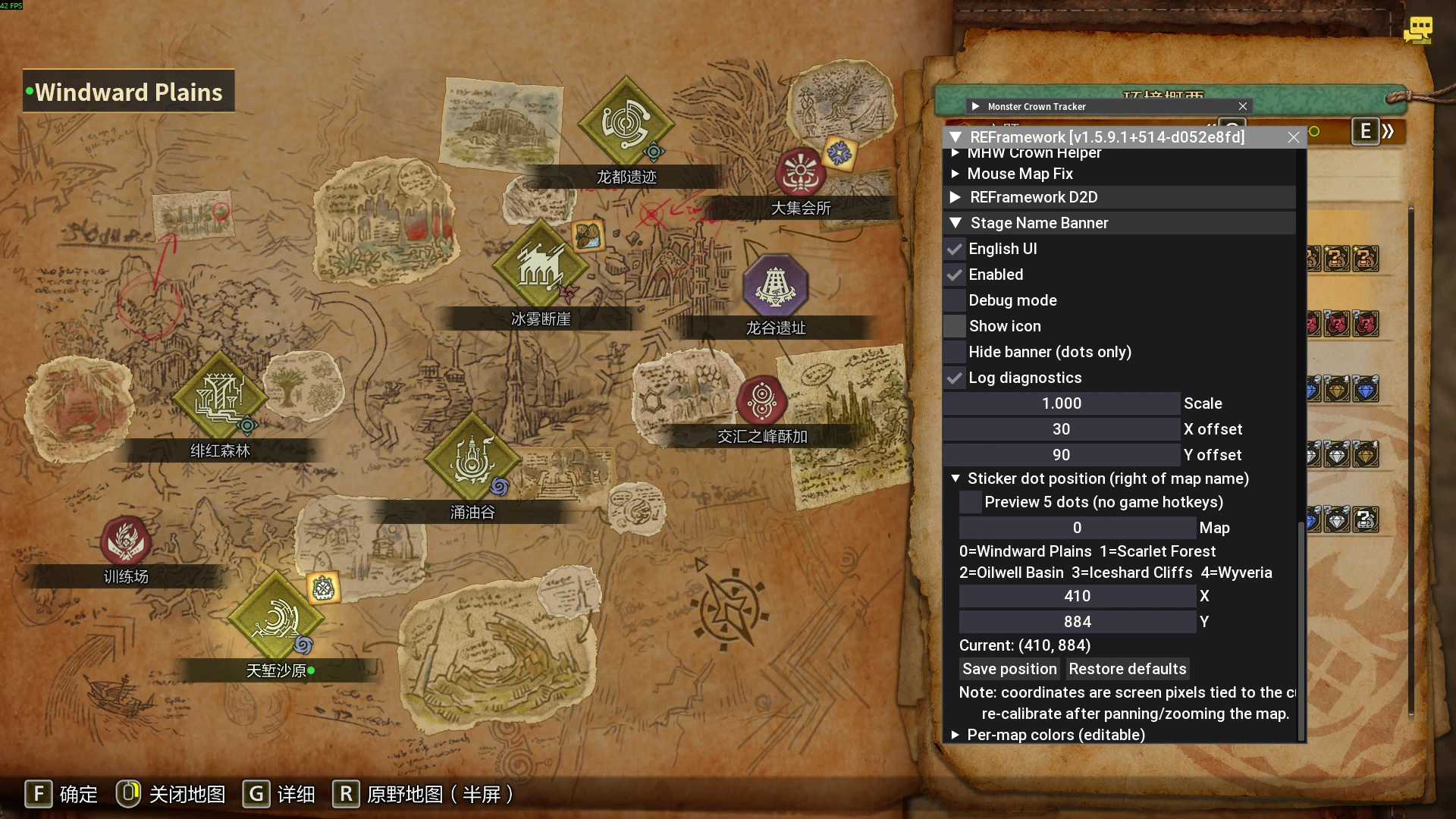
Locale name banner on the global map (styled like the in-game one) + an optional green dot on your current map's sticker. Per-map colors, dot position tuning, EN/中文 UI. 在全局地图上显示角色当前所在地图的名字(仿官方地名条),并可选在当前地图贴纸上加绿点;支持每图配色、绿点位置微调、中英
 查看大图
查看大图MapMarker
⚠ 本 mod 由 AI 制作:代码与说明均由 AI 生成,作者负责人工测试、调试与校对。 ⚠ This mod was created with AI: the code and documentation were AI-generated; the author performed the testing, debugging and verification.
[b]设置入口 / Settings location[/b] — 按 [b]Insert[/b] 打开 REFramework 菜单,找到 [b]Stage Name Banner[/b] 分组。(mod 名叫 [i]MapMarker[/i],但设置项在这个分组名下。) [b]EN[/b] — Open the REFramework menu with [b]Insert[/b], then look for the [b]Stage Name Banner[/b] section. (The mod title is [i]MapMarker[/i], but its settings live under the group name [b]Stage Name Banner[/b].)
[line]
[heading]简介 / Description[/heading]
[b]中文[/b] — MapMarker 会在[b]全局地图(环境概要)[/b]界面左上角显示你角色[b]当前所在地图的名字[/b],样式模仿游戏自己的地名条;也可选在当前地图的贴纸名字右边画一个绿点。 游戏本身在详情/原野地图上已有地名条,但[b]全局地图没有[/b] —— 这个 mod 就是补上这一点,其它界面一律不打扰。
[b]EN[/b] — MapMarker shows the name of the locale your hunter is currently in, at the top-left corner of the [b]global map[/b] screen (environment overview), styled like the game's own location banner. Optionally it also draws a green dot right after the current locale's sticker name on the map. The game already shows a location banner on the detail and field maps, but the [b]global map has none[/b] — this mod fills that gap and stays out of the way everywhere else.
[b]支持地图 / Supported locales[/b] 天堑沙原 / Windward Plains · 绯红森林 / Scarlet Forest · 涌油谷 / Oilwell Basin · 冰雾断崖 / Iceshard Cliffs · 龙都遗迹 / Wyveria
[line]
[heading]安装 / Installation[/heading]
[b]中文[/b]
[list=1]
[]安装 [b]REFramework[/b](MH Wilds 版;它自带本 mod 用到的中日韩字体,无需另放)[/]
[]安装 [b]reframework-d2d[/b] 插件(需单独下载)[/]
[]把压缩包解压到游戏根目录,使这个文件存在:
[code]reframework/autorun/StageNameBanner.lua[/code][/]
[]启动游戏,设置项在 REFramework 菜单([b]Insert[/b])→ [b]Stage Name Banner[/b];配置文件自动生成在
[code]reframework/data/StageNameBanner.json[/code][/]
[/list][b]EN[/b]
[list=1]
[]Install [b]REFramework[/b] for Monster Hunter Wilds (it already includes the CJK fonts this mod uses).[/]
[]Install the [b]reframework-d2d[/b] plugin (separate download).[/]
[]Extract the archive into your game folder so that this file exists:
[code]reframework/autorun/StageNameBanner.lua[/code][/]
[]Launch the game. Settings appear in the REFramework menu ([b]Insert[/b]) → [b]Stage Name Banner[/b]. The config file is auto-created at
[code]reframework/data/StageNameBanner.json[/code].[/]
[/list][b]卸载 / Uninstall[/b] — 删除
[code]StageNameBanner.lua[/code](可选:同时删除上面的 JSON)。
[line]
[heading]主要功能 / Main features[/heading]
[b]中文[/b]
[list]
[]全局地图左上角显示「角色所在地图」地名条,仿官方样式[/]
[]可选:在当前地图贴纸名字右边显示绿点[/]
[][b]只在全局地图显示[/b] —— 详情地图、原野半屏、原野全屏一律不显示(那些界面官方已有条)[/]
[]跟[b]人物所在地图[/b]走,不跟「正在浏览的地图」走[/]
[]每张地图独立配色(支持填色号)[/]
[]绿点位置可在菜单里逐地图微调(1px 步进,保存进配置)[/]
[]可勾选「隐藏条子(只保留绿点)」[/]
[]界面中英文切换(菜单里勾选)[/]
[]纯 2D 覆盖层 —— [b]不改游戏文件、不改游戏数据、不改玩法[/b][/]
[/list][b]EN[/b]
[list]
[]Locale name banner on the global map, styled after the game's own banner[/]
[]Optional green dot next to the current locale's sticker name[/]
[]Only on the [b]global map[/b] — never on the detail map, half-screen or full-screen field maps (those already have the official banner)[/]
[]Follows [b]your character's location[/b], not the map you are viewing[/]
[]Per-map colors with hex input[/]
[]Dot positions adjustable per map in the menu (1 px steps, saved to config)[/]
[]"Hide banner (dots only)" mode[/]
[]Bilingual UI: English / 中文 (toggle in the menu)[/]
[]Pure 2D overlay — no game files, game data or gameplay modified[/]
[/list][line]
[heading]前置需求 / Requirements[/heading]
[b]中文[/b] — REFramework(MH Wilds 版)· reframework-d2d 插件 · Monster Hunter Wilds(PC) [b]EN[/b] — REFramework for Monster Hunter Wilds · reframework-d2d plugin · Monster Hunter Wilds (PC)
[line]
[heading]已知限制 / Known limitations[/heading]
[b]中文[/b]
[list]
[]绿点坐标是屏幕像素,和当前地图视角绑定;平移或缩放地图后需到菜单里重新微调(贴纸绿点位置 → X/Y → 保存坐标)[/]
[]只支持五张主图[/]
[]调试面板目前只有中文(高级排查用,默认关闭)[/]
[/list][b]EN[/b]
[list]
[]Dot positions are screen pixels tied to the current map view — re-calibrate in the menu (Sticker dot position → X/Y → Save position) after panning or zooming the map.[/]
[]Only the five main locales are supported.[/]
[]The diagnostic debug panel is Chinese-only (advanced troubleshooting; off by default).[/]
[/list][line]
[heading]致谢 / Shout outs[/heading]
[b]中文[/b] — 感谢 praydog 的 REFramework 与 reframework-d2d,以及 MH Wilds 模组社区。 [b]EN[/b] — Thanks to praydog for REFramework and reframework-d2d, and to the Monster Hunter Wilds modding community.
正在加载版本记录…
正在加载评论…
评论在新手盒子客户端中发表,这里同步展示。