色彩校正_剑之道
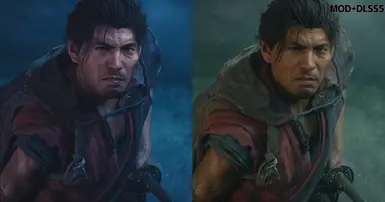
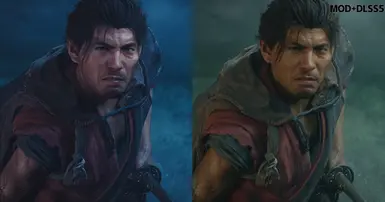
移除游戏原有的暗淡滤镜并校正颜色,使图像看起来更自然(这会破坏游戏原本的美术风格)。
 查看大图
查看大图移除游戏原有的暗色调滤镜,并校正颜色以获得更自然的图像(这将破坏游戏原有的艺术风格)。 配合 DLSS5 使用效果更佳
Removes the game's original dark color grading filter and implements color calibration to achieve a more natural visual presentation (this will deviate from the game's original artistic direction). Works best when paired with DLSS 5
DLSS5 MOD:https://www.nexusmods.com/onimushawayofthesword/mods/32
[color=#D4D4D8]本整合包整合了以下 mod 并添加自定义的 reshade 效果重新调色:
REFramework
https://www.nexusmods.com/monsterhunterwilds/mods/93
Disable Post Processing Effects
https://www.nexusmods.com/monsterhunterwilds/mods/221
reshade
https://www.reshade.me/
使用方法:
在 steam 中右键游戏,选择“管理 > 浏览本地文件”,打开游戏安装目录
将“里面文件全部丢到游戏目录”文件夹中的文件全都复制到游戏的安装目录
打开游戏即可自动启动效果
游戏中按 PgUp 关闭 reshade 效果
按 Ins 打开 REFramework 界面,重新勾选 script generted UI > Disable Post Processing Effects 的 color correction+other filters 即可恢复游戏的原始效果
***************************************************************************************************************************************************************
因为 reshade 是第三方 reshade 的后处理,无法识别游戏 UI,使用后部分 Reshade UI 会比较亮。如果无法接受,按 home 键打开菜单,然后关闭 MagicBloom
***************************************************************************************************************************************************************
文件中包含了 REFramework(Nightly 01089)的 dinput8.dll,如果你需要其他版本的 REFramework,请在复制文件时忽略 dinput8.dll
本整合包整合了以下 mod 并添加自定义的 reshade 效果重新调色:
REFramework
https://www.nexusmods.com/monsterhunterwilds/mods/93
Disable Post Processing Effects
https://www.nexusmods.com/monsterhunterwilds/mods/221
reshade
https://www.reshade.me/
使用方法:
在 steam 中右键游戏,选择“管理 > 浏览本地文件”,打开游戏安装目录
将“里面文件全部丢到游戏目录”文件夹中的文件全都复制到游戏的安装目录
打开游戏即可自动启动效果
游戏中按 PgUp 关闭 reshade 效果
按 Ins 打开 REFramework 界面,在关闭 reshade 效果的情况下重新勾选 script generted UI > Disable Post Processing Effects 的 color correction+other filters 即可恢复游戏的原始效果
******************************************************************************************************************************************************
注:因为 reshade 是第三方插件实现的后处理,无法识别游戏 UI,使用后部分 UI 会比较亮,如果接受不了可以按 home 键开启 reshade 菜单然后把 MagicBloom 关掉
******************************************************************************************************************************************************
文件中包含了 REFramework(Nightly 01089)的 dinput8.dll,如果你需要其他版本的 REFramework,请在复制文件时忽略 dinput8.dll [/color]
正在加载版本记录…
正在加载评论…
评论在新手盒子客户端中发表,这里同步展示。