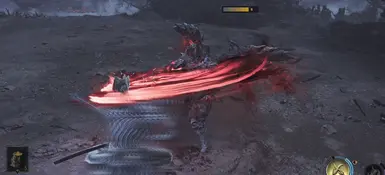
一穿窗口尺寸显示
这个模组以帧为单位显示每个攻击的Issen窗口大小,让玩家更容易识别哪些敌人招式更为宽容。
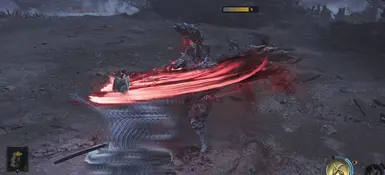 查看大图
查看大图Issen Window Size Display v1.0
English
Description
Different enemy moves have different Issen judgment windows. Moves with longer windows are generally easier to Issen, while moves with shorter windows require tighter timing. This mod displays the size of each attack's Issen window in frames, making it easier to identify which enemy moves are more forgiving.
After an enemy's attack data has been created, the script displays the window size as a length bar and frame count above the enemy. The bar represents the number of frames in the judgment window. It is not a timeline, countdown, input prompt, or timing cursor. The displayed value is calculated by the game's own
getCounterIssenFrame
function, so it reflects the player's current difficulty, equipment, items, and other active modifiers.
Features:
- Displays the actual Issen window size in frames for the current enemy attack.
- Excludes attacks marked by the game as unable to be countered with Issen.
- Represents the window with a gray-to-white or gray-to-gold gradient bar.
- Briefly flashes a new window display when it appears.
- Supports automatic scaling based on the game resolution.
- Provides runtime enable, disable, and display settings in the REFramework menu.
- Saves user settings automatically.
- Reads game data only. It does not modify attack parameters, player state, or judgment results.
The window display appears after the first active or upcoming attack period has been created. This is normally close to the beginning of an attack, but it is not guaranteed to be the first animation frame of the action. The enemy position is captured when the display is created; the display does not continue following the enemy during its display time.
Files
The release package should contain:
text issen_window_size_display.lua README.md
Installing REFramework
- Close the game.
- Open REFramework Nightly Releases and download
REFramework.zip .
- Non-VR users only need
dinput8.dll from the archive.
- Place
dinput8.dll in the game directory next to the game executable:
text ...\Steam\steamapps\common\OnimushaWotS\dinput8.dll
This mod was tested with the following REFramework build:
REF Nightly 01415 — REFramework.zip
Other Nightly builds may also work but have not been verified for this mod.
Installing the Mod
- Make sure the game is closed.
- Find or create the following folder inside the game directory:
text ...\Steam\steamapps\common\OnimushaWotS\reframework\autorun
- Copy
issen_window_size_display.lua into the autorun folder:
text ...\OnimushaWotS\reframework\autorun\issen_window_size_display.lua
- Start the game.
Usage
The script loads automatically with the game. The window display appears when an enemy performs an Issen-compatible attack and its attack data becomes available.
Open the REFramework menu and navigate to:
text Script Generated UI > Issen Window Size Display
Available settings:
| Setting | Default | Description |
|---|---|---|
| Enabled | On | Enables or disables attack processing and HUD drawing. |
| Scale with resolution | On | Scales the HUD with the game display resolution. The reference resolution is 1920×1080. |
| HUD scale | 1.00× | Adjusts the overall size after resolution scaling. |
| World height offset | 2.00 | Adjusts the world-space height above the enemy. |
| Screen Y offset | -36 | Adjusts the projected vertical screen position. |
| Pixels per frame | 15 | Sets the bar width represented by each Issen frame. |
| Bar height | 20 | Sets the bar height. |
| Maximum bar width | 300 | Limits the maximum bar width. |
| Number size | 2.00× | Sets the frame-number size. At the default value, its line height matches the bar height. |
| Number Y offset | 0 | Adjusts the vertical position of the frame number. |
| Number area width | 48 | Sets the reserved width for the frame number to the right of the bar. |
| Display duration | 2.2 s | Sets how long each window display remains visible. |
| Flash duration | 0.32 s | Sets the initial flash duration for a new window display. |
Select
Set to Default
to restore all default settings, including
Enabled .
Settings are saved automatically to:
text ...\OnimushaWotS\reframework\data\issen_window_size_display.json
Updating
Close the game, then replace the old
issen_window_size_display.lua in reframework\autorun with the new version. The user configuration file is not replaced.
Uninstalling
Close the game and remove
issen_window_size_display.lua from reframework\autorun .
To remove saved settings as well, remove:
text reframework\data\issen_window_size_display.json
中文说明
功能介绍
敌人的不同招式有不同的一闪判定窗口。窗口较长的招式通常比较容易一闪,窗口较短的招式则需要更严格的时机。本模组以帧数显示每次攻击的一闪判定窗口大小,帮助玩家直观识别哪些敌人招式更容易一闪。
脚本在敌人攻击数据生成后,在敌人上方用长度条和帧数显示窗口大小。长度条只表示判定窗口包含多少帧,不是时间轴、倒计时、按键提示或输入时机游标。显示值由游戏自身的
getCounterIssenFrame
计算,因此会反映玩家当前的难度、装备、道具及其他有效修正。
主要功能如下:
- 显示当前敌人攻击的实际一闪判定窗口大小和帧数。
- 自动排除游戏标记为无法一闪的攻击。
- 使用由灰色到白色或金色的渐变条表示窗口长度。
- 新窗口显示出现时短暂闪白。
- 支持按游戏分辨率自动缩放。
- 支持在 REFramework 菜单中实时启用、停用和调整显示参数。
- 自动保存用户配置。
- 只读取游戏数据,不修改攻击参数、玩家状态或判定结果。
窗口信息会在该次攻击的首个有效或即将生效的攻击区间生成后出现。此时通常接近攻击开始,但不保证是攻击动作动画的第一帧。敌人位置在窗口信息生成时记录;显示期间不会继续跟随敌人移动。
文件
发布包需要包含以下文件:
text issen_window_size_display.lua README.md
安装 REFramework
- 关闭游戏。
- 前往 REFramework Nightly Releases 下载
REFramework.zip 。
- 非 VR 用户只需从压缩包中取出
dinput8.dll 。
- 将
dinput8.dll 放到游戏根目录,即游戏可执行文件所在目录:
text ...\Steam\steamapps\common\OnimushaWotS\dinput8.dll
本模组已在以下 REFramework 版本测试:
REF Nightly 01415 — REFramework.zip
其他 Nightly 版本可能也能正常使用,但未经本模组验证。
安装模组
- 确认游戏已关闭。
- 在游戏目录下找到或创建以下文件夹:
text ...\Steam\steamapps\common\OnimushaWotS\reframework\autorun
- 将
issen_window_size_display.lua 复制到 autorun 文件夹:
text ...\OnimushaWotS\reframework\autorun\issen_window_size_display.lua
- 启动游戏。
使用方法
脚本随游戏自动加载。敌人发动可一闪攻击且攻击数据可用时,指示器会自动显示。
打开 REFramework 菜单,然后进入:
text Script Generated UI > Issen Window Size Display
可用设置如下:
| 设置 | 默认值 | 说明 |
|---|---|---|
| Enabled | On | 启用或停用脚本的攻击读取和 HUD 绘制。 |
| Scale with resolution | On | 根据游戏显示分辨率缩放 HUD。基准分辨率为 1920×1080。 |
| HUD scale | 1.00× | 在自动分辨率缩放的基础上调整整体大小。 |
| World height offset | 2.00 | 调整指示器在敌人世界坐标上方的高度。 |
| Screen Y offset | -36 | 调整指示器投影到屏幕后的位置。 |
| Pixels per frame | 15 | 每一帧一闪窗口对应的条形宽度。 |
| Bar height | 20 | 条形高度。 |
| Maximum bar width | 300 | 条形最大宽度。 |
| Number size | 2.00× | 帧数数字大小。默认值下,数字行高与条形高度一致。 |
| Number Y offset | 0 | 单独调整帧数数字的垂直位置。 |
| Number area width | 48 | 条形右侧为帧数数字保留的区域宽度。 |
| Display duration | 2.2 s | 每个指示器的显示时间。 |
| Flash duration | 0.32 s | 新指示器出现时的闪白时间。 |
点击
Set to Default
可恢复全部默认设置,包括
Enabled 。
设置修改后会自动保存到:
text ...\OnimushaWotS\reframework\data\issen_window_size_display.json
更新
关闭游戏后,用新版本的
issen_window_size_display.lua 覆盖 reframework\autorun 中的旧文件。用户配置文件不会被覆盖。
卸载
关闭游戏,然后从
reframework\autorun 中移除 issen_window_size_display.lua 。
如需同时清除用户设置,可移除:
text reframework\data\issen_window_size_display.json
正在加载版本记录…
正在加载评论…
评论在新手盒子客户端中发表,这里同步展示。