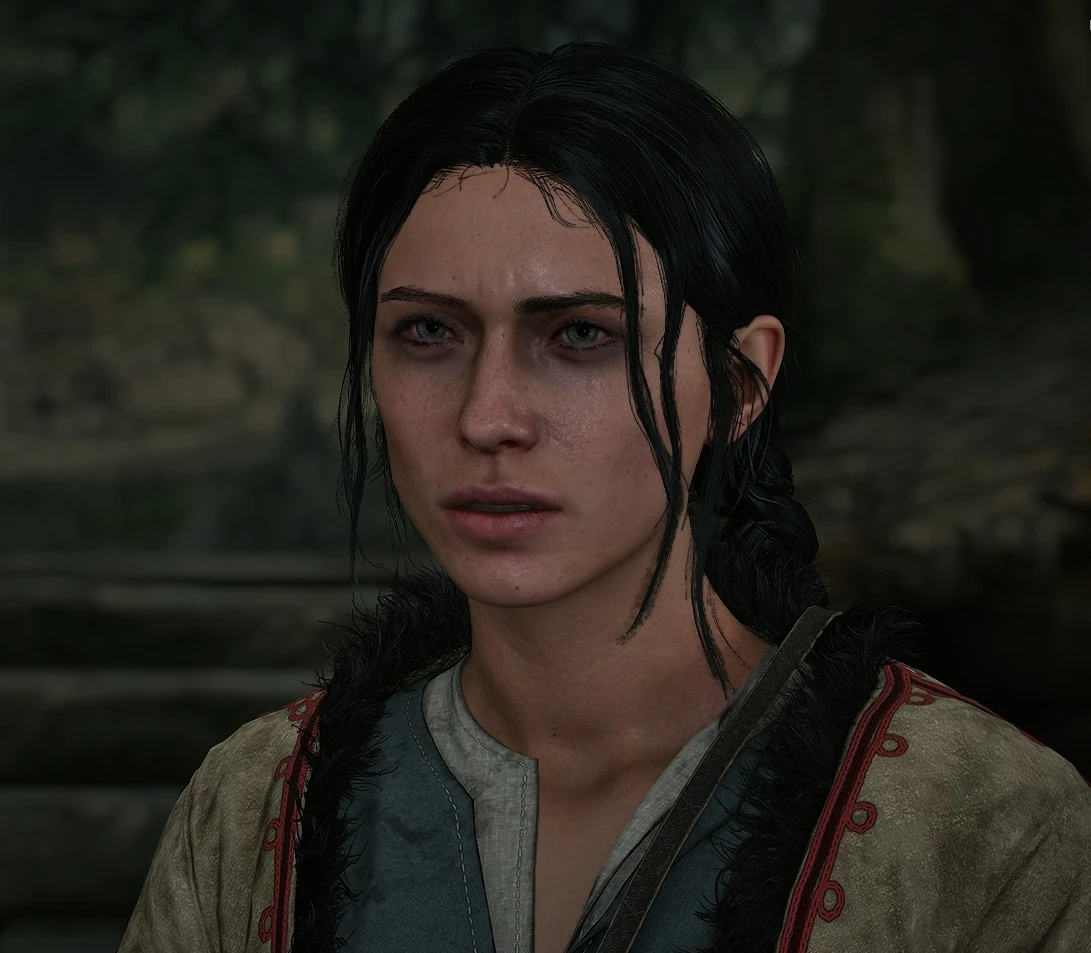
Anca Simple black hair
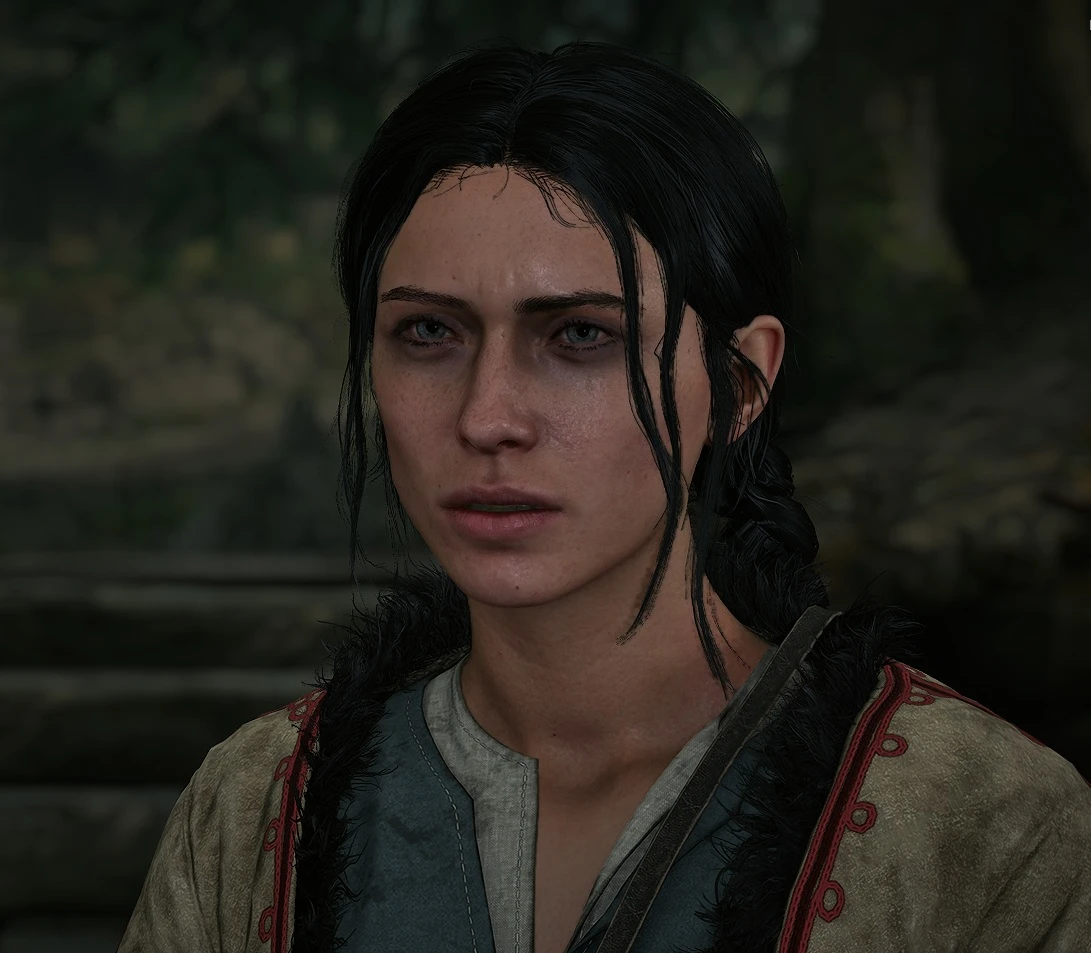
I like my women raven haired.
 查看大图
查看大图[size=4][b]Description[/b][/size]
[color=#D4D4D8]I like my women raven haired. There wasn't a mod for this so i asked chat gpt to make one with me (ya my first mod).
[img]https://staticdelivery.nexusmods.com/mods/9719/images/164/164-1788610399-1027764831.png[/img]
[/color]
[size=4][b]Installation instructions[/b][/size]
[color=#D4D4D8]Extract the archive and copy these 3 files:
AncaHair_P.pak
AncaHair_P.ucas
AncaHair_P.utoc
into your game's Paks folder:
...\SteamLibrary\steamapps\common\The Blood of Dawnwalker\Dawnwalker\Content\Paks
[b][size=4]Uninstall[/size][/b]
Remove these 3 files from the Paks folder:
AncaHair_P.pak
AncaHair_P.ucas
AncaHair_P.utoc[/color]
______________________________
[size=4]Random words:[/size]
Not much left to say. I tried a version with all 0s for the color (so jet black) and then this one which is slightly more conservative (values like 0,05 etc , tried slightly brighter root color) looks same as the jet black version to be honest.
Please leave comments and questions.
I would like to try to make a web app that would let people change the color on some sliders and then generate the 3 files but apparently its actually not that simple. Also the hairs have some filters etc. For example putting the colors i was changing to bright yellow did not make her super blond but just dark yellow. Meaning if someone wanted her blond there will have to be more changes made to ... something.
[b][size=5]DO not read past here if you don't want to create your own mod![/size][/b]
[size=4]Info for modders:[/size]
Honestly just ask LLM to help you out :) . Welcome to the future. Anyway ...
Software you will need:
- FModel
- retoc
- UAssetGUI
Game information
Unreal Engine version:
UE 5.5
AES key:
0xE98095DA4BEA0C8C2B916AC25BBDAAB744A410BD409DB56CF6B5035E22489029
You will also need the Dawnwalker .usmap mapping file.
A current FModel mapping file for the game can be downloaded from Nexus Mods.
1. Set up The Blood of Dawnwalker in FModel
Start FModel and add/select the game's Paks directory:
...\SteamLibrary\steamapps\common\The Blood of Dawnwalker\Dawnwalker\Content\Paks
Set the game's AES key in FModel:
0xE98095DA4BEA0C8C2B916AC25BBDAAB744A410BD409DB56CF6B5035E22489029
In FModel this can be configured through the AES settings for the selected game directory.
Next, configure the mapping file.
Download the Dawnwalker .usmap mapping file and set it as the local mapping file in FModel.
The basic setup should therefore be:
Game directory:
...\The Blood of Dawnwalker\Dawnwalker\Content\Paks
AES:
0xE98095DA4BEA0C8C2B916AC25BBDAAB744A410BD409DB56CF6B5035E22489029
Engine:
UE 5.5
Mapping:
Dawnwalker .usmap file
After that, reload the game archives.
Dawnwalker uses UE5 IoStore, so the important game data is contained in the .utoc/.ucas containers.
FModel should now be able to browse the full game asset tree.
In FModel you need to open two files at the same time:
Dawnwalker-Windows.pak
Dawnwalker-Windows.utoc
FModel is useful for:
- browsing game assets
- previewing meshes, materials and textures
- viewing asset properties
- searching for assets
- copying virtual package paths
FModel is NOT used to save the actual modifications.
2. Find the asset you want to modify
For this Anca hair color mod, the material is:
Dawnwalker/Content/_Dawnwalker/Characters/Heads/HFA_Anca_Head_A/Materials/MI_HFA_Anca_Hair.uasset
You can find assets in FModel and use Copy Path to get the exact package path.
3. Convert the asset with retoc
"Install" retoc to c:tools or wherever you like. Just understand that you will put paths in the cmds that will follow.
Oh ya you will aqlso have to use some cmd.
Dawnwalker uses UE5 IoStore/Zen assets.
Before editing the material with UAssetGUI, convert it to legacy .uasset/.uexp format using retoc.
Example:
retoc.exe -a 0xE98095DA4BEA0C8C2B916AC25BBDAAB744A410BD409DB56CF6B5035E22489029 to-legacy -f "Dawnwalker/Content/_Dawnwalker/Characters/Heads/HFA_Anca_Head_A/Materials/MI_HFA_Anca_Hair.uasset" --no-shaders --version UE5_5 -v "E:\SteamLibrary\steamapps\common\The Blood of Dawnwalker\Dawnwalker\Content\Paks" "C:\tools\AncaHair"
This should create:
C:\tools\AncaHair\Dawnwalker\Content\_Dawnwalker\Characters\Heads\HFA_Anca_Head_A\Materials\MI_HFA_Anca_Hair.uasset
and:
C:\tools\AncaHair\Dawnwalker\Content\_Dawnwalker\Characters\Heads\HFA_Anca_Head_A\Materials\MI_HFA_Anca_Hair.uexp
Keep the .uasset and .uexp files together.
4. Open the asset in UAssetGUI
Open:
MI_HFA_Anca_Hair.uasset
In UAssetGUI:
- Set engine version to 5.5
- Import the same Dawnwalker .usmap mapping file
- Make sure the imported mapping is selected instead of "No mappings"
The .usmap is required because Dawnwalker uses unversioned Unreal properties.
5. Edit Anca's hair color
Inside the material instance look under:
Export Data
-> VectorParameterValues
Anca's hair material contains:
RootColor
TipColor
These use Unreal LinearColor values:
R
G
B
A
The useful RGB range is normally:
0.0 - 1.0
Alpha should normally remain:
1.0
For example, a very dark hair color could use values around:
RootColor:
R = 0.01
G = 0.01
B = 0.01
A = 1.0
TipColor:
R = 0.02
G = 0.02
B = 0.02
A = 1.0
For testing, using an extreme color such as bright yellow makes it easy to confirm that the mod is actually working:
R = 1.0
G = 1.0
B = 0.0
A = 1.0
After editing the values, save the asset with Ctrl+S.
6. Pack the edited asset back into IoStore format
Use retoc to convert the modified legacy asset back into UE5 IoStore files.
Example:
retoc.exe to-zen --version UE5_5 -v "C:\tools\AncaHair" "C:\tools\AncaHair_P.utoc"
This should generate:
AncaHair_P.pak
AncaHair_P.ucas
AncaHair_P.utoc
7. Install/test the mod
Copy all three files into:
...\The Blood of Dawnwalker\Dawnwalker\Content\Paks
For example:
E:\SteamLibrary\steamapps\common\The Blood of Dawnwalker\Dawnwalker\Content\Paks
Then launch the game and check the result.
Useful retoc note
If you are trying to inspect or convert an asset from an existing mod and retoc reports a missing ScriptObjects chunk, do not point retoc only at the mod's .utoc file.
Instead, point retoc at the entire game's Paks directory and use -f to select the asset.
This allows retoc to use the base game's ScriptObjects while still reading the modded asset override.
![https://staticdelivery.nexusmods.com/mods/9719/images/164/164-1788610399-1027764831.png[/img]](https://staticdelivery.nexusmods.com/mods/9719/images/164/164-1788610399-1027764831.png%5B/img%5D)
还没有人评论,去客户端里说两句吧。
评论在新手盒子客户端中发表,这里同步展示。