SmartHunter-风格布局,适用于HelloWorld
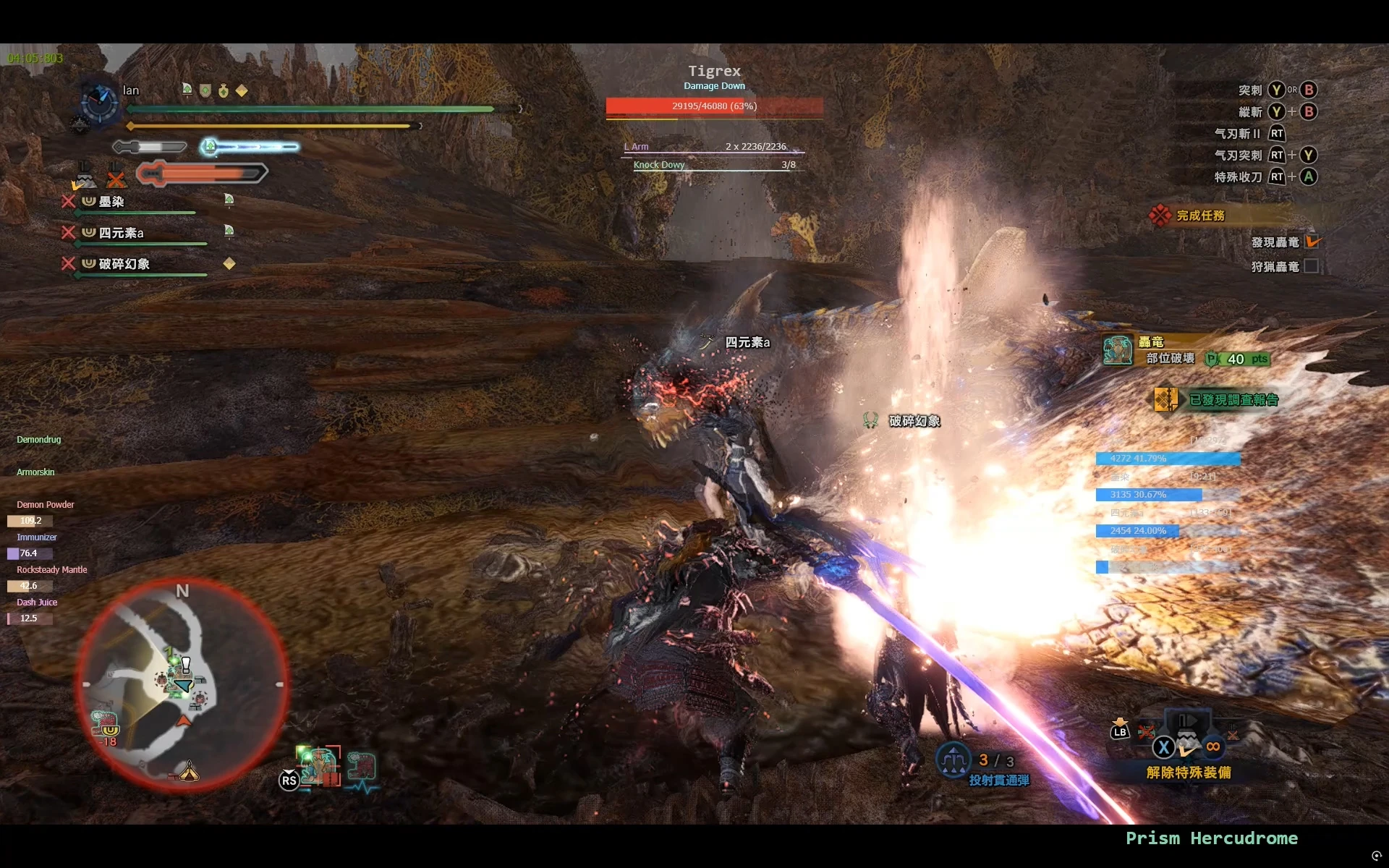
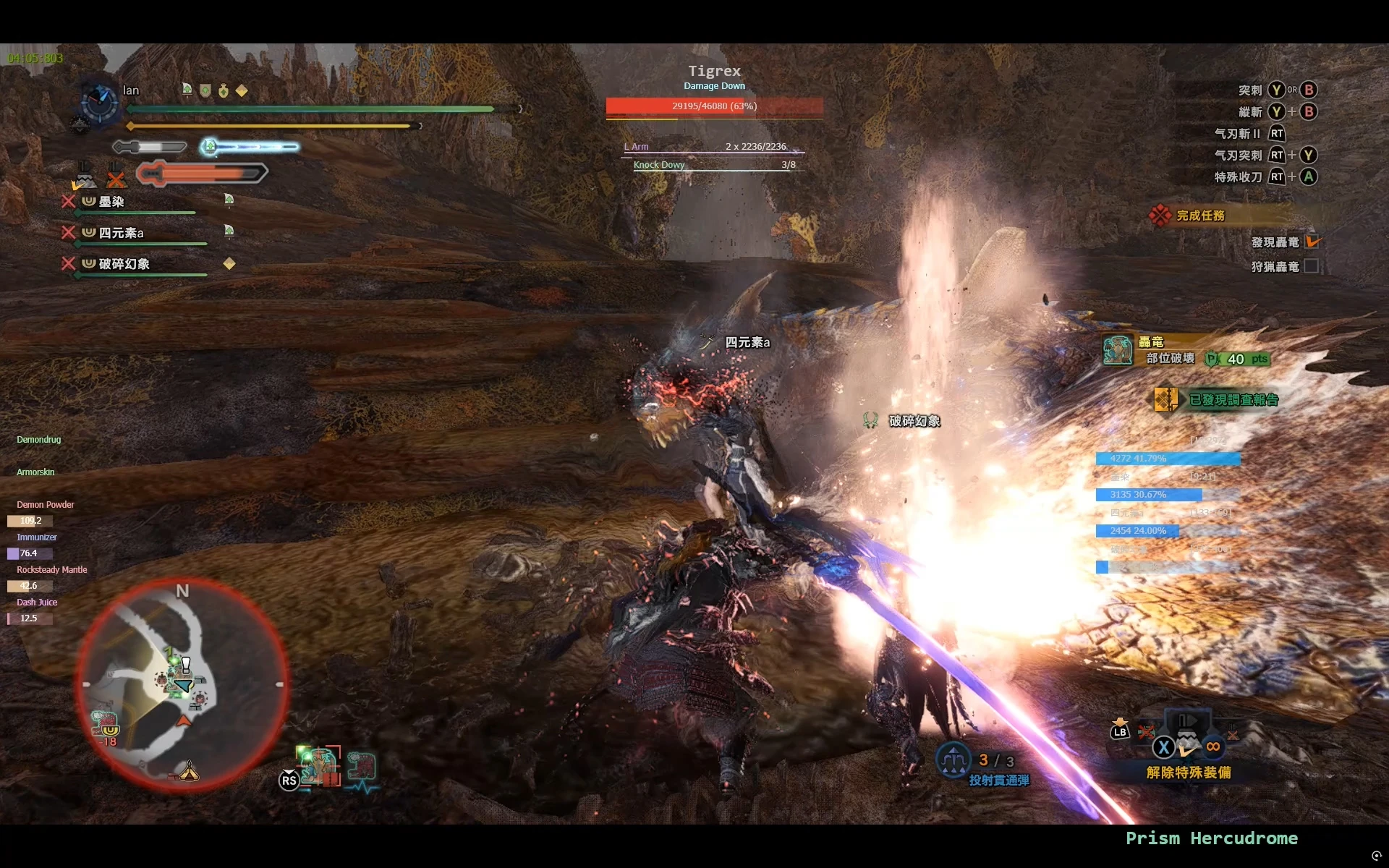
本模组为 HelloWorld 提供了一套受 SmartHunter 启发的全新布局。在保留 HelloWorld 核心功能的基础上,重新设计了界面排布与视觉风格,带来更清爽、更聚焦的战斗信息体验。界面简洁直观,所有关键数据一目了然,适合追求高效与美观兼顾的猎人。
 查看大图
查看大图描述
本模组为 HelloWorld 提供了一套借鉴 SmartHunter 的全新布局。在保留 HelloWorld 全部核心功能的前提下,对界面排布与视觉样式进行重新设计,打造出更加清爽、战斗信息更突出的使用体验。界面简约直观,全部关键战斗数据尽收眼底,适合追求高效显示效果同时看重界面观感的猎人。
安装步骤
- 若尚获取 HelloWorld,请先下载 an overlay that shows lots and lots of stuff
- 下载本模组
- 将解压得到的 config 文件放入 HelloWorld 的文件夹内
- 启动游戏,再运行 HelloWorld
主要功能
- 复刻 SmartHunter 的视觉风格
- 干净利落的简约界面布局
- 核心战斗信息一眼看清
- 单人、多人模式均可正常使用
- 体量轻巧,几乎无性能损耗
依赖要求
HelloWorld(Ver10.4)
感谢
- 原作者 HelloWorId
- 时崎狂三、夜吟の曲yydq 帮忙测试
Description
This mod provides a brand‑new layout for HelloWorld inspired by SmartHunter. While retaining all core functionalities of HelloWorld, it redesigns the UI arrangement and visual style to deliver a cleaner experience with more prominent combat information. Featuring a simple and intuitive interface that puts all critical combat data in plain sight, it is ideal for hunters who pursue both efficient display and pleasing visual aesthetics.
Installation
- If you do not already have HelloWorld, download it first: an overlay that shows lots and lots of stuff
- Download this mod
- Place the extracted config file into the HelloWorld folder
- Launch the game, then run HelloWorld
Main Features
- Replicates the visual style from SmartHunter
- Clean and streamlined minimalist UI layout
- Critical combat information at a glance
- Fully functional for both solo and multiplayer modes
- Light‑weight, with virtually no performance overhead
Requirements
HelloWorld (Ver10.4)
Credits
- Created by HelloWorId
- Testing assistance from: 时崎狂三, 夜吟の曲yydq
| 快捷键 | 功能 |
|---|---|
| F5 | 发送伤害数据 |
| F6 | 发送高龄怪物信息 |
| 左 Ctrl + 左 Shift + M | 开关怪物 UI |
| 左 Ctrl + 左 Shift + E | 开关环境生物 UI |
| 左 Ctrl + 左 Shift + T | 开关队伍 UI |
| 左 Ctrl + 左 Shift + B | 开关 Buff UI |
| 左 Ctrl + 左 Shift + I | 开关时间 UI |
| 左 Ctrl + 左 Shift + O | 开关全部 UI |
| 左 Ctrl + 左 Shift + P | 开关怪物部位 UI |
| 左 Ctrl + 左 Shift + 鼠标左键 | 拖动 UI |
| 左 Ctrl + 左 Shift + D | 开关怪物 UI 动态定位 |
| Hotkey | Function |
|---|---|
| F5 | Send Damage Data |
| F6 | Send Highlighted Monster Information |
| Left Ctrl + Left Shift + M | Toggle Monster UI |
| Left Ctrl + Left Shift + E | Toggle Endemic Life UI |
| Left Ctrl + Left Shift + T | Toggle Team UI |
| Left Ctrl + Left Shift + B | Toggle Buff UI |
| Left Ctrl + Left Shift + I | Toggle Time UI |
| Left Ctrl + Left Shift + O | Toggle All UI |
| Left Ctrl + Left Shift + P | Toggle Monster Parts UI |
| Left Ctrl + Left Shift + Left Mouse Button | Drag UI |
| Left Ctrl + Left Shift + D | Toggle Monster UI Dynamic Positioning |
还没有人评论,去客户端里说两句吧。
评论在新手盒子客户端中发表,这里同步展示。