Trinity - Mod Menu (Crimson Desert 1.18.0 Update)
Trinity mod menu rebuilt for Crimson Desert 1.18.0. The 15 August patch moved another set of engine structures and broke most of the menu again — item names, Add Item, fast travel, NPC trust, game speed, Free Flight, and more are all working again, and dye now survives a reload on already-dyed pieces. Original mod, reverse-engineered by XeTrinity
 查看大图
查看大图[size=4][b]Description[/b][/size]
Trinity is a lightweight, expandable in-game mod menu for Crimson Desert, created by [b]XeTrinityz[/b]. This page hosts a build updated for game version [b]1.18.0. [/b] Trinity is open source under the MIT licence, and it allows forks and patch fixes.
The 15 August game patch moved another set of internal engine structures. Trinity still loaded, and the menu still opened, but most of what it does stopped working, mostly without any visible error. This build restores it.
[b]Working in 0.15.0[/b]
[list]
[][b]Add Item[/b] — full catalogue with real names, categories and icons[/]
[][b]Inventory editor[/b] — item list and quantity editing[/]
[][b]Edit Equipment[/b] — refinement and Abyss Gear sockets that apply and persist[/]
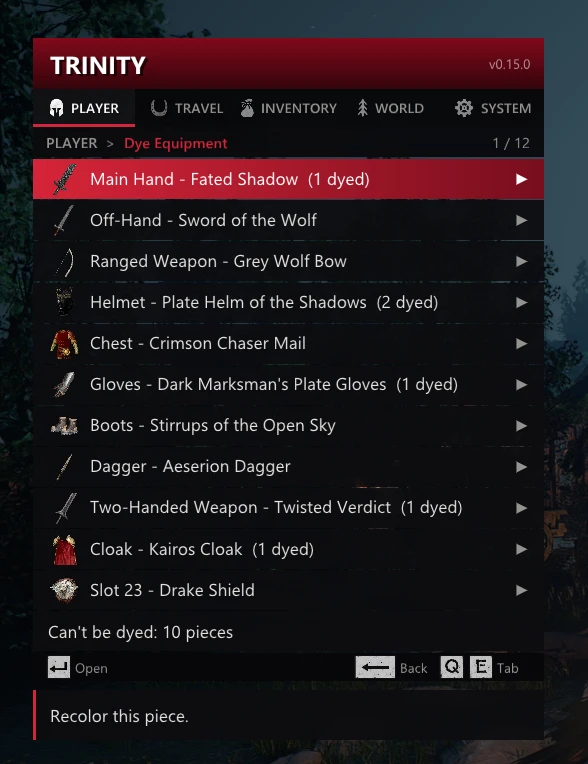
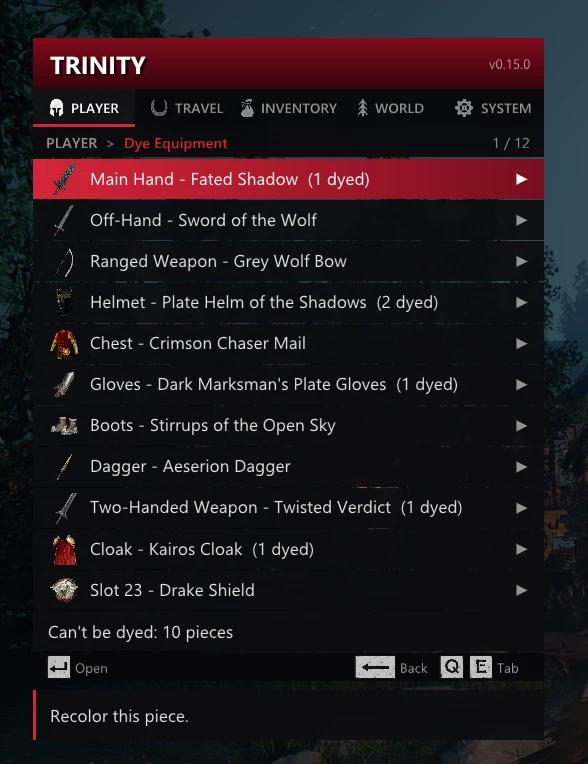
[][b]Dye Equipment[/b] — per-part channels; colours persist on already-dyed pieces[/]
[][b]Infinite Stamina[/b] and [b]Infinite Spirit[/b][/]
[][b]God Mode[/b], [b]Super Run[/b], [b]Super Jump[/b], [b]Free Flight[/b][/]
[][b]Trust Multiplier[/b][/]
[][b]Game Speed[/b], [b]Freeze Time of Day[/b], [b]Advance 1 Hour[/b][/]
[][b]Fast travel[/b] — destinations, Shop names, and coordinates[/]
[][b]Slot Size[/b] and [b]Max Stack Size[/b][/]
[/list]This is a compatibility update, not a feature release — nothing was added, and nothing was removed.
[b]Known issues on 1.18.0[/b]
[list]
[][b]Dye on a never-dyed piece does not persist.[/b] Colours apply and render, but a channel the game has never written a dye record for cannot be made durable — that needs an engine allocator whose signature is gone on this build. Pieces that already carry a dye record (most gear you have coloured before, or that came coloured) keep the new colour through a reload.[/]
[]Both dye and sockets show live after a [b]re-equip[/b] of the piece; that is the game's own render step, not a bug.[/]
[/list]Nothing here risks your save. Both cases are logged at startup rather than failing silently. [b]Single-player only.[/b] Do not use this in online or anti-cheat-protected modes.
The mod writes a
[code]Trinity.log[/code] next to
[code]Trinity.asi[/code]After a future game patch, it will name exactly which part stopped resolving, so please attach it to any bug report — it is the difference between a fix taking an evening and taking a week.
[size=4][b]Installation instruction[/b][/size]
[list=1]
[]Install an [b]ASI Loader[/b] (for example, Ultimate ASI Loader). Place its proxy DLL next to the game executable —
dinput8.dll, winmm.dll, or version.dll. All work.[/]
[]Extract [b]Trinity.asi[/b] into Crimson Desert\bin64\ — the folder containing CrimsonDesert.exe.[/]
[]Launch the game and press [b]Insert[/b] (or [b]LB + D-Pad Down[/b] on a controller).[/]
[/list]If you use a mod manager that deploys ASI plugins, install through it rather than copying the file by hand, or it may overwrite this build with an older one.
[b]Compatibility with other mods[/b]
Trinity draws its menu by hooking the game's DirectX 12 present call. A few other mods do the same, and only one of them can hold that hook — when two try, the game usually won't start at all. Neither mod is broken; they just want the same thing.
[b]Crimson Route[/b]
Open CrimsonRoute.ini and change
[code]Renderer=Present[/code] to
[code]Renderer=DirectComposition[/code] under [Display], then restart the game. Crimson Route's own config recommends this as its compatibility option.
[b]OptiScaler[/b]
Install it through the nvngx / DLSS-enabler route rather than as a dxgi.dll proxy, and keep the ASI loader on winmm.dll. Setting
[code]OverlayMenu = false[/code] in OptiScaler.ini also helps, since both mods ship Dear ImGui.
[b]Driver-level Frame Generation[/b] (enabled in the NVIDIA app rather than by a mod) is still under investigation. If the menu never appears but Trinity.log ends with "Overlay ready", try turning Frame Generation off to confirm.
[size=4][b]Main features[/b][/size]
[b]Controls[/b]
Keyboard and mouse:
[list]
[]Insert — open/close menu (Esc closes)[/]
[]Arrow keys, mouse wheel or hover — navigate[/]
[]Enter or click — select[/]
[]Backspace — back[/]
[]Left / Right — adjust values[/]
[/list]Controller:
[list]
[]LB + D-Pad Down — open/close menu[/]
[]D-Pad — navigate[/]
[]A — select[/]
[]B — back[/]
[]D-Pad Left / Right — adjust values[/]
[/list][list]
[]Del (or X on a controller) — in Inventory > Item Editor, removes the selected item. Press twice to confirm. This ignores the game's own rules, so it also removes items the game won't let you drop — and it cannot be undone.[/]
[/list]All bindings are rebindable under [b]System → Keybinds[/b].
[b]Free Flight[/b] is worth explaining, since it is not a hover: it turns the crow-wing glide, which normally only sinks, into vertical control. While airborne, HOLD the ascend key to rise or the descend key to sink; release and normal physics resume, so jumps and aerial attacks are untouched. Defaults are Caps Lock and Ctrl, or RB and Right Trigger on a controller.
[b]Menu[/b]
[code]Player
├── Dye Equipment
├── Edit Equipment
├── God Mode
├── Infinite Stamina
├── Infinite Spirit
├── Super Run
├── Super Jump
├── Free Flight
├── Trust Multiplier
├── Outgoing Damage
└── Incoming Damage
Travel
├── Position
└── Fast Travel
Inventory
├── Add Item
├── Item Editor
├── Slot Size
└── Max Stack Size
World
├── Game Speed
├── Freeze Time of Day
└── Advance 1 Hour
System
├── Keybinds
├── Auto Save Features
├── Reset All to Default
└── Show FPS Counter[/code]Item and category icons are decoded from the game's own
[code].paz[/code] archives at runtime, so the menu shows the game's real art rather than placeholders.
[b][size=4]Requirements[/size][/b]
[list]
[][b]Crimson Desert 1.18.0[/b] — this build is compiled against that version's memory layout. On another build, features disable themselves and say so in Trinity.log rather than misbehave.[/]
[][b]An ASI Loader[/b] — Ultimate ASI Loader or equivalent.[/]
[]Keyboard and mouse or controller. Both are fully supported.[/]
[]Nothing else. The mod is statically linked, so no VC++ redistributable is needed.[/]
[/list][b]Steam Deck / Linux[/b]
Trinity works under Proton. Everything except the font loading was already fine there — the hooks, the overlay, and all the 1.18.00 offsets resolve normally. A Proton prefix carries no Microsoft fonts, so from 0.14.1 the menu falls back to a built-in font when it can't find one. It looks plainer than on Windows but works the same. The log line tells you when this happened. If you want the nicer typeface, installing Segoe UI (or Arial or Tahoma) into the prefix with protontricks is enough — the menu picks up whichever it finds.
Shout outs
[b]XeTrinityz[/b] — creator and developer of Trinity. Every signature, struct offset, and the entire menu framework are their work; this build only re-points offsets that the game patch moved. Original mod: [url=https://www.nexusmods.com/crimsondesert/mods/3109]https://www.nexusmods.com/crimsondesert/mods/3109[/url] Source: [url=https://github.com/XeTrinityz/Trinity]https://github.com/XeTrinityz/Trinity[/url] (MIT)
[b]Orcax1399[/b] — research insights, credited in the original mod.
Dear ImGui by Omar Ocornut (MIT) — user interface rendering. MinHook by Tsuda Kageyu (BSD-2-Clause) — function hooking.
显示 1-12 条,共 12 条
以上为资源接口提供的文件记录。安装时请在客户端确认文件、游戏版本及依赖。
还没有人评论,去客户端里说两句吧。
评论在新手盒子客户端中发表,这里同步展示。